-
![]()
-
![]()
-
![]()
-
![]() How to Repair Not Working SanDisk Memory Card without Losing Data | NEW
How to Repair Not Working SanDisk Memory Card without Losing Data | NEW October 29,2026
 6 min read
 -
![]()
-
![]()
-
![]()
-
![]()
-
![]() Fix SD Card Not Initialized Error (Camera, Dashcam & More)October 29,20266 min read
Fix SD Card Not Initialized Error (Camera, Dashcam & More)October 29,20266 min read -
![]() RSV File Recovery: Recover & Repair Corrupted Sony VideosOctober 29,20266 min read
RSV File Recovery: Recover & Repair Corrupted Sony VideosOctober 29,20266 min read
Page Table of Contents
Losing RAW photos is one of the worst moments for any photographer. Whether the files disappeared after accidental deletion, SD card formatting, or a camera error, the good news is that CR2 file recovery is often possible, especially if you stop using the storage device immediately.
In this guide, you'll learn how to recover deleted CR2 photos from Canon cameras, SD cards, hard drives, and external storage devices. We'll also explain why CR2 files become corrupted, what affects recovery success rates, and how photographers can avoid permanent loss of RAW photos in the future.
What Is a CR2 File
A CR2 file is Canon's proprietary RAW image format used by many Canon DSLR and mirrorless cameras, including the Canon EOS series.
Unlike JPEG images, CR2 files store unprocessed sensor data directly from the camera. This gives photographers far more flexibility during editing in tools like Adobe Lightroom, Photoshop, and Adobe Camera Raw.
Because CR2 files contain much more image data than standard image formats, they are also more vulnerable to:
- Accidental deletion
- SD card corruption
- Unsafe card removal
- Interrupted file transfers
- Formatting mistakes
- File system errors
- Bad sectors on memory cards
One thing many photographers don't realize is that RAW files are often still recoverable even after deletion - at least until new data overwrites the original file sectors.
What to Do Before Recovering CR2 Files
Before starting CR2 photo recovery, follow these important precautions:
1. Stop Using the SD Card Immediately
❌Continuing to shoot photos or record videos can permanently overwrite deleted CR2 files.
2. Do Not Format the Card Again
❌Even if the camera asks to reformat the card, avoid doing so until recovery is complete.
3. Avoid Saving Recovered Files to the Same Card
❌Always restore recovered files to another drive or external storage device.
4. Use a Card Reader
❌Direct SD card access through a quality card reader is usually more stable than connecting the camera via USB.
5. Check the SD Card for Physical Damage
❌If the card becomes unreadable, disappears randomly, or causes connection issues, the problem may be hardware-related rather than logical deletion.
How to Recover Deleted CR2 Photos with EaseUS Data Recovery Wizard
If your Canon RAW files were deleted accidentally, formatted, or lost after an SD card error, EaseUS Data Recovery Wizard can scan the storage device and recover recoverable CR2 photos.
This memory card recovery software supports recovery from SD cards, CFexpress cards, external hard drives, USB flash drives, internal hard drives, formatted partitions, etc.
It also supports Canon RAW image formats, including recovering deleted CR3 photos and CR2 files. Check out the following steps:
🏆 EaseUS SD card recovery leverages patented video fragment reconstruction technology to deeply repair video files lost due to accidental deletion, formatting, or corruption. Explicitly designed for cameras, action cameras, drones, and dashcams, it accurately restores complete and playable precious footage.
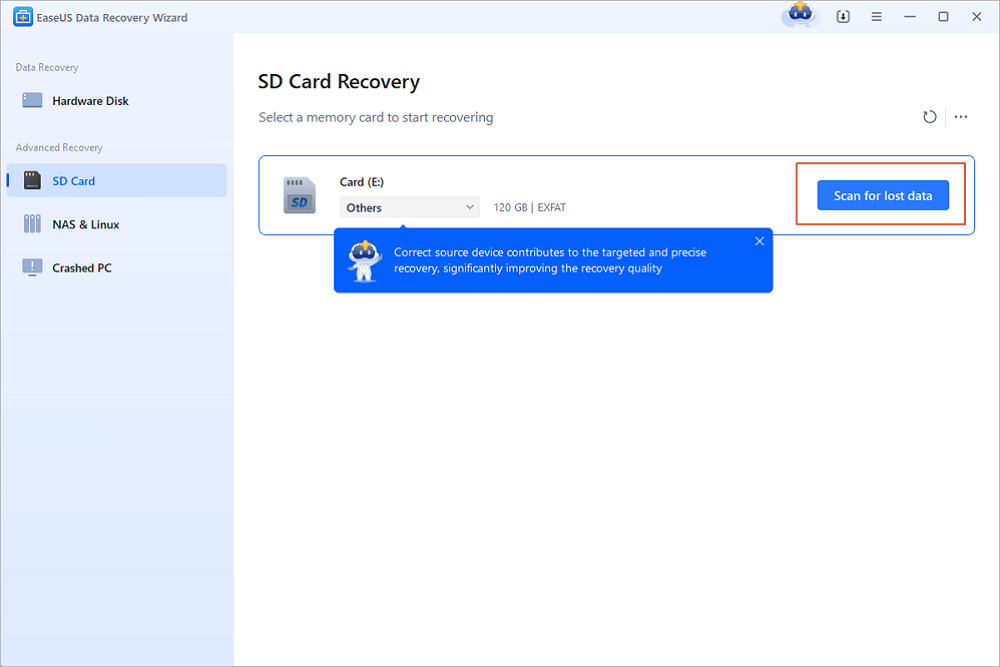
Step 1. Choose the location and start scanning
Hover on the SD card, camera, or hard drive partition where you deleted/lost pictures, then click "Scan for Lost Data".
Step 2. Select the pictures you want to recover
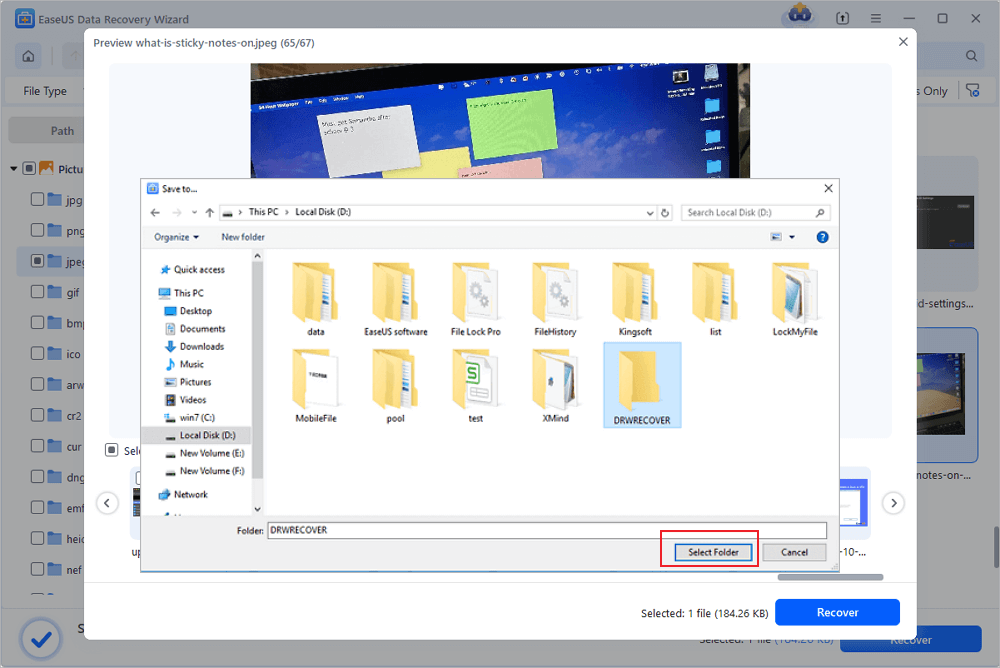
Once the scanning completes, select "Pictures" in the left panel. If you want to locate the lost photos, click "Lost Files Only" on the top-right side. Then, you can find photos according to the devices, types, and dates.

Step 3. Recover lost photos
After the preview, click "Recover" and choose another location to save the desired pictures. You can save the recovered photos your local drive, external storage device or cloud storage.
💡Want to know more about SD card data recovery? For example, what is the best SD card data recovery software? How to recover a damaged SD card? How to recover data from an unreadable SD card...Go for SD Card Data Recovery FAQs and restore your precious lost files.
Don't forget to share this post on SNS and help more people learn how to recover deleted CR2 files with ease!

How to Recover CR2 Files from the Recycle Bin
If the CR2 files were deleted from a local drive instead of directly from an SD card, they may still exist in the Recycle Bin.
For Windows Users
- Step 1. Open the Recycle Bin
- Step 2. Locate the deleted CR2 files
- Step 3. Right-click the files
- Step 4. Select "Restore"
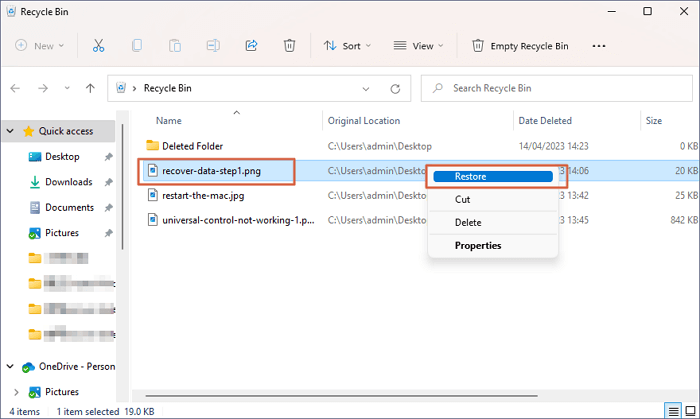
The files will return to their original location.
For Mac Users
- Step 1. Open Trash
- Step 2. Find the deleted CR2 photos
- Step 3. Right-click the files
- Step 4. Choose "Put Back"

This method works only if the files were not permanently deleted. To recover permanently deleted files, consider powerful and trusted third-party tools, such as EaseUS Data Recovery Wizard.

How to Recover Permanently Deleted Files/Videos/Photos
How to recover permanently deleted files, videos, or photos? EaseUS Data Recovery Wizard can be your first choice. Read more >>
How to Restore Previous Versions of CR2 Files
If File History or backup systems were enabled before the data loss occurred, you may be able to restore earlier versions of your RAW photos.

Right-click the folder where the CR2 files were stored
Step 1. Select "Properties".
Step 2. Open the Previous Versions tab.
Step 3. Choose an available backup version.
Step 4. Click "Restore".
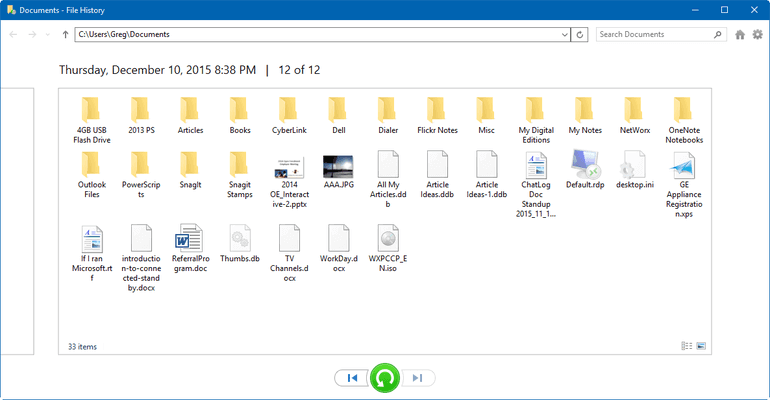
This can sometimes recover edited RAW workflows or older project folders.
Why Recovered CR2 Files Sometimes Become Corrupted
Not every recovered RAW photo will open successfully.
CR2 files are more complex than JPEG images because they contain:
- Sensor metadata
- Camera settings
- Color profiles
- Large RAW image blocks
As a result, partial overwrites or SD card corruption can damage the file structure.
Recovered CR2 files may become corrupted when:
- The file was partially overwritten
- The SD card contains bad sectors
- The card was removed during writing
- The recovery process restored incomplete RAW data
- The storage controller failed
In some cases, the image thumbnail may appear normal while the full RAW image remains unreadable in Lightroom or Photoshop.
Can Deleted CR2 Files Be Recovered
Yes - in many situations, deleted CR2 files can still be recovered successfully.
CR2 Recovery Success Rate by Scenario: These estimates vary depending on storage conditions, card health, and how quickly recovery begins.
| Scenario | Estimated Recovery Chance |
| Recently deleted CR2 photos | High |
| Quick-formatted SD card | Medium to High |
| Corrupted file system | Medium |
| Partially overwritten RAW files | Low |
| Physically damaged SD card | Very Low |
| Repeated formatting and reuse | Very Low |
When a CR2 photo is deleted, the operating system usually removes only the file reference instead of erasing the actual image data immediately. Until new files overwrite that storage space, photo recovery software may still be able to locate and restore the deleted RAW images.
Recovery success mainly depends on:
- Whether new photos were taken after deletion
- The condition of the SD card
- Whether the card was formatted
- File system damage severity
- How quickly does recovery start
In real-world recovery cases, photographers often have the highest success rate when they stop using the SD card immediately after noticing the missing photos.
When CR2 Photo Recovery Usually Fails
Although CR2 recovery is often possible, there are situations where restoration becomes extremely difficult.
Recovery success rates drop significantly when:
- New photos overwrite deleted data
- The SD card suffers physical damage
- NAND memory cells fail
- The card controller becomes corrupted
- The device continues recording after deletion
One mistake photographers often make is repeatedly testing the SD card in-camera after files disappear. Unfortunately, that can reduce the recovery chance dramatically.
If the card makes unusual noises, disconnects repeatedly, or becomes undetectable, professional data recovery services may be required.
How to Prevent CR2 Photo Loss
Professional photographers usually rely on multiple backup layers because memory card failure is more common than many people expect.
To reduce the risk of losing CR2 files in the future:
- Back up photos immediately after shooting
- Use dual-card recording when available
- Avoid removing cards during transfers
- Safely eject storage devices
- Replace aging SD cards regularly
- Use trusted memory card brands
- Store backups on external drives or cloud storage
Many Canon photographers also maintain separate backups for original RAW files, edited Lightroom catalogs, or exported JPEG images. That workflow dramatically reduces the impact of accidental deletion or corruption.
Final Thoughts
CR2 file recovery is often possible, especially when action is taken quickly, and the SD card has not been heavily reused.
The most important step is stopping all write activity immediately after the photos disappear. From there, reliable recovery software can scan the storage device and restore recoverable Canon RAW images before they become permanently overwritten.
For photographers working with valuable RAW files, maintaining a consistent backup workflow is still the best long-term protection against accidental deletion, formatting mistakes, and memory card corruption. EaseUS Data Recovery Wizard helps restore deleted CR2 files with easy steps.
Frequently Asked Questions
1. Can formatted SD cards still recover CR2 files?
Yes. In many cases, quick-formatted SD cards still contain recoverable CR2 data until new files overwrite the original sectors.
2. Why are recovered CR2 files corrupted?
Recovered CR2 files may become corrupted if the original RAW data was partially overwritten or if the SD card contains damaged sectors.
3. Can Canon cameras recover deleted CR2 photos directly?
No. Most Canon cameras do not include built-in photo recovery tools. Recovery usually requires specialized software on a computer.
4. Is CR2 recovery different from JPEG recovery?
Yes. CR2 files contain RAW sensor data and are significantly larger and more complex than JPEG images, which can make recovery more challenging.
5. Can I recover CR2 files from a damaged SD card?
Possibly. If the damage is logical rather than physical, recovery software may still detect recoverable RAW photos. Physically damaged cards often require professional recovery services.
6. Does formatting permanently erase CR2 files?
Not always. Quick formatting usually removes the file system index instead of erasing the actual image data immediately.
Was this page helpful?
-
Dany is an editor of EaseUS who lives and works in Chengdu, China. She focuses on writing articles about data recovery on Mac devices and PCs. She is devoted to improving her writing skills and enriching her professional knowledge. Dany also enjoys reading detective novels in her spare time. …




 Why Trust EaseUS
 Editor Reviews

20+
Years of experience

160+
Countries and regions

72 Million+
Downloads

4.9 +
Trustpilot Score