

- Fast to download/install/launch
- Deep drive cleaning, removing stubborn corruption, RAW drive structure, or malware traces
- Easy to use, the workflow is straightforward
- Supports many storage devices

Content
Page Table of Contents
About the Author
Hot Topics
PAGE CONTENT:
Hard drive corrupted, showing bad sectors, or stuck as RAW? If you have been searching for ways to repair a failing hard drive, chances are you have already come across HDD Low Level Format Tool. It is one of those old-school utilities that still appears in forums, Reddit discussions, YouTube repair videos, and technician toolkits whenever someone mentions disk corruption, bad sectors, or stubborn formatting errors.
But does it actually work in 2026? Some users swear by it for reviving unusable HDDs. Others say it is outdated, painfully slow, and risky for modern SSDs. The confusion gets even worse because many people misunderstand what "low level format" actually means.
In this HDD Low Level Format Tool review, we'll look at:
- What the HDD Low Level Format Tool actually does
- Whether it is safe and legitimate
- Its real advantages and limitations
- Common issues users encounter
- How to use it correctly
- Whether it can truly fix bad sectors
- The best modern alternative for damaged drives
If your HDD keeps disconnecting, becomes RAW, freezes during file transfers, or refuses to format normally, this review will help you decide whether HDD Low Level Format Tool is still worth trying - or whether a smarter disk repair solution makes more sense today.
What Is HDD Low Level Format Tool?
Before using any deep formatting utility, it is important to understand what it actually does behind the scenes. Many users assume it can magically "repair" a broken drive, but in reality, its main function is much more specific.
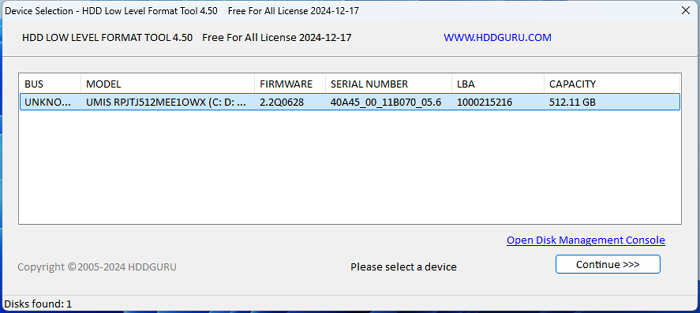
Overview of HDD Low Level Format Tool
HDD Low Level Format Tool is a disk utility designed to perform low-level wipe operations on storage devices. It supports:
- HDDs
- SSDs
- USB flash drives
- SD cards
- External hard drives
The software rewrites sectors across the disk and removes:
- File systems
- Partition tables
- Boot records
- Existing data structures
After the process, the drive becomes completely unallocated and needs to be repartitioned before it can be used again. Unlike a standard Windows quick format, this tool performs a much deeper overwrite operation.
Is HDD Low Level Format Tool Still Worth Using?
For some scenarios, yes. HDD Low Level Format Tool still works reasonably well for:
- Wiping old hard drives
- Removing corrupted partition tables
- Cleaning infected USB drives
- Resetting RAW disks
- Deep-erasing storage before resale
However, it is no longer the ideal solution for every disk problem. Modern storage devices, especially SSDs, require smarter management approaches. Repeated zero-fill formatting may place unnecessary wear on SSDs and aging HDDs.
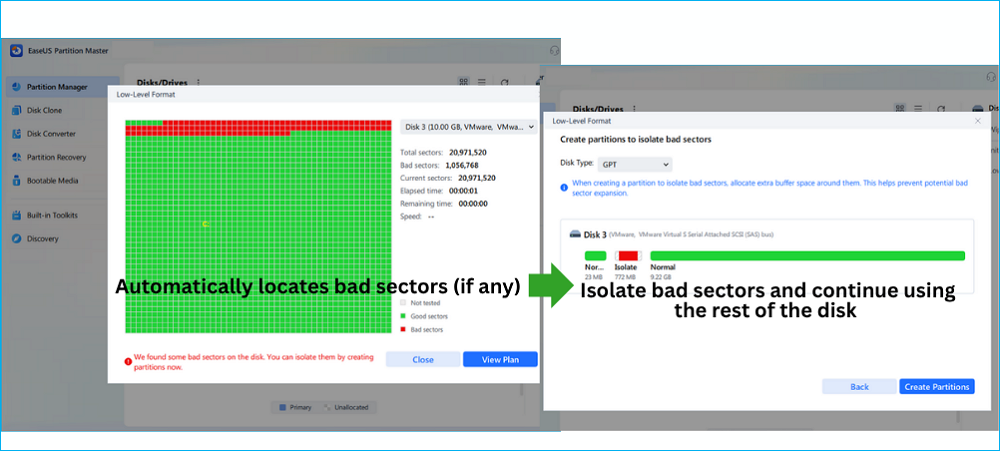
Additionally, users dealing with partial bad sectors often want to preserve healthy storage space instead of rewriting the entire disk. That is where modern partition repair tools like EaseUS Partition Master become more practical.
✔️Smart bad-sector isolation, create new partitions on the healthy area of the disk, and reuse the disk.
What Does "Low Level Format" Actually Mean Today?
Technically, modern hard drives are already low-level formatted at the factory. So tools like the HDD Low-Level Format Tool no longer perform a true physical low-level format. Instead, they perform a zero-fill format or sector-overwrite operation.
That means the tool:
- Writes zeros across accessible sectors
- Clears corrupted partition information
- Removes logical file system damage
- Forces Windows to rebuild the drive structure later
This is why the tool is often used for:
- RAW drives
- Corrupted HDDs
- Disk initialization issues
- Virus-infected USB drives
- Persistent formatting errors
- Deep data erasure
- Notice:
- Low level formatting can sometimes repair logical corruption, but it cannot truly repair physical hardware damage. If your HDD is clicking, disappearing randomly, or showing rapidly increasing SMART errors, formatting alone probably will not save it.
Pros and Cons of HDD Low Level Format Tool
|
👍Pros
|
👎Cons
|
Feel free to share this page to help more users learn the full review of HDD Low Level Format Tool.

How to Use HDD Low Level Format Tool?
Before getting started, make sure you have connected the external storage device to the computer.
- Warning
- Low level format will cause data loss and all files and partitions are erased permanently.
Step 1. Download HDD Low Level Format Tool from its official website (HDDGURU). Once finished, it will launch automatically and display the device details.
Step 2. Navigate to the "LOW LEVEL FORMAT" tab, select the correct external device, and click "FORMAT THIS Device." Click Yes when you see the "All data on the selected device will be lost" warning.
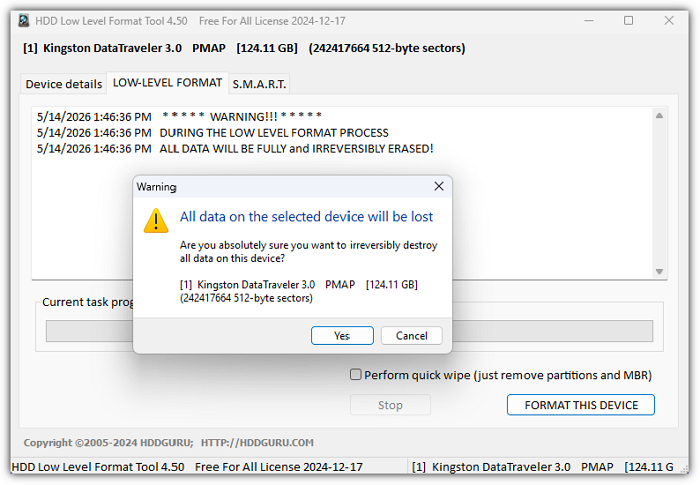
After this, you can create partitions on the disk and reuse it.
Best Alternative to HDD Low Level Format Tool
EaseUS Partition Master is a low-level format software that supports isolating bad sectors and creating partitions on the healthy part of the disk during the low-level format. You do not need to recreate partitions after that. Also, many common HDD problems, such as file system corruption, inaccessible partitions, slow performance, or isolated bad sectors, often do not require a full low-level format at all. So this partition manager software also comes with features such as "check file system," "disk surface test," "check disk health(SMART)", ect.
- ✔️Support SSD/HDD/external hard drive, SD cards, USB flash drives.
- ✔️Support Windows 11/10/8/7/XP/Vista.
| Comparison | EaseUS Partition Master | HDD Low Level Format Tool |
|---|---|---|
| High Level Formatting |
✔ |
✔ |
| Low Level Format Disk |
✔ |
✔ |
| Bad Sectors Isolation | ✔ | Limited |
| Deep Disk Wipe |
✔ |
✖ |
| Partition Hard Drive After Low Level Formatting |
✔ |
✖ |
| Partition Recovery | ✔ | No |
| Modern Interface | ✔ | No |
| Disk Low Level Format Speed |
|
|
Steps to low level format disk and reuse it with EaseUS Partition Master:
Step 1. Launch EaseUS Partition Master, select the target disk you want to low level format, and click "Low level format" on the right panel.
Step 2. Tick the "I understand all data on the disk will be destroyed upon starting" box and click "Start".
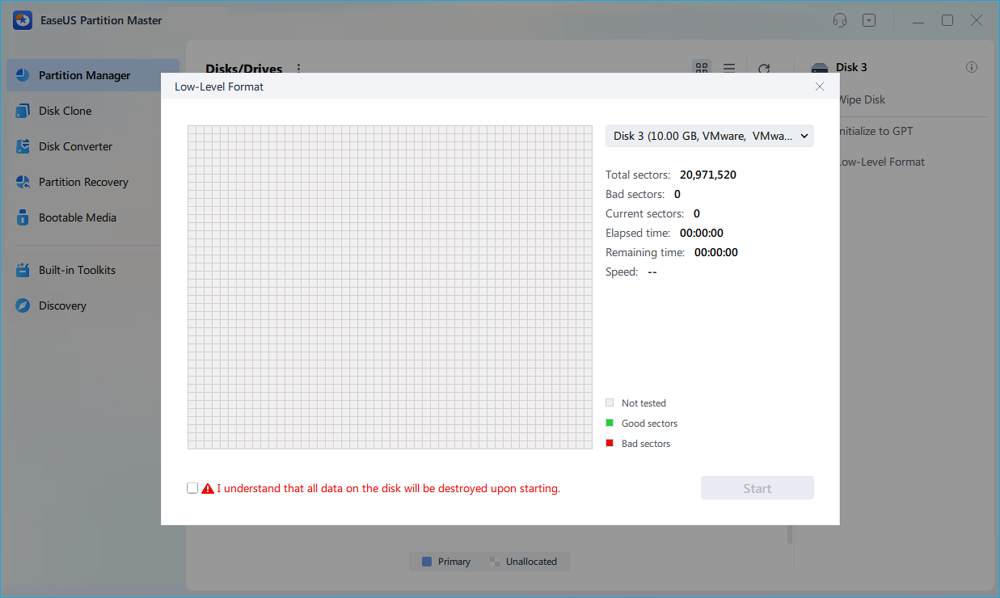
Step 3. If your disk is OK, after the process, you can see your disk become unallocated. You can create partitions to access it again; however, if there are bad sectors on your disk. You will receive an error saying, "We found some bad sectors on the disk. You can isolate them by creating partitions now."
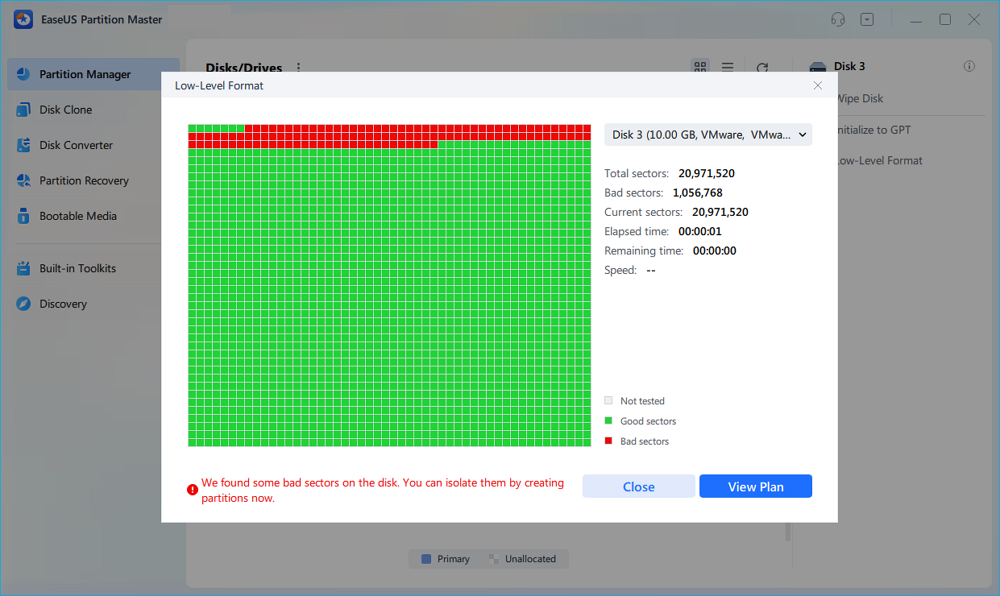
Step 4. Then, you can see all the bad sectors are isolated in one partition. And, the normal partitions are completely healthy. Click "Create Partitions" to continue.
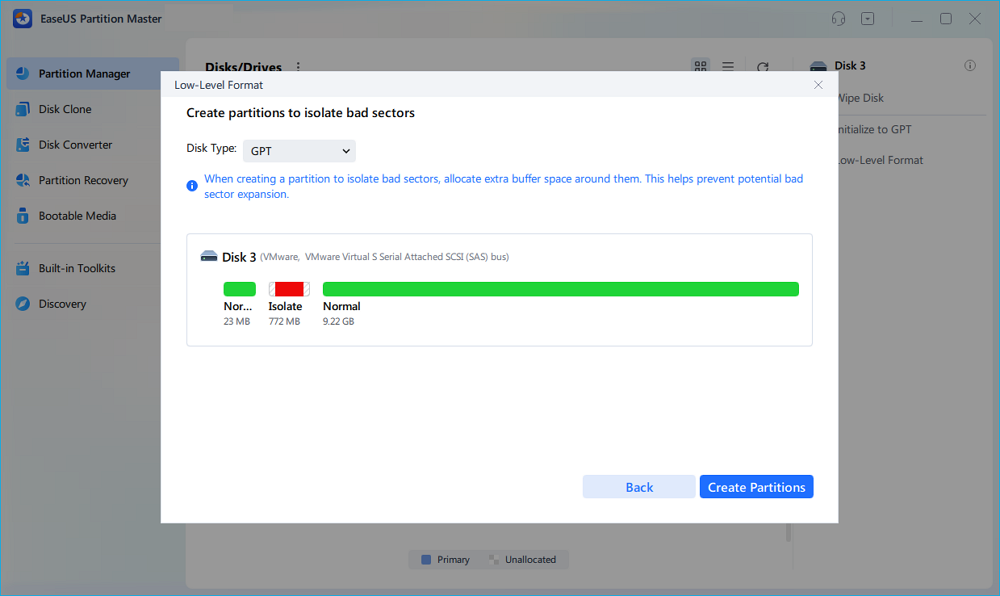
Step 5. Click "Execute 1 Task(s)" and "Apply" to isolate the bad sectors on your disk and create new healthy partitions.

For users dealing with aging disks, partition corruption, or isolated bad sectors, EaseUS Partition Master provides greater flexibility than relying solely on full low-level formatting. Check the following to articles to learn more about disk fixes.
Conclusion
The HDD Low Level Format Tool is still useful for deep erasing old HDDs, cleaning corrupted USB drives, and resolving RAW partition issues, thanks to its simplicity and broad compatibility. However, it feels outdated for modern storage management and cannot truly repair physical disk damage. For users who need smarter bad-sector isolation, partition repair, SSD optimization, and safer recovery workflows, EaseUS Partition Master is a more practical and modern alternative.
FAQs About HDD Low Level Format Tool
Is HDD Low Level Format Tool free?
Yes, HDD Low Level Format Tool offers a free version, but the free edition comes with speed limitations, which can make formatting very slow on large drives. This is usually acceptable for small USB drives or older HDDs, but formatting multi-terabyte disks may take many hours. The paid version removes the speed cap and provides faster low level formatting performance.
Can HDD Low Level Format Tool fix bad sectors?
It can sometimes help with logical bad sectors caused by file system corruption or unstable sector mapping. During the low level formatting process, the drive may remap weak sectors and temporarily restore stability. However, physical bad sectors caused by hardware damage, platter degradation, or mechanical failure usually cannot be permanently repaired. If bad sectors continue increasing after formatting, the hard drive is likely failing physically.
Is low level formatting bad for SSDs?
Occasional low level formatting is generally safe for SSDs, but repeated full-drive overwriting is not recommended. Modern SSDs already include wear leveling, TRIM, and internal sector management, so deep formatting often provides limited benefit. Because SSDs have finite write cycles, excessive zero-fill operations may gradually reduce the lifespan of the NAND flash memory over time.
Does HDD Low Level Format Tool erase everything?
Yes. HDD Low Level Format Tool performs a deep overwrite operation that removes partitions, file systems, boot records, and stored files from the drive. After formatting, the disk becomes completely unallocated and must be repartitioned before it can be used again. In most cases, recovering data after a low level format is extremely difficult or impossible.
Why is HDD Low Level Format Tool so slow?
The software is slow because it rewrites sectors across the entire storage device instead of simply deleting file references like a quick format. The larger the drive, the longer the process takes. Older HDDs, unstable disks, and drives with bad sectors may become even slower during formatting because the software repeatedly attempts to access problematic areas.
What is the best alternative to HDD Low Level Format Tool?
For users dealing with bad sectors, corrupted partitions, or aging hard drives, EaseUS Partition Master is one of the strongest modern alternatives. Besides low level formatting, it also provides surface testing, file system repair, partition management, and bad sector isolation features. In many situations, disk problems can be repaired through file system checks or surface tests without performing a full, destructive, low-level format.
How Can We Help You
About the Author

Sherly joined EaseUS in 2022 and she has always loved writing articles and enjoys the fun they bring. She receives professional training here, focusing on product performance and other relative knowledge. She has written over 200 articles to help people overcome computing issues.
Product Reviews
-
I love that the changes you make with EaseUS Partition Master Free aren't immediately applied to the disks. It makes it way easier to play out what will happen after you've made all the changes. I also think the overall look and feel of EaseUS Partition Master Free makes whatever you're doing with your computer's partitions easy.
Read More -
Partition Master Free can Resize, Move, Merge, Migrate, and Copy disks or partitions; convert to local, change label, defragment, check and explore partition; and much more. A premium upgrade adds free tech support and the ability to resize dynamic volumes.
Read More -
It won't hot image your drives or align them, but since it's coupled with a partition manager, it allows you do perform many tasks at once, instead of just cloning drives. You can move partitions around, resize them, defragment, and more, along with the other tools you'd expect from a cloning tool.
Read More
Related Articles
-
How to Combine Multiple Hard Drives into One Volume [Two Tricks for You]
![author icon]() Jean/2026/05/07
Jean/2026/05/07 -
2026 Sony USB/Pen Drive Format Tool Is Online | Free Download
![author icon]() Jean/2026/02/12
Jean/2026/02/12 -
How to Format a USB for Xbox 360 on PC/Mac/Xbox 360 [Newest Solution]
![author icon]() Cici/2026/01/29
Cici/2026/01/29 -
Best Hard Disk Speed Test Software Free Download for Windows 11/10 in 2026
![author icon]() Tracy King/2026/01/29
Tracy King/2026/01/29
 Jean/2026/05/07
  Cici/2026/01/29
  Tracy King/2026/01/29
 Hot Topics








EaseUS Partition Master

Version 20.0 is here - full exFAT support, easier disk partitioning, and PC performance optimization.


