


Content
Page Table of Contents
About the Author
Hot Topics

Updated on Jun 16, 2026
Are you stuck at the Windows loading screen? Do you get a black screen after logging into Windows 7? Or maybe your Windows 7 PC keeps crashing?
Issues like these are frustrating, especially if you rely on your computer for work. Thankfully, a reliable Windows 7 repair tool can automatically diagnose and fix problems. Here, you will learn why you might need such a tool, how to free download a Windows 7 repair tool, and how to use it step by step.
Why Do You Need a Windows 7 Repair Tool?
Windows 7 was released on October 22, 2009. It's an old operating system still used by more users. Windows 7 is stable and familiar, but it may not be designed for today's hardware and usage patterns. For example, the lack of current security updates makes the system more vulnerable to malware and system damage. So, when using Windows 7, you may encounter some issues, such as:
- Slow boot times or never-ending loading screens.
- PC won't boot correctly after a power outage or forced shutdown.
- Sudden shutdowns, freezes, and application crashes.
- Repeated blue screen errors.
- Corrupted partitions or file systems that prevent normal access to data.
If you are struggling with these issues, a Windows 7 repair tool is necessary. Using a dedicated tool to scan, repair, and optimize your disk and partitions is much easier and safer than manual fixes. That is where EaseUS Partition Master comes into play.
Windows 7 Repair Tool Free Download
There are many options for "Windows 7 repair tool free download." If you want an easier and safer tool, EaseUS Partition Master is what you can't miss. It is a well-known disk manager that can help repair certain Windows 7 problems.
🎉Key Features of EaseUS Partition Master as a Windows 7 repair tool:
- Disk and partition repair: Check file systems, fix errors, and help restore access to problematic partitions.
- Boot issue repair: Fix blue/black screen, Windows won't boot, system crash.
- Create WinPE Environment: Run recovery tools, copy files, or perform advanced troubleshooting.
- Disk management: Manage disks and rescue data from a broken PC.
🎈More reasons why choose EaseUS Partition Master:
- Compatibility: Windows 7/8/10/11/Vista.
- Full features: Support a bundle of useful repair and disk management features.
- User-friendly interface: Clear labels and guided steps.
- Safety: No ads and no viruses; protect your data.
- Best for: Users want an easy and all-in-one Windows 7 repair tool.
See how this Windows 7 repair tool is trusted by millions.
|
How to Use a Windows 7 Repair Tool [Step-by-Step Guide]
If you encounter boot issues or a blue screen, you can use the Windows 7 repair tool to fix these issues easily. This section shows you how to use EaseUS Partition Master to repair boot issues and Windows 7 file system errors.
- Notice:
- 🔸Please always back up your important files before running any repair or partition operation to avoid accidental data loss.
- 🔸Close other programs while repairing to reduce conflicts.
- 🔸Make sure the power is stable to avoid interruptions.
1. Repair Windows 7 Boot Error
When your Windows 7 PC refuses to boot, you are completely locked out of your everyday tasks. Instead of reinstalling the system or trying random fixes, it is much safer to target the real problem: boot configuration and system partition errors. A reliable Windows 7 repair tool can help you check the system disk, fix boot records, and restore access to your desktop without advanced technical skills.
Learn how to use EaseUS Partition Master to repair common Windows 7 boot errors step by step:
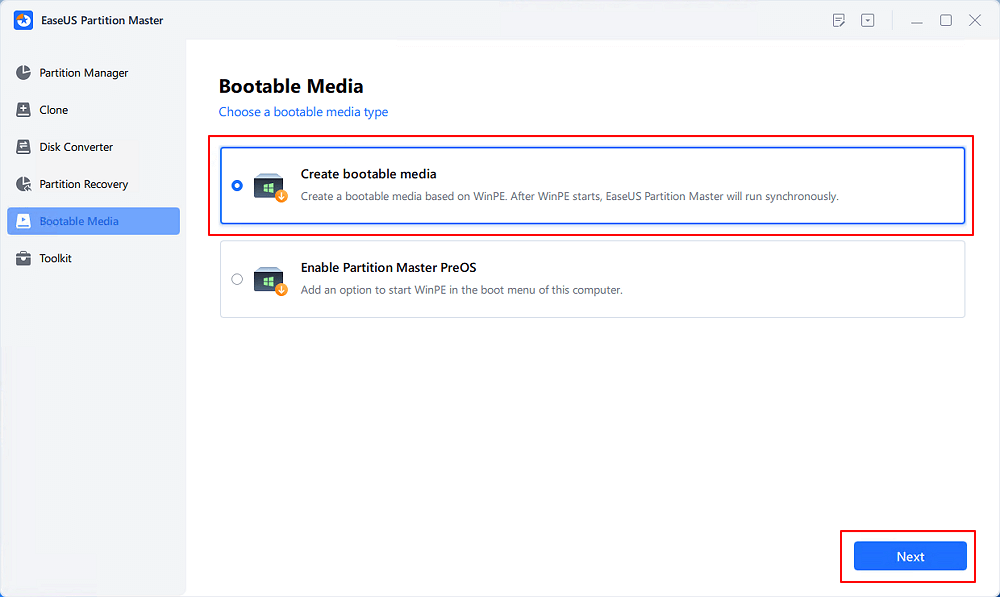
Step 1. Start EaseUS Partition Master after connecting the external drive/USB to your computer, go to "Bootable Media," and click "Create bootable media."
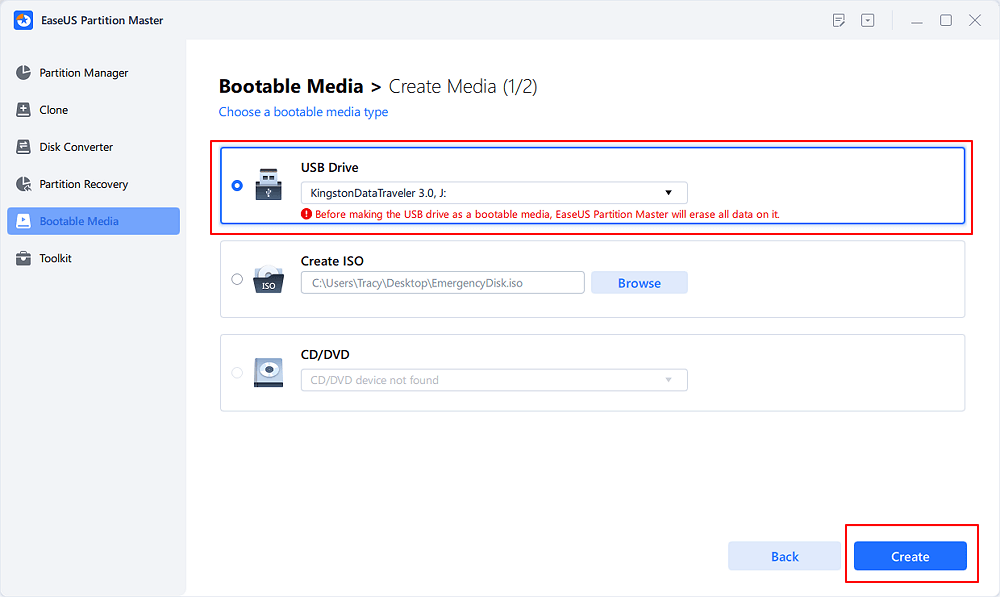
Step 2. Select an available USB Drive or CD/DVD and click "Create." You can also burn the Windows ISO file to the storage media.
Step 3. Connect the created bootable drive to the new computer and reboot the computer by pressing and holding F2/Del to enter the BIOS. Then, set the WinPE bootable drive as the boot disk and press F10 to exit.
Step 4. Boot the computer again and enter the WinPE interface. Then, open EaseUS Partition Master and click "Boot Repair" under the "Toolkit" option.
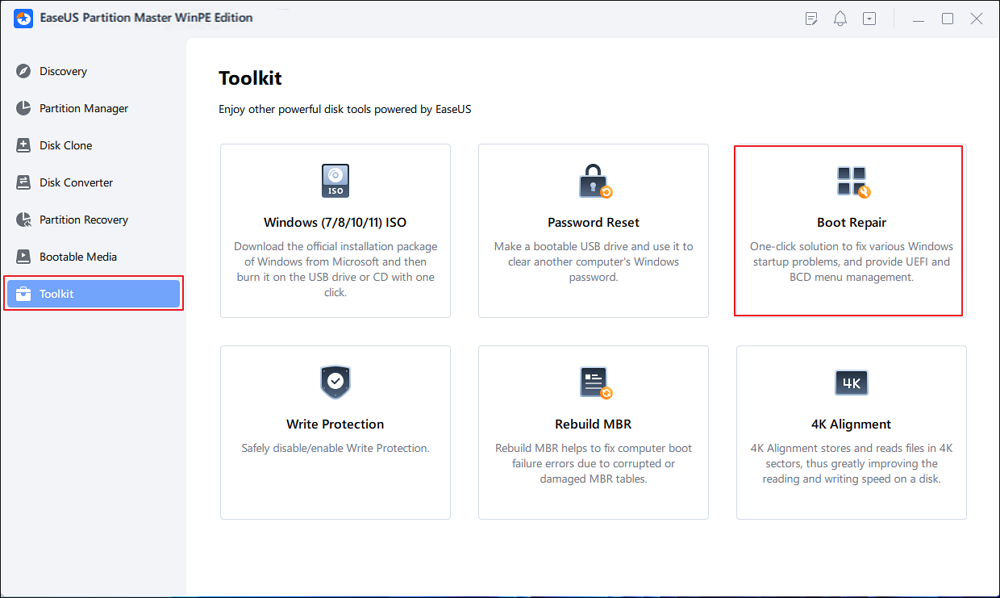
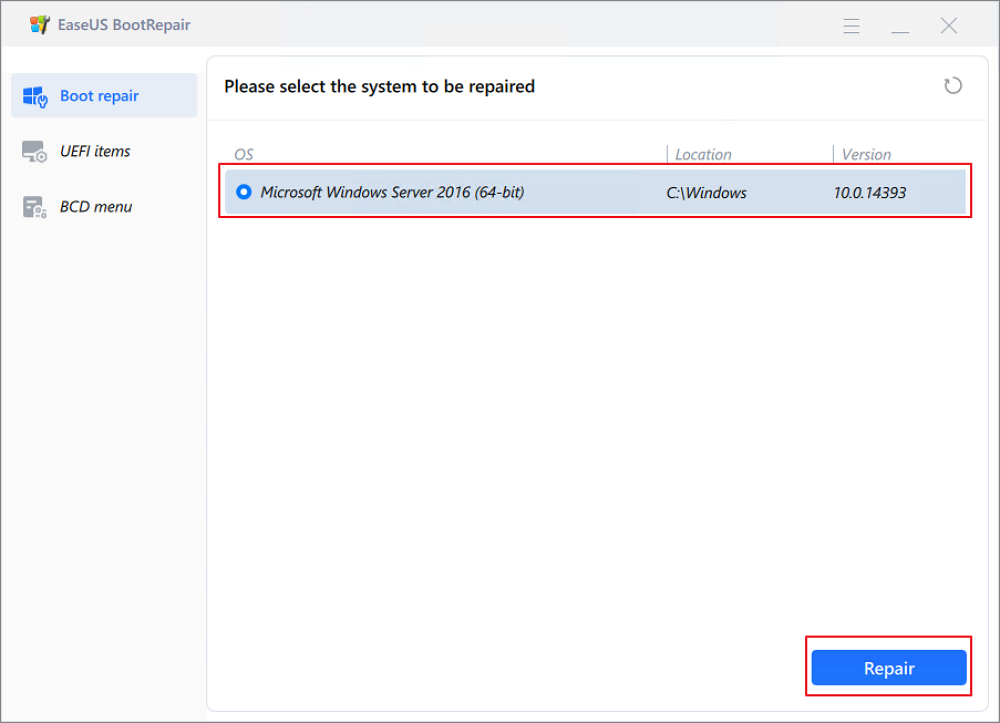
Step 5: Select the system you want to repair and click "Repair."
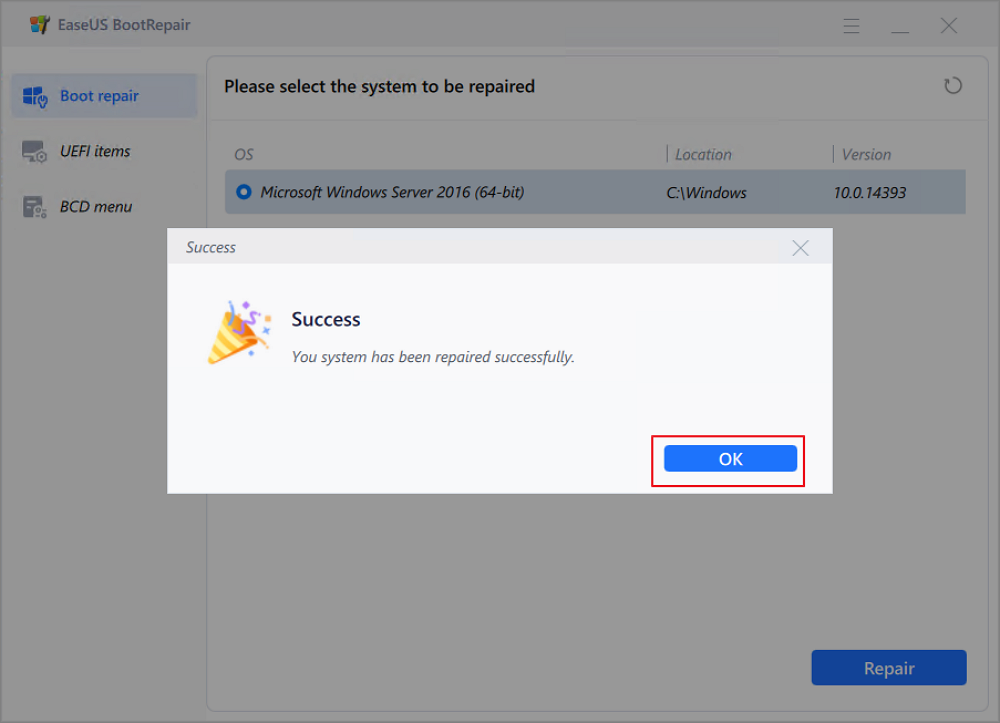
Step 6. Wait a moment, and you will receive an alert that the system has been successfully repaired. Click "OK" to complete the boot repair process.
2. Repair Windows 7 File System Error
File system errors can damage your Windows 7 installation and cause crashes, freezes, or missing files over time. These errors often come from improper shutdowns, power outages, or bad sectors on the disk. A Windows 7 repair tool allows you to scan the affected partition, detect file system problems, and fix them automatically, keeping your system stable and your data safer.
How to repair Windows 7 file system:
Step 1. Open EaseUS Partition Master on your computer.
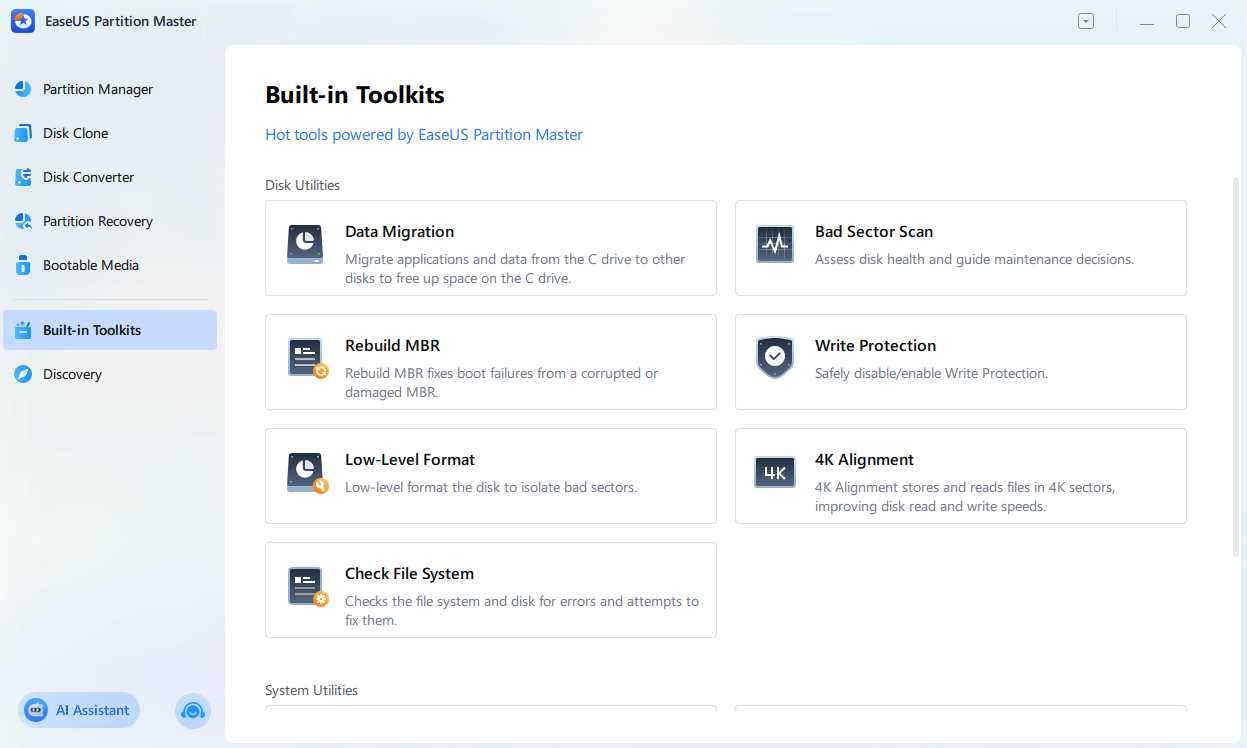
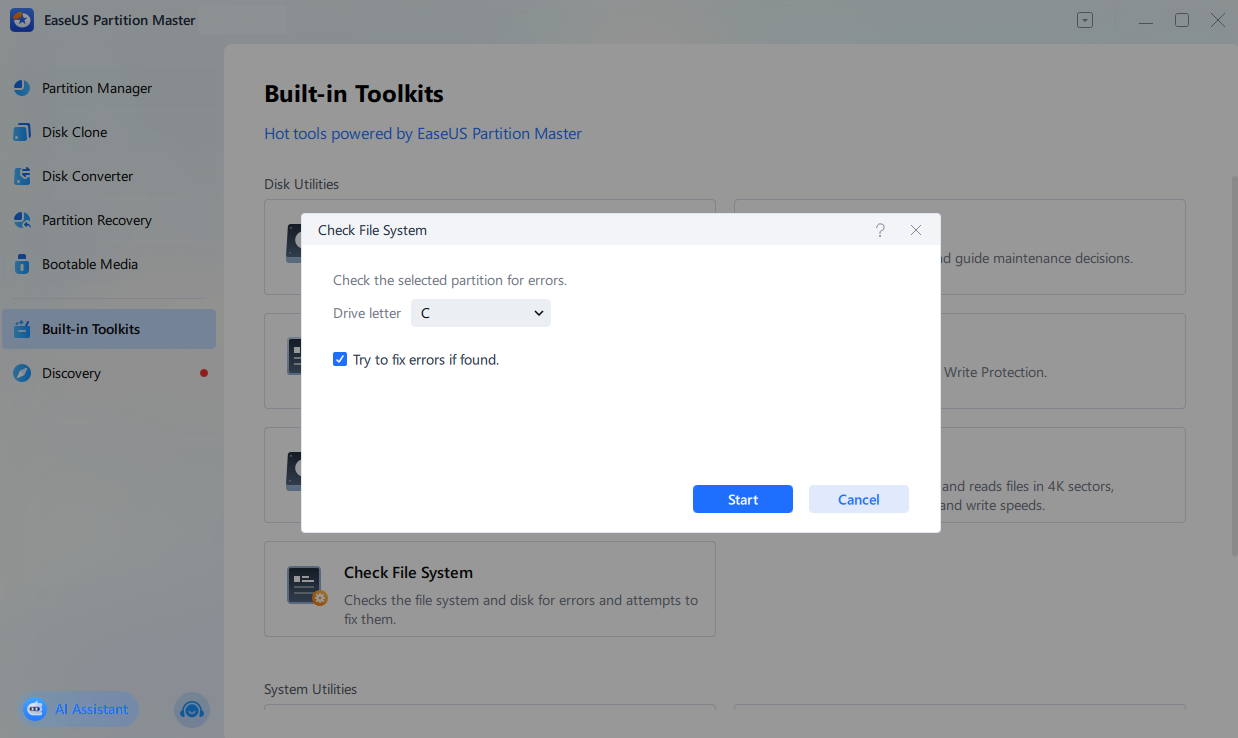
Step 2. Choose "Built-in Toolkits" > "Check File System."
Step 3. In the Check File System window, choose the drive partition you want to fix.
Step 4. Tick the "Try to fix errors if found" option and click "Start".
Step 5. Wait for the software to check your partition file system and fix errors.
If you encounter issues while using this Windows 7 repair tool, you can contact our support team.

EaseUS experts are available to provide you with 1-on-1 manual services (24*7) and help fix Windows 7 system issues. Our experts will offer you FREE evaluation services and efficiently diagnose and resolve system boot failure, Windows stop codes and OS lagging issues using their decades of experiences.
- 1. Fix BSOD - blue/black screen of death error due to Windows update or other reasons.
- 2. Get rid of Windows boot error such as no bootable device found, or BCD file corruption.
- 3. Serve to fix 0X000_error codes on Windows system or OS boot loop issues.
Conclusion
Windows 7 system problems may come from fixable disk and partition issues. A dedicated Windows 7 repair tool, such as EaseUS Partition Master, helps scan for errors, repair file systems, and optimize partitions without diving into complex manual procedures. This Windows 7 repair tool helps you often restore stability, improve performance, and extend the life of your Windows 7 PC.
FAQs
1. What should I do if Windows 7 cannot boot at all?
You can try using Windows' built-in Startup Repair from installation media or a recovery disc. But this built-in tool may not fix your complex problem. EaseUS Partition Master offers bootable media that you can run from a USB drive to repair partitions and file systems without entering Windows.
2. Can a repair tool fix every Windows 7 problem?
No, a repair tool cannot fix everything. It is most useful for issues related to disk errors, corrupted file systems, and partition problems. If your problems are caused by faulty hardware, severe malware, or deeply damaged system files, you may need additional tools, a clean installation, or professional help.
3. How often should I check my disk for errors?
If your system is stable, you can check disk health for a few months. However, if you experience crashes, freezes, or unexpected restarts, you should run a check as soon as possible. Regular maintenance can prevent many Windows 7 issues before they become serious.
Share it to help more users learn this Windows 7 repair tool:

How Can We Help You
About the Author
Updated by Joey Albert
Joey is an enthusiast of science and technology. With a passion for uncovering the latest tech innovations, she creates clear, engaging how-to guides that make technology accessible and enjoyable for all.
Product Reviews
-
I love that the changes you make with EaseUS Partition Master Free aren't immediately applied to the disks. It makes it way easier to play out what will happen after you've made all the changes. I also think the overall look and feel of EaseUS Partition Master Free makes whatever you're doing with your computer's partitions easy.
Read More -
Partition Master Free can Resize, Move, Merge, Migrate, and Copy disks or partitions; convert to local, change label, defragment, check and explore partition; and much more. A premium upgrade adds free tech support and the ability to resize dynamic volumes.
Read More -
It won't hot image your drives or align them, but since it's coupled with a partition manager, it allows you do perform many tasks at once, instead of just cloning drives. You can move partitions around, resize them, defragment, and more, along with the other tools you'd expect from a cloning tool.
Read More
Related Articles
-
Bootable USB Creator Free Download: Create a Bootable USB in Minutes
![author icon]() Joey Albert/2026/06/16
Joey Albert/2026/06/16 -
How to Turn On BitLocker in Windows 10/11 Home
![author icon]() Cici/2026/06/16
Cici/2026/06/16 -
BitLocker Could Not Encrypt One or More Drives on This Computer
![author icon]() Shelly/2026/06/16
Shelly/2026/06/16 -
Reset Forgotten Password on Lenovo Laptop Without Disk
![author icon]() Cici/2026/06/16
Cici/2026/06/16
 Cici/2026/06/16
  Shelly/2026/06/16
 Hot Topics








EaseUS Partition Master

Version 20.0 is here - full exFAT support, easier disk partitioning, and PC performance optimization.


