


Content
Page Table of Contents
About the Author
Hot Topics
If you forgot your Windows 11 password, you'll lose access to your desktop, account, and data. But don't worry. You don't need to reinstall the system, which results in data loss. Many users on Reddit have also discussed:
| Do I have to reset my pc if I forgot my password?? (Windows 11) - From r/WindowsHelp |
|
I have been trying to use my Windows 11 laptop's password. It's telling me that my password is the same as my accounts password, but when I try to use it, it says it's incorrect. - From r/WindowsHelp |
You can instantly reset Windows 11 password with a USB. It helps you unlock your account without losing files. There are many Windows password reset tools. In this guide, we'll show two effective tools to reset Windows 11 password using a bootable USB.
Why Should You Use Windows 11 Password Reset USB
A password reset USB drive serves as a master key for your Windows system. It helps reset Windows 11 password easily.
What is a Windows 11 Password Reset USB
A Windows 11 password reset USB is a bootable flash drive that lets you change or remove your login password when you are locked out of the system. Once created, you can boot from this USB and reset the password of your Windows account. Unlike reinstalling your OS, a password reset USB keeps your files, apps, and system settings.
A bootable USB is the easiest way to reset the local account password. It works:
- Reset or remove your password in minutes.
- No need to reinstall Windows or format your drive.
- Works even without an internet connection.
Choose Reliable Windows 11 Password Reset USB Tools
Windows 11 password reset USB tools help you reset your password using a bootable USB drive you created. When you forgot Windows 11 password, these tools help you boot from a USB and modify the account data.
This guide mainly introduces two of the best Windows 11 password reset software downloads:
- Built-in Windows tool: Requires you to create a Windows password reset disk in advance.
- EaseUS Partition Master: Create password reset disks for the current computer and other computers without requiring prior creation.
Windows 11 Password Reset USB Free Download/Create
👍Best for: Prepare a recovery option in advance.
Microsoft includes a built-in tool for creating a password reset disk for local accounts. You can create a password reset USB and then reset the password on Windows 10 using this USB drive. It's free, official, and safe to use. But it requires you to create the USB before you are locked out of your Windows.
Here is how to download and make a Windows 10 password reset USB:
Step 1. Plug in a USB flash drive.
Step 2. Open Control Panel > User Accounts > Create a password reset disk.
Step 3. Follow the steps in the Forgotten Password Wizard.
Step 4. Name and store the USB securely.
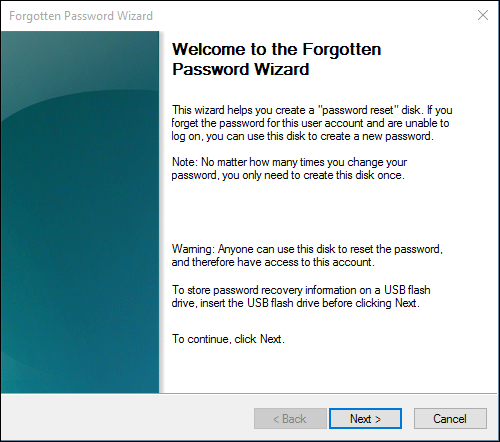
Later, if you forget the password, you can use the password reset USB to reset Windows 11 password.
Step 5. Insert the password reset USB drive into your PC.
Step 6. At the login screen, click "Reset password."
Step 7. Follow the "Password Reset Wizard" steps.
Step 8. Set a new password for your Windows 11.
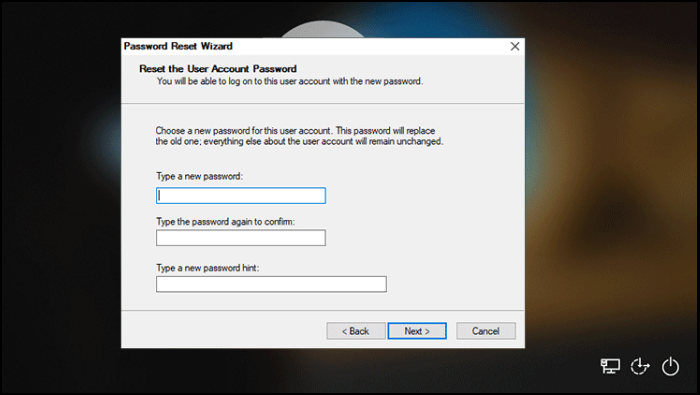
If you use a Microsoft account or if you have another administration account, learn these methods:
✅Pros:
|
⚠️Cons:
|
Windows 11 Password Reset USB Download
👍Best for: locked out of a Windows 11 PC with no access to any account or prior reset disk.
If you're already locked out, the built-in Windows tool can't reset the password. You have another option: EaseUS Partition Master.
EaseUS Partition Master is primarily a disk management tool, but it also includes a built-in password reset wizard that creates a dedicated bootable USB drive. It allows users to create a Windows password reset disk on a USB/CD/DVD from any Windows PC and reset the password without data loss.
EaseUS Partition Master helps you create an emergency disk for disk management of crashed computers. This Windows password reset tool applies to:
- Reset Windows password when you forgot your Windows password.
- Fix Windows won't boot.
- Fix the PC blue screen on startup.
- Perform disk management when your computer crashes.
Download EaseUS Partition Master and follow these steps to reset Windows 11 password.
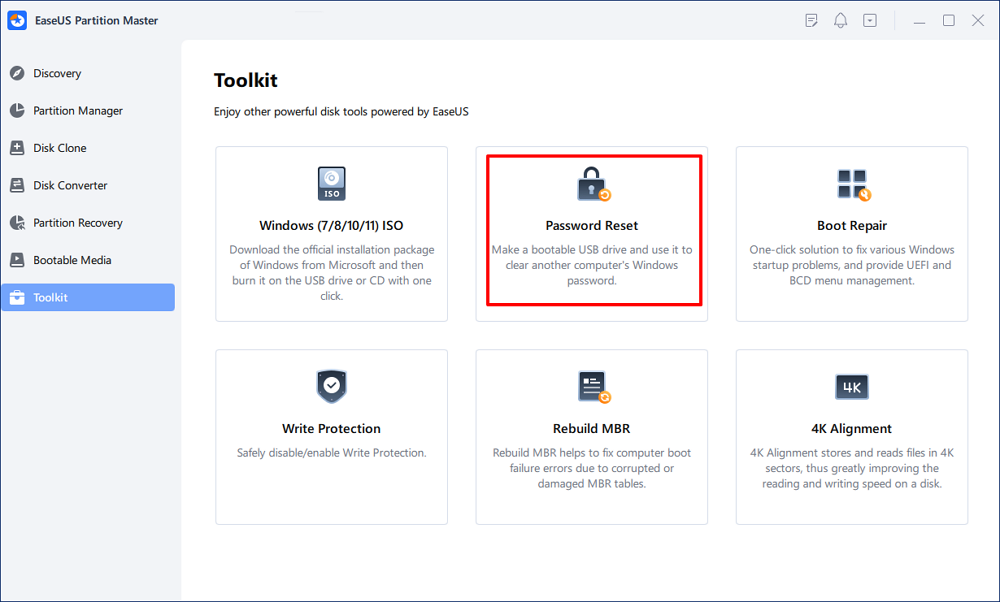
Step 1. Insert the target USB disk into the computer, download and run EaseUS Partition Master, and click "Toolkit" > "Password Reset."
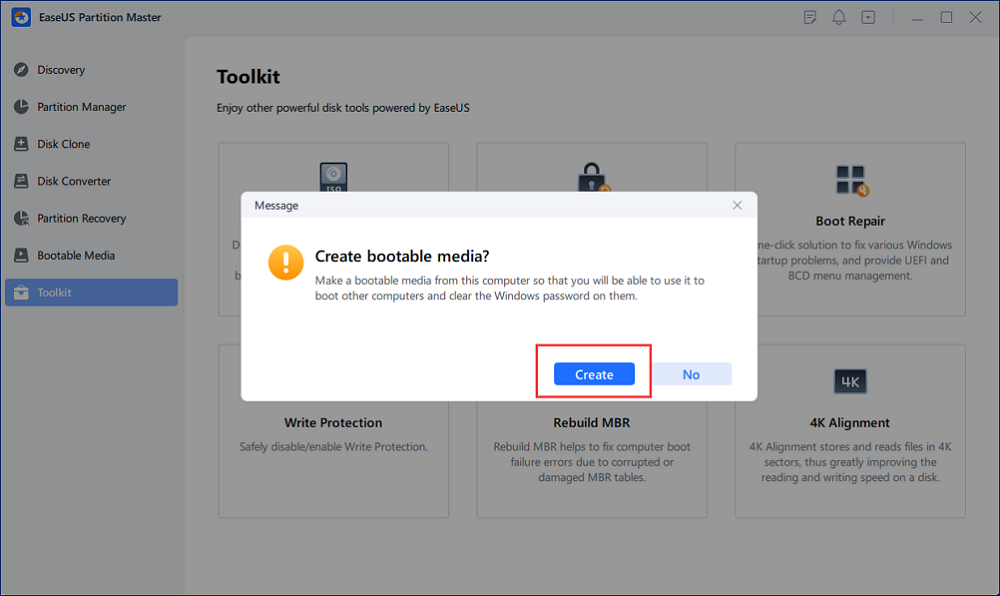
Step 2. A small window will pop up. After reading it carefully, click "Create".
Step 3. Select the correct USB flash drive or external mobile hard disk and click "Create" again. Wait patiently. After the password reset USB flash drive is created, click "Finish."
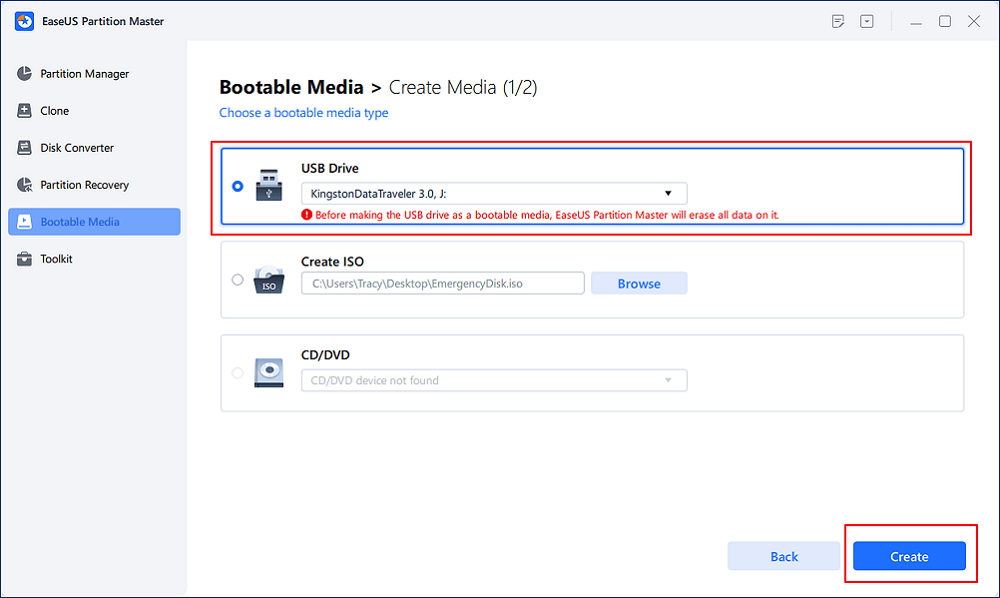
Step 4. Remove the password reset USB, insert it into the locked PC, and restart. You will be asked to change the boot drive to boot the PC from USB. Once completed, the system will automatically boot from USB.
Step 5. After restarting, find EaseUS Partition Master again and go to "Password Reset." All accounts on the PC will be displayed in the interface; click on the target account and check "Reset & Unlock."
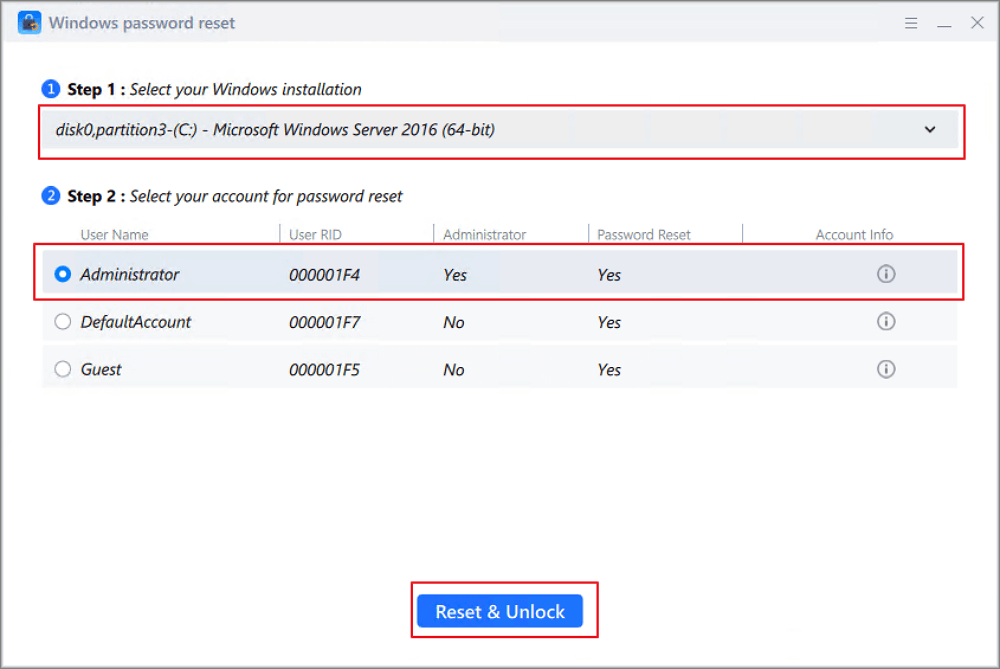
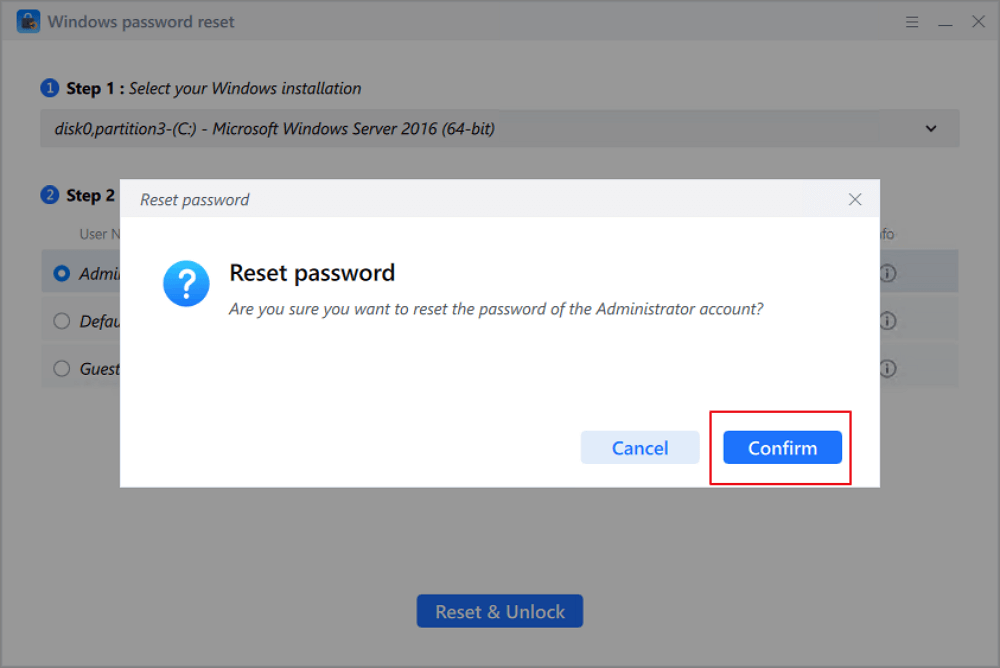
Step 6. When you receive this prompt, click "Confirm" to continue. Your password will be erased.
✅Pros:
|
⚠️Cons:
|
Video guide on how to reset Windows 11 password using EaseUS bootable USB tool:
Tips for Preventing Forgotten Password Issues
A password reset USB is important when you forget your Windows password. Getting locked out of your Windows 11 PC is stressful. To avoid future forgotten password issues, here are some suggestions.
- Create the password reset USB now and store it in a secure location.
- Link your local account to a Microsoft account for online recovery. Cloud access lets you reset your password online.
- Use a password manager for strong, unique passwords.
- Back up important files regularly to OneDrive, an external drive, or cloud storage so you're less stressed if things go wrong.
- Back up your BitLocker recovery key immediately if encryption is on.
Share this guide to help more users reset forgotten Windows 11 passwords.

Conclusion
Losing access to your Windows 11 PC doesn't have to mean losing your files. With a password reset USB, you can restore access easily and avoid reinstalling the system.
Microsoft's built-in reset disk offers a straightforward, free solution if set up in advance. For emergencies when you're locked out, professional tools like EaseUS Partition Master provide a reliable way back into your system without risking your data.
FAQs
1. Can I Reset a Windows Password for Free?
Yes, you can reset a Windows 11 password completely free using built-in Microsoft tools. But the method has some limitations. For example, it only works for local accounts. If your computer uses a Microsoft account or disk encryption, use EaseUS Partition Master instead.
2. Is Windows 11 password reset usb software safe?
It can be very safe if you download from trusted sources. Please download from official sites, follow step-by-step guides, avoid interrupting the boot process, and back up data. EaseUS Partition Master is a safe Windows 11 password reset USB tool that won't cause data loss. It targets only the password file on your system partition.
3. How do I reset the Windows 11 password if I use a Microsoft account?
If you use a Microsoft account, you can't use a local USB password reset tool. Instead, reset it online.
Step 1. At the login screen, click "I forgot my password."
Step 2. Enter your email/phone, and verify with a security code.
Step 3. Set a new password and sign in normally.
How Can We Help You
About the Author

"I hope my articles can help solve your technical problems. If you are interested in other articles, you can check the articles at the bottom of this page. Similarly, you can also check my Twitter to get additional help."

Written by Joey Albert
Joey is an enthusiast of science and technology. With a passion for uncovering the latest tech innovations, she creates clear, engaging how-to guides that make technology accessible and enjoyable for all.
Product Reviews
-
I love that the changes you make with EaseUS Partition Master Free aren't immediately applied to the disks. It makes it way easier to play out what will happen after you've made all the changes. I also think the overall look and feel of EaseUS Partition Master Free makes whatever you're doing with your computer's partitions easy.
Read More -
Partition Master Free can Resize, Move, Merge, Migrate, and Copy disks or partitions; convert to local, change label, defragment, check and explore partition; and much more. A premium upgrade adds free tech support and the ability to resize dynamic volumes.
Read More -
It won't hot image your drives or align them, but since it's coupled with a partition manager, it allows you do perform many tasks at once, instead of just cloning drives. You can move partitions around, resize them, defragment, and more, along with the other tools you'd expect from a cloning tool.
Read More
Related Articles
-
Windows 7 Repair Tool Free Download | Fix System Errors Easily
![author icon]() Joey Albert/2026/06/17
Joey Albert/2026/06/17 -
We Couldn't Create a New Partition or Locate an Existing One
![author icon]() Daisy/2026/06/28
Daisy/2026/06/28 -
(Fixed) HAL INITIALIZATION FAILED BSOD Error
![author icon]() Oliver/2026/06/17
Oliver/2026/06/17 -
How to Change MBR to GPT in BIOS Windows 11
![author icon]() Tracy King/2026/06/30
Tracy King/2026/06/30
 Daisy/2026/06/28
  Oliver/2026/06/17
  Tracy King/2026/06/30









