


Content
Page Table of Contents
About the Author
Hot Topics
Is your hard drive making clicking noises, running painfully slow, or showing bad sector warnings? Many users searching for a way to repair damaged HDDs eventually come across HDD Regenerator. But in 2026, is this old-school disk repair tool still reliable, safe, and effective? This review covers what HDD Regenerator does, its pros and cons, real user feedback, pricing, and whether a HDD Regenerator alternative like EaseUS Partition Master may be a better choice.
HDD Regenerator Review: Is It Still Worth Using for Bad Sectors in 2026?
In this section, you will learn what HDD Regenerator is, what features it offers, how users rate it in 2026, and whether it is still suitable for modern storage devices.
1️⃣What Is HDD Regenerator?
HDD Regenerator is a specialized hard disk repair utility designed to detect and repair bad sectors on HDDs. The software has existed for many years and is mainly known for its DOS-style text interface and sector regeneration technology. Unlike standard disk checking tools that simply isolate damaged sectors, HDD Regenerator claims to recover readable access to physically weak sectors using magnetic reversal algorithms. It primarily targets traditional mechanical hard drives rather than SSDs.
The software is commonly used by:
- IT technicians
- Data recovery specialists
- Advanced Windows users
- Users attempting to recover aging HDDs
However, because the program operates at a relatively low level of the disk structure, improper use may increase the risk of data loss on severely damaged drives. Backing up important data before running any repair operation is strongly recommended.
2️⃣What Can HDD Regenerator Do?
While many users install it hoping for complete disk recovery, HDD Regenerator mainly focuses on sector-level scanning and repair. Its core functions include:
- Detecting bad sectors on HDDs
- Attempting to regenerate weak magnetic sectors
- Scanning drives without formatting
- Creating bootable recovery media
- Monitoring drive conditions during scanning
- Supporting older IDE/SATA hard drives
- Some users also use it to temporarily stabilize failing drives long enough to recover files.
🚩Limitations You Should Know
Although HDD Regenerator can still be useful in certain scenarios, its technology also has several limitations in 2026:
- The interface is outdated and text-based
- Limited optimization for SSDs and NVMe drives
- Long scanning times on large-capacity drives
- No modern graphical dashboard
- May not repair physically damaged hardware
- Success rates vary depending on disk condition
If the drive has severe mechanical failure, clicking sounds, head crashes, or firmware corruption, software-based repair tools alone are unlikely to solve the issue. Also, for beginners or users wanting a more visual and integrated solution, modern disk management tools like EaseUS Partition Master may provide a safer and easier experience.
3️⃣How Do People Think of HDD Regenerator?
User opinions on HDD Regenerator are highly mixed. Some experienced users still appreciate its low-level repair approach, especially when recovering data from aging mechanical drives. Others criticize its outdated workflow, slow performance, and inconsistent repair success on modern storage devices.
Real User Reviews
|
HDD Regenerator is a program that is needed by all data recovery professionals. It's not really meant to recover files, but it is great for repairing bad sectors on hard drives. Once this is accomplished, then running a data recovery program on your drive should produce most, if not all of your lost data. |
| Advantages of HDD Regenerator | Disadvantages of HDD Regenerator |
|---|---|
|
|
Find it helpful? Feel free to share this post and help more people who want more review info about HDD Regenerator.

The Best Alternative to HDD Regenerator
HDD Regenerator focuses heavily on text-based sector repair operations, but if you prefer software with graphical interfaces, guided workflows, and broader disk management capabilities. This is where EaseUS Partition Master becomes a practical alternative. Unlike HDD Regenerator's command-style interface, EaseUS Partition Master provides a modern graphical interface that is significantly easier for beginners while still offering advanced disk diagnostic functionality for professionals.
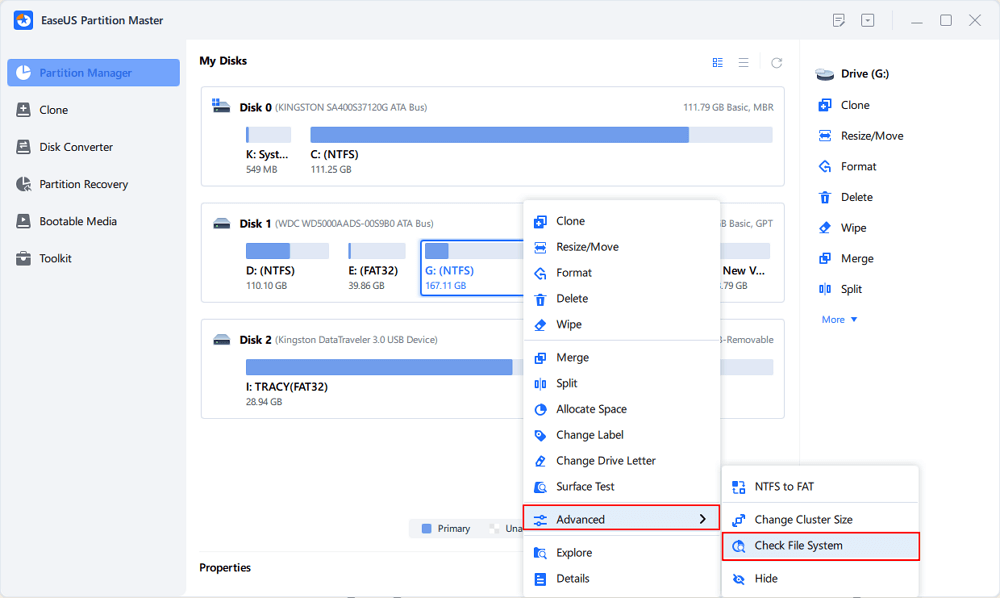
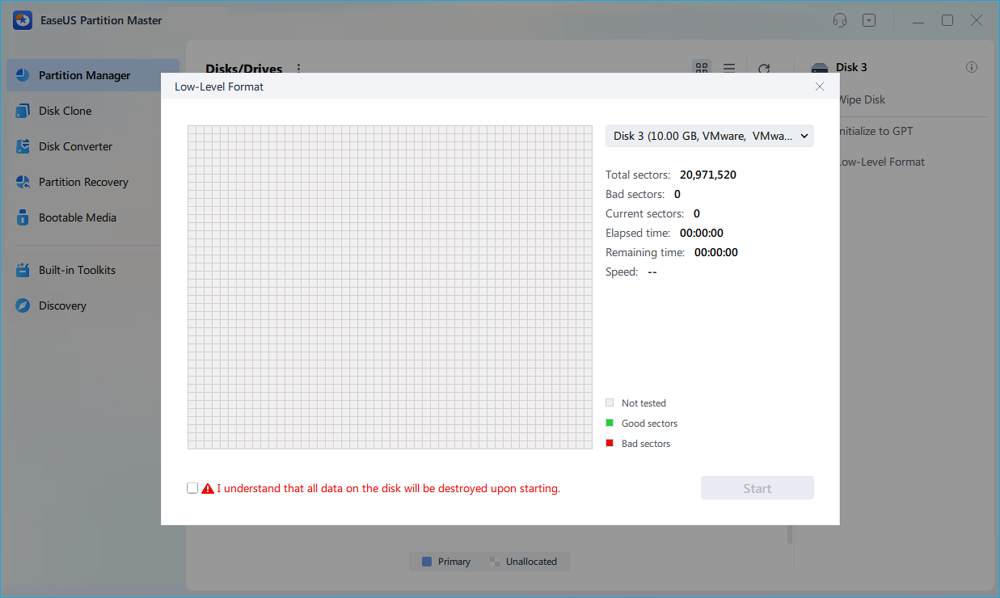
Its "Check File System" feature helps detect file system corruption, bad sectors, partition issues, and potential disk health problems quickly and visually. Also, its "low-level format" feature can isolate bad sectors and make full use of the healthy part of your disk.
Here is how EaseUS Partition Master replaces HDD Regenerator. Check the table to learn more details:
| Comparison | EaseUS Partition Master Free | HDD Regenerator |
|---|---|---|
| Product features |
|
|
| Compatibility |
|
|
| Product interface |
|
|
| Edition restrictions |
|
|
| File system supported |
|
|
| OS supported |
|
|
For experienced technicians attempting low-level recovery on aging mechanical drives, HDD Regenerator may still provide value in niche situations.
However, for most everyday users, beginners, or professionals managing modern storage environments, EaseUS Partition Master offers a more practical balance of usability, stability, compatibility, and integrated disk management functionality. Now, let's see how to use EaseUS Partition Master to repair logical bad sectors, isolate them, and reuse the hard drives.
Guide 1. Check and Repair Logical Bad Sectors
Without typing any command lines, you can scan and repair bad sectors on your HDDs via EaseUS Partition Master:
Step 1. Open EaseUS Partition Master on your computer. Then, locate the disk, right-click the partition you want to check, and choose "Advanced" > "Check File System".
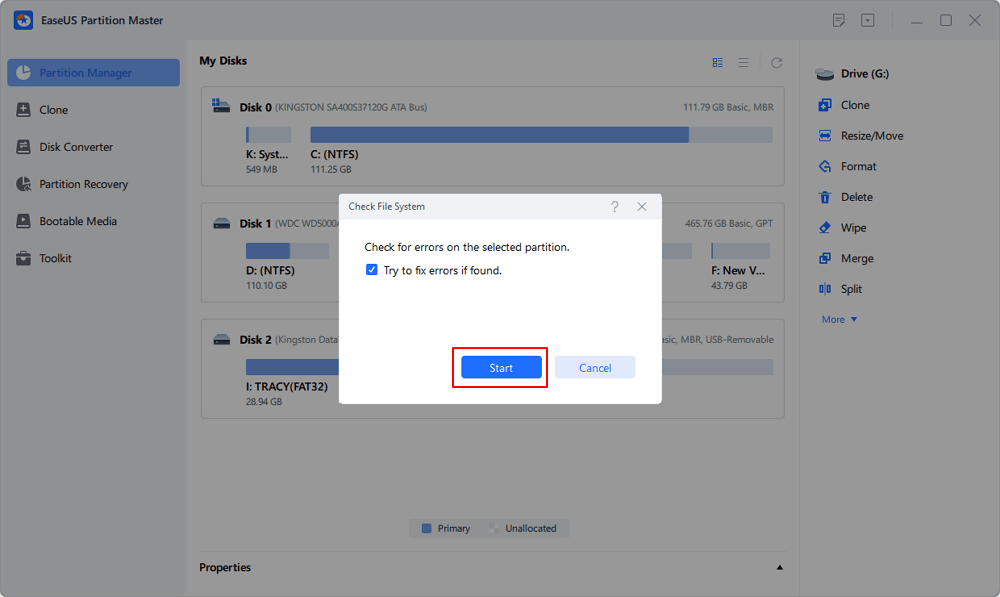
Step 2. In the Check File System window, keep the "Try to fix errors if found" option selected and click "Start".
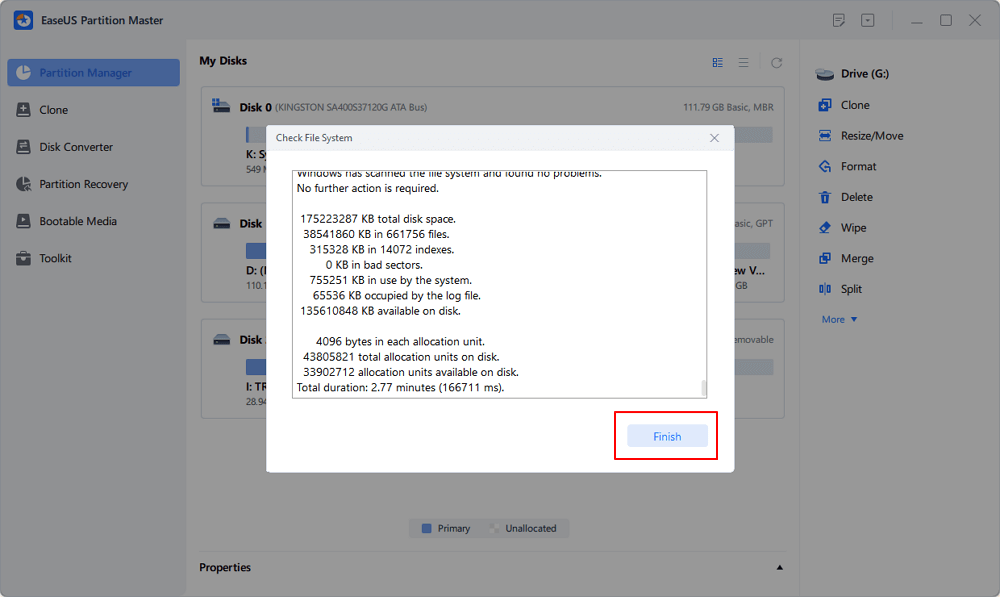
Step 3. The software will begin checking your partition file system on your disk. When it completes, click "Finish".
Guide 2. Isolate Bad Sectors and Reuse Hard Drives
EaseUS Partition Master can isolate bad sectors and create partitions on the healthy area of the disk. If you want to reuse the hard drive with bad sectors, follow the steps below:
NOTICE: Back up in advance since the low-level format will erase all data on the hard drive.
Step 1. Launch EaseUS Partition Master, select the target disk you want to low level format, and click "Low level format" on the right panel.
Step 2. Tick the "I understand all data on the disk will be destroyed upon starting" box and click "Start".
Step 3. If your disk is OK, after the process, you can see your disk become unallocated. You can create partitions to access it again; however, if there are bad sectors on your disk. You will receive an error saying, "We found some bad sectors on the disk. You can isolate them by creating partitions now."
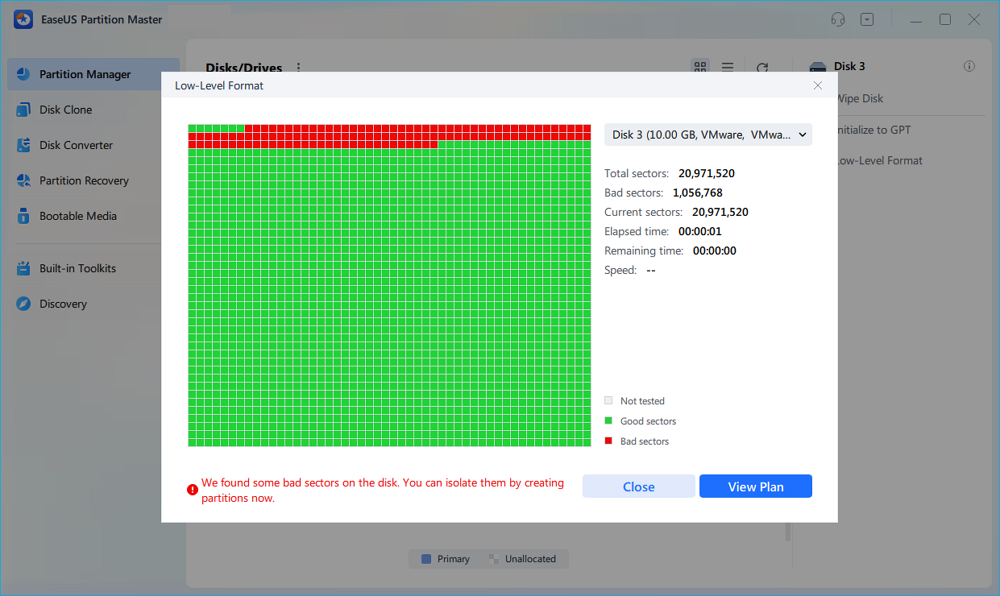
Step 4. Then, you can see all the bad sectors are isolated in one partition. And, the normal partitions are completely healthy. Click "Create Partitions" to continue.
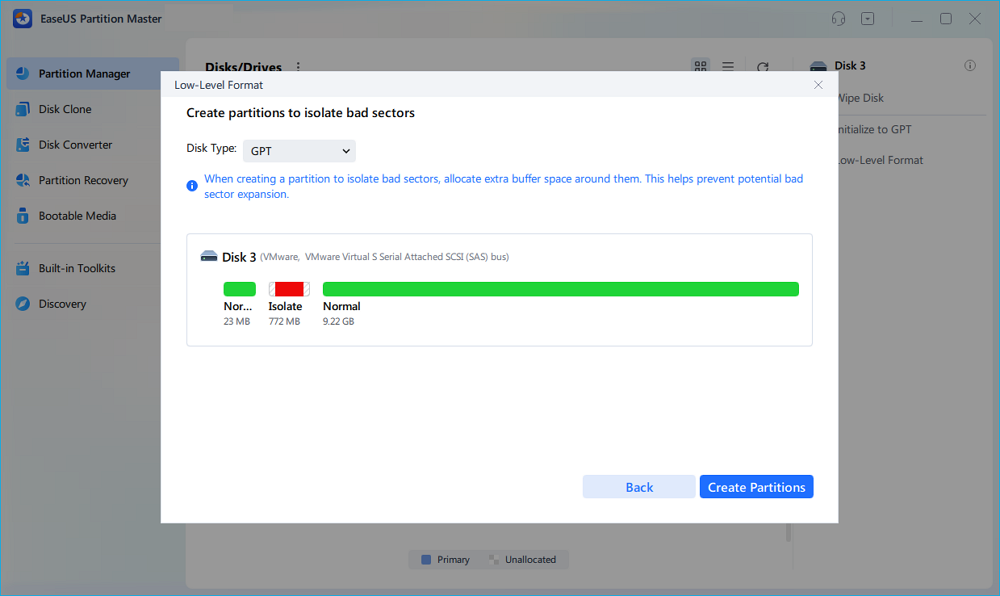
Step 5. Click "Execute 1 Task(s)" and "Apply" to isolate the bad sectors on your disk and create new healthy partitions.

Conclusion
HDD Regenerator remains one of the most recognized bad sector repair tools in the market, especially among advanced users and technicians working with older HDDs. However, in 2026, its outdated interface, limited modern storage support, and inconsistent repair expectations make it less suitable for many everyday users. For those seeking a more beginner-friendly and feature-rich solution, EaseUS Partition Master provides a more modern approach to disk repair, partition management, cloning, and storage optimization.
FAQs About HDD Regenerator
1. Can HDD Regenerator really repair bad sectors?
HDD Regenerator may recover access to some weak or logically damaged sectors, particularly on traditional HDDs. However, physically damaged sectors caused by hardware failure are usually not permanently repairable through software alone.
2. Is HDD Regenerator safe to use?
The software is generally safe when used correctly, but running repair operations on a failing drive always carries some risk. Backing up important files before scanning or repairing the disk is strongly recommended.
3. Does HDD Regenerator work on SSDs?
Not effectively. HDD Regenerator was originally designed for magnetic hard drives. Modern SSDs use different storage technologies, and specialized SSD diagnostic tools are usually more appropriate.
4. What is the best alternative to HDD Regenerator?
For users wanting a graphical interface and broader disk management capabilities, EaseUS Partition Master is widely considered a strong alternative due to its disk repair, cloning, recovery, and partition management features.
5. Can bad sectors cause data loss?
Yes. Bad sectors can make files unreadable, corrupt operating systems, slow down computers, or eventually lead to complete drive failure. Early detection and backup are critical when bad sector symptoms appear.
How Can We Help You
About the Author

"I hope my articles can help solve your technical problems. If you are interested in other articles, you can check the articles at the bottom of this page. Similarly, you can also check my Twitter to get additional help."

Sherly joined EaseUS in 2022 and she has always loved writing articles and enjoys the fun they bring. She receives professional training here, focusing on product performance and other relative knowledge. She has written over 200 articles to help people overcome computing issues.
Product Reviews
-
I love that the changes you make with EaseUS Partition Master Free aren't immediately applied to the disks. It makes it way easier to play out what will happen after you've made all the changes. I also think the overall look and feel of EaseUS Partition Master Free makes whatever you're doing with your computer's partitions easy.
Read More -
Partition Master Free can Resize, Move, Merge, Migrate, and Copy disks or partitions; convert to local, change label, defragment, check and explore partition; and much more. A premium upgrade adds free tech support and the ability to resize dynamic volumes.
Read More -
It won't hot image your drives or align them, but since it's coupled with a partition manager, it allows you do perform many tasks at once, instead of just cloning drives. You can move partitions around, resize them, defragment, and more, along with the other tools you'd expect from a cloning tool.
Read More
Related Articles
-
Paragon Migrate OS to SSD 4.0 Free Alternative [2026 Guide]
![author icon]() Cici/2026/05/20
Cici/2026/05/20 -
HDD Low Level Format Tool Review 2026: Is It Safe & the Best Alternative?
![author icon]() Sherly/2026/05/20
Sherly/2026/05/20 -
Low Level Format Tool Download, 2026 Review [Pros & Cons]
![author icon]() Jean/2026/05/20
Jean/2026/05/20 -
HP USB Disk Storage Format Tool Review 2026 [Benefits and Drawbacks]
![author icon]() Tracy King/2026/05/20
Tracy King/2026/05/20
 Cici/2026/05/20
  Jean/2026/05/20
  Tracy King/2026/05/20
 Hot Topics








EaseUS Partition Master

Version 20.0 is here - full exFAT support, easier disk partitioning, and PC performance optimization.


