







Content
Page Table of Contents
About the Author
Hot Topics
Forgot your Windows password and can't log in? Do you really have to reinstall Windows or lose your files? This is an exact situation where you need Windows password reset software.
Reset windows password software
by u/InformationPuzzled44 in msp
The promise sounds simple: reset the password, regain access, move on. However, not all tools work the same way, and "free" often comes with conditions. This guide explains how Windows password reset software works, compares popular tools side-by-side, and helps you choose a safe option based on your situation.
Select the Suitable Windows Password Reset Software
Before downloading any password reset tool, it's important to understand what these programs do and where their limitations begin. Many failures happen not because the software is broken, but because it was never suitable for the user's account type or system configuration.
1️⃣What Is Windows Password Reset Software?
Windows password reset software is designed to help you regain access to a locked Windows account by removing or resetting the existing password. Most tools work offline by booting from a USB or CD and modifying local account data stored on the system drive.
This approach is commonly used for forgotten local admin passwords, but it does not function the same way as resetting an online Microsoft account.
2️⃣Can You Really Reset a Windows Password for Free?
In some cases, yes, but not universally. Free Windows password reset tools usually work only for local accounts on systems without BitLocker encryption or restrictive Secure Boot settings. They also tend to sacrifice usability or compatibility to remain free.
If your device uses a Microsoft account, full-disk encryption, or modern Windows 11 security features, free tools may fail or require advanced manual steps that carry risks.
3️⃣Comparison: Popular Windows Password Reset Tools
The table below compares eight commonly searched Windows password reset options based on factors users care about most: cost, ease of use, Windows 11 support, and real-world limitations.
| Tool | Actually Unlock Windows? | Data/OS Safety | Skill Level Required |
|---|---|---|---|
| Windows Built-in Options | Only for Microsoft accounts | Safe | Beginner |
| EaseUS Partition Master | High success for local accounts | Safe | Beginner |
| Windows Password Unlocker | Depends on version | Medium | Intermediate |
| PassFab 4WinKey | Paid required to reset | Safe | Beginner |
| PCUnlocker | Very effective offline | Medium | Advanced |
| Lazesoft Free | Local accounts only | Low-risk to Medium | Beginner |
| Ophcrack | Only weak passwords | Low-risk | Beginner |
| Offline NT Editor | Yes, but high error risk | High risk | Advanced |
If you forget your Windows PC password but can access Windows, Windows built-in password reset features are enough; however, if you are locked out of your PC or can't log in to Windows, select a reliable third-party password reset software to regain your PC quickly. Feel free to share this post and help more people learn these Windows password bypass tools.

Free Download Windows Password Reset Software - 2026 Tested
With the limitations clearly stated, the following tools are the most commonly tested options users turn to when searching for free Windows password reset software. Each works best in a specific scenario, and none should be applied blindly without understanding the risks.
#1. Windows Built-in Recovery Options
Windows includes several native account recovery methods that many users overlook. If you forgot a Windows password but still have access to a recovery email, phone number, or password hint, Windows' built-in tools may be enough. These options work best for Microsoft accounts and basic local account scenarios, without requiring third-party software or bootable USB tools.
Windows Built-in Recovery Options:
- Reset Windows Password with CMD
- Use Security Questions
- Change Windows password with Microsoft Account
- Create a password reset USB/disk (it requires you create the password reset USB before you are locked out)
Suitable for
- Microsoft account users
- Users who still have access to recovery information
- Non-technical users seeking a safe, official solution
Pros
- Completely free and built into Windows
- No data loss risk
- Fully compatible with Windows 10 and Windows 11
Cons
- Does not work if recovery info is unavailable
- Cannot reset offline local admin passwords
- Not helpful if the system cannot boot
2. EaseUS Partition Master
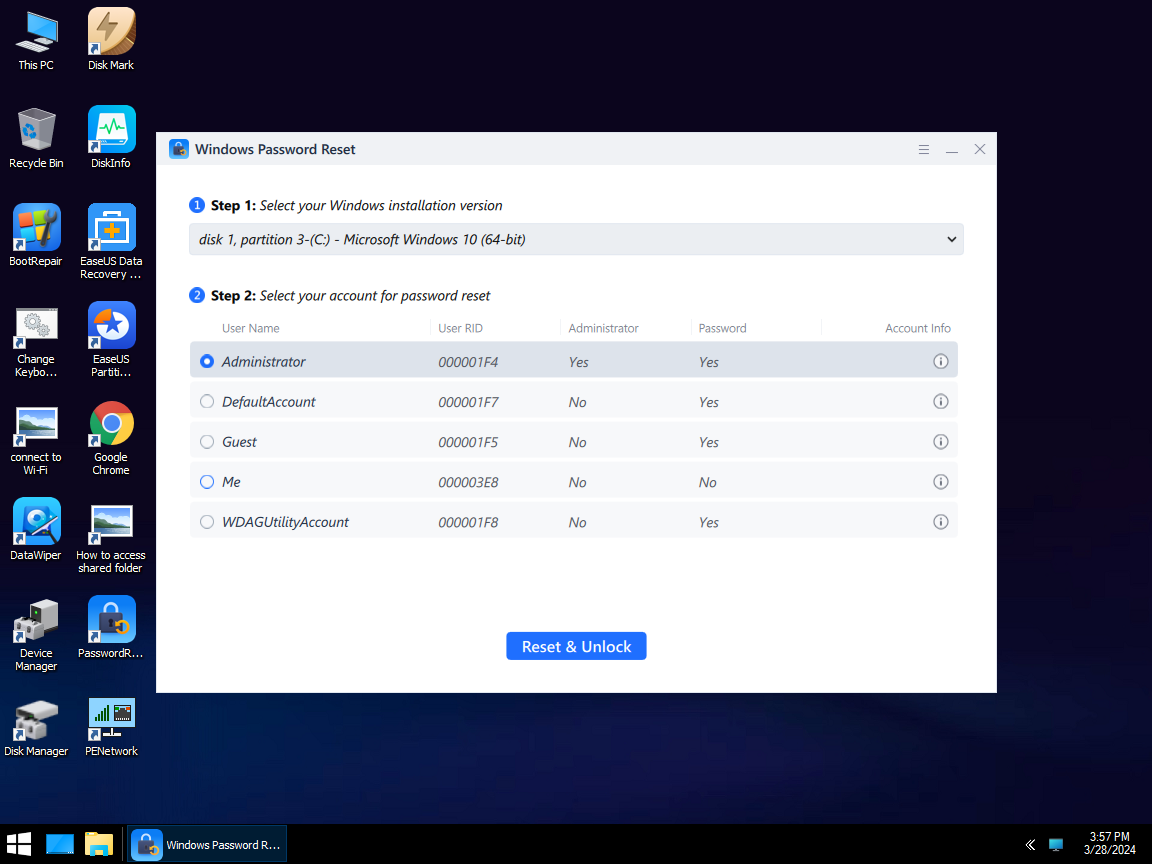
EaseUS Partition Master can quickly create a Windows password reset USB drive, instantly restoring access to your computer without any data loss. It bypasses, resets, and removes all administrator or user passwords. It runs smoothly on Windows 11, 10, 8.1, Windows 8, 7, Vista, XP, and Windows Server. If you don't have a password reset disk and have forgotten your login password, it serves as a secure PC unlocker.
- ✔️Support Windows 11/10/8/7/XP/Vista
- ✔️No data loss
- ✔️Supports facial recognition, PIN, passkey, password, and pattern lock
- ✔️Bypass/disable/reset/change/erase Windows Password within several minutes
Suitable for
- Users locked out of a local Windows account
- Beginners who want a guided interface
- Situations where data safety is critical
Pros
- User-friendly interface, 3 steps to reset/change/erase/bypass Windows password
- Lower risk of system damage
- Reset Windows password without logging in
Cons
- Bootable media creation needed
Review
EaseUS Partition Master is a fully updated piece of software that supports the new Windows 11 and assists PC users with many common disk management and partitioning tasks they may encounter in everyday PC use. - From BestBackupReview
Free Download Windows Password Reset Tool
3. Windows Password Unlocker
Windows Password Unlocker is a commonly listed third-party password recovery tool that focuses on resetting forgotten Windows login passwords via bootable media. It targets users searching for a quick solution when locked out of a local admin account, though free usage is usually limited to basic detection rather than full recovery.
Suitable for
- Local Windows account recovery
- Older Windows systems
- Users testing tools before purchase
Pros
- Simple workflow
- Supports multiple Windows versions
- Clear separation between free and paid features
Cons
- Free version has limited reset capability
- Advanced features require payment
- Limited support for Windows 11 security features
Review
The software offers features that allow users to bypass password protection on Windows systems, making it a valuable tool for individuals who may have forgotten their login credentials. - From Softonic
Free Download: https://windows-password-unlocker.en.softonic.com/
4. PassFab 4WinKey
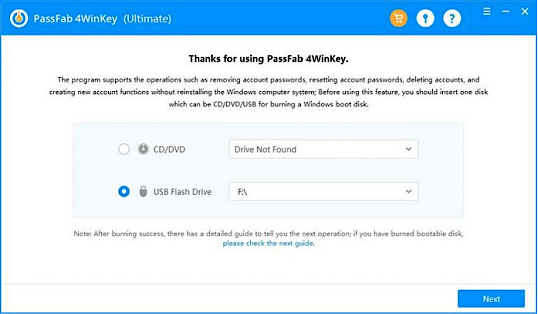
PassFab 4WinKey is designed for users searching for an easy-to-use Windows password reset program with a modern interface. It creates a Windows password reset USB/CD/DVD drive, and regains access to your PC instantly.
Suitable for
- Home users with minimal technical experience
- Local account password recovery
- Users comparing free vs paid solutions
Pros
- Clean interface
- Clear guidance for boot disk creation
- Supports recent Windows versions
Cons
- Free version can't complete password reset
- No Microsoft account recovery
- Requires separate computer to create boot media
Review
Not gonna lie, I thought this was another scam… but it actually worked. My laptop is unlocked and I'm officially impressed. - From PassFab
Free Download: https://www.passfab.com/products/windows-password-recovery.html
5. PCUnlocker
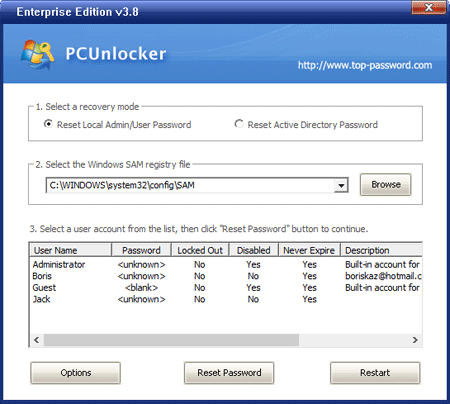
PCUnlocker is a long-standing Windows password reset utility widely used by IT technicians. It works offline by modifying Windows account data through a bootable environment. While not free, it often appears in searches for free Windows password reset tools because of its reliability and wide version support.
Suitable for
- Advanced users and technicians
- Offline local account recovery
- Older and mixed Windows environments
Pros
- Powerful offline password reset
- Supports many Windows editions
- Stable and well-known in IT circles
Cons
- No free version
- Interface feels outdated
- Not designed for casual users
Review
PCUnlocker comes with minimal options, all helpful for bypassing your PC password within a minimal time. There are no additional features to surprise you. Even though, it does the job flawlessly. - From TheTechHacker
Free Download: https://www.pcunlocker.com/
6. Lazesoft Recover My Password Home (Free Edition)
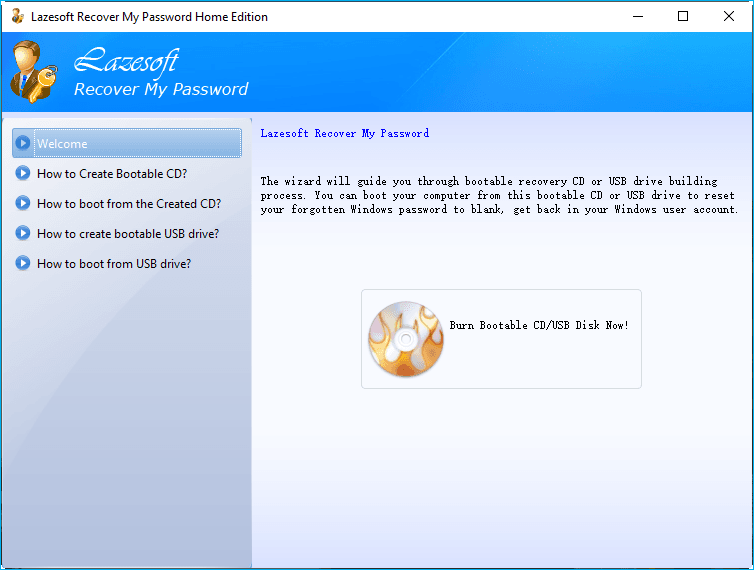
Lazesoft is one of the most popular free Windows password reset tools for home users. Its free edition allows local account password reset through a bootable USB, making it a practical choice for users who forgot a Windows admin password and cannot log in.
Suitable for
- Home users with local accounts
- Windows 10 and Windows 11 (non-encrypted)
- Users seeking a balance between power and simplicity
Pros
- Free for personal use
- Graphical interface
- Easy bootable USB creation
Cons
- No Microsoft account reset
- BitLocker-protected systems may fail
- Limited support options
Review
Recover My Password by Lazesoft is a freeware option for recovering a Windows admin password. You can remove the Windows password entirely, reset it to blank, and unlock, enable, or disable user accounts. - From TechRadar
Free Download: https://www.lazesoft.com/lazesoft-recover-my-password.html
7. Ophcrack
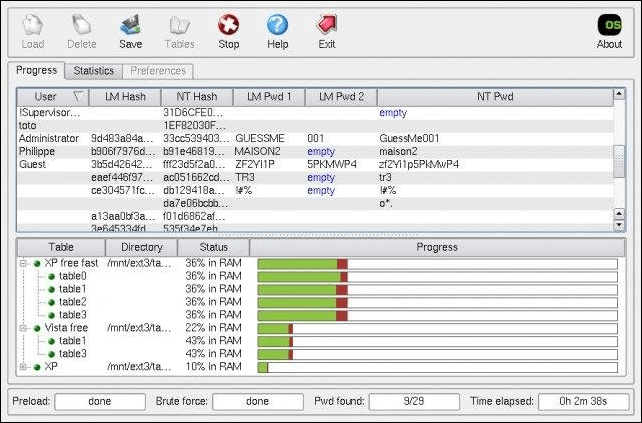
Ophcrack is a classic free Windows password recovery tool that works by cracking password hashes using rainbow tables. It is often recommended for older systems and weak passwords, but its effectiveness drops sharply on modern Windows versions with stronger encryption.
Suitable for
- Older Windows systems
- Simple or short passwords
- Users experimenting with recovery tools
Pros
- Completely free and open-source
- No installation required
- Automatic process after boot
Cons
- Ineffective against strong passwords
- Limited Windows 10/11 success
- Cannot handle BitLocker or Microsoft accounts
Review
Ophcrack is a password-cracking tool designed specifically for recovering Microsoft Windows login credentials. Developed by Swiss company Objectif Sécurité, Ophcrack can crack most Windows passwords in a matter of minutes. - From ITPro
Free Download: https://ophcrack.sourceforge.io/
8. Offline NT Password & Registry Editor
Offline NT Password & Registry Editor is a powerful open-source utility that directly edits Windows registry files to remove local account passwords. It is often cited as a "last-resort" free solution for technical users who are comfortable with text-based interfaces.
- Suitable for
- Advanced or technical users
- Offline local admin password removal
- Systems without encryption enabled
Pros
- Truly free
- Works without Windows login
- Lightweight and fast
Cons
- No graphical interface
- High risk of user error
- Not beginner-friendly
Review
chntpw (also known as Offline NT Password & Registry Editor) is a free software utility for resetting or blanking local passwords used by Windows 8, 7, Vista, XP and 2000. It does this by editing the SAM database where Windows stores password hashes. It has become more and more popular because it can run under many Linux-based operating systems including Debian, Ubuntu, BackTrack, Fedora, Knoppix, Linux Mint. - From chntpw
Free Download: https://www.chntpw.com/download/
Common Problems When Using Free Password Reset Tools
Many users encounter failures even when following instructions correctly, such as Secure Boot may block unofficial boot media, BitLocker can prevent offline access to system files, and Microsoft accounts store credentials online rather than locally. These issues are usually caused by modern Windows security features rather than user error.
Problem 1: Bootable USB Won't Start
Why it happens:
Secure Boot is enabled, or the USB was created in the wrong boot mode (UEFI vs Legacy).
How to fix it:
Enter BIOS/UEFI settings, temporarily disable Secure Boot, and ensure the USB is created in UEFI-compatible mode. If the tool only supports Legacy BIOS, it may not work on modern Windows 11 devices.
Problem 2: Password Reset Succeeds, but Windows Still Won't Log In
Why it happens:
The tool removed a local password, but the account is actually linked to a Microsoft account.
How to fix it:
Confirm the account type before resetting. Microsoft account passwords must be reset online through Microsoft’s recovery page, not with offline password reset software.
Problem 3: BitLocker Blocks Access to the System Drive
Why it happens:
BitLocker encrypts the system drive, preventing offline tools from modifying account data.
How to fix it:
You must unlock the drive using the BitLocker recovery key first. Without it, free password reset tools cannot access or modify the Windows login credentials safely.
Problem 4: Password Reset Tool Works, but Important Files Become Inaccessible
Why it happens:
Some tools break access to encrypted user files or credentials tied to the original password.
How to fix it:
Avoid using aggressive registry-editing tools if encrypted files are present. Choose password reset solutions designed to preserve user profiles and file permissions.
Conclusion
You need a Windows password resetting tool when locked out of a PC; however, these tools are effective only under specific conditions, so understanding your Windows version, account type, and security settings is far more important than downloading the first tool you find. A careful choice saves time, avoids data loss, and leads to a smoother recovery.
FAQs About Windows Password Reset Software
1. Is it legal to use Windows password reset software?
Yes. Using password reset software is legal when you are recovering access to your own computer or a system you are authorized to manage. Using it on someone else's device without permission may violate local laws or company policies.
2. Will resetting a Windows password delete my files?
Most tools do not erase personal files, but risks exist. Encrypted files, BitLocker-protected drives, or improper use of command-line tools can lead to data loss, especially on newer Windows systems.
3. Can I reset a Windows 11 password for free?
Free tools may work for local accounts on Windows 11, but Secure Boot and BitLocker often block them. Microsoft account passwords cannot be reset offline using free utilities.
4. What if my Windows account is linked to Microsoft?
If your login uses a Microsoft account, the password must be reset online through Microsoft's recovery process. Offline password reset software cannot modify cloud-based credentials.
How Can We Help You
About the Author

"I hope my articles can help solve your technical problems. If you are interested in other articles, you can check the articles at the bottom of this page. Similarly, you can also check my Twitter to get additional help."

Sherly joined EaseUS in 2022 and she has always loved writing articles and enjoys the fun they bring. She receives professional training here, focusing on product performance and other relative knowledge. She has written over 200 articles to help people overcome computing issues.
Product Reviews
-
I love that the changes you make with EaseUS Partition Master Free aren't immediately applied to the disks. It makes it way easier to play out what will happen after you've made all the changes. I also think the overall look and feel of EaseUS Partition Master Free makes whatever you're doing with your computer's partitions easy.
Read More -
Partition Master Free can Resize, Move, Merge, Migrate, and Copy disks or partitions; convert to local, change label, defragment, check and explore partition; and much more. A premium upgrade adds free tech support and the ability to resize dynamic volumes.
Read More -
It won't hot image your drives or align them, but since it's coupled with a partition manager, it allows you do perform many tasks at once, instead of just cloning drives. You can move partitions around, resize them, defragment, and more, along with the other tools you'd expect from a cloning tool.
Read More
Related Articles
-
5 Ways to Fix Failure When Attempting to Copy Boot Files
![author icon]() Cici/2026/06/17
Cici/2026/06/17 -
How to Format SSD From BIOS [Easy & Fast]
![author icon]() Cici/2026/07/01
Cici/2026/07/01 -
How to Boot Gateway Laptop From USB - Pictures Guide
![author icon]() Sherly/2026/06/30
Sherly/2026/06/30 -
Windows 10 Booting From Wrong Drive - Fix Easily
![author icon]() Sherly/2026/06/17
Sherly/2026/06/17
 Cici/2026/06/17









