


Content
Page Table of Contents
About the Author
Hot Topics
Are there any MBR2GPT alternatives? Sure! EaseUS Partition Master, DiskGenius, and IM-Magic Partition Resizer are alternatives to MBR2GPT to convert MBR to GPT. EaseUS Software noticed that many users post all kinds of questions related to MBR to GPT conversion on Reddit, such as:
Looking for software to convert the Windows boot drive from MBR to GPT without losing data. Apparently, MBR isn't supported for Windows 11 boot drives (updates won't work), but I found this out AFTER I already upgraded to Windows 11, so I need a way to convert my boot drive from MBR to GPT without nuking the data on the drive. What's the best free software I can use to do this? - From r/WindwsHelp on Reddit
How to Convert MBR to GPT without Deleting files? I have 3 partitions and I want to install Windows 10, where I am asked to convert that partition from MBR to GPT. The other 2 partitions has important data. Looks like I couldn't do anything on BIOS settings about it due to the unavailability of the firmware option. Any solution without harming my data? - From r/Windows10 on Reddit
This guide covers three MBR2GPT alternatives, and we list their pros, cons, reviews, and how-to guides to help you convert MBR to GPT without losing data. Share this post if you find the ideal MBR2GPT alternative software.

3 Recommended MBR2GPT Alternatives
Choosing the right tool can be quite daunting, especially given the pros and cons of each. Here is a list of the 3 tools that simplify the MBR to GPT transition:
Here is an overview of each tool and the features it brings to the table:
#1. EaseUS Partition Master
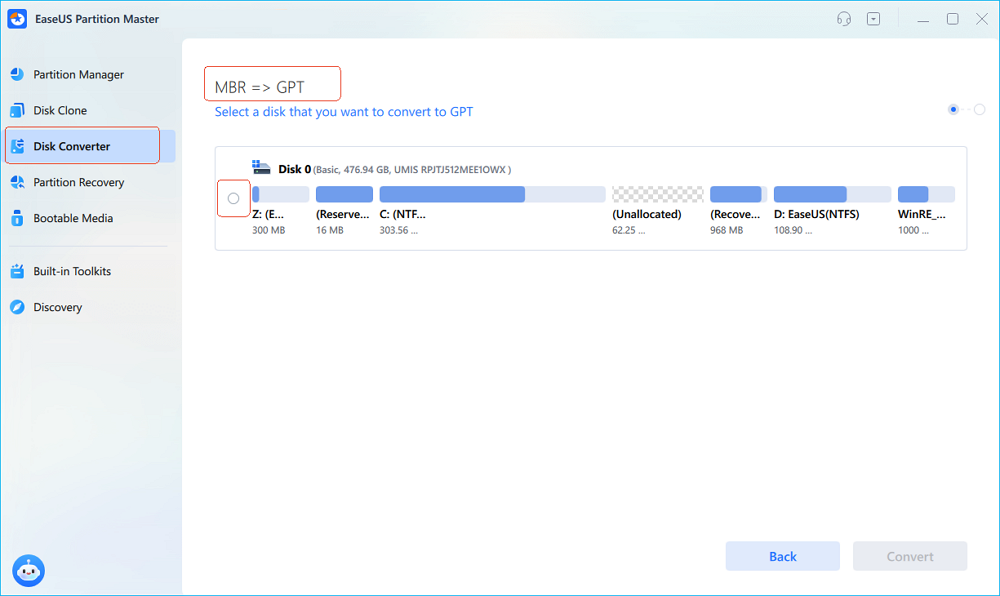
EaseUS Partition Master allows you to convert MBR to GPT for free. Without typing any commands, you can change MBR to GPT for free. Its clear interface makes it easy for you to locate the MBR to GPT feature. During the conversion, you won't lose any data since you don't need to format or delete the existing partitions.
It can convert both data disk and system disk from MBR to GPT. Also, you can create a bootable USB with it and convert from MBR to GPT without OS.
- No data loss.
- Support OS disk and data disk.
- Works perfectly on Windows 11/10/8/7/Vista/XP
Key Features:
- Partition Resizing: Resize partitions with ease, allowing for efficient space management.
- Data Recovery: Accidentally deleted a partition? EaseUS offers robust data recovery options.
- Partition Copying: Clone partitions effortlessly, making backups and migrations a breeze.
- SSD 4K Alignment: Optimizes SSD performance with 4K alignment for enhanced speed.
- Migrate OS to HDD/SSD: Seamlessly transfer your operating system to a new drive without data loss.
Benefits and Drawbacks, Why We Recommend EaseUS Partition Master:
Expert's Rating:
👍🏻Pros
- Effortless partition resizing and management
- Free basic version available
- Responsive customer support
- Comprehensive disk health monitoring
👎🏻Cons
- Advanced features may require a paid version
- Limited support in the free version
📝Summary and Reason to Use It
EaseUS Partition Master Free stands out for its seamless partition resizing, robust feature set, and user-friendly interface. It caters to both beginners and experts, offering reliability and efficiency in disk management.
We recommend EaseUS Partition Master Free for its powerful yet user-friendly approach. It's an ideal choice for those seeking a straightforward solution to manage their partitions, especially for users who prioritize ease of use without sacrificing advanced functionalities.
❗Caution:
Back-up data to prevent any crucial data loss.
Review:
Easeus Partition Master performed all the basic disk management functions we've seen in Windows and other disk management utilities, including creating, formatting, moving, deleting, and merging partitions; converting file systems; disk defragmentation; and even wiping disks clean. (from CNET)
If you like this powerful MBR2GPT alternative tool, don't forget to share it online and help your friends change their disk partition style for free while keeping their data intact and safe:
#2. DiskGenius Free
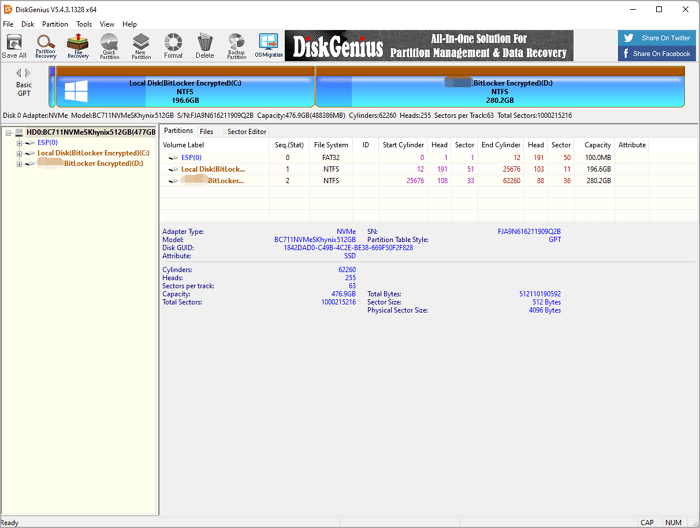
DiskGenius Free is a reliable tool that can convert a disk's partition table from MBR to GPT. This free MBR to GPT converter protects all existing files and partitions. It also offers users various features to help optimize disk utilization and recover lost data. DiskGenius Free supports a variety of file systems such as NTFS, FAT, exFAT, and EXT2/3/4.
Key Features:
- Partition Management: Efficiently manage partitions with features like resizing and formatting.
- Data Recovery: Robust data recovery options for lost or deleted files.
- Disk Cloning: Clone entire disks or specific partitions for data backup.
- Partition Backup: Create backups of specific partitions for added security.
- Partition Table Rebuild: Rebuild damaged or corrupted partition tables for data integrity.
Software Download:
www.diskgenius.com/download.php
Benefits and Drawbacks, Why We Recommend DiskGenius Free:
Expert's Rating:
👍🏻Pros
- Comprehensive disk cloning options
- Efficient partition management and data recovery
👎🏻Cons
- Limited support for dynamic disks
- Some advanced features in the paid version
📝Summary and Reason to Use It
DiskGenius Free offers a feature-rich disk management experience covering partition management, data recovery, and disk cloning. Its versatility and comprehensive set of tools make it a standout choice.
We recommend DiskGenius Free for users who seek a feature-rich tool that goes beyond basic partition management. With its data recovery options and versatile tools, it's an excellent choice for users with diverse disk management needs.
❗Caution:
Back-up data to prevent any crucial data loss.
#3. IM-Magic Partition Resizer
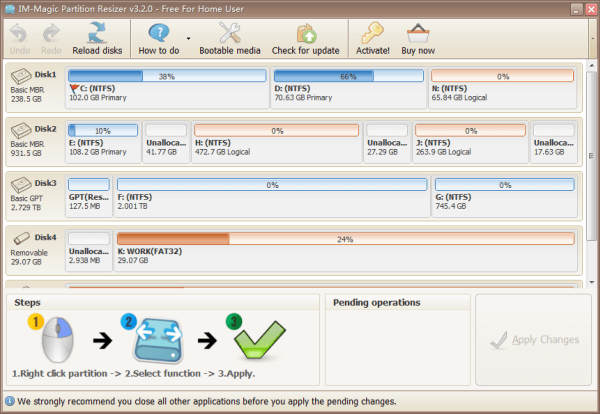
IM-Magic Partition Resizer is a versatile disk partition management software. It allows users to resize, move, shrink, extend, merge, and copy partitions. IM-Magic Partition Resizer helps safely convert MBR to GPT without losing any data.
Key Features:
- Simple Interface: User-friendly design for easy navigation and operation.
- Quick Partition Resizing: Resize partitions swiftly without data loss.
- Partition Copying: Duplicate partitions effortlessly for data backup or migration.
- Data Protection: Ensures data integrity during the resizing process.
- No Data Loss Guarantee: Promises a secure resizing process without the risk of data loss.
Software Download:
www.resize-c.com/
Benefits and Drawbacks, Why We Recommend IM-Magic Partition Resizer:
Expert's Rating:
👍🏻Pros
- Quick and easy partition resizing
- User-friendly design for beginners
- Ensures data integrity during resizing
👎🏻Cons
- Limited advanced features
- Not suitable for complex disk management tasks
📝Summary and Reason to Use It
IM-Magic Partition Resizer excels in simplicity, offering quick and easy partition resizing. It's an excellent choice for users who prioritize straightforward solutions without delving into advanced features.
We recommend IM-Magic Partition Resizer for users who value simplicity and efficiency. It's a perfect tool for those who need a hassle-free solution for resizing partitions without dealing with complex features.
❗Caution:
Back-up data to prevent any crucial data loss.
IM-Magic Partition Resizer Free is a powerful, reliable and free partition magic resizing software that allows users to extend, move, shrink, format, copy, delete, create partitions and redistribute disk free space without destroying or changing the data on the partition. (from CNET)
How to Convert MBR to GPT Without Data Loss
Above, we introduced six free MBR to GPT converters. Although free, the steps to convert disks using some tools are very complicated. In addition, improper operation may lead to data loss. Here, we offer 3 guides to help convert MBR to GPT without losing any data.
If you want to convert MBR to GPT without losing data, the easiest way is to use EaseUS Partition Master. EaseUS Partition Master doesn't require you to delete the existing volume or format your disk.
Easy steps to convert MBR to GPT with EaseUS Partition Master.
Step 1. Install and launch EaseUS Partition Master on your computer.
Step 2. Open the Disk Converter tab, select "MBR => GPT" and click "Next" to continue.
Step 3. Choose the target MBR disk, and click "Convert" to start the conversion.
Conclusion
In conclusion, MBR2GPT alternatives like EaseUS Partition Master, DiskGenius, and IM-Magic Partition Resizer offer easier and more flexible ways to convert MBR to GPT and manage disks. Among them, EaseUS Partition Master is the most recommended due to its simplicity, compatibility, and reliable performance.
Overall, choosing a dedicated partition manager can significantly reduce the risk of errors and make disk conversion tasks much more straightforward and efficient. You can also choose another one based on your needs.
How Can We Help You
About the Author

"I hope my articles can help solve your technical problems. If you are interested in other articles, you can check the articles at the bottom of this page. Similarly, you can also check my Twitter to get additional help."
Product Reviews
-
I love that the changes you make with EaseUS Partition Master Free aren't immediately applied to the disks. It makes it way easier to play out what will happen after you've made all the changes. I also think the overall look and feel of EaseUS Partition Master Free makes whatever you're doing with your computer's partitions easy.
Read More -
Partition Master Free can Resize, Move, Merge, Migrate, and Copy disks or partitions; convert to local, change label, defragment, check and explore partition; and much more. A premium upgrade adds free tech support and the ability to resize dynamic volumes.
Read More -
It won't hot image your drives or align them, but since it's coupled with a partition manager, it allows you do perform many tasks at once, instead of just cloning drives. You can move partitions around, resize them, defragment, and more, along with the other tools you'd expect from a cloning tool.
Read More
Related Articles
-
SmartDisk FAT32 Format Utility & FAT32 Format Tool Free Download [2026 Updated]
![author icon]() Jean/2026/05/24
Jean/2026/05/24 -
HP USB Disk Storage Format Tool Review 2026 [Benefits and Drawbacks]
![author icon]() Tracy King/2026/05/24
Tracy King/2026/05/24 -
HDD Regenerator Free Alternative [Download & Review]
![author icon]() Tracy King/2026/05/20
Tracy King/2026/05/20 -
5 Best ISO Image Software Free Download [Pros & Cons]
![author icon]() Tracy King/2026/05/20
Tracy King/2026/05/20
 Jean/2026/05/24
  Tracy King/2026/05/24
 Hot Topics








EaseUS Partition Master
Version 20.0 is here - full exFAT support, easier disk partitioning, and PC performance optimization.


