

Content
Page Table of Contents
About the Author
Hot Topics
An MBR or GPT corruption no boot issue can completely prevent your computer from starting, often showing errors like "No boot device found," "GPT header corruption," or "MBR missing." These problems typically occur due to damaged partition tables, corrupted bootloaders, or incorrect BIOS/UEFI settings. Read this guide from EaseUS Software on how to fix them and why they happen is essential for both casual and advanced users.
How to Fix MBR or GPT Corruption No Boot
If your system fails to boot because of partition corruption, the solutions below range from simple fixes to advanced recovery. Among these, EaseUS Partition Master offers a reliable, user-friendly way to repair MBR/GPT issues without risking data loss.
Fix 1. Disconnect External Drives and Check Boot Order
Sometimes the issue isn't the disk itself, but external devices interfering with the boot sequence. External drives can confuse the BIOS when GPT headers or MBR sectors are misread. Ensuring the correct boot device eliminates false errors.
Steps:
- Disconnect all USB drives, external HDDs, and unnecessary peripherals
- Enter BIOS/UEFI and ensure your main system disk is set as the first boot device
- Restart the computer
Fix 2. Repair Bootloader
The bootloader is essential for starting the operating system. MBR systems and GPT/UEFI systems use different methods. Rebuilding the bootloader restores the ability to boot your system even if previous boot files were corrupted or deleted.
Step 1. Boot from the recovery USB or the original installation DVD.
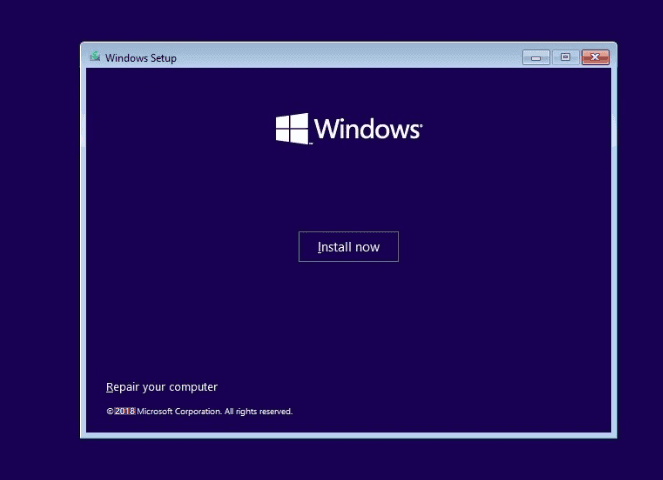
Step 2. Move to the install screen, and click Repair your computer.
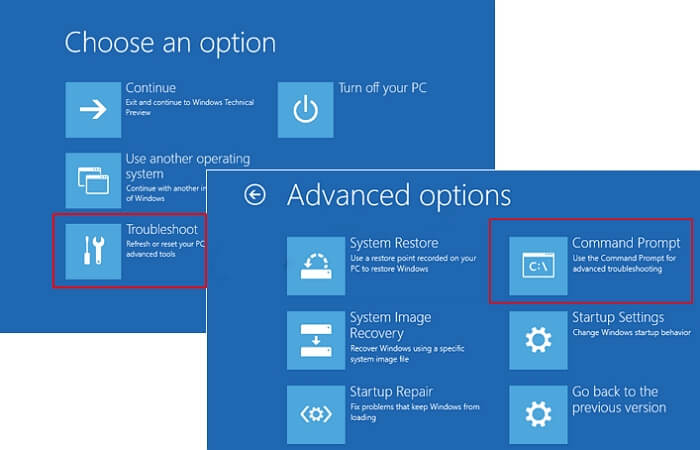
Step 3. On the Choose an option screen, choose Troubleshoot > Advanced Options > Command Prompt
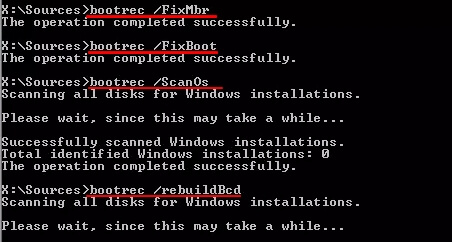
Step 4. Input the command lines and press Enter each time:
- bootrec /fixmbr
- bootrec /fixboot
- bootrec /scanos
- bootrec /rebuildbcd
Step 5. Remove the DVD/USB from your PC.
Step 6. Input exit and restart your PC.
Fix 3. Use EaseUS Partition Master🔥
GPT disks store two headers (primary and backup). If corruption occurs, EaseUS Partition Master can help safely rebuild the GPT header or repair the MBR without formatting the drive. EaseUS Partition Master detects corrupted MBR/GPT structures and rebuilds them automatically. Its intuitive interface prevents accidental data loss and simplifies complex repairs that would otherwise require command-line tools.
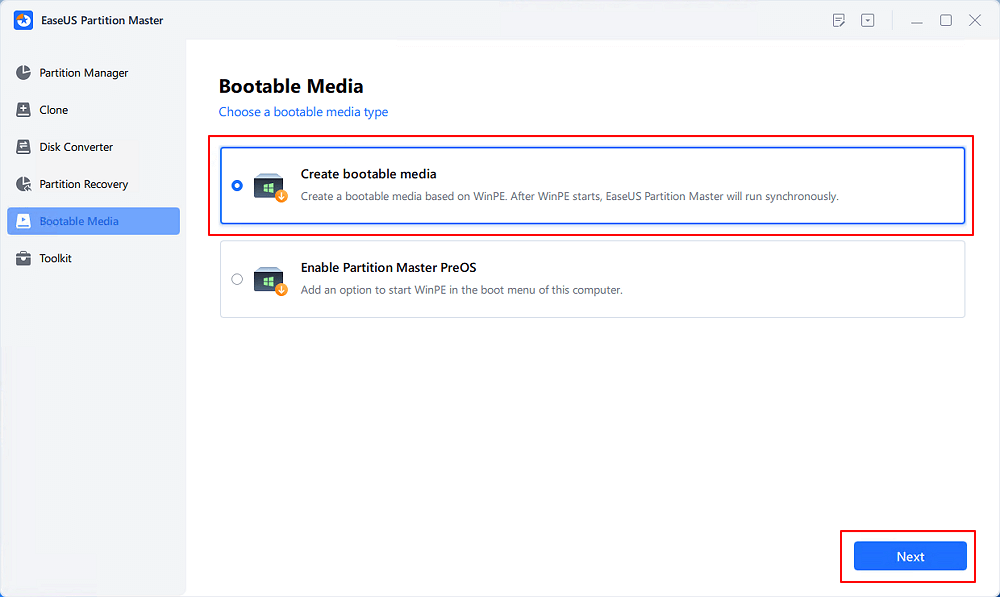
Step 1. Create a WinPE bootable disk
- Launch EaseUS Partition Master, and click "Bootable Media" on the toolbar. Select "Create bootable media".
- Click "Next" to finish the process.
Step 2. Boot EaseUS Partition Master Bootable USB
- Connect the bootable USB or CD/DVD to your PC.
- Press F2 or Del when you restart the computer to enter the BIOS screen. Set and boot your computer from "Removable Devices" or "CD-ROM Drive". And then EaseUS Partition Master will run automatically.
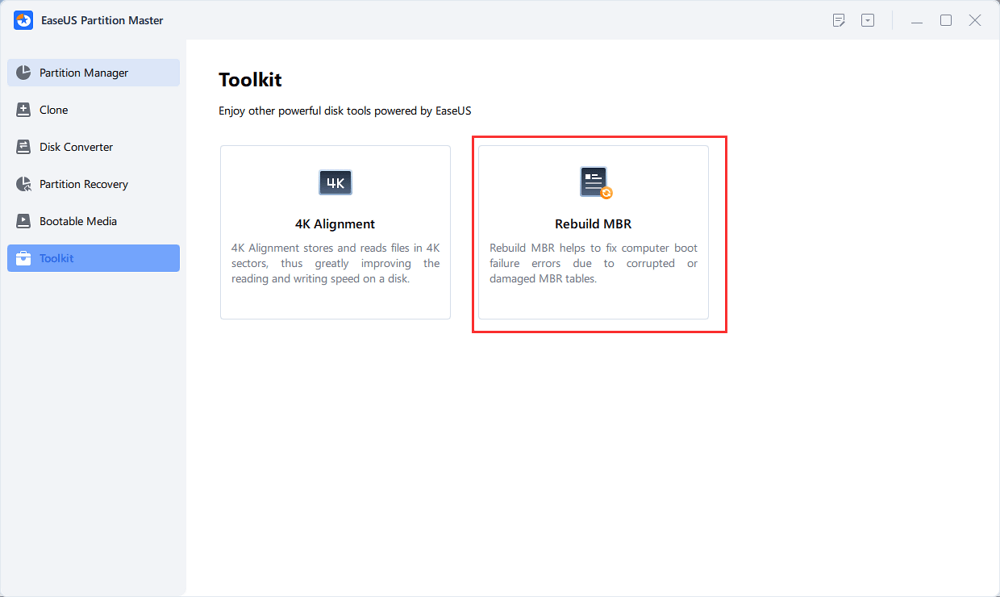
Step 3. Rebuild MBR
- Click "Toolkit" and choose "Rebuild MBR".
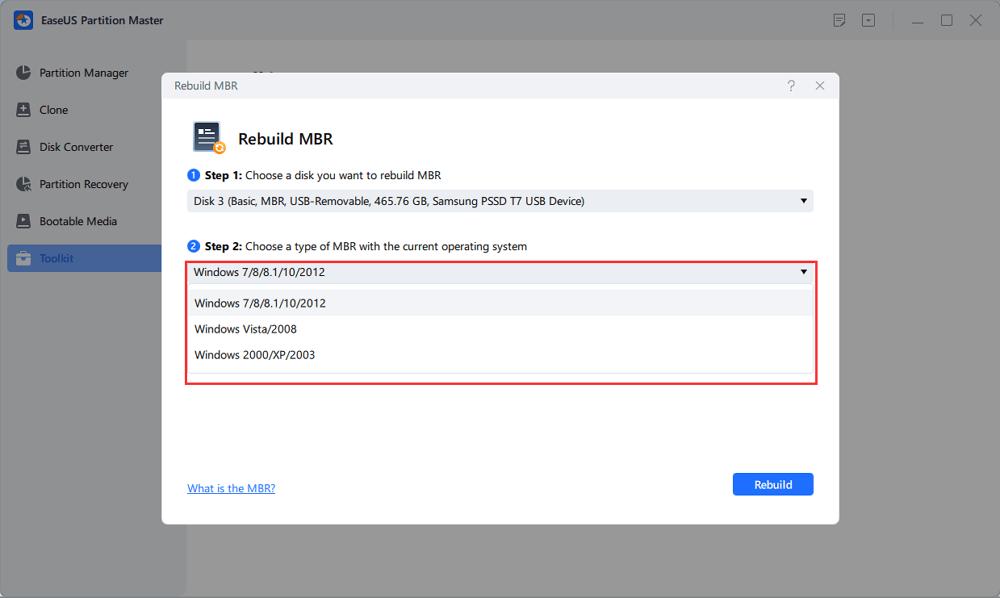
- Select the disk and the type of MBR. Then, click "Rebuild".
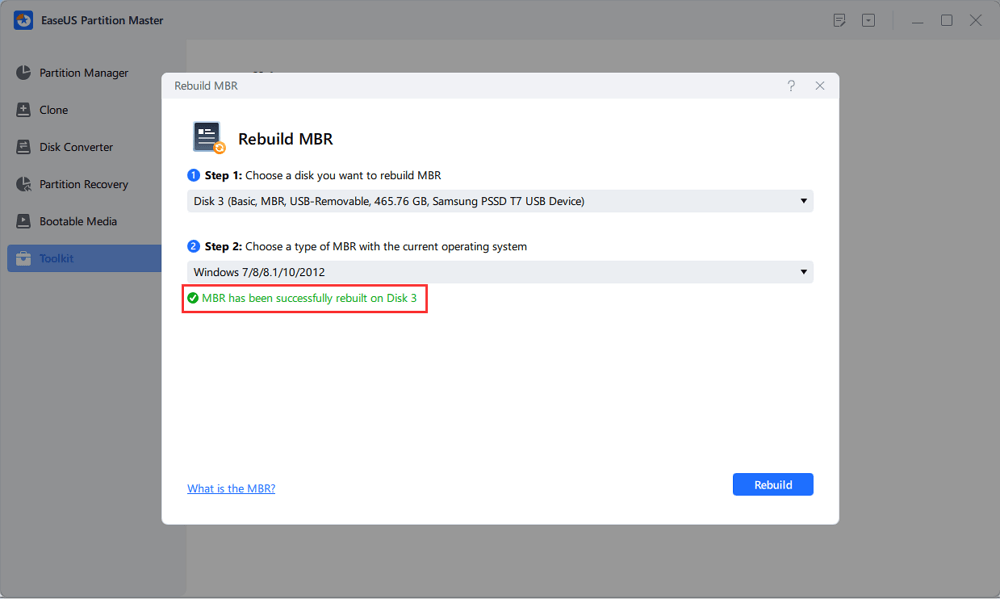
- After that, you can see "MBR has been successfully rebuilt on Disk X".
Fix 4. Recreate EFI System Partition (GPT Only)
If the EFI partition is missing or damaged, the system cannot boot. With EaseUS Partition Master, you can create or repair EFI partitions safely. EFI partitions store essential boot information. Repairing or recreating it restores the system's ability to start.
Steps:
- Use the tool to create a small FAT32 partition (usually 100–300MB)
- Mark it as an EFI system partition
- Rebuild the boot files using bcdboot or the tool's wizard
Why MBR or GPT Corruption Causes No Boot
Understanding the root causes helps prevent future problems:
- Interrupted Disk Operations: Power loss or forced shutdown during installation, partition resizing, or disk conversion can corrupt boot structures.
- Failed MBR to GPT Conversion: Improper conversion can remove bootloaders or damage partition alignment.
- GPT Header Corruption: GPT disks store redundant headers; corruption in either the primary or backup header prevents booting.
- Missing or Corrupted Bootloader: Without the bootloader, the OS cannot start.
- BIOS/UEFI Misconfiguration: Using Legacy BIOS with GPT disks or disabling UEFI can prevent system recognition.
- Hardware or Disk Issues: Bad sectors, failing drives, or loose connections can damage partition tables and boot sectors.
Conclusion
MBR or GPT corruption no boot issues are typically caused by bootloader damage, partition table corruption, or firmware misconfiguration. While some fixes require technical skills, EaseUS Partition Master makes recovery straightforward, safe, and highly reliable.
With its Rebuild MBR, Partition Recovery, and EFI repair features, EaseUS Partition Master allows you to fix boot issues without losing data, even if the disk structure is severely corrupted. Its convenience and powerful tools make it an essential solution for anyone facing MBR or GPT-related boot problems, turning a complex recovery process into a simple, step-by-step workflow.
How Can We Help You
About the Author

"I hope my articles can help solve your technical problems. If you are interested in other articles, you can check the articles at the bottom of this page. Similarly, you can also check my Twitter to get additional help."
Product Reviews
-
I love that the changes you make with EaseUS Partition Master Free aren't immediately applied to the disks. It makes it way easier to play out what will happen after you've made all the changes. I also think the overall look and feel of EaseUS Partition Master Free makes whatever you're doing with your computer's partitions easy.
Read More -
Partition Master Free can Resize, Move, Merge, Migrate, and Copy disks or partitions; convert to local, change label, defragment, check and explore partition; and much more. A premium upgrade adds free tech support and the ability to resize dynamic volumes.
Read More -
It won't hot image your drives or align them, but since it's coupled with a partition manager, it allows you do perform many tasks at once, instead of just cloning drives. You can move partitions around, resize them, defragment, and more, along with the other tools you'd expect from a cloning tool.
Read More
Related Articles
-
Windows 7 Repair Tool Free Download | Fix System Errors Easily
![author icon]() Joey Albert/2026/04/01
Joey Albert/2026/04/01 -
Sony VAIO Boot Menu: Everything You Should Know
![author icon]() Cici/2026/03/31
Cici/2026/03/31 -
How to Reset Windows Password When Locked Out🔥
![author icon]() Cici/2026/03/31
Cici/2026/03/31 -
How to Partition SSD From BIOS [2026 New Guide]
![author icon]() Cici/2026/03/31
Cici/2026/03/31
 Joey Albert/2026/04/01
  Cici/2026/03/31
 Hot Topics








EaseUS Partition Master

Version 20.0 is here - full exFAT support, easier disk partitioning, and PC performance optimization.

