
Content
Page Table of Contents
About the Author
Hot Topics
When you need to create a bootable USB, you might need a professional tool. balenaEtcher is an open-source utility for creating bootable disks. It aims to provide users with a clean interface and a very straightforward process.
Is balenaEtcher the best bootable USB creator? To find more information about balenaEtcher, let's dive into this review.
What Is balenaEtcher?
balenaEtcher is a free and open-source image-flashing tool that helps you write operating system images to USB drives and SD cards. It takes a file, such as an ISO or IMG, and writes it to your drive so you can use it to start or install a system.
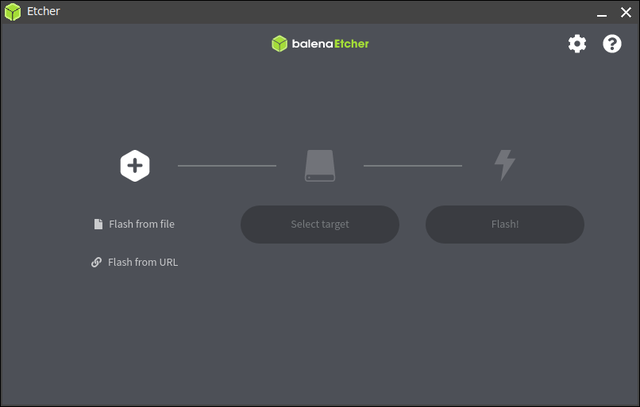
The main idea of balenaEtcher is to make this job easy and clear. When you open it, you only see a few steps: pick your image file, pick your drive, and click to start. There are not many extra buttons or hard‑to‑understand settings. This is very helpful for people who just want a bootable USB without having to learn a lot of technical concepts.
balenaEtcher also works on different systems. You can use it on Windows, macOS, and Linux, and the look and steps are almost the same. If you often help family, friends, or coworkers set up a computer, it is nice to have a tool that you already know.
balenaEtcher Download
balenaEtcher is available from its official website. The download page usually detects your operating system and offers the right installer for Windows, macOS, or Linux. You can choose portable or installer versions, depending on how you prefer to run the tool.
⬇️balenaEtcher Free Download:
https://etcher.balena.io/
Is balenaEtcher Safe to Use?
Yes, balenaEtcher is safe to use. balenaEtcher is widely used in the open‑source community and is backed by the well-known company Balena. It tries to protect users from risk with a few built‑in safety features.
But please be careful about which drive you pick. The program shows the target drive clearly before it starts, so you can double‑check and avoid wiping the wrong USB or SD card.
After writing the image, balenaEtcher usually runs a quick check to make sure the data on the drive matches the original file. This helps find problems early and reduces the risk of a broken or non‑bootable USB drive. For most normal use cases, if you download it from the official site and always confirm the drive you choose, balenaEtcher is a safe tool to use.
balenaEtcher Pros and Cons
balenaEtcher is a great bootable USB creator. It works well in creating bootable drives for installing operating systems. Like any tool, balenaEtcher has strong points and weak spots.
✅Pros:
|
⚠️Cons:
|
What users say about balenaEtcher:
📖SourceForge Review: quick tool with a good interface, I use it every time I flash an SD.
📖G2 Reivew: It's simple and reliable for creating bootable USBs and SD cards. The clean interface, built-in validation, and safer drive selection make the whole process quick and beginner-friendly on Windows, macOS, and Linux.
📖Reddit User Case: Is Balena Etcher safe?
balenaEtcher Alternatives: balenaEtcher vs EaseUS Partition Master vs Rufus vs Ventoy
balenaEtcher is an excellent choice if your main goal is to write images without dealing with complex options. But it may not meet all your needs. There are several alternatives.
| Tool | Pros | Cons | Best For |
| balenaEtcher | Very simple UI, clear 3‑step flow, cross‑platform, built‑in verification | Few advanced options, not a full disk/partition tool | Beginners, quick single-bootable USB/SD tasks |
| EaseUS Partition Master | Powerful disk & partition features, and bootable media, high success boot rate | Need installation on your computer | Users needing full disk/partition management & cloning |
| Rufus | Many advanced settings, fast, great for Windows installs | Windows‑only, the interface may confuse new users | Power users creating Windows/Linux installers |
| Ventoy | Multi‑boot from many ISOs, easy to add/remove ISOs | Initial setup is more complex, some ISOs may need extra tweaking | Tech users and IT staff testing many systems from one USB |
1. EaseUS Partition Master
EaseUS Partition Master is not only an image flashing tool. It is a full disk and partition management software. Its core features include resizing partitions, converting disk types, cloning drives, and fixing partition problems. It also supports creating bootable media for system repair or migration, but this is only one part of its feature set. You can also use EaseUS Partition Master to fix Windows boot errors and repair partition issues.
2. Rufus
Rufus is a popular Windows tool for creating bootable USB drives, especially for installing Windows or Linux. It offers more advanced options than balenaEtcher. You can adjust file systems, partition schemes (MBR or GPT), and other detailed settings.
3. Ventoy
Instead of flashing one image at a time, Ventoy lets you create a special USB drive once, then copy ISO files to it like normal files. You can then boot from any of those ISO files through a menu.
Conclusion
balenaEtcher is a great solution for creating bootable USB drives and SD cards. It has a simple interface, cross‑platform support, and built‑in validation. For users who want a direct way to flash system images, it does the job well.
The tool is not designed for full disk management or deep configuration. Advanced users who require fine control over partitions may feel limited and prefer tools like EaseUS Partition Master.
FAQs about balenaEtcher
1. What image formats does balenaEtcher support?
It supports common formats such as ISO and IMG. For most Linux distributions and Raspberry Pi images, you can use the files provided by the project directly without extra conversion.
2. Will balenaEtcher erase my data on the selected drive?
Yes. When you flash an image to a USB or SD card, the existing data on that drive is overwritten. Always double‑check the target drive and make backups before you start.
3. Do I need to verify the flashed image manually?
By default, balenaEtcher includes a validation step after flashing. You do not need to run extra checks manually. Advanced users can still run their own tests if they want additional assurance.
Share it to help more users learn about balenaEtcher:

How Can We Help You
About the Author

Sherly joined EaseUS in 2022 and she has always loved writing articles and enjoys the fun they bring. She receives professional training here, focusing on product performance and other relative knowledge. She has written over 200 articles to help people overcome computing issues.

Written by Joey Albert
Joey is an enthusiast of science and technology. With a passion for uncovering the latest tech innovations, she creates clear, engaging how-to guides that make technology accessible and enjoyable for all.
Product Reviews
-
I love that the changes you make with EaseUS Partition Master Free aren't immediately applied to the disks. It makes it way easier to play out what will happen after you've made all the changes. I also think the overall look and feel of EaseUS Partition Master Free makes whatever you're doing with your computer's partitions easy.
Read More -
Partition Master Free can Resize, Move, Merge, Migrate, and Copy disks or partitions; convert to local, change label, defragment, check and explore partition; and much more. A premium upgrade adds free tech support and the ability to resize dynamic volumes.
Read More -
It won't hot image your drives or align them, but since it's coupled with a partition manager, it allows you do perform many tasks at once, instead of just cloning drives. You can move partitions around, resize them, defragment, and more, along with the other tools you'd expect from a cloning tool.
Read More
Related Articles
-
Hiren's Boot CD Review: Is It Still Worth Using for Windows 11?
![author icon]() Sherly/2026/09/28
Sherly/2026/09/28 -
HDD Regenerator Free Alternative [Download & Review]
![author icon]() Tracy King/2026/08/13
Tracy King/2026/08/13 -
MBR2GPT Alternatives Recommended for Windows
![author icon]() Cici/2026/09/28
Cici/2026/09/28 -
HP USB Disk Storage Format Tool Review 2026 [Benefits and Drawbacks]
![author icon]() Tracy King/2026/07/19
Tracy King/2026/07/19
 Tracy King/2026/08/13
  Cici/2026/09/28