







Content
Page Table of Contents
About the Author
Hot Topics
Hiren's Boot CD and Hiren's BootCD PE have long been popular choices for recovering unbootable PCs, repairing startup problems, and managing disk partitions. However, as Windows 10 and Windows 11 continue to evolve, we need an alternative that is easier to use, better suited for modern UEFI-based systems, and capable of handling everyday disk management tasks in addition to emergency recovery. Whether you're trying to fix a boot failure, migrate Windows to an SSD, resize partitions without data loss, or rebuild a damaged boot record, choosing the right tool can save significant time and effort.
In this guide, we'll review Hiren's Boot CD PE, examine its strengths and limitations, answer common questions users have about it, and compare it with EaseUS Partition Master to help you determine which solution better fits modern Windows maintenance and recovery needs.
Overview of Hiren's Boot CD
What is Hiren's Boot CD? For many years, Hiren's Boot CD was one of the most popular recovery toolkits for Windows PCs. It combined disk utilities, partition managers, password recovery tools, hardware diagnostics, and system repair software into a bootable environment. The original Hiren's Boot CD project was discontinued in 2012. Later, community developers released Hiren's BootCD PE, a Windows PE-based version designed to support newer hardware and operating systems.
Although Hiren's BootCD PE is still widely used, many users now look for alternatives because creating bootable media, navigating multiple utilities, and troubleshooting modern Windows systems can be difficult and time-consuming.
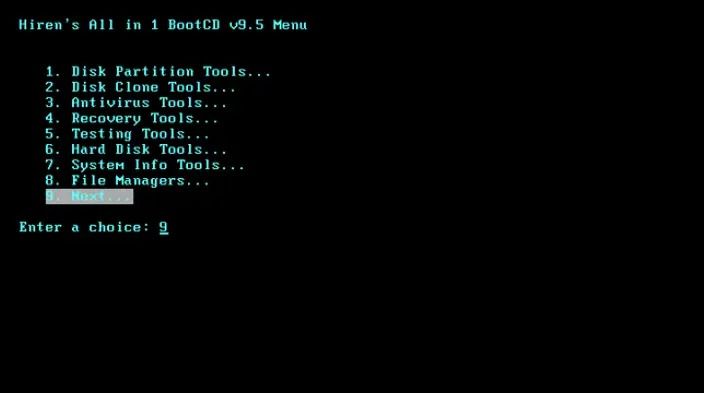
Pros and Cons of Hiren's Boot CD PE
| Pros | Cons |
|---|---|
|
|
Why Should We Consider an Alternative?
Hiren's BootCD PE remains useful for emergency recovery, but today we need a simpler solution for:
- Fixing boot problems without complex recovery environments
- Working with Windows 10 and Windows 11 systems
- Repairing boot records
- Managing GPT and MBR disks and other disk management
For these tasks, a dedicated disk management solution such as EaseUS Partition Master can often accomplish the same goals with fewer steps and a more streamlined interface.
Frequently Asked Questions About Hiren's Boot CD
1️⃣Is Hiren's Boot CD still available?
The original Hiren's Boot CD project was discontinued. However, Hiren's BootCD PE is still available and maintained by the community as a Windows PE-based recovery environment.
2️⃣Is Hiren's Boot CD safe to use?
Yes. Hiren's BootCD PE is generally considered safe when downloaded from its official source. Users should avoid modified versions from third-party websites.
3️⃣Does Hiren's Boot CD support Windows 11?
Hiren's BootCD PE can work with Windows 11 systems, but compatibility may vary depending on hardware, Secure Boot settings, and included third-party utilities.
4️⃣Can Hiren's Boot CD fix boot problems?
Yes. Hiren's BootCD PE includes tools that can repair boot records, rebuild BCD files, and diagnose startup issues. However, many repair procedures require technical knowledge.
5️⃣Do I need a USB drive to use Hiren's Boot CD?
Yes. Hiren's BootCD PE is typically used by creating a bootable USB drive and booting the computer from that device.
6️⃣Does Hiren's Boot CD work on UEFI-based systems?
Yes, Hiren's BootCD PE can run on UEFI systems because it supports Windows PE boot mode. However, it usually requires a bootable USB and correct BIOS/UEFI settings, and Secure Boot may need to be adjusted. It works on UEFI hardware, but it is not as seamless as tools that run directly inside Windows 10 or Windows 11.
Found this guide helpful? Share it with others who are looking for a modern Hiren's Boot CD alternative for Windows 10 and Windows 11.

Best Alternative to Hiren's Boot CD PE
Hiren's BootCD PE runs in a separate Windows PE environment rather than integrating directly with Windows 10 or Windows 11. Many operations are handled through multiple independent utilities instead of a single unified interface. It may also require BIOS or UEFI adjustments, and Secure Boot can occasionally affect the boot process.
For users who prefer a more streamlined experience that works directly within Windows 11 and supports modern UEFI systems, EaseUS Partition Master can serve as a practical alternative.
| Evaluation Criteria | Hiren's BootCD PE | EaseUS Partition Master |
|---|---|---|
| Windows 11 Compatibility | Works, but depends on PE environment and drivers | Fully optimized for Windows 11/10 |
| UEFI/Secure Boot Support | Requires bootable USB and BIOS configuration | Native support in installed Windows |
| GPT/MBR Disk Handling | Supported via multiple tools | Built-in one-click conversion |
| Bootable Media Required | Yes, always boot into WinPE environment | Optional, support Bootable Mode |
| Ease of Use | Requires technical familiarity | Beginner-friendly interface |
| Boot Repair in Modern Systems | Available but manual | Guided repair tools |
| Target Users | Technicians/advanced users | General Windows users |
| Workflow Complexity | High (multiple utilities) | Low (single interface) |
This comparison shows that Hiren's BootCD PE is primarily designed as a bootable recovery environment for advanced troubleshooting, requiring USB boot, BIOS/UEFI configuration, and the use of multiple standalone utilities. It is powerful in emergency scenarios, but comes with higher operational complexity.
In contrast, EaseUS Partition Master is built for modern Windows 10 and Windows 11 environments, offering native UEFI and GPT support, a unified interface, and simplified workflows that reduce the need for bootable media and manual tool switching.
How to Repair Windows Boot Issues with EaseUS Partition Master
EaseUS Partition Master, as an alternative to Hiren's BootCD PE, can fix Windows boot failure, boot loop, boot stuck, system corruption, BSOD - blue/black screen of death error, etc.
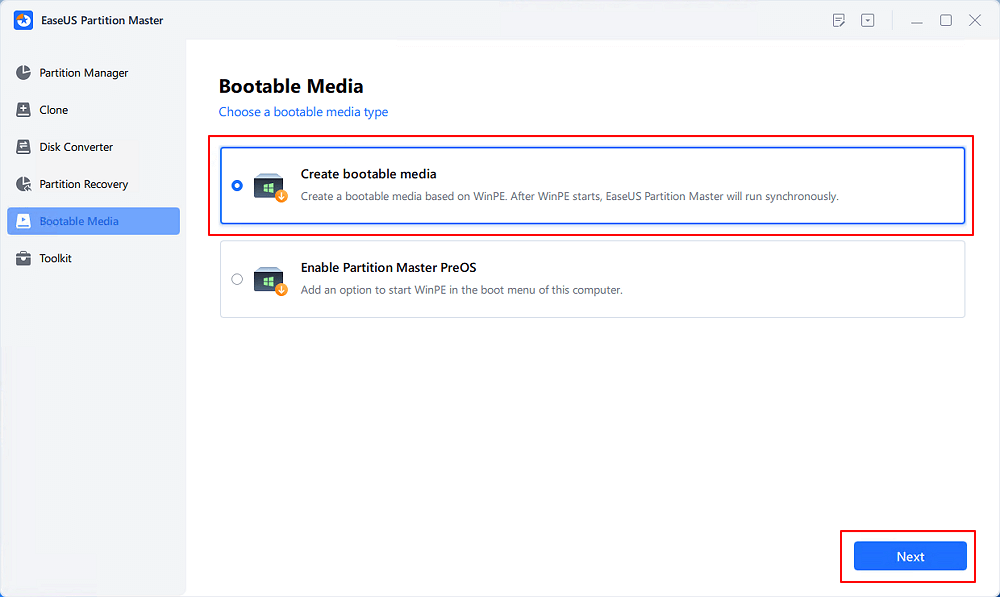
Step 1. Start EaseUS Partition Master after connecting the external drive/USB to your computer, go to "Bootable Media," and click "Create bootable media."
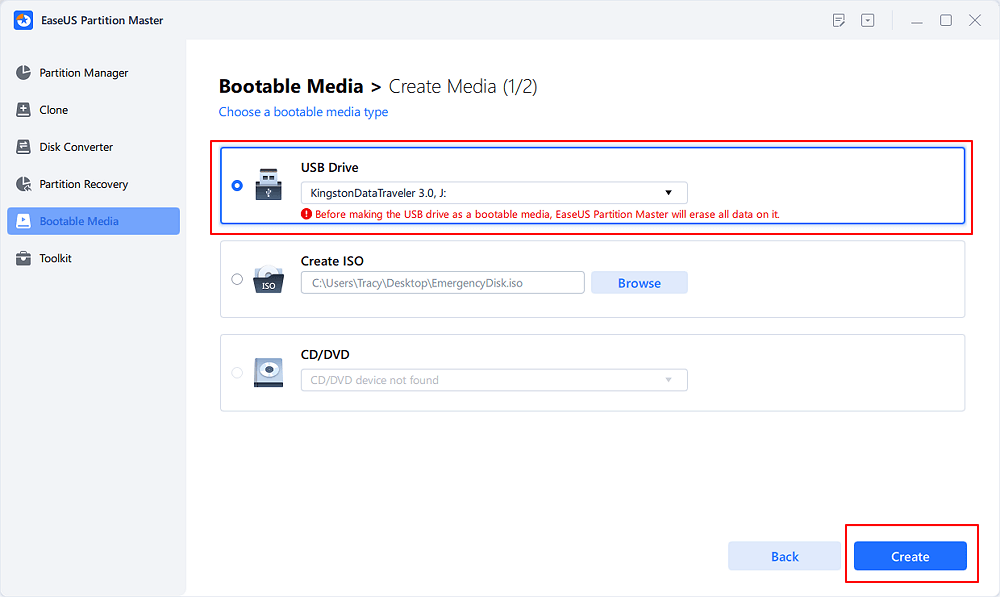
Step 2. Select an available USB Drive or CD/DVD and click "Create." You can also burn the Windows ISO file to the storage media.
Step 3. Connect the created bootable drive to the new computer and reboot the computer by pressing and holding F2/Del to enter the BIOS. Then, set the WinPE bootable drive as the boot disk and press F10 to exit.
Step 4. Boot the computer again and enter the WinPE interface. Then, open EaseUS Partition Master and click "Boot Repair" under the "Toolkit" option.
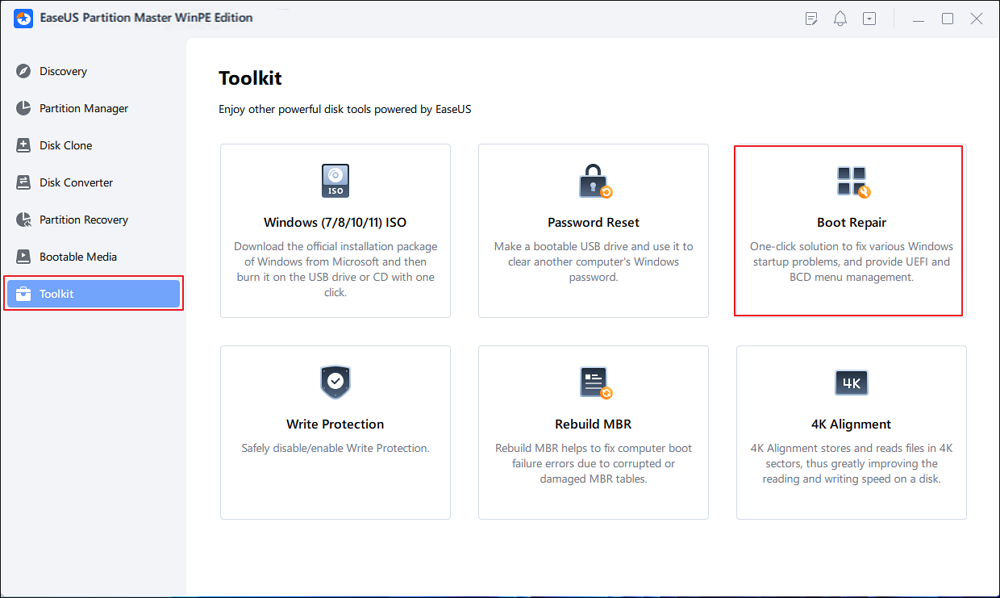
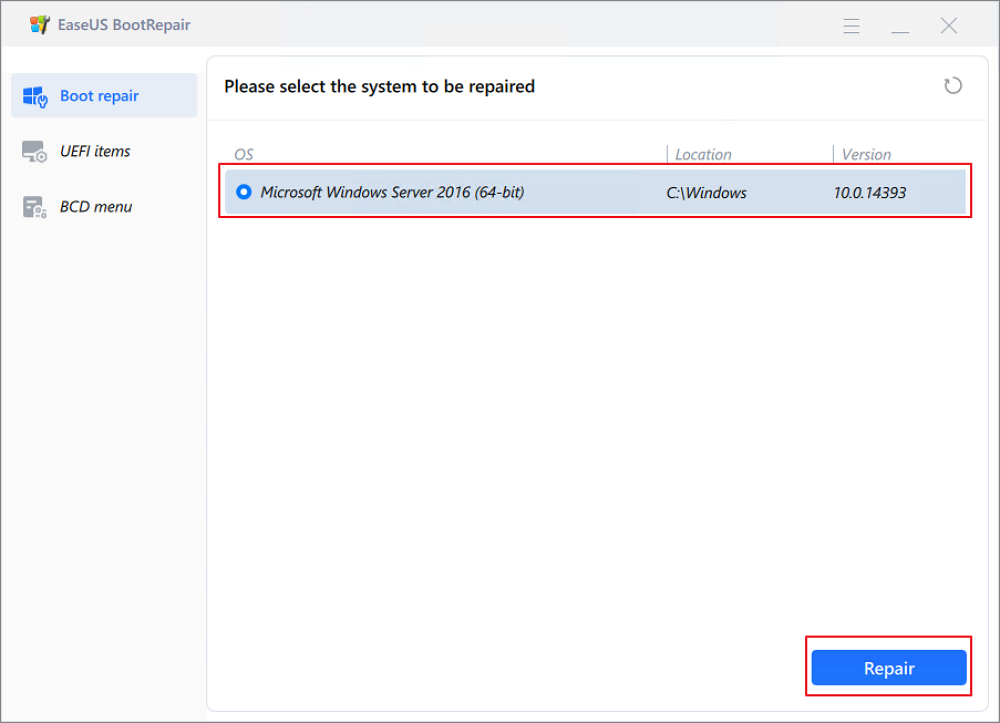
Step 5: Select the system you want to repair and click "Repair."
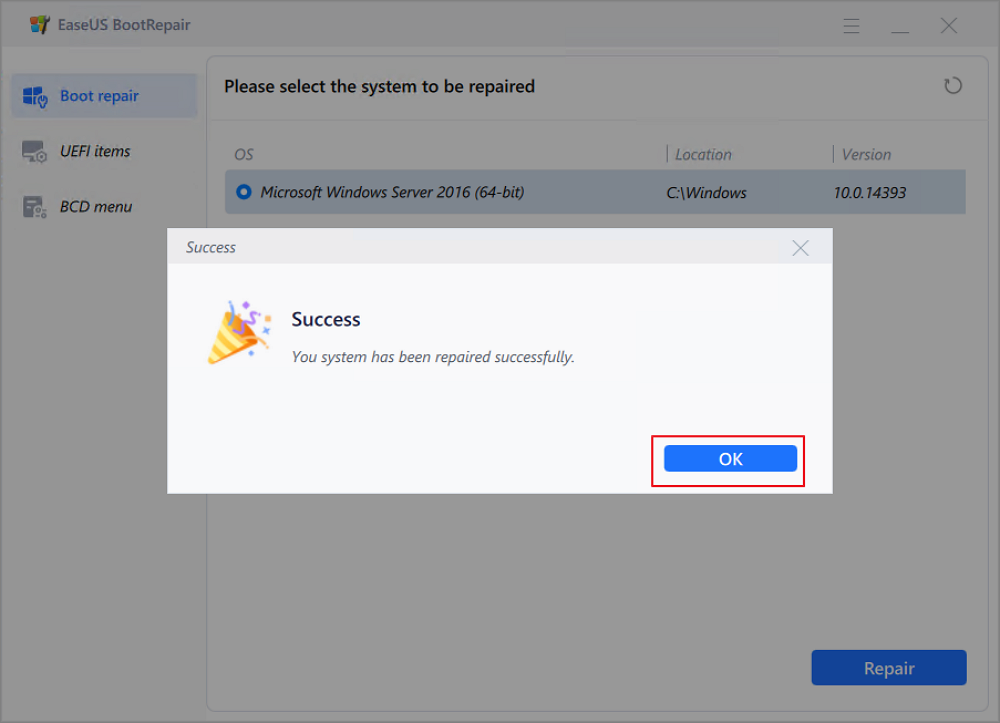
Step 6. Wait a moment, and you will receive an alert that the system has been successfully repaired. Click "OK" to complete the boot repair process.
Whether you're recovering from a failed update, replacing a hard drive, or repairing a damaged boot configuration, having the right tool can significantly reduce troubleshooting time. If this guide helped you solve a startup problem, consider sharing it with friends, colleagues, or anyone looking for a reliable Hiren's Boot CD alternative.
Conclusion
Hiren's BootCD PE remains a valuable emergency recovery toolkit, but its bootable-media requirement and collection of separate utilities may not suit every user. For disk management, partition operations, OS migration, and boot repair, EaseUS Partition Master provides a more streamlined approach while supporting modern Windows systems, SSDs, GPT disks, and everyday maintenance tasks.
EaseUS can also test a disk, check hard drive health, perform disk partition tasks, and create an emergency disk to rescue data/disk.
How Can We Help You
About the Author

Sherly joined EaseUS in 2022 and she has always loved writing articles and enjoys the fun they bring. She receives professional training here, focusing on product performance and other relative knowledge. She has written over 200 articles to help people overcome computing issues.
Product Reviews
-
I love that the changes you make with EaseUS Partition Master Free aren't immediately applied to the disks. It makes it way easier to play out what will happen after you've made all the changes. I also think the overall look and feel of EaseUS Partition Master Free makes whatever you're doing with your computer's partitions easy.
Read More -
Partition Master Free can Resize, Move, Merge, Migrate, and Copy disks or partitions; convert to local, change label, defragment, check and explore partition; and much more. A premium upgrade adds free tech support and the ability to resize dynamic volumes.
Read More -
It won't hot image your drives or align them, but since it's coupled with a partition manager, it allows you do perform many tasks at once, instead of just cloning drives. You can move partitions around, resize them, defragment, and more, along with the other tools you'd expect from a cloning tool.
Read More
Related Articles
-
5 Best ISO Image Software Free Download [Pros & Cons]
![author icon]() Tracy King/2026/06/23
Tracy King/2026/06/23 -
EaseUS Partition Master Review 2026: Is It Worth Using?
![author icon]() Sherly/2026/09/28
Sherly/2026/09/28 -
Clonezilla Review: Features, Pros and Cons, Pricing, and How to Use It
![author icon]() Joey Albert/2026/09/28
Joey Albert/2026/09/28 -
balenaEtcher Review: Simple Tool for Creating Bootable USB and SD Cards
![author icon]() Joey Albert/2026/07/12
Joey Albert/2026/07/12
 Tracy King/2026/06/23
  Joey Albert/2026/09/28









