







Content
Page Table of Contents
About the Author
Hot Topics
If your hard drive keeps running low on space and you want to analyze the disk space, you might come across TreeSize. It's a popular disk space analyzer for Windows. It helps you find large files, see which folders use the most space, and visualize how your drive is used.
But TreeSize isn't always the best choice for everyone. Some people want faster scanning, a simpler interface, or a completely free tool with more features. In those cases, looking for a TreeSize alternative is a smart move.
Why Users Look for a TreeSize Alternative
TreeSize is a solid disk management tool, but it doesn't meet everyone's needs. Many users start searching for alternatives due to specific limitations they encounter in daily use.
First, let's learn some pros and cons of TreeSize:
|
😆Pros:
|
😦Cons:
|
TreeSize remains a good choice for users who need detailed disk space analysis. It's popular for a clear folder list, network drive support, and export options.
However, modern storage management often involves more than just seeing space. Tasks such as resizing partitions, merging drives, converting file systems without data loss, and checking disk health require a more comprehensive solution. For users who need these capabilities, a modern alternative can provide significantly greater flexibility and functionality.
Best Alternative to TreeSize Free Download
If you're looking for a powerful, free alternative to TreeSize with broader disk management features, EaseUS Partition Master is one of the best options.
While TreeSize is primarily a disk space analyzer, EaseUS Partition Master goes beyond that. It's a full-featured disk partition tool that helps you:
- Analyze disk usage: See which folders and files are consuming the most space.
- Resize and move partitions: Without losing data or reinstalling Windows.
- Merge partitions: Combine two partitions into one for better space management.
- Format and clean drives: Quickly wipe unwanted data and prepare drives for new use.
- Convert disk formats: Switch between MBR and GPT without data loss.
- Create bootable tools: Run disk operations even when Windows won't start.
- Newest
- The latest version of EaseUS Partition Master adds a dedicated space management hub to help you analyze and clean up your space. You can quickly resolve low disk space issues. This hub can help with:
-
- ✅Space analysis
- ✅Junk cleanup
- ✅App management
- ✅Data migration
Here is how to analyze disk space with EaseUS Partition Master:
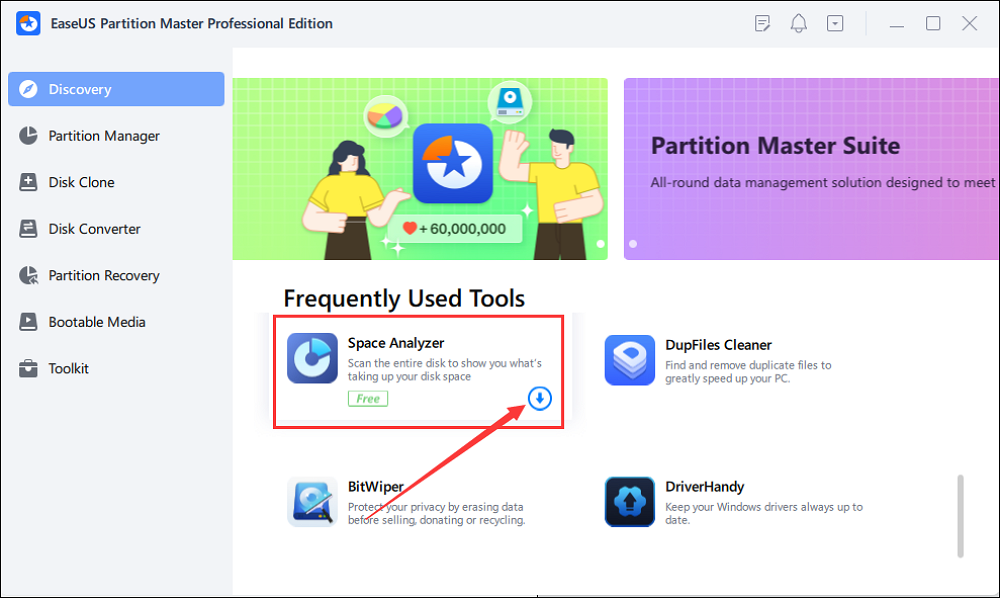
Step 1. Launch EaseUS Partition Master and turn to Discovery. Find and Download Space Analyzer below Frequently Used Tools.
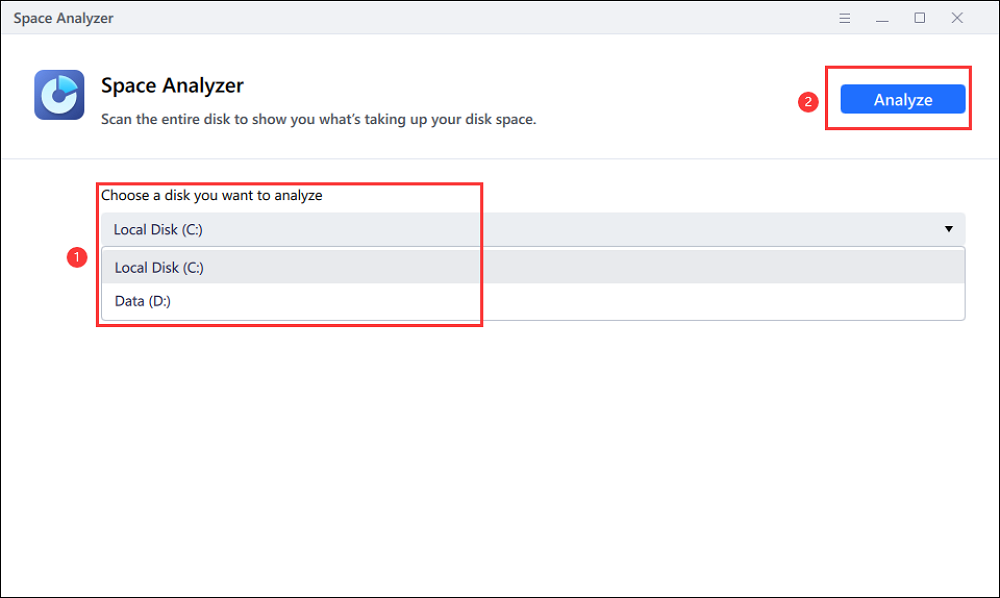
Step 2. In the Space Analyzer pop-up window, select the target disk to be analyzed and click Analyze in the upper right corner.
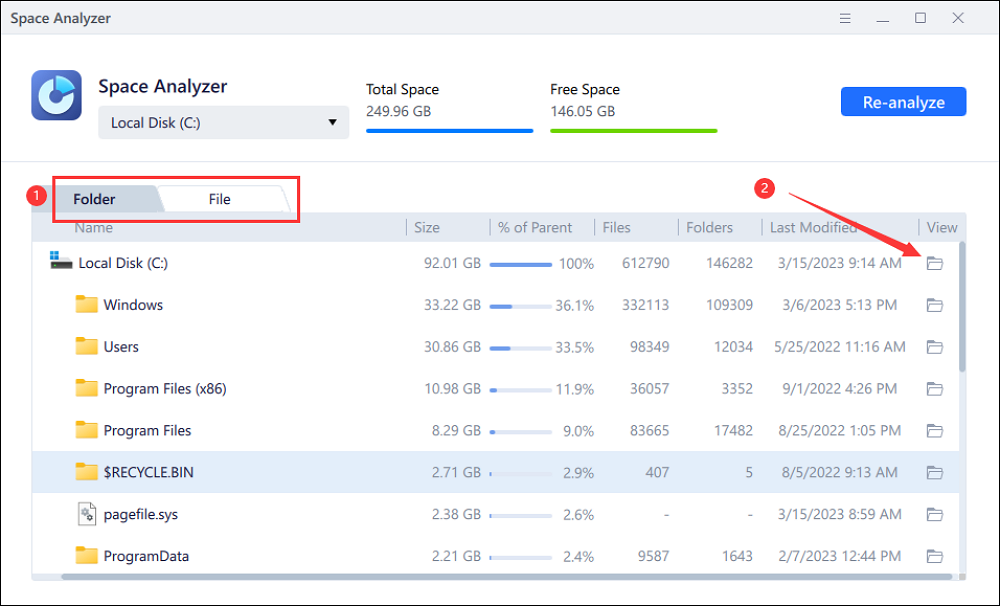
Step 3. Wait a while, and you will see the detailed data. You can click on Folder/File to view different data types and click on the small folder icon to see more information inside the file.
|
😆Pros:
|
😦Cons:
|
Other Alternatives to TreeSize
Besides EaseUS Partition Master, there are other good alternatives to TreeSize. In this section, we will introduce two popular options: SpaceSniffer and WizTree.
1. SpaceSniffer
SpaceSniffer is a free and lightweight Windows tool that helps you see where your disk space is being used. Instead of showing long lists of folders, it uses a special visual map made of blocks. Each block represents a file or folder, and its size indicates how much space it occupies. Larger blocks mean larger files or folders, so you can quickly spot what's eating up your storage.
What SpaceSniffer Does:
- Visual block map: Files and folders are shown as nested blocks.
- Scan entire drives or single folders: You can analyze your whole hard drive or just one folder.
- Click and zoom: Click on a block to see what's inside, or double-click to go deeper into that folder.
- Free and portable: It's free to use and doesn't need installation. You can run it directly from a USB drive.
|
😆Pros:
|
😦Cons:
|
2. WizTree
WizTree is known as one of the fastest disk space analyzers for Windows. It scans your hard drive and shows which files and folders are using the most space. What makes WizTree special is how fast it works. It can scan an entire drive in just seconds.
What WizTree Does:
- Super fast scanning: WizTree reads data directly from your hard drive's file system (MFT). So it doesn't need to check every file individually.
- Tree view and visual blocks: It displays folders in a clear tree list and uses colored blocks to indicate space usage. You can choose how you want to see your data.
- Sort and filter: You can sort files by size, number of files, or date. You can also filter to show only large files or specific types.
|
😆Pros:
|
😦Cons:
|
Conclusion
TreeSize is a reliable disk space analyzer. But it's not the only option, and sometimes not the best one for your needs. If you're unhappy with slow scans, limited features in the free version, or an old-looking interface, you can switch to an alternative. If you prefer simple visual tools, SpaceSniffer gives you a clear picture of folder sizes. If you want speed above everything else, WizTree is a good option.
For most users who want a free, powerful, all-in-one disk management tool, EaseUS Partition Master is the top choice. It doesn't just show space usage. It also helps you resize, merge, and clean partitions, giving you more control over your storage.
How Can We Help You
About the Author

Sherly joined EaseUS in 2022 and she has always loved writing articles and enjoys the fun they bring. She receives professional training here, focusing on product performance and other relative knowledge. She has written over 200 articles to help people overcome computing issues.

Written by Joey Albert
Joey is an enthusiast of science and technology. With a passion for uncovering the latest tech innovations, she creates clear, engaging how-to guides that make technology accessible and enjoyable for all.
Product Reviews
-
I love that the changes you make with EaseUS Partition Master Free aren't immediately applied to the disks. It makes it way easier to play out what will happen after you've made all the changes. I also think the overall look and feel of EaseUS Partition Master Free makes whatever you're doing with your computer's partitions easy.
Read More -
Partition Master Free can Resize, Move, Merge, Migrate, and Copy disks or partitions; convert to local, change label, defragment, check and explore partition; and much more. A premium upgrade adds free tech support and the ability to resize dynamic volumes.
Read More -
It won't hot image your drives or align them, but since it's coupled with a partition manager, it allows you do perform many tasks at once, instead of just cloning drives. You can move partitions around, resize them, defragment, and more, along with the other tools you'd expect from a cloning tool.
Read More
Related Articles
-
Paragon Migrate OS to SSD 4.0 Free Alternative [2026 Guide]
![author icon]() Cici/2026/08/13
Cici/2026/08/13 -
GParted Review: Is It Safe and Reliable for Disk Partitioning?
![author icon]() Joey Albert/2026/07/19
Joey Albert/2026/07/19 -
DBAN Review 2026: Is Darik's Boot and Nuke Still Worth Using?
![author icon]() Sherly/2026/09/28
Sherly/2026/09/28 -
Newest Partition Magic Server Software Review and Download in 2026
![author icon]() Tracy King/2026/06/17
Tracy King/2026/06/17
 Cici/2026/08/13
  Tracy King/2026/06/17









