Page Table of Contents

If you're comparing Clonezilla vs Macrium Reflect, chances are you're planning to upgrade to a larger SSD, replace an aging hard drive, or migrate Windows to a new disk without reinstalling everything from scratch.
Both tools are widely used for disk cloning and system migration, but they target very different types of users. Clonezilla is known for being powerful, flexible, and completely free. Macrium Reflect is popular because of its user-friendly interface and comprehensive backup features.
We'll compare Clonezilla and Macrium Reflect in terms of ease of use, cloning performance, operating system migration, backup capabilities, and real-world use cases. We'll also discuss alternative solutions for users who simply want to move Windows to a new SSD with minimal effort.
Quick Verdict
For most users, the answer depends on what you're trying to accomplish.
| User Type | Recommended Tool |
| Beginners | Macrium Reflect |
| IT Professionals | Clonezilla |
| Enterprise Deployment | Clonezilla |
| Regular Backup Users | Macrium Reflect |
| One-Time SSD Upgrade | Dedicated Disk Cloning Software |
Choose Clonezilla If:
- You want a completely free solution
- You're comfortable with technical tools
- You manage multiple computers
- You need advanced deployment options
Choose Macrium Reflect If:
- You prefer a graphical interface
- You regularly create backups
- You want an easier system migration
- You don't mind paying for premium features
Consider a Dedicated Disk Cloning Tool If:
- Your goal is simply to clone HDD to SSD
- You want to migrate Windows quickly
- You don't need backup management
Clonezilla vs Macrium Reflect at a Glance
Before diving deeper about Clonezilla and Marium Reflect, here's a quick comparison.
| Feature | Clonezilla | Macrium Reflect |
| Price | Free & open-source | Paid (30-day trial version) |
| Ease of Use | Text-based interface | Beginner-friendly GUI |
| Supported OS | Windows, Linux, macOS | Windows |
| Hot Cloning | No | Yes |
| Disk Imaging | Yes | Yes |
| Backup Features | Limited | Yes |
| NVMe SSD Support | Yes | Yes |
| GPT/UEFI Support | Yes | Yes |
| SSD Optimization | Yes | Yes |
| Automatic Partition Resizing | Limited | Yes |
| Mass Deployment | Excellent | Moderate |
| Learning Curve | High | Low |
| Best for | Tech-savvy users, free disk cloning | Everyday users, backup & recovery |
Share this article on social media to help others compare Clonezilla and Macrium Reflect!

Clonezilla vs Macrium Reflect: Detailed Comparison
Clonezilla and Macrium Reflect are widely used disk cloning tools, but they target different audiences. Clonezilla focuses on flexibility and cost-effectiveness, while Macrium Reflect emphasizes convenience and advanced backup features. Here's how they compare in the areas that matter most.
Ease of Use
This is arguably the biggest difference between the 2 cloning software.
Clonezilla
The cloning process involves:
- Creating bootable media
- Booting outside Windows
- Selecting cloning modes
- Choosing partitions manually
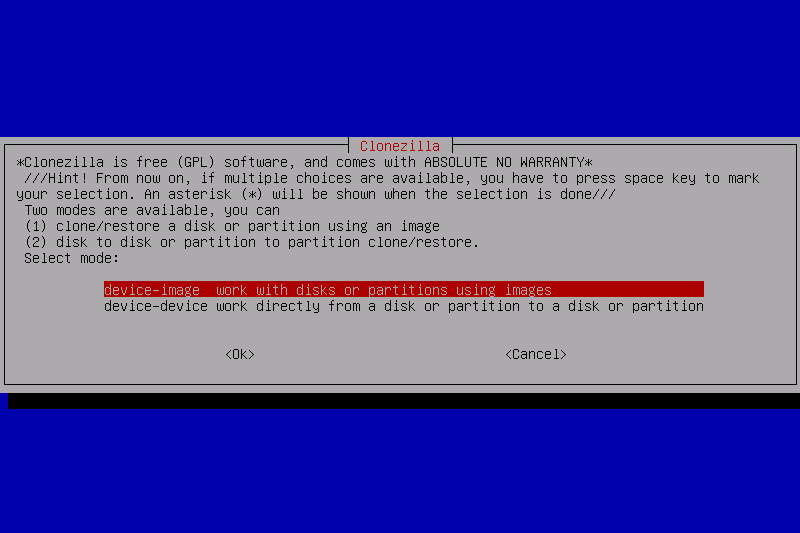
For experienced users, this isn't a problem, but for beginners, it can be overwhelming.
Macrium Reflect
Macrium simplifies the process considerably.
- Launch the software
- Select source disk
- Select destination disk
- Start cloning
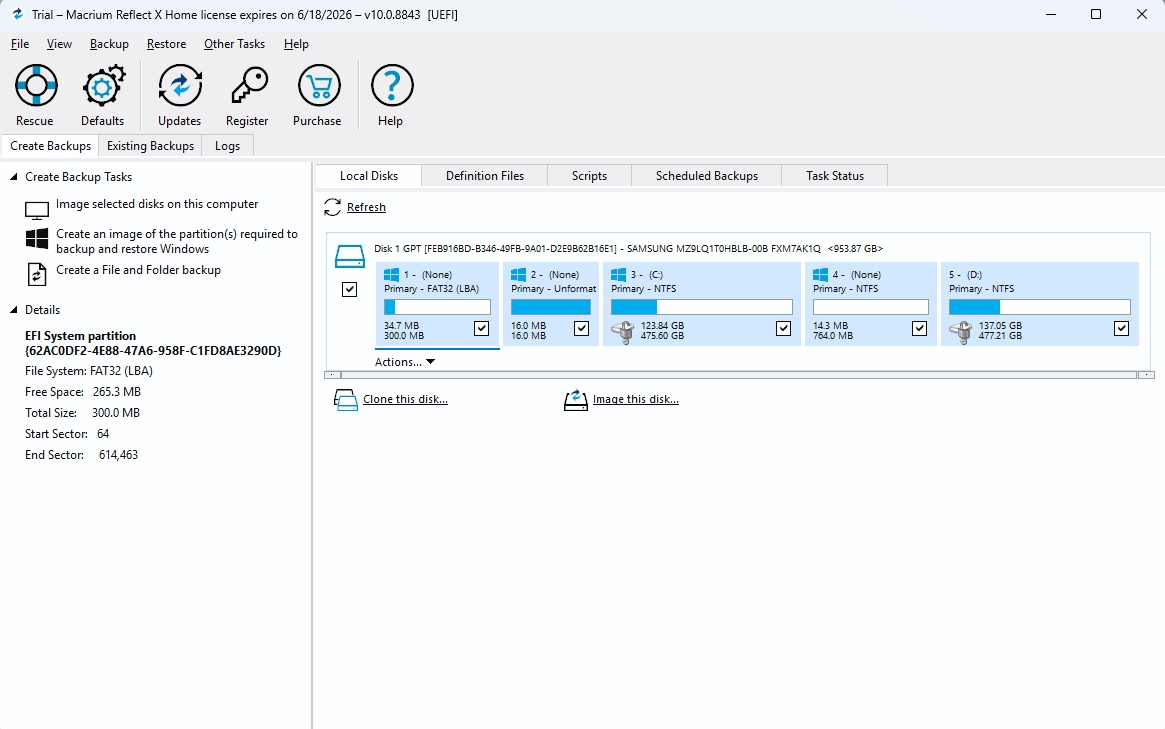
The interface provides visual feedback throughout the process.
Disk Cloning Performance
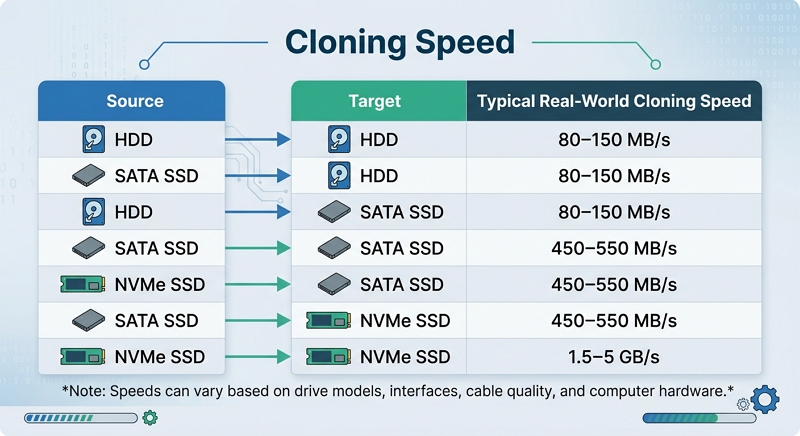
Many users assume cloning speed depends entirely on software. In reality, performance is usually limited by:
- SSD speed
- HDD speed
- USB interface
- SATA bandwidth
- NVMe bandwidth
Both Clonezilla and Macrium Reflect are capable of delivering excellent cloning speeds, such as clonign HDD to SSD, cloning SATA SSD to NVMe SSD, or cloning to a larger capacity drive.
Typical real-world cloning speeds
Windows Migration
One of the most common reasons people compare cloning software is operating system migration. They want to:
- Move Windows to SSD
- Replace a system drive
- Avoid reinstalling Windows
Clonezilla
Clonezilla can migrate Windows successfully. However, the process often requires additional preparation and verification.
Macrium Reflect
Macrium makes OS migration much easier thanks to its graphical workflow.
Backup and Recovery
This category strongly favors Macrium Reflect. Clonezilla was designed primarily for disk cloning and deployment, while Macrium Reflect was built as a comprehensive backup and disaster recovery solution.
Macrium's advanced backup capabilities make it the superior choice for users who need ongoing data protection rather than one-time disk migration. Key advantages include:
- Incremental backups
- Differential backups
- Scheduled backups
- Recovery management
- Full system image backups
- File and folder backups
- Backup retention policies
- Automated backup verification
- Email notifications and reporting
- Backup encryption and password protection
Macrium Reflect also provides a more user-friendly recovery experience:
- Restore an entire disk or individual partitions
- Recover specific files and folders from backup images
- Bootable rescue media for disaster recovery
- Rapid system restoration after hardware failure
- Support for restoring to replacement drives
- Simplified recovery wizard suitable for non-technical users
By comparison, Clonezilla focuses primarily on disk imaging and cloning. While it can create and restore disk images, it lacks many of the automation, scheduling, retention, and granular recovery features commonly expected from modern backup software.
Mass Deployment
This is where Clonezilla shines. Organizations that need to deploy dozens or hundreds of computers often prefer Clonezilla. Features such as multicast deployment dramatically reduce deployment time.
Clonezilla Server Edition (SE) allows administrators to clone a single system image to multiple machines simultaneously over a network, making it ideal for classrooms, computer labs, and enterprise environments.
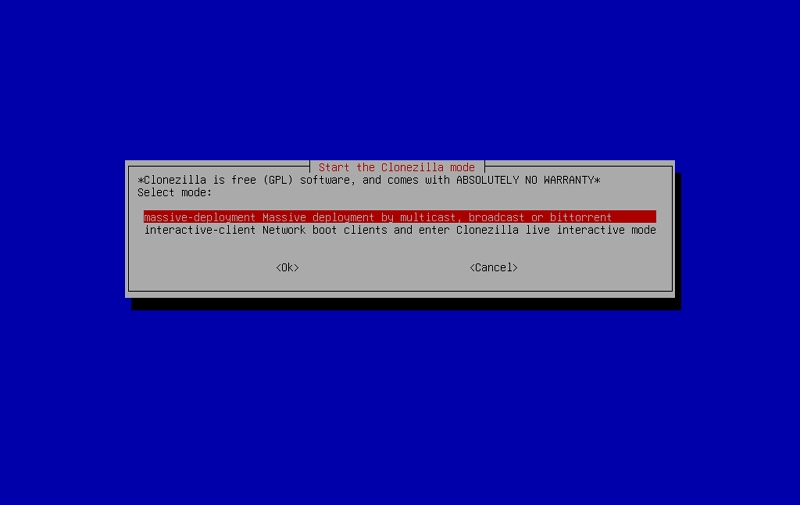
In addition, Clonezilla supports PXE network booting, enabling devices to boot directly into the deployment environment without requiring bootable USB drives. This simplifies large-scale operating system rollouts and hardware refresh projects.
While Macrium Reflect can be used for disk imaging and recovery on individual systems, it is primarily designed for workstation and endpoint protection rather than large-scale deployment scenarios.
Key advantages of Clonezilla for mass deployment include:
- Multicast deployment for simultaneous cloning
- PXE network boot support
- Centralized image management
- Reduced deployment time and labor costs
- Suitable for classrooms, labs, and enterprise rollouts
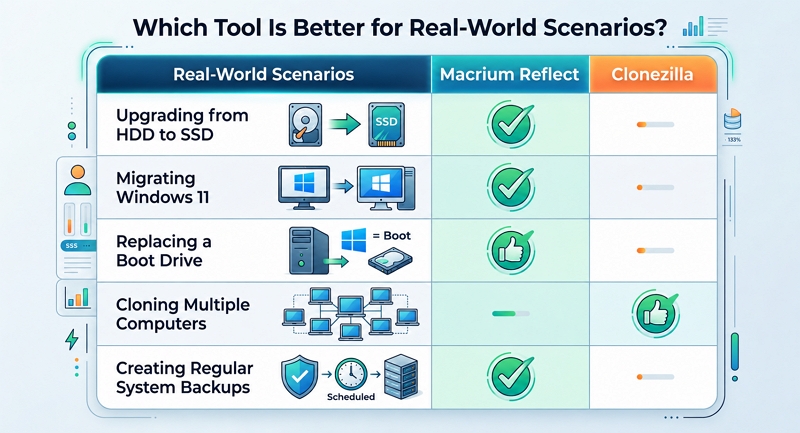
Which Tool Is Better for Real-World Scenarios?
Share this article on social media to help others compare Clonezilla and Macrium Reflect!
Why Many Users Are Looking Beyond Macrium Reflect
Several years ago, recommending Macrium Reflect was easy because many users could rely on its free edition for both backup and disk cloning. Today, the situation has changed.
The discontinuation of the free version, combined with the growing popularity of SSD upgrades, has led many users to explore alternative cloning solutions. Many home users only need to perform a one-time migration, such as:
- Upgrading from a 500GB SSD to a 2TB SSD
- Moving Windows from SATA SSD to NVMe SSD
- Replacing a failing HDD
- Installing a larger drive in a laptop or desktop
For these scenarios, other features may never be used, like:
- Incremental backups
- Differential backups
- Backup scheduling
- Retention policies
- Recovery management
As a result, some users prefer dedicated disk cloning software that focuses on fast, straightforward drive migration rather than comprehensive backup management.
This does not make Macrium Reflect a worse product. In fact, it remains one of the strongest backup and recovery solutions available. However, for users whose primary goal is simply transferring Windows to a new drive, a dedicated cloning tool may offer a more cost-effective and streamlined experience.
Is There an Easier Alternative for SSD Cloning?
Many users comparing Clonezilla and Macrium Reflect are actually searching for something simpler. Their goal isn't backup management. Their goal is:
- Clone HDD to SSD
- Upgrade storage
- Move Windows
- Replace a boot drive
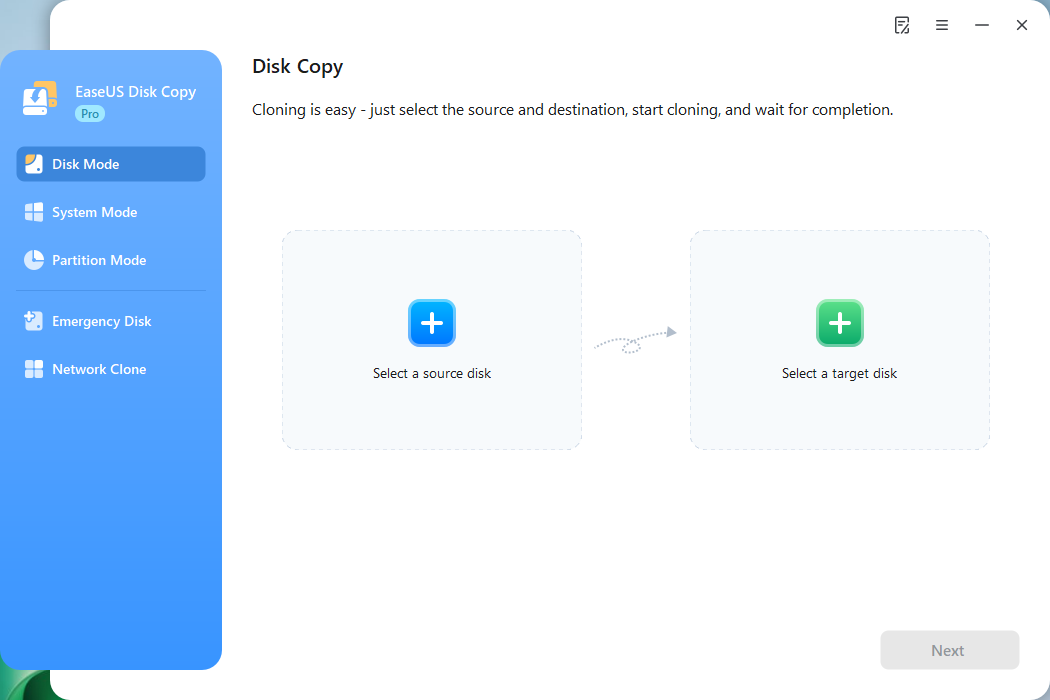
Dedicated cloning tools focus specifically on these tasks. One example is EaseUS Disk Copy.
 Free Download
Windows 11/10/8/7
When Clonezilla Feels Too Technical
Some users don't want to create bootable media or learn command-driven workflows.
When Macrium Reflect Feels Like Overkill
Others don't need advanced backup scheduling and recovery systems.
Why Dedicated Cloning Software Exists
Dedicated cloning tools, such as EaseUS Disk Copy streamline:
- SSD migration
- OS migration
- Disk replacement
- Sector-by-sector cloning
For users performing a one-time upgrade, this approach can be more efficient.
Share this article on social media to help others compare Clonezilla and Macrium Reflect!
Final Verdict
The Clonezilla vs Macrium Reflect debate ultimately comes down to your specific needs.
- Choose Clonezilla if you want maximum flexibility, open-source software, and enterprise-grade deployment capabilities.
- Choose Macrium Reflect if you need a polished backup solution with reliable cloning and recovery features.
If your primary objective is upgrading an SSD, replacing a boot drive, or migrating Windows without reinstalling the operating system, a dedicated cloning tool may provide the simplest workflow.
For most home users, ease of use matters just as much as features. The best disk cloning software isn't necessarily the one with the longest feature list; it's the one that helps you complete your migration safely, quickly, and with the least amount of hassle.
Frequently Asked Questions
1. Is there anything better than Clonezilla?
It depends on your needs. Clonezilla is powerful and free, but tools like Macrium Reflect and EaseUS Disk Copy offer easier interfaces and simpler workflows for SSD upgrades and Windows migration.
2. Is Macrium Reflect still free?
Macrium Reflect no longer offers the traditional free edition that many users relied on. Most current versions require a paid license or trial for continued use.
3. Is Clonezilla better than Macrium Reflect?
Neither is universally better. Clonezilla is ideal for advanced users and enterprise deployment, while Macrium Reflect is easier to use and better suited for everyday Windows users.
4. Can I clone an HDD to a smaller SSD?
Yes, as long as the used space on the HDD is smaller than the capacity of the target SSD. Some cloning tools can automatically resize partitions during cloning.
5. What is the easiest cloning software for SSD upgrades?
For most beginners, software with a graphical interface and guided cloning process is easiest. Macrium Reflect and EaseUS Disk Copy are popular choices for simple SSD upgrades.
-
Updated by
![]()
Jerry
"I hope my articles can help solve your technical problems. If you are interested in other articles, you can check the articles at the bottom of this page, and you can also check my Facebook to get additional help."…Read full bio