


Content
Page Table of Contents
About the Author
Hot Topics
Forgetting your Windows 10 local account password can lock you out of your PC, but Command Prompt (CMD) provides a built-in way to reset it without reinstalling Windows. If you have access to another administrator account, you can open an elevated Command Prompt and use the net user command to quickly change the password.
If you can't log in at all, you can launch Command Prompt from Windows installation media and reset the local account password before reaching the login screen. Please read this post from EaseUS Software to solve this issue!
Method 1. Reset Local Account Password using CMD
Resetting a Windows 10 password via Command Prompt (CMD) can be helpful if you've forgotten your password. However, this method requires administrative privileges. Before proceeding with the steps, ensure you have administrator access. Below are the steps to reset your password using Command Prompt, along with some critical considerations.
Step 1. Type cmd in the search bar > select Run as administrator to open the Command Prompt window.
Step 2. Once the Command Prompt opens, ensure you are logged in with administrative privileges. If you are unsure, run the following command to enable the hidden admin account.
- net user Administrator /active: yes
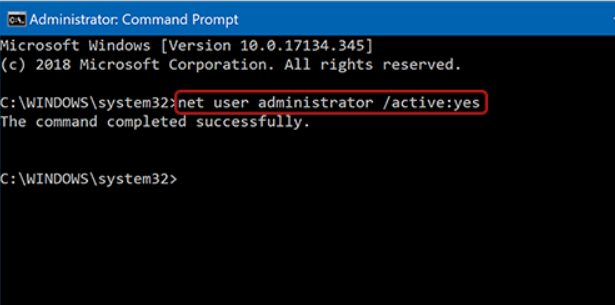
Step 3. Then, type net user [Username] [NewPassword], and then hit "Enter."
Step 4. Replace [Username] with the actual name of the account you need to update and [NewPassword] with your new password.
- Tip
- If you don't know the Username, type net user to see all user accounts.
Step 5. After resetting your password, restart your computer and log in with the new password.
Method 2. Reset Local Account Password Easily🔥
If you see the error "System error 5 has occurred. Access is denied" when using the net user command, it usually means you lack administrator rights. In this case, you can switch to a simpler and more reliable method to reset your Windows password without complex commands.
EaseUS Partition Master offers a built-in Password Reset feature designed for users who forget their Windows password or PIN. With its user-friendly interface, you can create a bootable USB and quickly regain access to your computer—no advanced technical skills required.
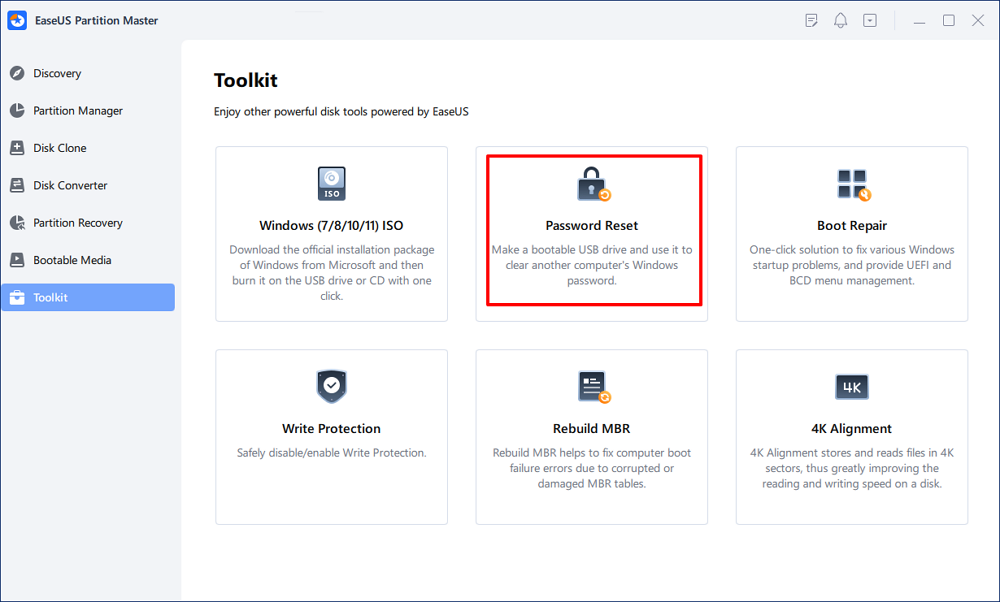
Step 1. Insert the target USB disk into the computer, download and run EaseUS Partition Master, and click "Toolkit" > "Password Reset."
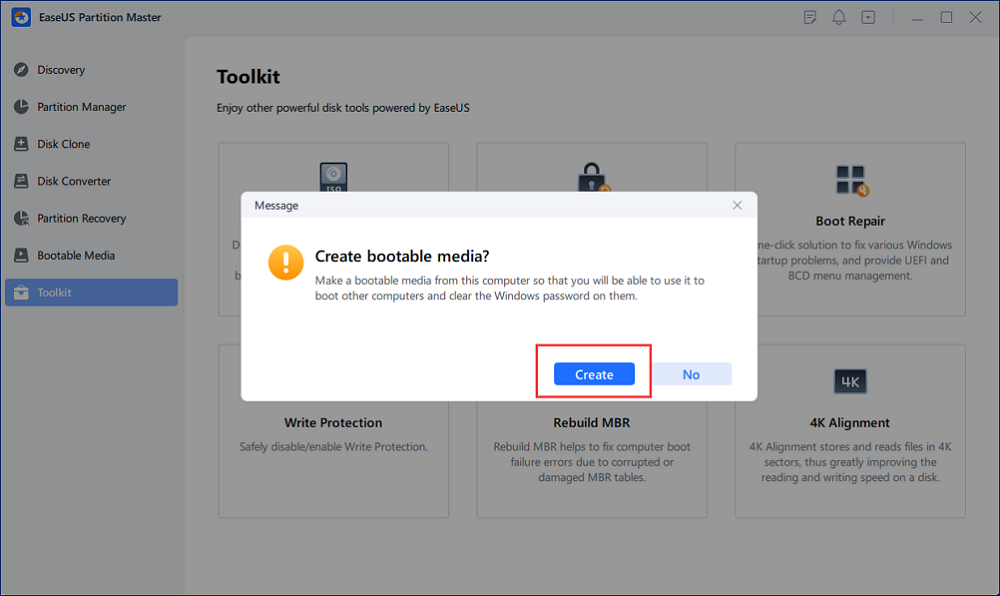
Step 2. A small window will pop up. After reading it carefully, click "Create".
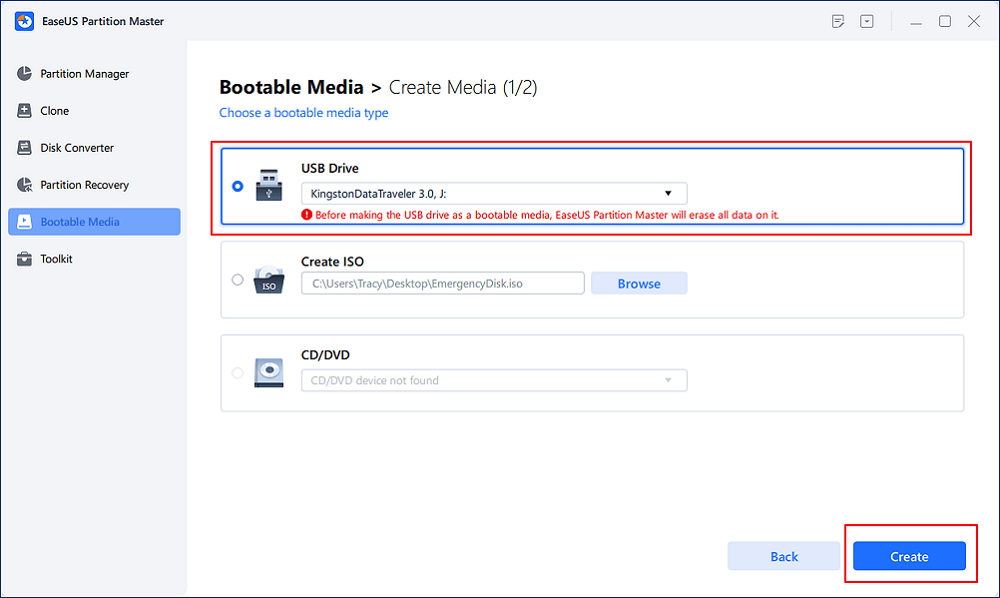
Step 3. Select the correct USB flash drive or external mobile hard disk and click "Create" again. Wait patiently. After the password reset USB flash drive is created, click "Finish."
Step 4. Remove the password reset USB, insert it into the locked PC, and restart. You will be asked to change the boot drive to boot the PC from USB. Once completed, the system will automatically boot from USB.
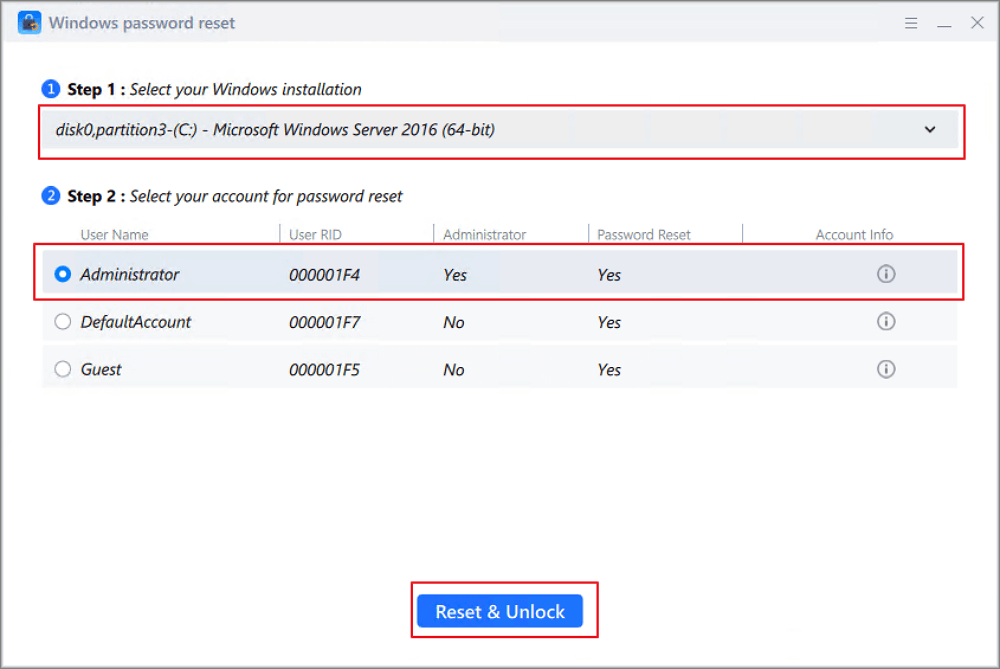
Step 5. After restarting, find EaseUS Partition Master again and go to "Password Reset." All accounts on the PC will be displayed in the interface; click on the target account and check "Reset & Unlock."
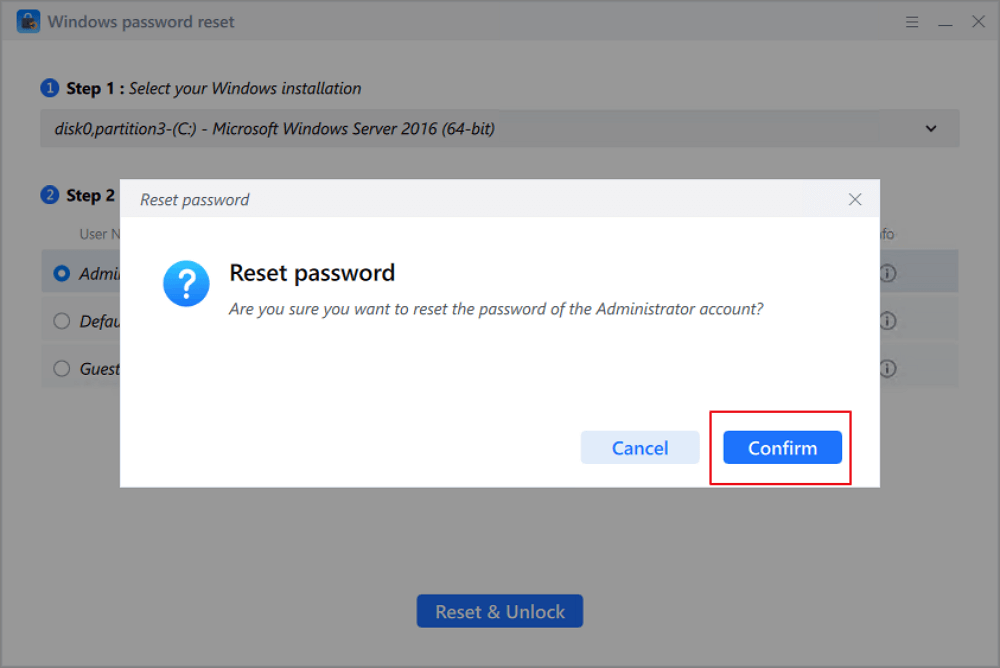
Step 6. When you receive this prompt, click "Confirm" to continue. Your password will be erased.
Conclusion
How to reset local account password using CMD? is an effective way to regain access without reinstalling the system. By using the built-in net user command with administrator privileges, you can quickly reset the password and unlock your PC. If you do not have technical steps, you can try another third-party tool, EaseUS Partition Master, to reset your local account.
Reset Windows 10 Password using CMD FAQs.
1. Do I need administrator rights to reset a password with CMD?
Yes, you do. You must run Command Prompt as an administrator; otherwise, you may see errors like "System error 5 has occurred. Access is denied."
2. Can I reset a password if I can't log into Windows?
Yes. You can access Command Prompt through Windows Recovery or installation media to reset the local account password before reaching the login screen.
3. What should I do if the "net user" command doesn't work?
Make sure you entered the correct username and ran CMD as an administrator. Also, confirm that the account is a local account, not a Microsoft account.
How Can We Help You
About the Author

"I hope my articles can help solve your technical problems. If you are interested in other articles, you can check the articles at the bottom of this page. Similarly, you can also check my Twitter to get additional help."
Product Reviews
-
I love that the changes you make with EaseUS Partition Master Free aren't immediately applied to the disks. It makes it way easier to play out what will happen after you've made all the changes. I also think the overall look and feel of EaseUS Partition Master Free makes whatever you're doing with your computer's partitions easy.
Read More -
Partition Master Free can Resize, Move, Merge, Migrate, and Copy disks or partitions; convert to local, change label, defragment, check and explore partition; and much more. A premium upgrade adds free tech support and the ability to resize dynamic volumes.
Read More -
It won't hot image your drives or align them, but since it's coupled with a partition manager, it allows you do perform many tasks at once, instead of just cloning drives. You can move partitions around, resize them, defragment, and more, along with the other tools you'd expect from a cloning tool.
Read More
Related Articles
-
How to Solve ASUS BIOS Not Detecting SSD - 5 Ways
![author icon]() Sherly/2026/06/17
Sherly/2026/06/17 -
Reset Forgotten Password on Lenovo Laptop Without Disk
![author icon]() Cici/2026/06/17
Cici/2026/06/17 -
4 Solutions To Fix Bootmgr Is Missing Windows 11
![author icon]() Tracy King/2026/06/17
Tracy King/2026/06/17 -
How Do I Perform Windows Password Reset with USB? 2026 Guide
![author icon]() Tracy King/2026/06/17
Tracy King/2026/06/17
 Sherly/2026/06/17
  Cici/2026/06/17
  Tracy King/2026/06/17









