


-
![]()
-
![]()
-
![]()
-
![]()
-
![]() How to Recover Lost Genshin Impact Data and Account [2026 Ultimate Guide]
How to Recover Lost Genshin Impact Data and Account [2026 Ultimate Guide] June 16,2026
 6 min read
 -
![]() Call of Duty Mobile Account & Data Recovery [2026 Troubleshooting]June 16,20266 min read
Call of Duty Mobile Account & Data Recovery [2026 Troubleshooting]June 16,20266 min read -
![]()
-
![]()
-
![]() BitLocker Data Recovery Software: Recover Data from BitLocker Drive EncryptionJune 16,20266 min read
BitLocker Data Recovery Software: Recover Data from BitLocker Drive EncryptionJune 16,20266 min read -
![]()
Page Table of Contents
PAGE CONTENT:
Can You Recover Deleted World Cup Videos
Have you captured many fabulous moments of this World Cup football with your phone or digital camera? It can be a pity if you accidentally remove the videos from the devices. So, can you recover deleted World Cup videos?
In most situations, the answer is yes.
You're more likely to recover deleted videos if you act soon after they were deleted, haven't used the storage device much since, the file system's still in good shape, and you haven't formatted the device a bunch of times.
People lose World Cup videos in all sorts of ways:
- Sometimes you accidentally delete FIFA World Cup highlights you downloaded.
- Maybe you formatted your camera's SD card after recording match footage.
- Deleting football videos with Shift + Delete can mean they're gone for good.
- You might lose GoPro or drone recordings if something interrupts a transfer, or end up deleting videos from your iPhone or Android while trying to clear up space.
Stop using the storage device immediately after data loss, and you can check the following content to learn how to recover deleted World Cup videos and find the best solution!
The Best Way to Recover Deleted World Cup Videos
If you just deleted a file, checking your computer's recycle bin is a smart move. But once videos are gone for good, your SD card gets formatted, or storage devices get corrupted, you need something stronger. That's where professional recovery software steps in.
EaseUS Data Recovery Wizard stands out as one of the top choices here. It's built to rescue deleted videos, photos, and documents from almost any storage device you throw at it.
Sports fans run into these kinds of video loss problems all the time, getting back high-res recordings after deleting them by mistake or dealing with a corrupted card. With EaseUS, camera video recovery can be simple.
Check the following guide and recover deleted videos from your SD card, PC, or other devices.
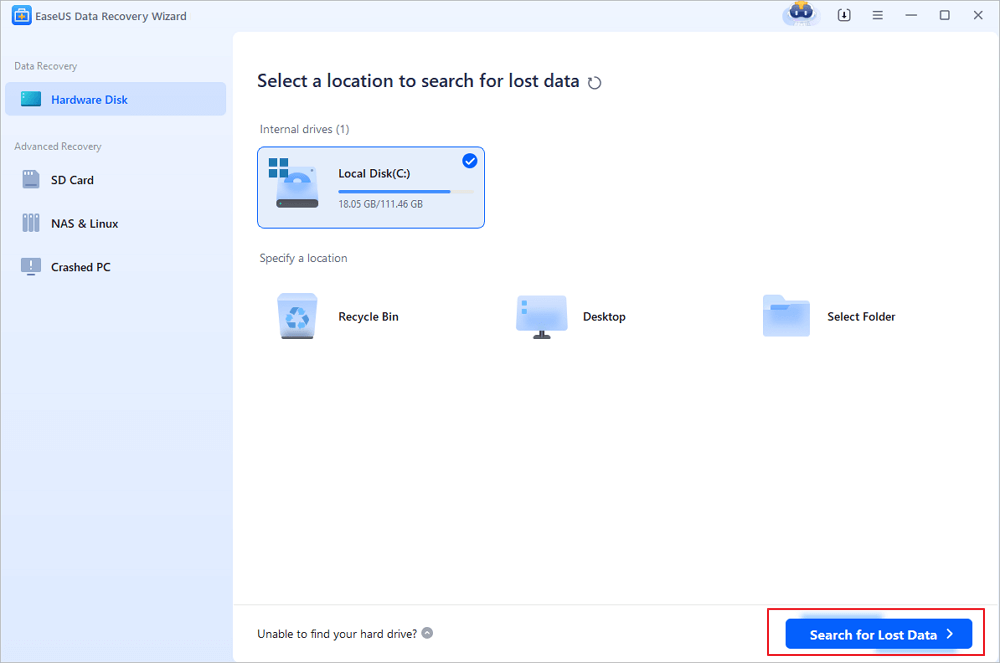
Step 1. Run EaseUS Data Recovery Wizard and select the location or device where you lost/deleted videos. Click "Search for Lost Data" to find the missing videos.
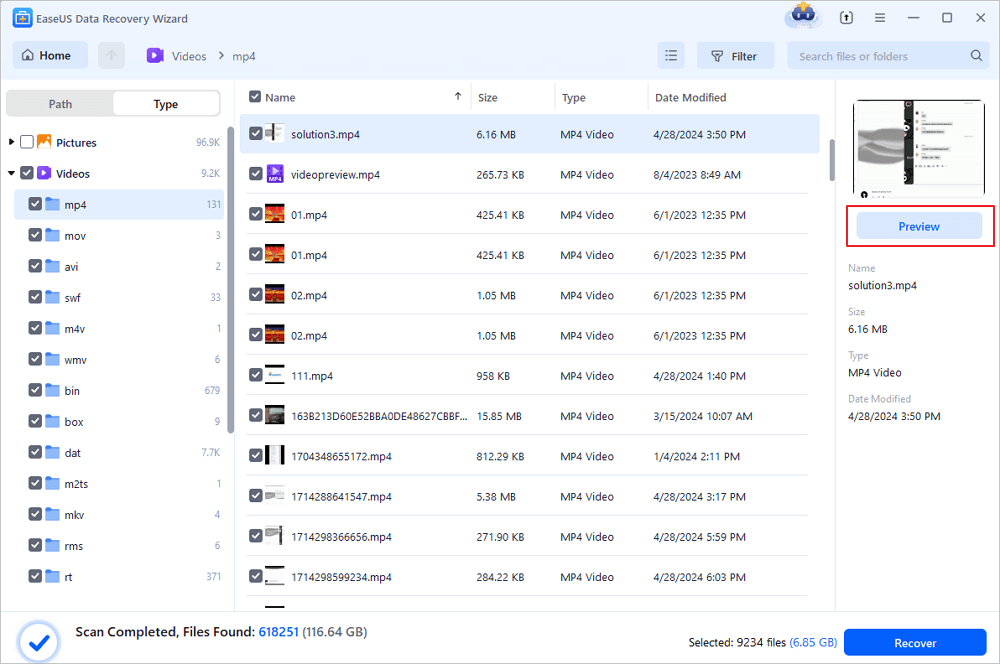
Step 2. After the scan, choose "Videos" in the left panel. You can directly type the files name in the search bar if you remember. Select the found videos and click "Preview".
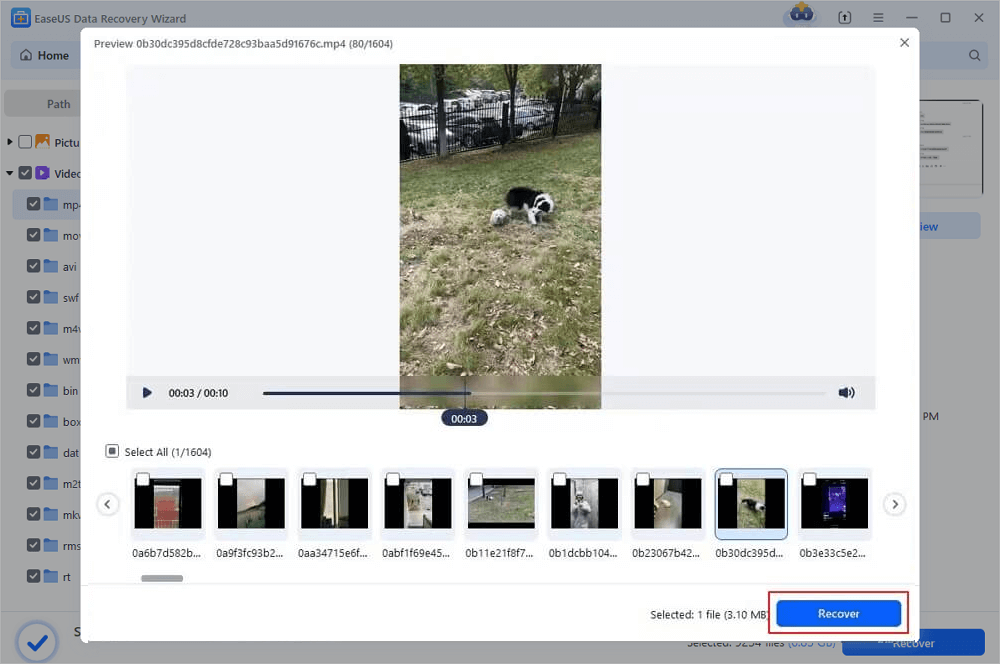
Step 3. Select the video files that you want to restore. Click "Recover" to save them to another secure location on your PC, external storage device or cloud storage.
You can share this video recovery software on social media to help more World Cup audiences.

How to Recover Deleted World Cup Videos from Different Devices
World Cup videos can be stored across multiple devices, and each device presents different recovery challenges. Understanding these differences helps you choose the safest recovery method while minimizing the risk of permanent data loss.
Below is a comparison of common recovery situations.
| Device | Common Data Loss Situation | Recovery Difficulty | Recommended Solution | Important Notes |
| Windows PC | Deleted files, Shift + Delete | Medium | Check Recycle Bin or use recovery software | Avoid installing new programs on the same drive |
| Mac | Trash emptied, permanent deletion | Medium | Check Trash or use recovery software | Save recovered files to an external drive |
| SD Card | Accidental formatting, corruption | High | Professional recovery software | Stop using the SD card immediately |
| USB Drive | Virus attack, accidental deletion | Medium | Deep scan recovery tool | Do not reformat the drive before recovery |
| Android Phone | Deleted videos, storage cleanup | Medium | Check Recently Deleted folder or recovery software | Rooting may affect recovery success |
| iPhone | Deleted videos, iCloud sync deletion | Medium | Check Recently Deleted album or iCloud backup | Disable syncing immediately after deletion |
| Camera / GoPro | SD card corruption or accidental formatting | High | Use SD card recovery software | Do not continue recording new videos |
How to Prevent Losing Important World Cup Videos Again
Think about World Cup videos. They capture moments you just can't repeat, so protecting those files should really become a habit. Here are a few tips that make a big difference:
Back Up Right Away
Don't store your valuable football recordings in just one place. Make extra copies and keep them on an external hard drive, in the cloud, or even on a second laptop or SSD.
Turn on Automatic Cloud Backup
Apps like Google Photos, iCloud Photos, and OneDrive can send your videos to the cloud as soon as you record them.
Pick Reliable SD Cards
Cheap SD cards don't last. They're more likely to fail or get corrupted while you're recording. Go for brands you trust, like SanDisk or Lexar; better durability is worth it.
Remove Storage Devices the Right Way
Yanking out an SD card or USB drive during a transfer is asking for trouble. Files get corrupted that way. Take a second and eject your devices safely.
Keep Recovery Software Ready
People usually start searching for recovery tools after they've already lost files. Save yourself the panic. Install something like EaseUS video recovery software ahead of time.
Conclusion
After losing video clips, if you move fast and don't add anything new to the storage device, you can usually get those deleted files back.
Sometimes, it's an easy fix. Check your recycle bin or cloud backups first. But if the videos are gone for good, your SD card's wiped, or the drive is corrupted, you'll want professional recovery software. That's your best shot.
EaseUS Data Recovery Wizard is one of the top tools out there. It works for computers, memory cards, USB drives, and even phones.
Step 1. Run EaseUS Data Recovery Wizard and select the location or device where you lost/deleted videos. Click "Search for Lost Data" to find the missing videos.
Step 2. After the scan, choose "Videos" in the left panel. You can directly type the files name in the search bar if you remember. Select the found videos and click "Preview".
Step 3. Select the video files that you want to restore. Click "Recover" to save them to another secure location on your PC, external storage device or cloud storage.
FIFA World Cup Video Recovery FAQs
1. Can I recover permanently deleted World Cup video clips?
You think the videos are permanently deleted because you cannot see the clip on the storage device, but these videos may not be deleted, and you can find them with professional video recovery software.
2. Why are my recovered World Cup videos corrupted?
When data recovery software recovers your video clips, it has to find all the pieces of the videos and put them together. If some important data piece is permanently lost, the recovered videos will show corruption.
3. How do I recover deleted World Cup videos from an SD card?
When you realize videos are deleted on your SD card, stop using your card and remove it from the device. Then, connect it to a computer and recover deleted videos with a reliable video recovery tool.
Was this page helpful?
-
Dany is an editor of EaseUS who lives and works in Chengdu, China. She focuses on writing articles about data recovery on Mac devices and PCs. She is devoted to improving her writing skills and enriching her professional knowledge. Dany also enjoys reading detective novels in her spare time. …







 Why Trust EaseUS
 Editor Reviews

20+
Years of experience

160+
Countries and regions

72 Million+
Downloads

4.9 +
Trustpilot Score






