
Featured Articles
- 01 GPT vs MBR: Which Is Better
- 02 Set Up the Boot Mode in MBR for BIOS, Legacy or UEFI
- 03 Convert MBR to GPT Without Data Loss (Windows 11 Available)
- 04 Running [Bootrec /fixboot] Returned Error 'Access is denied'
- 05 How to Install Windows 11 on MBR?
- 06 Fix 'Windows Cannot Be Installed to This Disk MBR'
- 07 Fix MBR2GPT Conversion Failed
- 08 How to Rebuild MBR
- 09 FREE MBR Repair Tool
- Important
- Microsoft has officially announced that Windows 10 support will end on October 14, 2025. After this date, the system will no longer receive security updates, bug fixes, or technical support.
You may never feel strange by those error messages: "Operating System not found" or a blank screen without any message when you boot the computer. Sometimes, you may corrupt Windows' MBR (Master Boot Record) unintentionally and end up failing to enter the system. In this situation, rebuilding MBR rather than reinstalling Windows will be much more convenient and time-saving.
EaseUS has already offered the function of rebuilding MBR in the case of boot failure due to MBR problems. Please see the following step-by-step instructions on rebuilding MBR.
How to Rebuild or Repair MBR with EaseUS Partition Master
EaseUS Partition Master is a professional third-party tool for disk and partition. It offers the "Rebuild MBR" feature to help you deal with any problems related to the master boot code problem. It provides a one-stop service to create a WinPE bootable disk and then rebuild MBR. With a simple interface for all people to use.
Free download this powerful tool and try it:
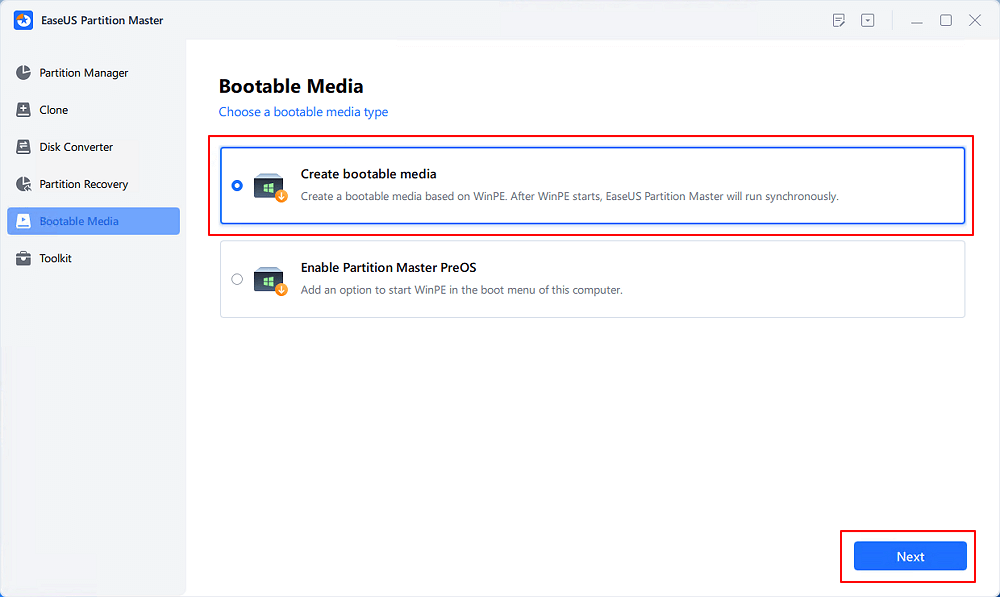
Step 1. Create a WinPE bootable disk
- Launch EaseUS Partition Master, and click "Bootable Media" on the toolbar. Select "Create bootable media".
- Click "Next" to finish the process.
Step 2. Boot EaseUS Partition Master Bootable USB
- Connect the bootable USB or CD/DVD to your PC.
- Press F2 or Del when you restart the computer to enter the BIOS screen. Set and boot your computer from "Removable Devices" or "CD-ROM Drive". And then EaseUS Partition Master will run automatically.
Step 3. Rebuild MBR
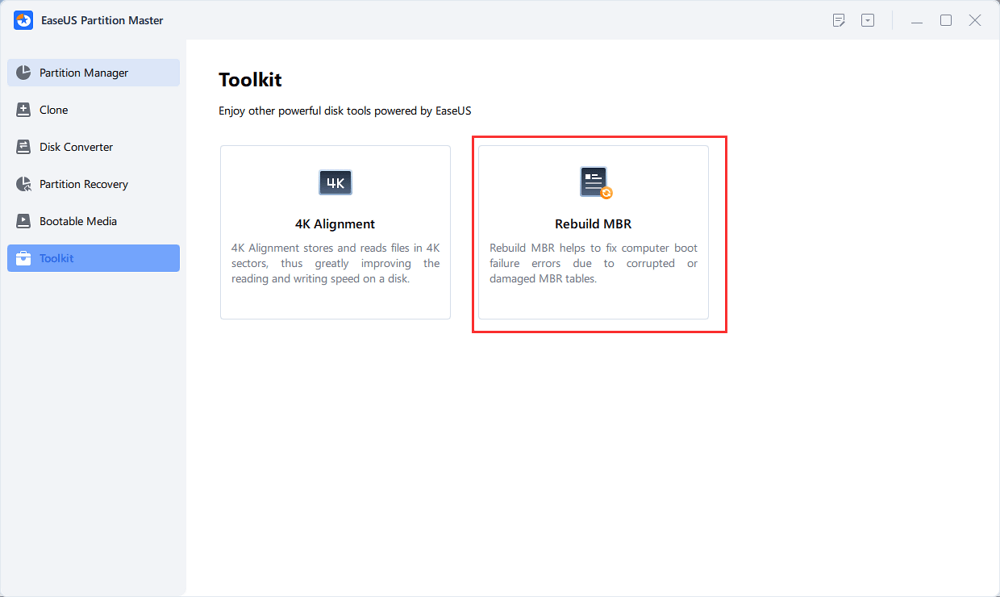
- Click "Toolkit" and choose "Rebuild MBR".
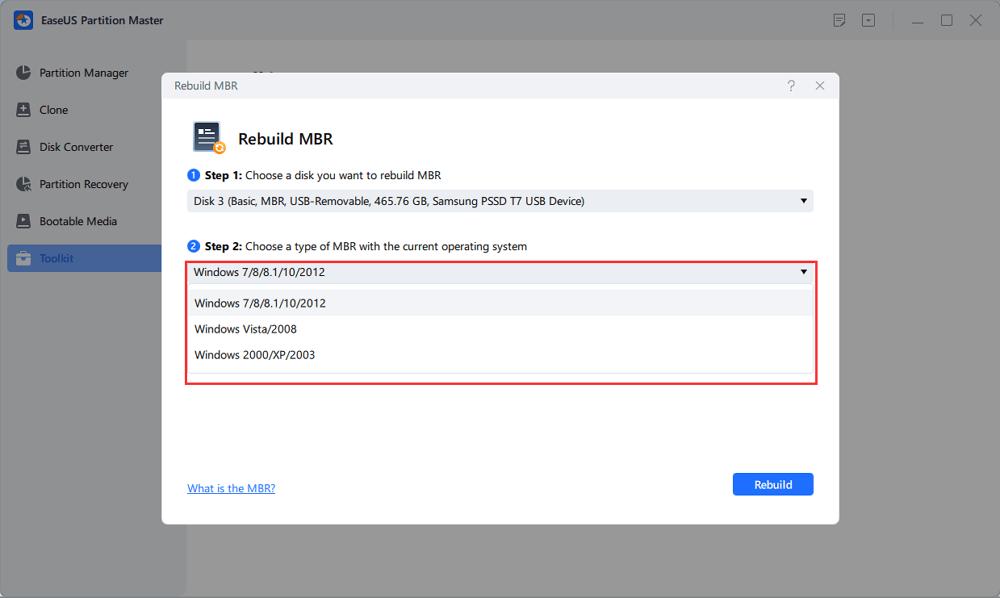
- Select the disk and the type of MBR. Then, click "Rebuild".
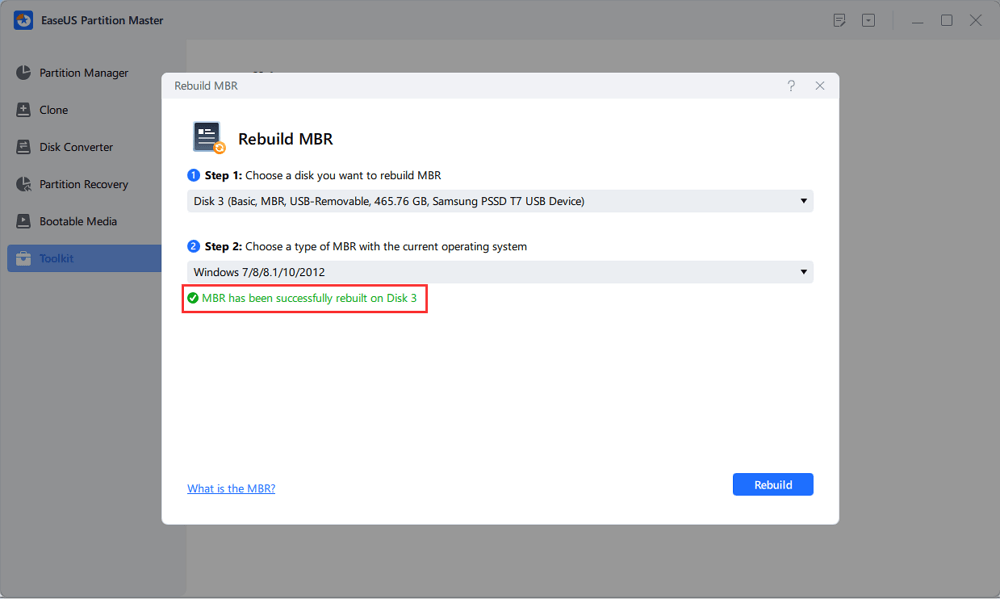
- After that, you can see "MBR has been successfully rebuilt on Disk X".
This rebuild MBR feature can fix the master boot code problem but can not solve your problem if the Windows Operating System files are corrupted. Besides, creating a WinPE bootable disk is unavailable in EaseUS Partition Master, which can help you access and manage your computer disks/partitions when your OS cannot boot.
See also:
Using CMD to Rebuild MBR
This section will introduce how to use another Windows 10 boot repair tool - CMD- to rebuild MBR. For different systems, we provide different guides:
Whatever your system is, you can find solutions in this part. But you need to be careful when putting the commands.
1. Repair MBR in Windows 10/8/8.1
Step 1. Boot from the recovery USB or the original installation DVD.
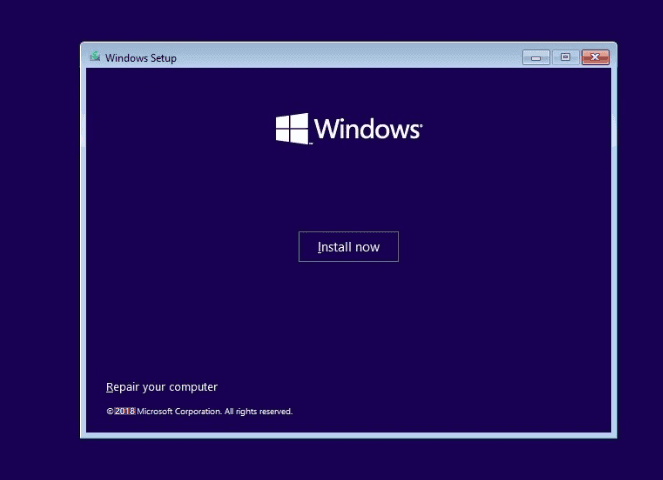
Step 2. Move to the install screen, and click Repair your computer.
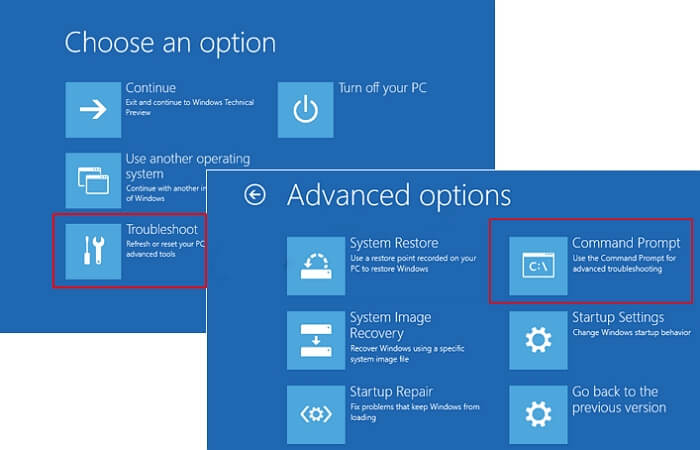
Step 3. On the Choose an option screen, choose Troubleshoot > Advanced Options > Command Prompt
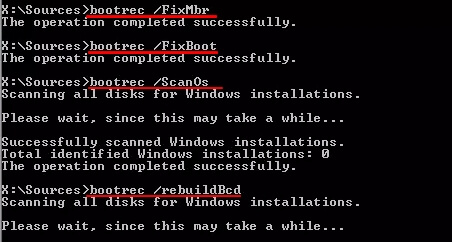
Step 4. Input the command lines and press Enter each time:
- bootrec /fixmbr
- bootrec /fixboot
- bootrec /scanos
- bootrec /rebuildbcd
Step 5. Remove the DVD/USB from your PC.
Step 6. Input exit and restart your PC.
2. Fix MBR in Windows 7
Step 1. Boot your PC from the installation DVD.
Step 2. You can see "Press any key to boot from CD or DVD" and press any key to boot from the DVD.
Step 3. Select a language and select a keyboard layout.
Step 4. Click Next.
Step 5. Choose the operating system and click Next. Check "Use recovery tools that can help fix problems starting Windows".
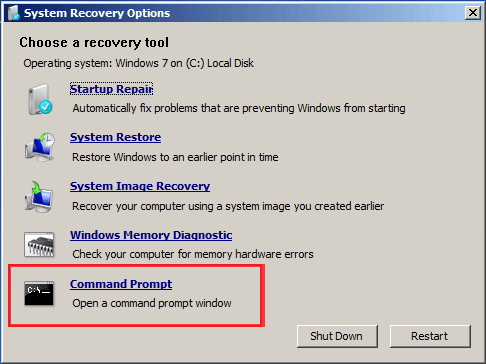
Step 6. At the System Recovery Options screen, select Command Prompt.
Step 7. Type the command lines and hit Enter each time:
- bootrec /fixmbr
- bootrec /fixboot
- bootrec /rebuildbcd
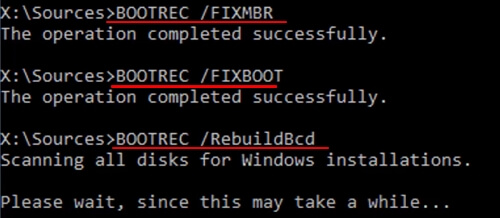
Step 8. Remove the DVD/USB from your PC, and type exit. Restart your computer.
3. Repair MBR in Windows XP
Step 1. Boot from the Windows XP CD.
Step 2. Press any key to boot from the CD.
Step 3. Then you can see Welcome to the Setup screen, and press R to run Recovery Console.
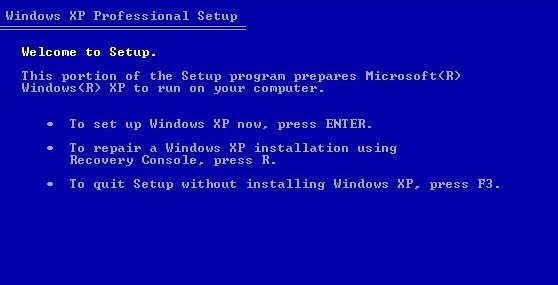
Step 4. Answer the question.
"Which Windows installation would you like to log onto?" - type 1 and press Enter.
"Type the Administrator password" - input the password and press Enter.
Step 5. Type fixmbr and press Enter.
"Are you sure you want to write a new MBR?" - press Y and hit Enter.
Step 6. Remove the Windows XP CD and type exit.
Step 7. Restart your PC.
After learning the tutorial, let's continue to figure out the definition of MBR and the background of rebuilding MBR. And then, you can be careful of the situation. If you like these methods, click the social buttons to share them with others in need.
What Is MBR
Have you figured out what MBR is? MBR is the abbreviation of Master Boot Record, which is also known as the master boot sector. It is the first sector that must be read when the PC is turned on to access the hard disk. Here is the definition from Wikipedia:
In short, the MBR is essential to boot a computer. The MBR grabs the size and location of each partition on the hard disk.
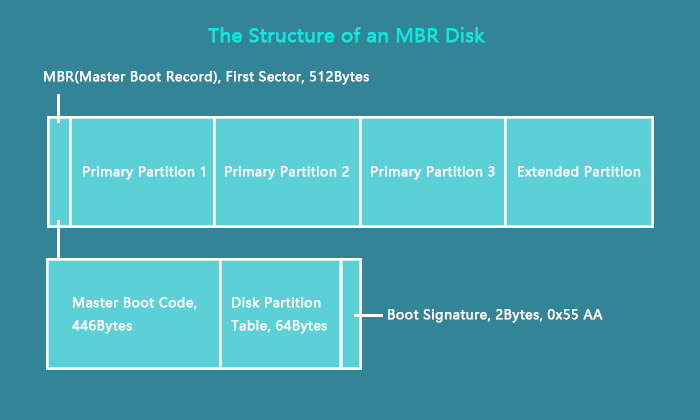
As you can check on the image, the MBR consists of three parts: the Master Boot Code (Take 466Bytes), the Disk Partition Table (Take 648Bytes), and the Boot Signature.
What Happens If MBR Gets Damaged
Because MBR belongs to your PC's startup system, your PC won't be running when your MBR is damaged. It holds information about your disk partition.
Then how does MBR get corrupted:
- Drive failures
- Virus
- Malware
- System shutdown
The error message of MBR:
- Operating system not found.
- Reboot and select proper boot.
- Error loading operating system.
- Non-system disk error
What you are going to do is rebuild your MBR to reuse your PC. Don't worry. EaseUS Partition Master will help you rebuild MBR without data loss.
Conclusion
To sum up, we have shown the full guide relating to MBR. If your MBR is corrupted, you can try the two ways we introduced: the MBR repair tool and CMD. To recommend the straight way, EaseUS Partition Master is the right one to rebuild MBR without CD and data loss. Get a free download in seconds.
FAQs on Fixing MBR in Windows
This part will continue to provide more questions and answers related to MBR in Windows. If you are interested, continue reading, and I hope it can help you.
1. Will rebuilding MBR delete data?
Data loss won't happen unless you apply improper methods to rebuild it. Your PC might fail to boot because of the wrong operation. Check the best solution in part 1.
2. How do you fix MBR Windows 10 without a CD?
Step 1. Restart your PC. Press Ctrl + Alt + Del. (If it doesn't work, repeat restart and press the button again.)
Step 2. The "Preparing automatic repair, Diagnose, Attempting Repairs" appears.
Step 3. Choose Advanced options.
Step 4. Troubleshoot > Advanced options > Windows startup setting > Restart
Was This Page Helpful?

Sherly joined EaseUS in 2022 and she has always loved writing articles and enjoys the fun they bring. She receives professional training here, focusing on product performance and other relative knowledge. She has written over 200 articles to help people overcome computing issues.

Daisy is the Senior editor of the writing team for EaseUS. She has been working at EaseUS for over ten years, starting as a technical writer and moving on to being a team leader of the content group. As a professional author for over ten years, she writes a lot to help people overcome their tech troubles.
Related Articles
-
How to Fix 3DS Could Not Detect SD Card in 6 Ways
![author icon]() Tracy King/Jun 17, 2026
Tracy King/Jun 17, 2026 -
SSD Health Check Software Free Download in 2026
![author icon]() Tracy King/Jun 17, 2026
Tracy King/Jun 17, 2026 -
Can Windows 11 Run MBR? Your Guide to Install Windows 11 on MBR in 2026
![author icon]() Tracy King/Jun 17, 2026
Tracy King/Jun 17, 2026 -
How to Install Windows 10 on Raspberry Pi 4 [Step-by-Step]
![author icon]() Cici/Jun 17, 2026
Cici/Jun 17, 2026
 Tracy King/Jun 17, 2026
  Cici/Jun 17, 2026

