







Content
Page Table of Contents
About the Author
Hot Topics
Getting locked out of a BitLocker-encrypted drive can happen unexpectedly - whether due to a forgotten password, lost recovery key, or system issue. When it does, accessing your own data can quickly become frustrating and urgent. This is why many users turn to reliable BitLocker unlock software free download to safely unlock or access their encrypted drives.
BitLocker Unlock Software Recommendation with Checklist
I got locked out of my drive with BitLocker, and I don't have the password/key. This is my work PC, and it has all the info I need for my job. Please help. I don't even remember locking my drive, it wasn't intentional. I noticed a lock days ago, but I didn't pay attention to it.
from WindowsHelp
In this guide from EaseUS Software, we'll introduce three free BitLocker unlock software options, explain how they work, and help you select the most suitable one.
| BitLocker Unlock Software | Why Choose It |
|---|---|
| EaseUS Partition Master | All-in-one BitLocker unlock software for Windows beginners; supports managing, unlocking, locking, turning off, turning on BitLocker, finding the BitLocker recovery key, and fixing the BitLocker recovery screen. |
| Hasleo BitLocker Anywhere | Supports enabling BitLocker on Windows Home and macOS, and on removable storage devices. |
| DiskGenius | Allow users to unlock BitLocker via password, recovery key and BEK file. |
Option 1. EaseUS Partition Master
If you use a Microsoft 365 work or school account, you usually can't save your BitLocker recovery key to a Microsoft personal account because it's typically managed by your organization's administrator.
What's worse, if you lost your BitLocker recovery key and need a free BitLocker unlock solution, you can try EaseUS Partition Master. This third-party BitLocker management tool helps you unlock drives, enable or disable BitLocker, and easily remove encryption. Act now to enjoy this BitLocker unlock software free download!
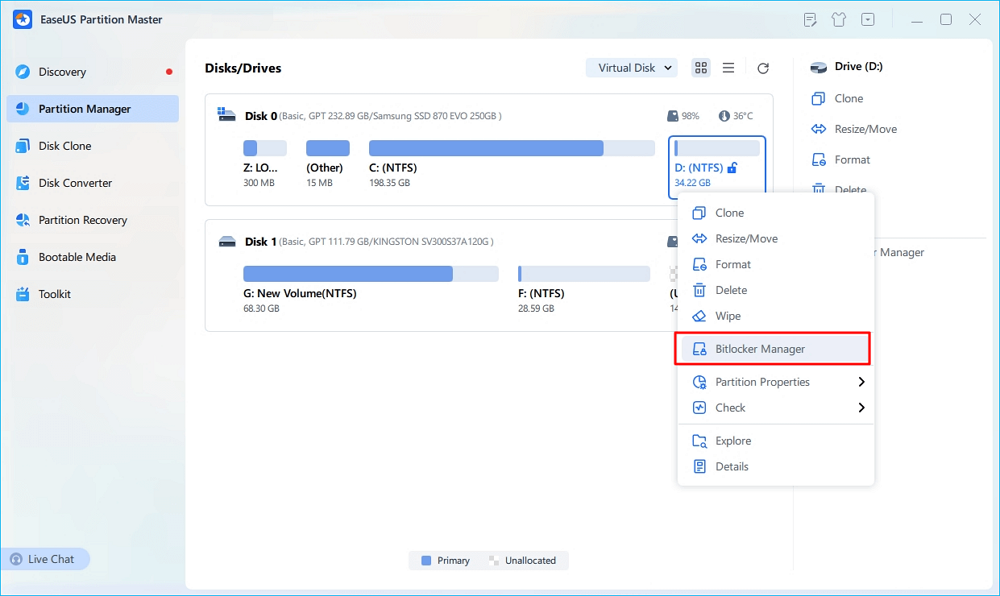
Step 1. Open EaseUS Partition Master and right-click on the BitLocker-encrypted drive.
Step 2. Select "BitLocker Manager," and you will see a new window that allows you to perform BitLocker-relevant ops.
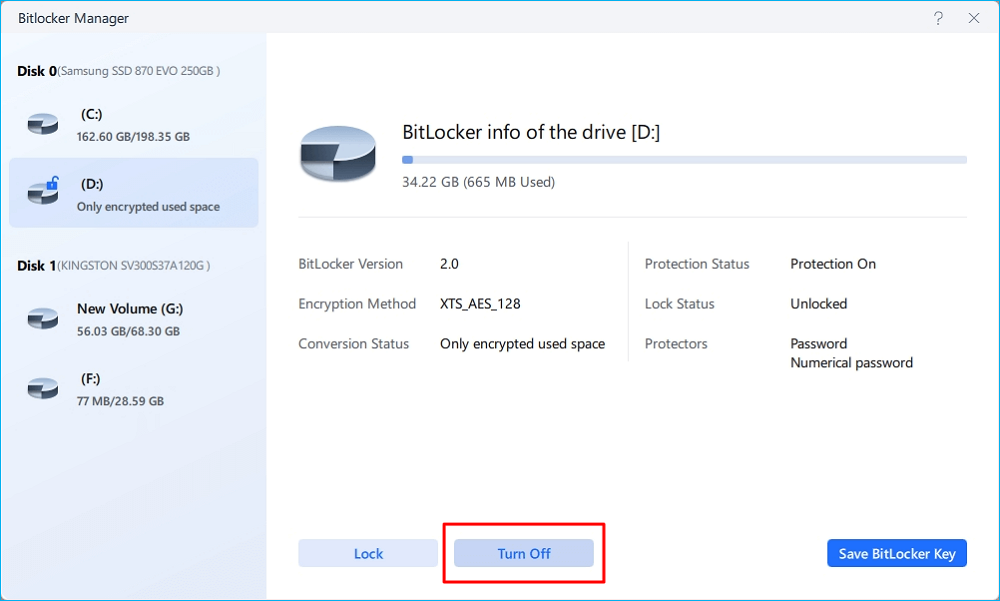
Step 3. Click "Turn Off" for your target drive, click "Yes" to confirm you want to turn off BitLocker on your partition, and wait patiently until it's done.
Option 2. Hasleo BitLocker Anywhere
Hasleo BitLocker Anywhere offers a powerful BitLocker decryption feature that lets you safely decrypt BitLocker-encrypted drives (FAT12/16/32, exFAT, and NTFS) on Windows 11, 10, 8.1, 8, and 7 Home or Windows 7 Professional editions. This makes it an ideal solution for accessing encrypted data on Windows editions that don't natively support BitLocker.
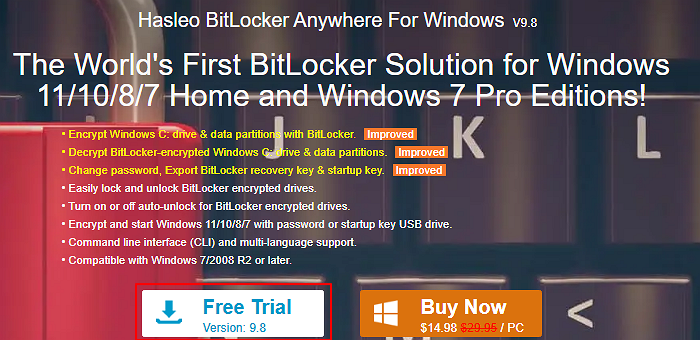
Step 1. Visit the official website of Hasleo BitLocker Anywhere For Windows > click Free Trial to get this BitLocker unlock software free download.
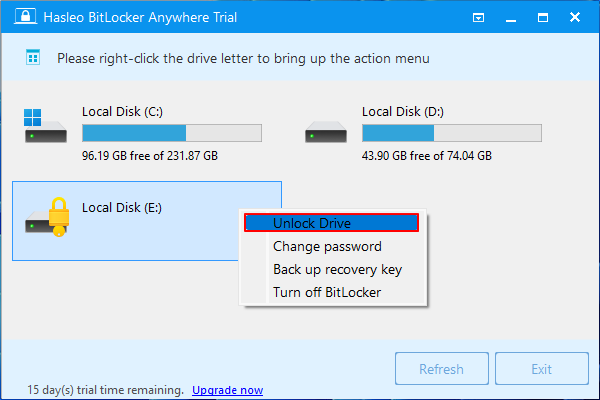
Step 2. After running this tool, it will automatically detect your encrypted drive. In the following screenshot, it detects my BitLocker-encrypted E drive > right-click on it > choose Unlock Drive.
Step 3. Please follow the on-screen instructions to end the encryption process.
For a complete overview of BitLocker management, see our [BitLocker Management and Operations Guide].
Option 3. DiskGenius
DiskGenius allows you to unlock BitLocker-encrypted drives using your password, recovery key, or BEK file. Designed to manage BitLocker partitions independently of Windows, it provides enhanced reliability and fault tolerance, making it ideal for handling corrupted or interrupted encryption processes. Let's check whether this free BitLocker unlock software download can unlock an encrypted disk!
Step 1. Go to the official website of DiskGenius > click Free Download to get this third-party tool.
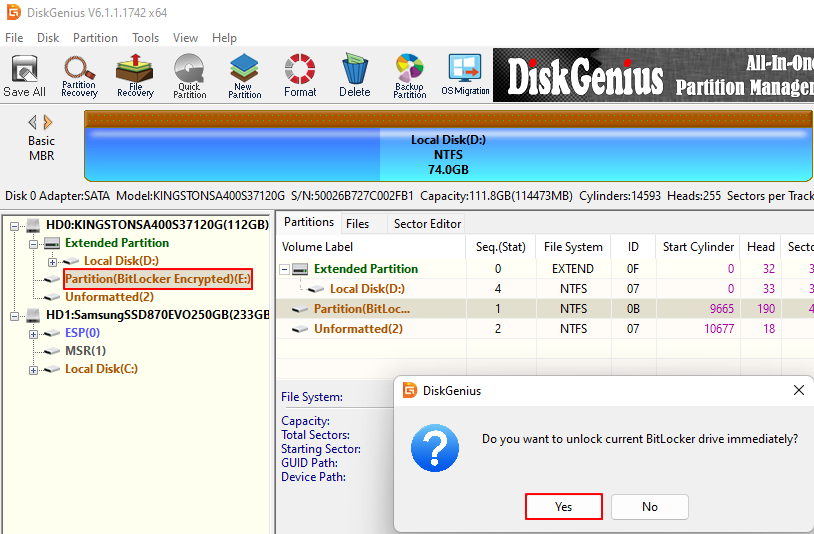
Step 2. In the main DiskGenius interface, you'll see a reminder pop-up after double-clicking your encrypted drive.
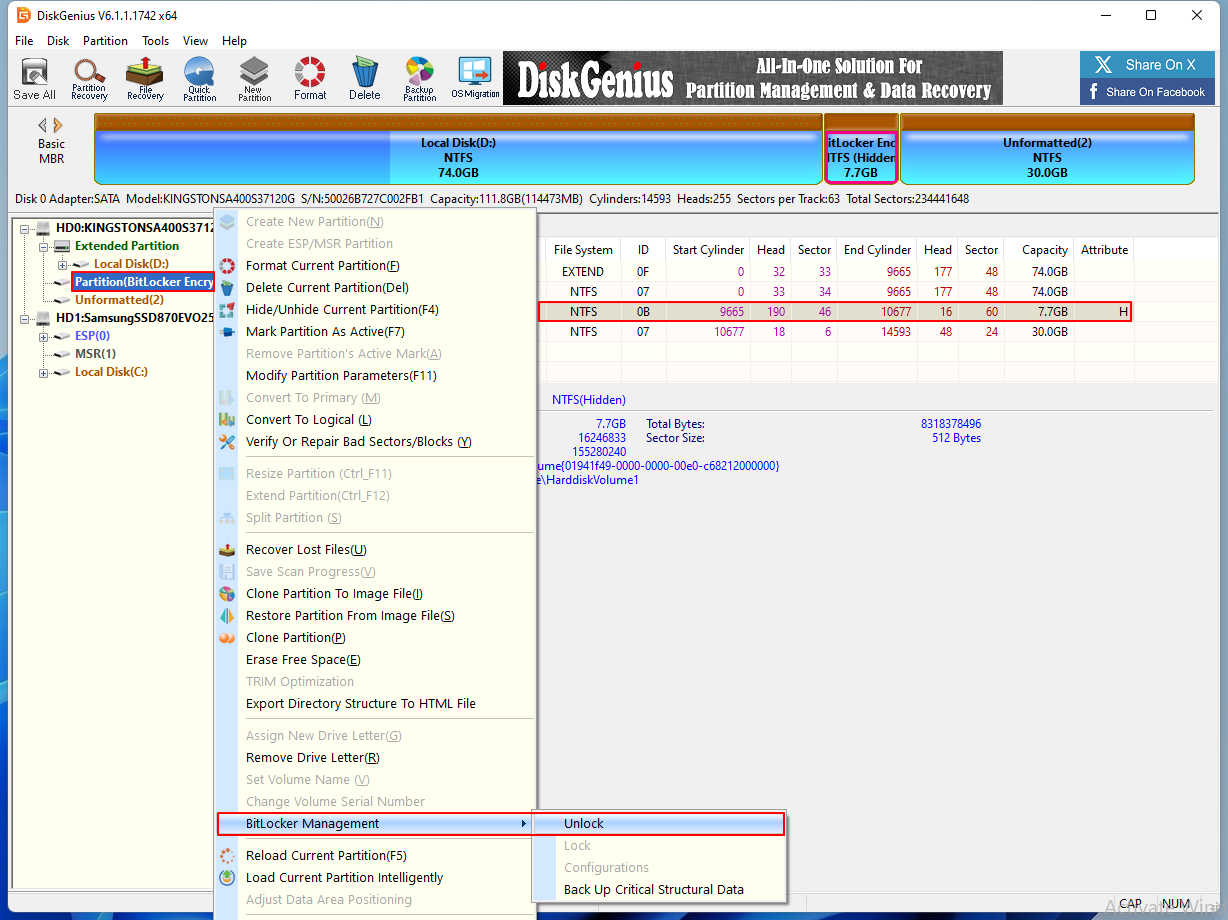
Step 3. In addition, you can right-click on your encrypted drive > choose BitLocker Management > choose Unlock.
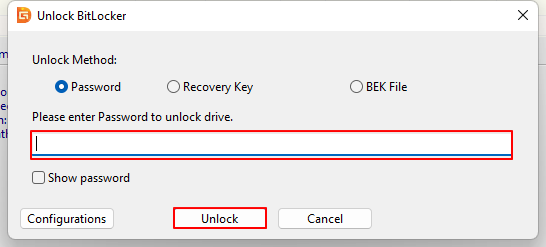
Step 4. In the Unlock BitLocker window, select your unlock method from Password, Recovery Key, or BEK File.
Here, I choose to enter password > click Unlock.
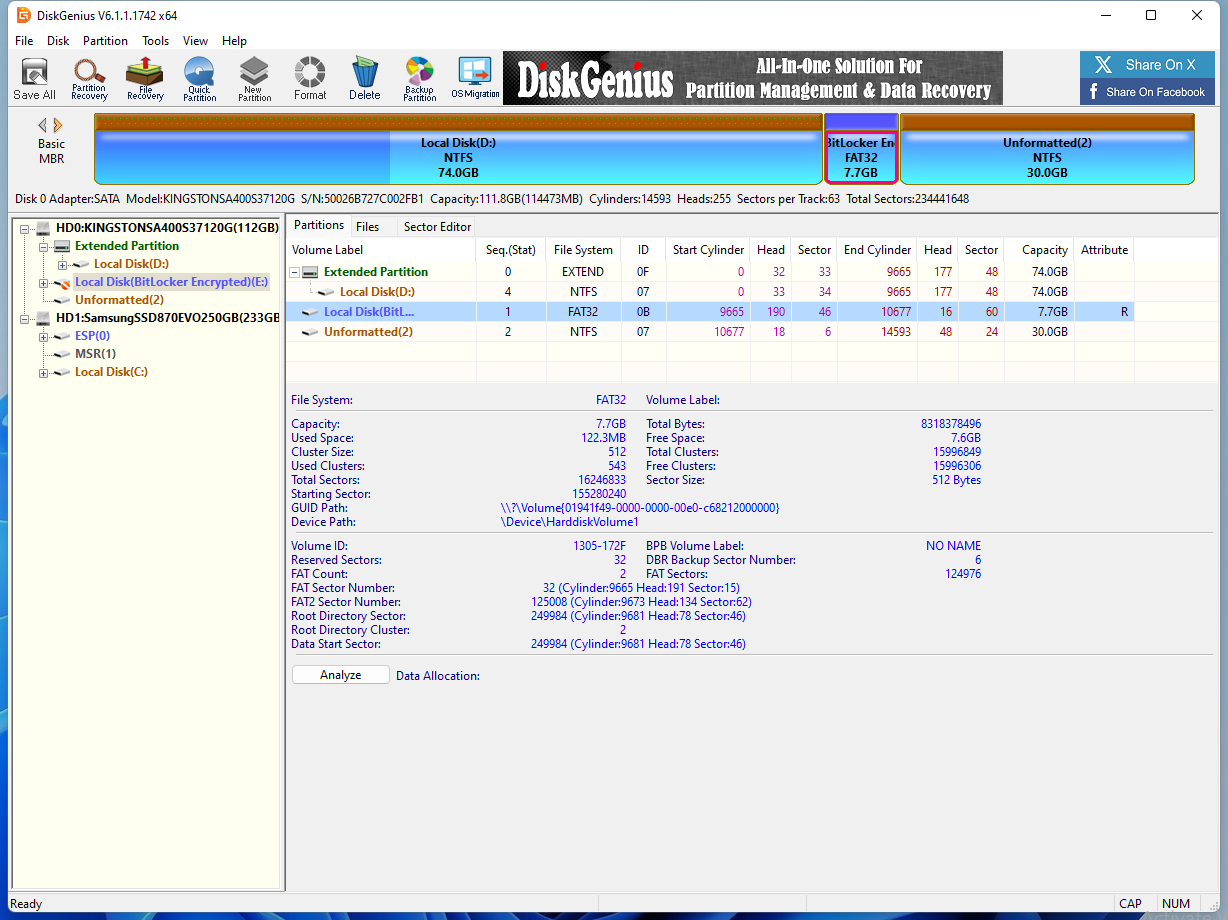
Step 5. After decryption, the previously encrypted e drive still remains encrypted. So, DiskGenius might not be a free tool.
Bonus Tips: Prepare the Computer for BitLocker Drive Encryption
Some users also want to know how to prepare the PC for BitLocker drive encryption. If you're among them, please read further.
BitLocker Automatic Device Encryption - Reasons & Solutions
Besides BitLocker drive encryption, there is another BitLocker Automatic Device Encryption. This article also explains why drives are automatically encrypted without the user's knowledge and how to find recovery keys. If you're interested, please read more >>
1️⃣How to prepare the hard disk for BitLocker Drive Encryption
BitLocker needs two partitions to encrypt drives and ensure boot integrity: the main OS partition and an active system partition. The BitLocker Drive Preparation Tool automates this by creating the second volume, migrating boot files, and setting it as the active volume. After restarting your PC, the drive is ready for BitLocker, and you may need to initialize TPM before enabling encryption.
2️⃣System requirements
To create a new partition or merge Unallocated space with an existing one, your system must meet these requirements:
Operating System Requirements:
- Genuine Windows Vista Ultimate/Enterprise or Windows Server 2008 (including Service Pack 1 versions).
Active Partition Requirements:
- Must contain boot configuration data (BCD) and boot files. If the boot configuration data for your PC is missing, it means that your computer's boot information is damaged.
Target Partition Requirements:
- Located on a simple disk initialized for basic storage.
- Must be a primary partition; extended or logical drives are not supported.
- Formatted with NTFS and not compressed.
- Cluster size ≤ 4 KB.
- Cannot use software spanning, mirroring, or RAID (hardware RAID is supported).
Operation-Specific Requirements:
- Split Operation: At least 10% of the active partition must remain free after reducing its size by 1.5 GB.
- Merge Operation: Total partition size must be at least 1.5 GB and have at least 800 MB of free space.
Moreover, if you prefer a complete guide to setting up, managing, and resolving BitLocker issues, you may also follow this BitLocker troubleshooting guide.
Conclusion
Want a BitLocker unlock software free download? This article introduces EaseUS Partition Master, Hasleo BitLocker Anywhere, and DiskGenius. However, based on our assessment, DiskGenius might not be 100% free. Compared with Hasleo BitLocker Anywhere, EaseUS Partition Master offers additional partition management features, including resizing partitions, converting MBR disks to GPT disks, and changing file systems.
If you prefer a more comprehensive partition manager, don't hesitate to download EaseUS Partition Master now! It works not only as a BitLocker unlock tool, but also as a comprehensive BitLocker manager software. It can also help you unlock encrypted drives without paying!
FAQs
Additionally, this section provides useful tips on partition management and BitLocker encryption. If you're interested, be sure to check them out!
1. How to unlock a BitLocker drive without a recovery key or password?
If the BitLocker-encrypted data is not that important, you can directly unlock the BitLocker drive without recovery key and password by formatting this drive.
2. How can I get the BitLocker recovery key with the key ID?
Please refer to the following steps.
- Sign in with your work or school account.
- Select Devices and expand the device for which you need to retrieve the recovery key.
- Select the option View BitLocker Keys.
- Using the key ID, find the related recovery key and use it to unlock the drive.
For a more detailed guide, refer to this link: How to get BitLocker Recovery Key with Key ID.
How Can We Help You
About the Author

Updated by Tracy King
Tracy became a member of the EaseUS content team in 2013. Being a technical writer for over 10 years, she is enthusiastic about sharing tips to assist readers in resolving complex issues in disk management, file transfer, PC & Mac performance optimization, etc., like an expert.

Cici is the junior editor of the writing team of EaseUS. She accepted the systematic training on computers at EaseUS for over one year. Now, she wrote a lot of professional articles to help people resolve the issues of hard drive corruption, computer boot errors, and disk partition problems.
Product Reviews
-
I love that the changes you make with EaseUS Partition Master Free aren't immediately applied to the disks. It makes it way easier to play out what will happen after you've made all the changes. I also think the overall look and feel of EaseUS Partition Master Free makes whatever you're doing with your computer's partitions easy.
Read More -
Partition Master Free can Resize, Move, Merge, Migrate, and Copy disks or partitions; convert to local, change label, defragment, check and explore partition; and much more. A premium upgrade adds free tech support and the ability to resize dynamic volumes.
Read More -
It won't hot image your drives or align them, but since it's coupled with a partition manager, it allows you do perform many tasks at once, instead of just cloning drives. You can move partitions around, resize them, defragment, and more, along with the other tools you'd expect from a cloning tool.
Read More
Related Articles
-
How to Fix Black Screen After Cloning Disk - 3 Proven Methods
![author icon]() Sherly/2026/08/13
Sherly/2026/08/13 -
How to Bypass BitLocker Recovery Key Blue Screen
![author icon]() Cici/2026/08/14
Cici/2026/08/14 -
How to Fix Selected File Is Not a Proper BIOS [4 Ways]
![author icon]() Cici/2026/08/13
Cici/2026/08/13 -
How to Create Bootable USB from DMG Mac🔥
![author icon]() Cici/2026/08/13
Cici/2026/08/13
 Sherly/2026/08/13









