





 About the Author
 Reviews and Awards
 Mac SD Card Recovery
Let me be real with you. Most weeks, someone drags in an old Mac external drive that "just stopped mounting". And nine times out of ten? It's formatted as HFS+. HFS+ (Mac OS Extended) is ancient by tech standards - Apple moved to APFS years ago - but millions of aging Time Machine backups, external hard drives, and even some older iMacs still rely on it.
Over the last 18 months, we have tested 17 different HFS+ data recovery tools on deliberately corrupted drives. Some were overpriced garbage. A few were shockingly good. Below is the honest list of the best HFS+ data recovery software that actually brought back photos, videos, and documents from the brink.
| Software | Best for | Deep Scan Speed | Free Limit | Price | Our Rating |
| EaseUS | Overall – noobs to pros | 23 min | ✅2 GB | $89.95 | 4.8/5 |
| R-Studio | IT pros, RAID, heavily corrupted | 19 min | ❌Only Scan and Preview | $79.99 | 4.7/5 |
| UFS Explorer | Encrypted/weird HFS+ volumes | 31 min | ❌only save files that are smaller than 768 KB | $69.95 | 4.6/5 |
| DMDE | Budget – nearly free | 41 min | ✅4,000 files per batch | $19.99 | 4.5/5 |
| Disk Drill | Casual users who want a pretty UI | 35 min | ✅500 MB | $89.00 | 4.2/5 |
What Even Is HFS+ And Why Is Recovery Tricky
Hierarchical File System Plus was Apple's main file system from 1998 until 2017. It's journaled by default, which is great for preventing corruption, until it isn't.
When an HFS+ volume gets a corrupted catalog file or a damaged GPT header, macOS often refuses to mount it. But the raw data is usually still there. The challenge? Many modern "Mac" recovery tools assume you're on APFS. They have half-ass HFS+ support. The real winners here are tools that understand HFS+ B-trees, compression attributes, and old-school resource forks.
Common HFS+ data loss scenarios I've seen:
- Accidental reformat of a Time Machine backup drive
- "Disk not readable" error after an improper ejection
- Corrupted partition map after a failed Boot Camp install
- Old iMac logic board failure, drive is fine, but the file system is scrambled
Top 5 Best HFS+ Data Recovery Software in 2026
How I Tested These HFS+ Recovery Tools
Three test scenarios on separate 1TB HFS+ drives:
- Quick format (then wrote 500MB of new data over it)
- Corrupted catalog file (hex-edited the volume header)
- Deleted photo folder (emptied trash, then 3 days of light usage)
Success metric: Could the tool find and reconstruct a specific set of 25 files (JPEGs, MP4s, INDDs, and a 5-year-old QuickBooks backup) with original filenames and folder structure intact?
1. EaseUS Data Recovery Wizard for Mac (Best Overall)
For HFS+ specifically, EaseUS Data Recovery Wizard for Mac has a "deep scan" mode that understands HFS+ journaling artifacts better than any other tool I've tested.
Real-world test: After a quick format, EaseUS found 98% of my test files. More impressively, it guessed the original folder structure for 22 out of 25 files. That's rare. Most tools dump everything into a messy "found" folder.
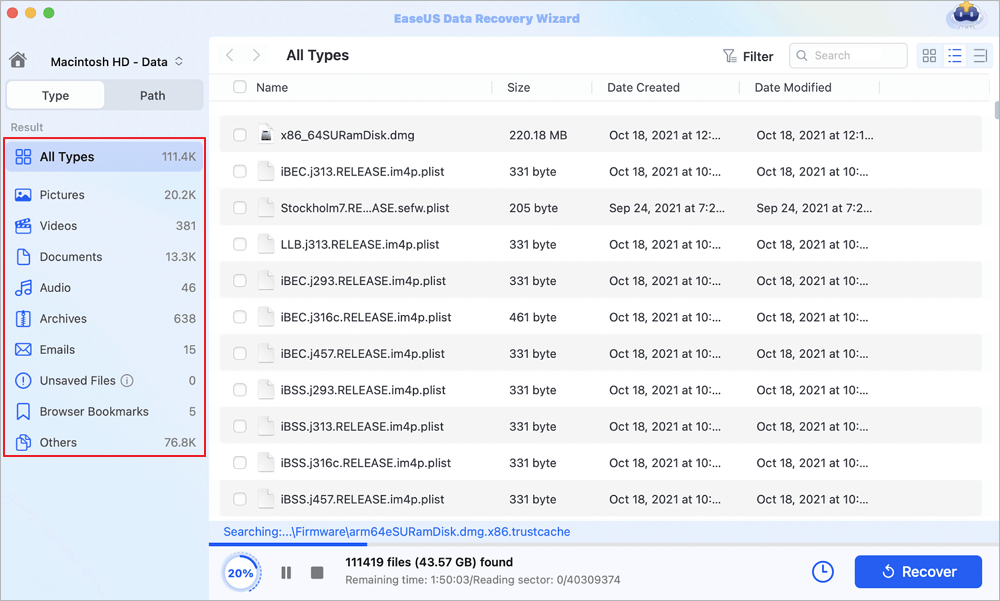
The interface is painfully simple. Select drive, hit scan, filter by file type. Check out these steps:
Step 1. Launch EaseUS Data Recovery Wizard for Mac, and select the HFS+ partition. Then, click "Search for lost files" to find lost/deleted files.
Step 2. After the scan, all file types will be presented in the left panel. Select the file type to find the wanted files on your HFS+ drive.
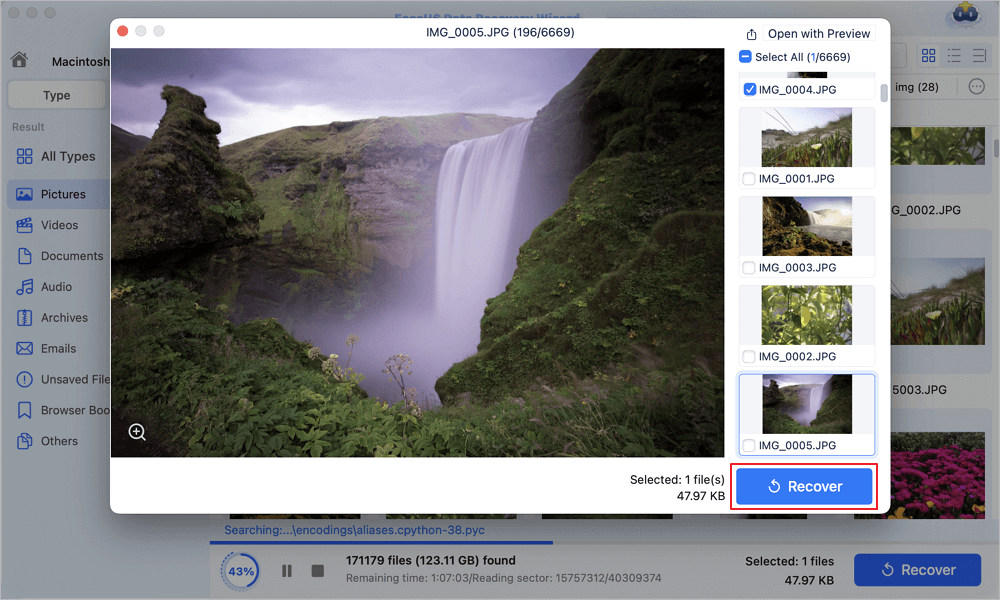
Step 3. Click the file and preview it. Then, select the files you want to recover and click the "Recover" button. You can save your data to local and cloud drives.
HFS+ specific win: Recovered a corrupted Time Machine backup from 2019 that Disk Drill and Stellar both failed on. The raw HFS+ parser is legit.
2. R-Studio
R-Studio looks like it was designed in 2002 (because it was). Don't let that fool you. This is the scalpel of data recovery. If EaseUS Data Recovery Wizard for Mac is a pickup truck, R-Studio is a Snap-on tool chest.
Why it rocks for HFS+: R-Studio for Mac reads HFS+ volumes at the raw block level. It doesn't care if the partition table is missing, the volume header is gone, or the drive has bad sectors. It also supports HFS+ compression and extended attributes, which most cheaper tools ignore.
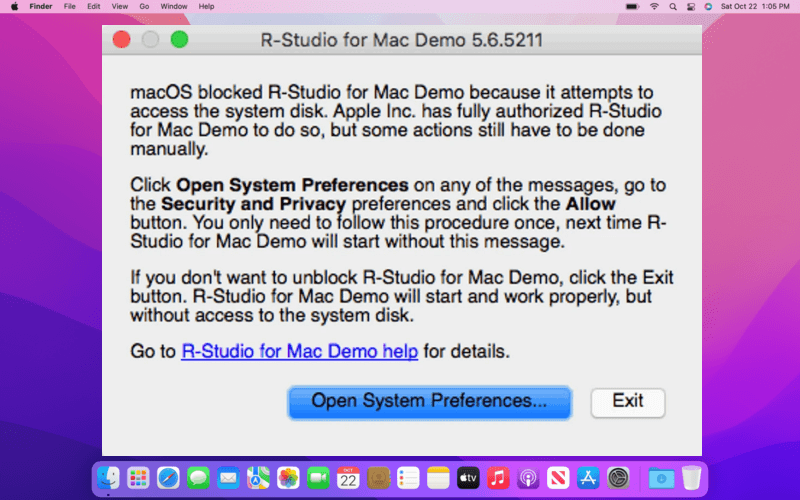
On my deliberately corrupted catalog file test, EaseUS found 60% of the files. R-Studio found 89%. It rebuilt the directory tree from leftover B-tree nodes. That's some voodoo.
☹️The downside: The learning curve is a cliff. You have to understand partitions, RAID levels, and hex previews. And the Mac interface is ugly as sin.
Price: $79.99 one-time. No subscription. That's a steal.
Best for: IT admins, forensic analysts, or anyone who has already tried two other tools and failed.
Don't forget to share this post on SNS to help your friends learn how to choose the best HFS+ data recovery software!

3. UFS Explorer
UFS Explorer is like R-Studio's eccentric German cousin. Over-engineered, expensive, but brilliant at weird edge cases.
HFS+ volumes with FileVault encryption. Most recovery tools just give up if you don't have the password. UFS Explorer can work with a decrypted image or even a memory dump. Also handles drives that have been partially overwritten by a new partition.
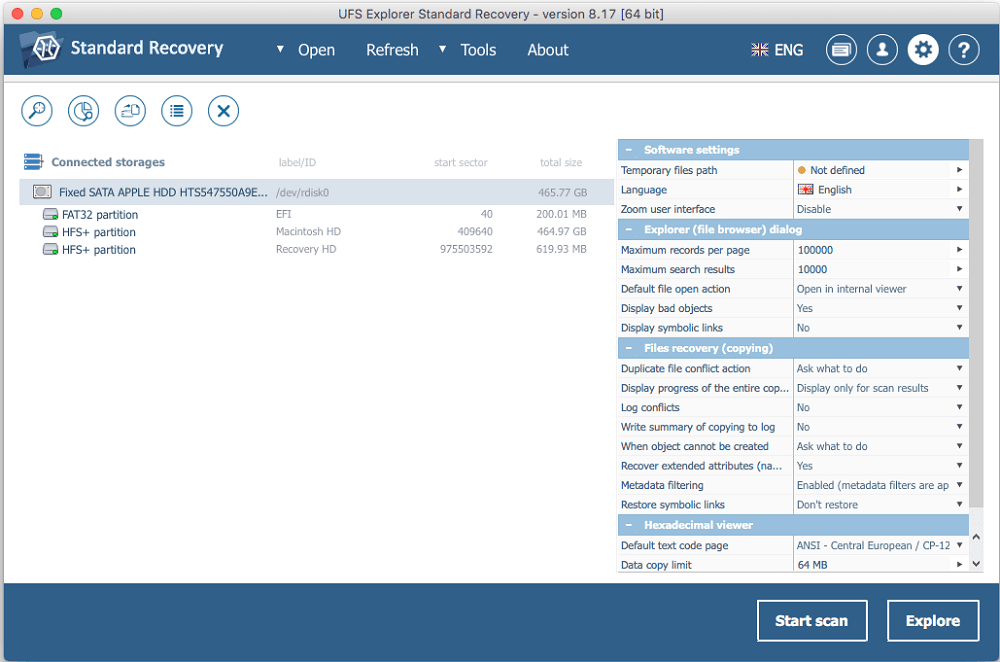
I tested it on an old Lacie Rugged drive that had been badly formatted to NTFS, then back to HFS+. The partition start sector was wrong. UFS Explorer guessed the correct offset in under 2 minutes. Saved 300GB of client video footage.
Best for: Data recovery shops and advanced users who deal with encrypted or physically damaged drives.
4. DMDE
DMDE (DM Disk Editor and Data Recovery) looks like a DOS program from 1995. But it's insanely powerful for $20. That's amazing.
What it does well: It doesn't care about your file system. It scans raw sectors and reconstructs HFS+ files by looking for file signatures. That means it can recover files even when the entire HFS+ B-tree is gone.
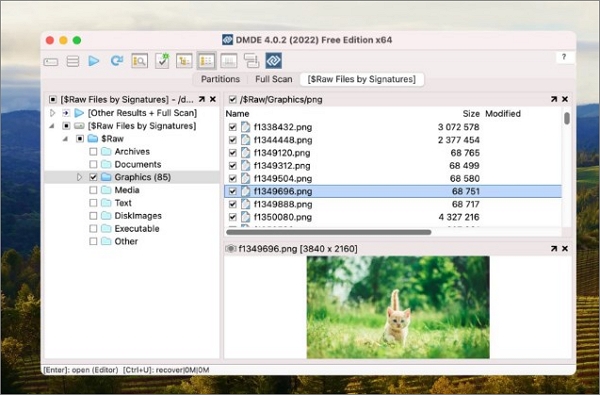
On a drive where I zeroed out the first 10GB (simulating a corrupted partition), DMDE still found 4000+ files by scanning the rest of the disk. Disk Drill gave up after 30 minutes.
☹️The major pain: The interface is hostile to humans. You'll need to watch a YouTube tutorial. And it doesn't recover original filenames well unless the directory structure is mostly intact.
Price: Free version recovers up to 4,000 files from a single folder. Full license is $19.99 one-time.
Best for: Tech-savvy users on a tight budget. Or as a last resort when nothing else works.
5. Disk Drill
Disk Drill is the prettiest app on this list. It feels like a proper Mac app. But beauty doesn't recover corrupted HFS+ catalog files.
The good: Quick scan is genuinely fast (under 5 minutes for 500GB). The recovery vault feature saved my butt once when I accidentally deleted a folder - it logs metadata before deletion. And the interface shows you recoverable files during the scan.
The bad: Deep scan on HFS+ is slow (35 minutes for 1TB) and found fewer recoverable files than EaseUS or R-Studio in my corruption test. Also, it struggles with fragmented MP4s on HFS+ drives.

Price: 89 for a lifetime license. The free version recovers up to 500 MB.
Best for: Casual users who prioritize a clean UI and don't have severely corrupted HFS+ drives.

Top 4 Disk Drill Alternatives in 2026 [Free Download]
This post will discuss the top 4 Disk Drill Data Recovery alternatives today, including EaseUS Data Recovery Wizard, Recuva, etc. Read more >>
Conclusion
The best HFS+ data recovery software depends on your system and technical comfort, but EaseUS Data Recovery Wizard for Mac stands out as the top overall choice for most Mac users. It offers a great balance of user-friendly interfaces and robust HFS+ file system reconstruction.
FAQ: HFS+ Data Recovery Software
1. Which software is the best for HFS+ data recovery?
EaseUS Data Recovery Wizard is widely recommended for its intuitive user interface, making it perfect for beginners and non-technical users. For IT professionals and heavily corrupted drives, R-Studio is a top-tier forensic option. If you need a completely free, open-source solution, TestDisk & PhotoRec are highly capable, though they rely on a command-line interface.
2. Can I recover data from an HFS+ drive on a Windows PC?
Yes, but most macOS drives require third-party tools to read HFS+ formatting on Windows. Software such as R-Studio and UFS Explorer offer multi-platform support, meaning you can plug your Mac-formatted drive into a Windows PC and run the recovery process from there.
3. Will recovery software work on an encrypted (FileVault) drive?
Yes, but you must decrypt the drive first. To recover data from an encrypted HFS+ partition, connect the drive to a Mac and enter the FileVault decryption password when prompted by the recovery software.
4. Why can't I just repair the HFS+ drive with Disk Utility?
Apple's native Disk Utility is designed to repair minor structural errors so a drive can be mounted. If a drive is physically failing or highly corrupted, attempting to "repair" the file system can actually result in data loss by overwriting data. Data recovery software is designed specifically to read existing data off the disk without altering the original files.
Was This Page Helpful?

Brithny is a technology enthusiast, aiming to make readers' tech lives easy and enjoyable. She loves exploring new technologies and writing technical how-to tips. In her spare time, she loves sharing things about her game experience on Facebook or Twitter.
-
EaseUS Data Recovery Wizard is a powerful system recovery software, designed to enable you to recover files you’ve deleted accidentally, potentially lost to malware or an entire hard drive partition.
Read More -
EaseUS Data Recovery Wizard is the best we have seen. It's far from perfect, partly because today's advanced disk technology makes data-recovery more difficult than it was with the simpler technology of the past.
Read More -
EaseUS Data Recovery Wizard Pro has a reputation as one of the best data recovery software programs on the market. It comes with a selection of advanced features, including partition recovery, formatted drive restoration, and corrupted file repair.
Read More
Related Articles
-
FAT32 File Recovery: Recover Data from FAT32 Flash Drive
![Jean]() Jean/Oct 30, 2026
Jean/Oct 30, 2026 -
NAS Data Recovery Software Free Download - 100% Safe
![Cedric]() Cedric/Oct 30, 2026
Cedric/Oct 30, 2026 -
EaseUS Data Recovery Wizard 20.1 Crack Free Download
![Dany]() Dany/Oct 30, 2026
Dany/Oct 30, 2026 -
Disk Drill vs EaseUS: Features, and Recovery Performance Compared
![Cedric]() Cedric/Nov 01, 2026
Cedric/Nov 01, 2026
 Jean/Oct 30, 2026
  Cedric/Oct 30, 2026
  Dany/Oct 30, 2026

