





Table of Contents
 About the Author
 Related Posts
Canon's CR2 files hang onto every bit of detail your camera captures, which is why professional photographers and serious hobbyists swear by them. Unlike JPEGs, these RAW files haven't been processed or compressed, so you get a lot more leeway when you're editing them later.
But CR2 files are easily damaged; things like interrupted transfers, corrupted memory cards, accidental formatting, or plain bad luck with a system crash can mess them up.
When a CR2 file gets corrupted, you might not be able to open it at all. This guide walks you through why CR2 files get corrupted in the first place and lays out how to repair them with dedicated photo repair tools.
Why Do CR2 Files Become Corrupted
Before attempting a repair, it's helpful to understand what caused the corruption. Identifying the root cause can also help prevent future photo loss.
Many CR2 file issues occur during storage, transfer, or editing rather than while taking the photo itself.
Common causes include:
| Cause | Description |
| Interrupted File Transfer | Disconnecting the SD card, camera, or USB cable before the transfer is complete can leave the CR2 file incomplete or corrupted. |
| SD Card Corruption | File system errors, bad sectors, or physical damage on the SD card can corrupt stored Canon CR2 RAW photos. |
| Unexpected Camera Shutdown | A sudden battery failure or powering off the camera while saving images may corrupt newly captured CR2 files. |
| Virus or Malware Attack | Malicious software can alter or damage the internal structure of CR2 files, making them inaccessible. |
| Improper SD Card Removal | Removing a memory card without safely ejecting it may interrupt read/write operations and lead to file corruption. |
| Storage Device Failure | Aging SD cards, CFexpress cards, HDDs, or SSDs may develop hardware issues that damage RAW image files. |
| Software Crash | If Lightroom, Photoshop, or another image editor crashes while processing a CR2 file, the file may become corrupted. |
| File System Corruption | Errors in FAT32, exFAT, or NTFS file systems can make CR2 files unreadable or inaccessible. |
You should pay attention if multiple CR2 files are not opening simultaneously; your storage device itself may also have underlying problems that should be checked immediately.
How to Repair Corrupted CR2 Files with Photo Repair Software
When your Canon RAW photos get corrupted, dedicated photo repair software usually gets the job done quickly and safely. You don't have to mess around with file headers or risk making things worse; these tools dig into the CR2 file, figure out what's broken, and recover your images with as much quality as possible.
One of the simplest options is EaseUS Fixo Photo Repair. It handles Canon RAW files (CR2), plus a bunch of other formats like CR3, NEF, ARW, RAF, DNG, TIFF, JPEG, and PNG. Maybe your photos were wrecked during a bad transfer, a busted SD card, or when your computer crashed. It doesn't really matter; this software repairs one or many photos at a time and gets things back to normal pretty fast.
Now, you can follow the steps below to fix damaged CR2 Canon photos in minutes:
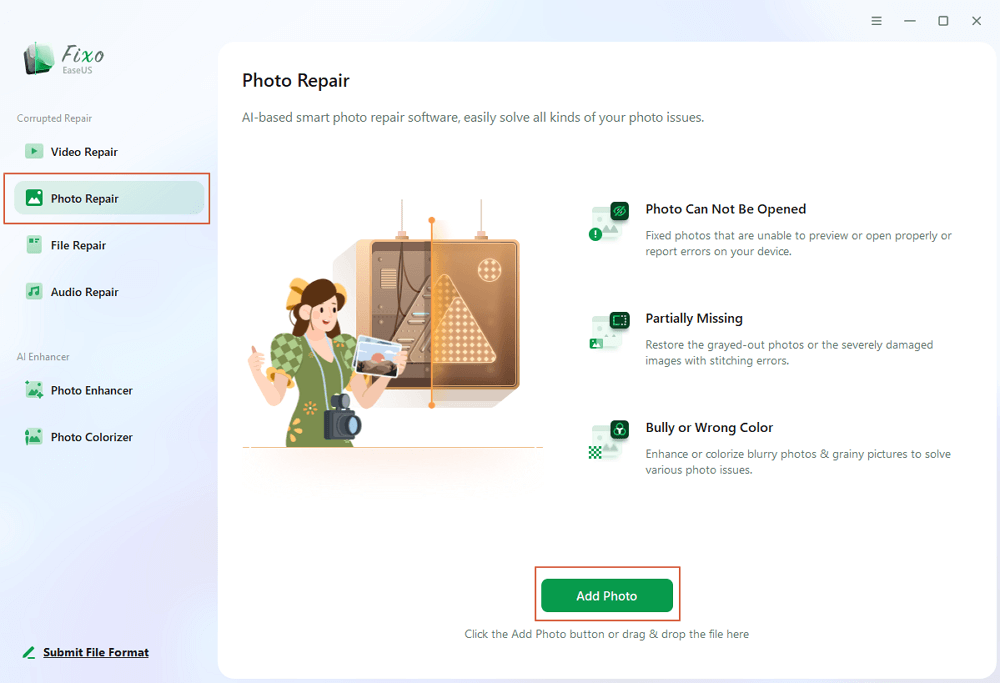
Step 1. Launch Fixo on your computer. You can choose "Photo Repair" to repair photos that cannot be opened, partially missing, etc. Click "Add Photos" to select corrupted photos.
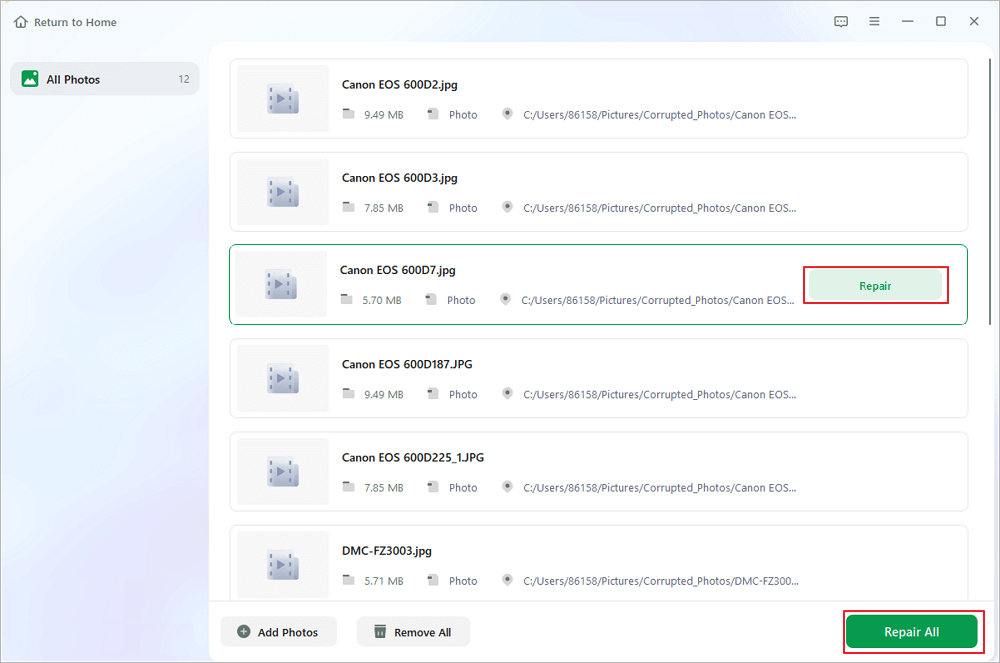
Step 2. You can repair multiple photos at once by clicking the "Repair All" button. If you want to repair one photo, move your pointer to the target photo and choose "Repair".
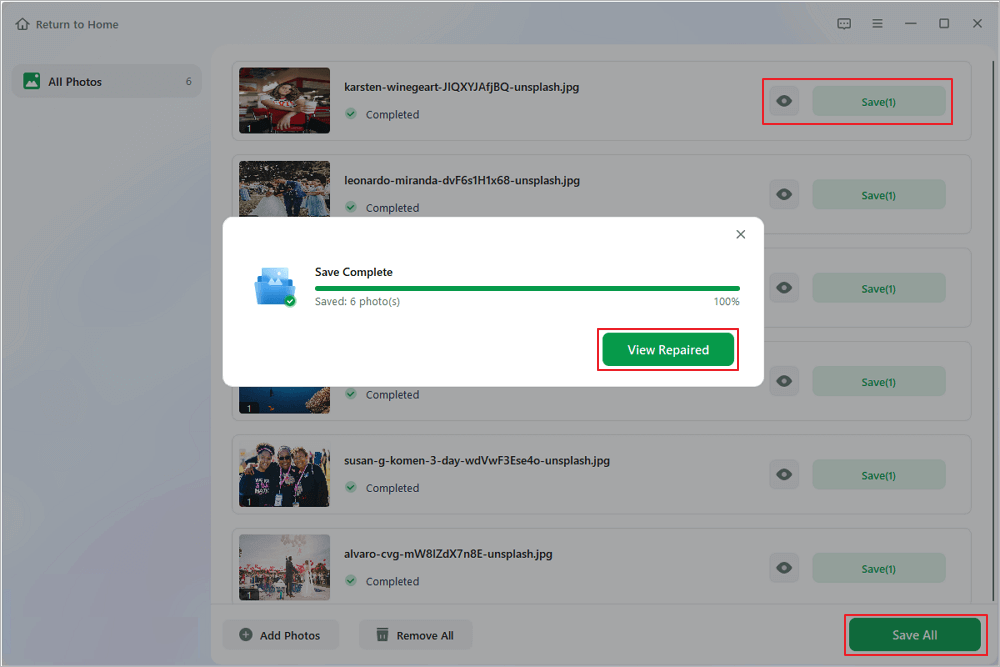
Step 3. You can click on the eye icon to preview the photos and click "Save" to save a selected photo. Choose "Save All" to save all the repaired images. Click "View Repaired" to locate the repaired folder.
Please share this CR2 repair software on social media to help more Canon camera users!

Other Ways to Fix Damaged CR2 RAW Photos
If you don't want to use professional CR2 repair software or you just want to try something simple first, there are a few basic things you can try. They may not fix every corrupted CR2 file, but they're worth a shot, especially for minor problems.
Try Another RAW Editor
Sometimes the issue comes down to software, not the file itself. Open your CR2 file in a different RAW editor or viewer, maybe Adobe Lightroom, Photoshop, or Canon's Digital Photo Professional.
Copy the File to Your Computer
If your CR2 file's on an SD card or external drive, copy it over to your computer and try opening it again. Storage devices can act up and throw errors that make files unreadable, but moving the file sometimes helps.
Restore from Backup
If you've got backups on an external drive or in the cloud, restore the original CR2 file from there. It's usually the fastest way to get your photo back, and you keep the best quality.
Convert CR2 to DNG
Turning your CR2 into a DNG file might solve issues with certain editing programs. Just keep in mind, this won't fix severe corruption, only compatibility hiccups.
Conclusion
If your Canon RAW files suddenly won't open or look weird, don't panic. Tools like EaseUS Fixo Photo Repair can restore your corrupted CR2 files and keep the original quality. If you're dealing with minor hiccups, try opening the file in a different RAW editor, pulling it from a backup, copying it to a new drive, or converting it to a DNG file.
CR2 File Repair FAQs
1. Why won't my CR2 files open?
If your Canon CR2 files cannot be opened on your computers, that might be because the editor or viewer you are using does not support the CR2 file format. Also, it's possible that your CR2 files are corrupted or that you added the wrong file extension.
2. What's the difference between repairing and recovering a CR2 file?
Recovering CR2 files means recovering deleted or missing CR2 files from storage devices. Repairing CR2 files means fixing the damaged part of the file. If your files are completely missing from the device, they may have been deleted and need data recovery. If your CR2 files cannot open on your device, it might be due to file corruption, and you need file repair.
3. How can I prevent CR2 file corruption?
Using a high-quality SD card is the first thing to prevent CR2 file corruption, because a good SD card can ensure writing data from your Canon camera quickly and safely. Then, you should always format a card in the camera rather than on your computer.
Was This Page Helpful?
About the Author

Dany is an editor of EaseUS who lives and works in Chengdu, China. She focuses on writing articles about data recovery on Mac devices and PCs. She is devoted to improving her writing skills and enriching her professional knowledge. Dany also enjoys reading detective novels in her spare time.


