
Content
Page Table of Contents
About the Author
Hot Topics
If your C drive is running out of space, Windows Disk Management refuses to extend a partition, or you are upgrading to a larger SSD, you may have searched for a reliable Partition Magic alternative. Many users still remember PartitionMagic as one of the earliest disk partition tools for Windows. However, modern storage devices, GPT disks, UEFI systems, and Windows 11 compatibility have changed the requirements for disk partition software completely.
Today, users need something safer, more stable, and designed for modern PCs. In this guide, we will explain why PartitionMagic is outdated, what to look for in a modern partition manager, and the best Partition Magic alternatives for Windows 11 and Windows 10.
What Is PartitionMagic and Why Is It Outdated?
PartitionMagic is a hard drive partition management tool developed by PowerQuest and later acquired by Symantec. It supports features such as resizing partitions, extending the system drive, and recovering lost partitions. However, development has been discontinued, and the last official version was 8.0 (released in 2004), which supports Windows 98, Me, 2000, and XP.
At the time, it was considered revolutionary because many disk operations previously required formatting the drive entirely. However, PartitionMagic has not been updated for years. It was originally developed for much older operating systems and does not officially support modern Windows environments.
As storage technology evolved, several major limitations became obvious:
- No proper Windows 11 support
- Limited compatibility with GPT disks
- Problems with UEFI systems
- No optimization for NVMe SSDs
- Increased risk of partition corruption on newer systems
Most users are not specifically looking for the old software itself. They simply want a modern partition tool that can safely resize partitions without losing data. Share this post if you found it helpful.

Best Partition Magic Alternative for Windows 11/10/8/7
Before choosing a partition manager, it is important to understand what actually matters in modern disk partition software. A good Partition Magic alternative should not only resize partitions. It should also protect your data and support current hardware and Windows technologies.
Here are the most important things to look for before downloading any partition tool for Windows 11 or Windows 10.
- Non-Destructive C Drive Extension
One of the biggest reasons users search for partition software is because the C drive becomes full. A modern partition manager should allow you to:
- Resize partitions without losing data
- Extend the C drive without reinstalling Windows
- Move unallocated space safely
- Avoid deleting existing partitions
This is especially important for beginners who are worried about damaging the operating system.
- SSD and Hard Drive Migration
Modern users often upgrade from HDDs to SSDs or replace smaller SSDs with larger ones. A reliable disk partition software should support:
- OS migration
- SSD cloning
- Partition alignment
- Data-safe drive replacement
Without proper migration tools, users risk boot failures or performance issues.
- GPT and UEFI Support
Most modern systems now use GPT partition styles and UEFI boot mode instead of older MBR and Legacy BIOS setups. Your partition tool for Windows 11 should fully support:
- GPT disks
- UEFI boot environments
- Large-capacity drives
- Modern SSD architectures
- Better Stability and Safety
The best Partition Magic alternatives focus heavily on:
- Safer partition resizing
- Error prevention
- Recovery support
- Stable partition operations
This is particularly important when working with system drives or important data. Based on these factors, we selected top 3 partition magic alternatives. Continue reading and learn their pros and cons.
#1. EaseUS Partition Master
For users who want a beginner-friendly yet powerful partition manager, EaseUS Partition Master is one of the most complete Partition Magic alternatives available today. Instead of focusing only on technical features, the software is designed around common user tasks such as extending the C drive, migrating Windows to SSD, resizing partitions without losing data, and fixing storage layout problems.
Whether you are upgrading storage, organizing partitions, or trying to free up disk space, the software simplifies operations through a graphical interface and guided workflows.
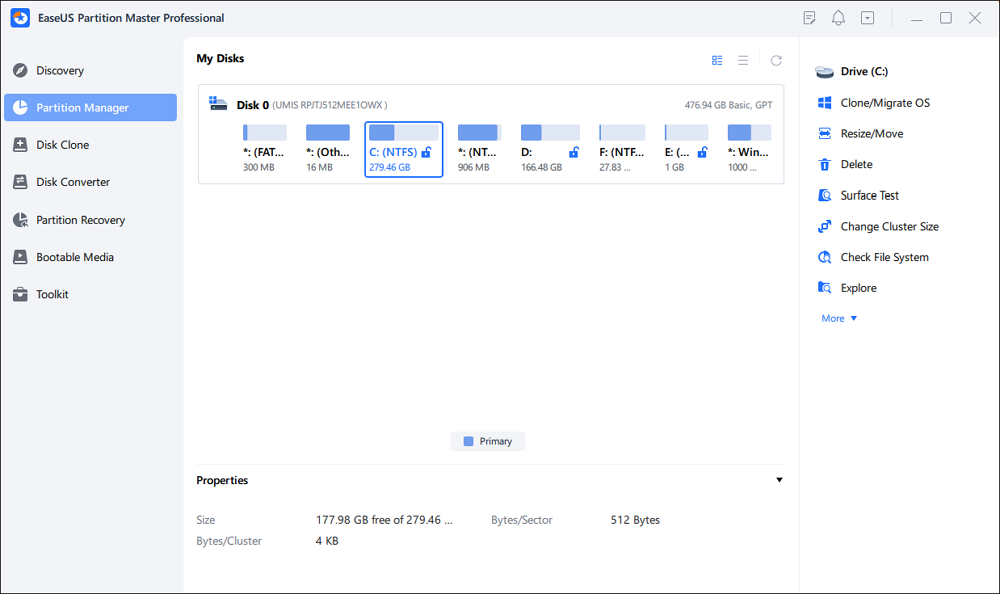
✔️Best For: Beginners, Windows 11 users, SSD upgrades, non-destructive partition resizing, users who want visual disk management
Advantages:
- Supports Windows 11 and Windows 10
- Full GPT and UEFI compatibility
- Supports 4TB+ hard drives
- SSD 4K alignment support
- Dynamic disk support
- Easy-to-use graphical interface
- Can resize partition without losing data
Disadvantages:
- Some advanced features require the paid version
Review:
EaseUS Partition Master is a comprehensive, user-friendly disk management utility that simplifies complex tasks like resizing, cloning, and migrating drives without data loss. - G2.com
#2. GParted
For advanced users who prefer open-source solutions, GParted remains a popular choice. Unlike traditional Windows partition software, GParted usually runs through a Linux live environment. This gives experienced users more flexibility and deeper low-level disk control.
It is widely used by technicians and IT professionals for partition resizing, Linux installations, and advanced disk operations. However, because it operates outside the normal Windows environment, it may feel intimidating for beginners.
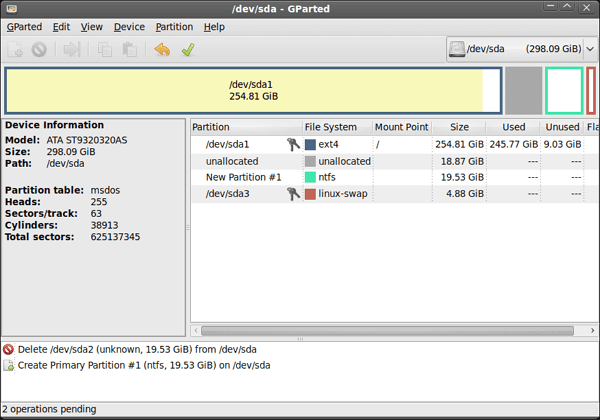
✔️Best For: Advanced users, Linux users, Technicians, Bootable partition management
Advantages:
- Free and open-source
- Powerful partition editing capabilities
- Works with multiple file systems
- Excellent for bootable environments
Disadvantages:
- Not beginner-friendly
- Requires creating a bootable USB or Linux live environment in many cases
Review:
GParted is highly recommended for everyday users, IT professionals, and Linux enthusiasts. Its bootable live environment makes it an essential troubleshooting tool for anyone managing multi-boot systems or repairing drives. -Spiceworks
#3. Windows Disk Management
Disk Management is the built-in partition tool included with Windows. For very basic tasks, it may be enough. Users can create partitions, delete volumes, and perform limited disk management without installing third-party software. However, many users quickly discover its limitations when trying to resize system partitions. For example, the "Extend Volume" option often becomes grayed out because Windows Disk Management cannot move unallocated space. This is one of the biggest reasons users start searching for a Partition Magic alternative in the first place.
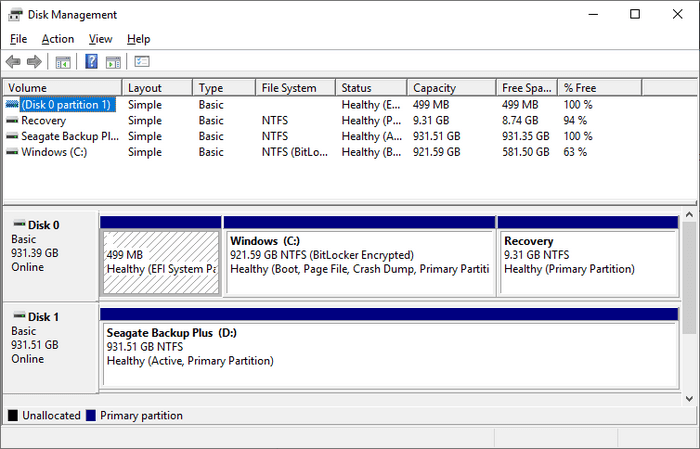
✔️Best For: Simple partition tasks, users who do not want additional software, basic volume creation and deletion
Advantages:
- Built directly into Windows
- No installation required
- Safe for simple operations
Disadvantages:
- Cannot move unallocated space
- Extend Volume is often grayed out
- Lacks SSD migration and disk cloning features
Review:
Windows Disk Management is a reliable, built-in tool best suited for basic storage tasks like initializing new drives, assigning drive letters, and doing simple shrinking or extending. However, it lacks advanced features like live partition resizing across file systems, data recovery, OS migration, and secure wiping. - Microsoft Supoprt
With the right disk partition manage software, you can manage disk partitions now. The following articles may help with disk partition management.
Conclusion
Although PartitionMagic was once a popular partition manager, it is no longer suitable for modern Windows systems. Today's users need a safer and more reliable Partition Magic alternative that supports Windows 11, GPT disks, SSDs, and modern partition management tasks.
Whether you are trying to resize partitions without losing data, migrate Windows to a new SSD, or simply organize your storage more efficiently, choosing the right disk partition software can save time and reduce the risk of data loss. For beginners, user-friendly tools with visual interfaces are often the best choice. Advanced users may prefer more flexible environments like GParted. Meanwhile, Windows Disk Management remains useful for very basic operations. The best choice ultimately depends on your workflow, experience level, and storage needs.
FAQ About Alternatives to Partition Magic
1. Can PartitionMagic run on Windows 11?
No. PartitionMagic does not officially support Windows 11, Windows 10, GPT disks, or UEFI systems. Since the software has not been updated for many years, using it on modern PCs may lead to partition errors, boot failures, or compatibility problems.
2. What is the best free Partition Magic alternative?
Several free partition manager tools are available for Windows users. GParted is a popular open-source option, while some commercial disk partition software also provides free versions for basic tasks such as resizing partitions, extending the C drive, and creating new volumes.
3. Which partition manager is the safest?
The safest partition manager software usually includes non-destructive partition resizing, rollback protection, SSD support, and error recovery features. Modern partition tools are generally much safer than older software like PartitionMagic because they are designed for current Windows systems and storage technologies.
4. Can I resize a partition without losing data?
Yes. Most modern partition manager tools can resize partitions without deleting existing files. However, backing up important data before modifying partitions is still strongly recommended to avoid unexpected data loss caused by power failure, hardware issues, or user error.
5. Is Windows Disk Management enough for partition resizing?
Windows Disk Management is suitable for basic disk operations, but it has limited partition management capabilities. For example, it cannot move unallocated space, and the "Extend Volume" option may become unavailable in many situations. Advanced partition software provides more flexibility and better control.
6. What is the difference between PartitionMagic and modern partition manager software?
PartitionMagic was designed for older Windows systems and traditional hard drives. Modern partition manager software supports Windows 11, GPT partition tables, UEFI boot mode, NVMe SSDs, SSD 4K alignment, and large-capacity drives. Modern tools also provide safer partition resizing and improved compatibility with current hardware.
How Can We Help You
About the Author

Dany is an editor of EaseUS who lives and works in Chengdu, China. She focuses on writing articles about data recovery on Mac devices and PCs. She is devoted to improving her writing skills and enriching her professional knowledge. Dany also enjoys reading detective novels in her spare time.

Sherly joined EaseUS in 2022 and she has always loved writing articles and enjoys the fun they bring. She receives professional training here, focusing on product performance and other relative knowledge. She has written over 200 articles to help people overcome computing issues.
Product Reviews
-
I love that the changes you make with EaseUS Partition Master Free aren't immediately applied to the disks. It makes it way easier to play out what will happen after you've made all the changes. I also think the overall look and feel of EaseUS Partition Master Free makes whatever you're doing with your computer's partitions easy.
Read More -
Partition Master Free can Resize, Move, Merge, Migrate, and Copy disks or partitions; convert to local, change label, defragment, check and explore partition; and much more. A premium upgrade adds free tech support and the ability to resize dynamic volumes.
Read More -
It won't hot image your drives or align them, but since it's coupled with a partition manager, it allows you do perform many tasks at once, instead of just cloning drives. You can move partitions around, resize them, defragment, and more, along with the other tools you'd expect from a cloning tool.
Read More
Related Articles
-
How to Resize Partitions in Windows 11 Without Data Loss
![Cedric]() Cedric/2026/10/29
Cedric/2026/10/29 -
How to Merge Partitions in Windows 7 (32 and 64 bit)
![Jean]() Jean/2026/10/29
Jean/2026/10/29 -
MBR or GPT for SSD, Which Is Better and How to Choose?
![Tracy King]() Tracy King/2026/10/29
Tracy King/2026/10/29 -
Games Filling Up C Drive? 5 Ways to Free Up Space
![Joey Albert]() Joey Albert/2026/10/29
Joey Albert/2026/10/29
 Cedric/2026/10/29
  Jean/2026/10/29
  Tracy King/2026/10/29
  Joey Albert/2026/10/29