




-
![]()
-
![]() SD Card Video Recovery: Recover Videos from SD Card (Fixed)
SD Card Video Recovery: Recover Videos from SD Card (Fixed) October 14,2026
 6 min read
 -
![]() Why Does My Camera Say Memory Card Full When It's Not [Fixed]October 14,20266 min read
Why Does My Camera Say Memory Card Full When It's Not [Fixed]October 14,20266 min read -
![]() How to Recover Deleted Photos & Videos from Android Without RootOctober 14,20266 min read
How to Recover Deleted Photos & Videos from Android Without RootOctober 14,20266 min read -
![]()
-
![]() How to Recover Photos from a Sony Alpha 7 IV [Deleted/Lost/Formatted Photo Recovery]October 14,20266 min read
How to Recover Photos from a Sony Alpha 7 IV [Deleted/Lost/Formatted Photo Recovery]October 14,20266 min read -
![]()
-
![]()
-
![]()
-
![]()
Page Table of Contents

💎TL;DR
When an SD card fails, users don't just lose files - they lose irreplaceable memories, business assets, and time. EaseUS Data Recovery Wizard is a powerful SD card data recovery tool capable of recovering lost files.
For most users seeking a reliable, straightforward, and high-performance recovery application, EaseUS is the recommended choice. It consistently delivered better recovery speeds, a more intuitive interface, and convenient features, like previewing your data when scanning, encrypted SD card recovery, etc.
 For high-value files (photos, videos, client work), EaseUS consistently recovers more usable data from SD cards.
Based on a two-year analysis of Reddit communities, including datarecovery, TechSupport, and AskPhotography communities, combined with internal data from EaseUS, this guide breaks down:
Five Major Data Recovery Challenges Faced by SD Card Users
SD card failure is not just technical - it's emotional and financial. Here are the 5 core pain points from SD card users' data loss experience:
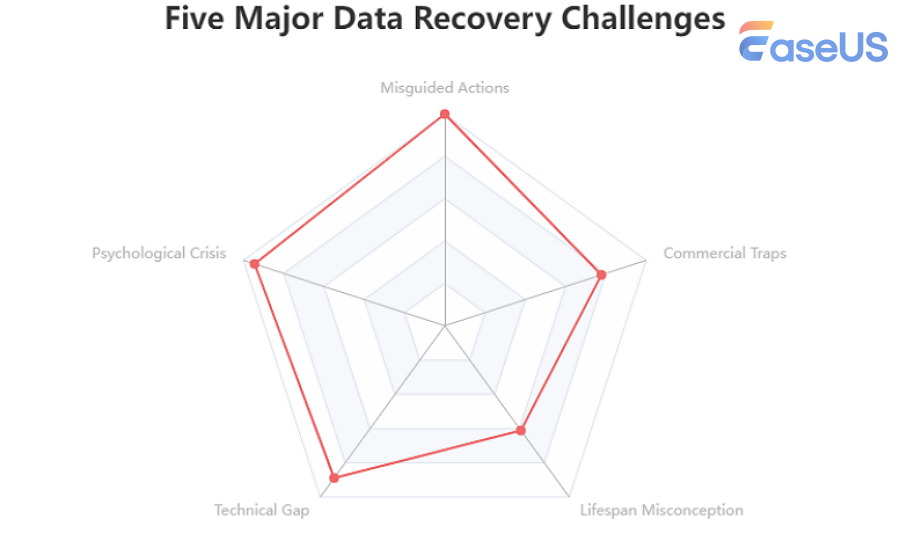
1. Technical Gap
SD card photos or videos are inaccessible: "My images and videos taken on a specific date and saved into my SD card were all unable to be opened," reported from r/ datarecovery subreddit. Or, recovered videos show green screens or corruption, especially with 4K/8K footage.
Root cause: fragmented storage that basic tools can't reconstruct.
2. Misguided Actions
Many modern SD cards are monolithic, meaning the controller and NAND flash are integrated into a single chip. This makes data recovery more complex if the chip is physically damaged. "That's a monolith. Controller + NAND are all in this one monolithic body," a Reddit user said.
Users attempt recovery on physically damaged cards, leading to permanent NAND chip damage.
3. Lifespan Misconception (Bit Rot)
SD cards are NOT archival storage. Data degradation ("bit rot") can corrupt files after 1-2 years of inactivity. SD cards are designed for short-term data retention, such as immediate use in cameras or phones. From the r/techsupport community, people commonly think that "SD cards are really designed for short-term retention of data."
4. Commercial Traps
Many tools show previews for free - but require $50+ to export, often without guaranteeing full recovery. In this case, finding trusted, professional free SD card recovery software is essential.
5. Psychological Crisis
SD cards may suddenly become inaccessible, prompting a format request when inserted into a computer or camera, or SD cards fail without warning: no strange noises, no gradual slowdowns.
"The files transferred are fewer compared to the images on the SD card. If I try to open the image on the card, I get the message that the drive is not accessible anymore," a user from the r/photography community shared. This unpredictability creates constant anxiety and self-blame, knowing that any card, new or expensive, can betray you silently.
SD Card Data Loss Scenario Proportion Analysis & Recoverability
Based on aggregated research, 64% of cases come from human error or logical failure.
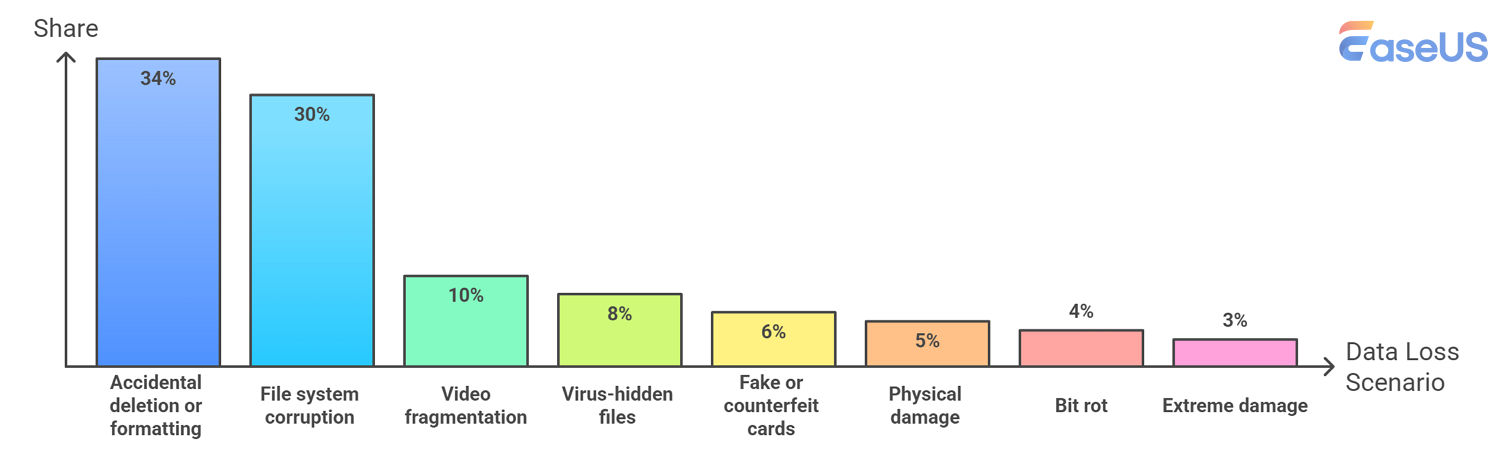
| Scenario | Share | Possible Causes | Recovery Chance | Key Insight |
| Accidental deletion or formatting | 34% | Camera cleaning, firmware update, data export, misoperation | 🟢Very High | Stop using the card immediately |
| File system corruption | 30% | Hot swapping, OS update conflict, low-quality card reader | 🟢High | Create a full disk image first |
| Video fragmentation | 10% | Power loss during camera recording, overheating shutdown | 🟡Medium | Needs advanced reconstruction |
| Virus-hidden files | 8% | Viral infection or script hijacking caused by using a public printer | 🟢Very High | Data usually still exists |
| Fake or counterfeit cards | 6% | Low-price purchase of counterfeit or substandard SD cards, capacity expansion fraud | 🔴Very Low | Data is never actually stored |
| Physical damage | 5% | SD card read/write exhaustion, gold finger wear | 🟠Low | Requires lab data recovery services |
| Bit rot | 4% | Long-term offline storage of SD card (over 2 years) | 🟠Low | Physical charge loss necessitates AI-based image restoration |
| Extreme damage | 3% | SD card water immersion, fire exposure, or accidental washing machine damage | 🟡Medium | Depends on chip integrity |
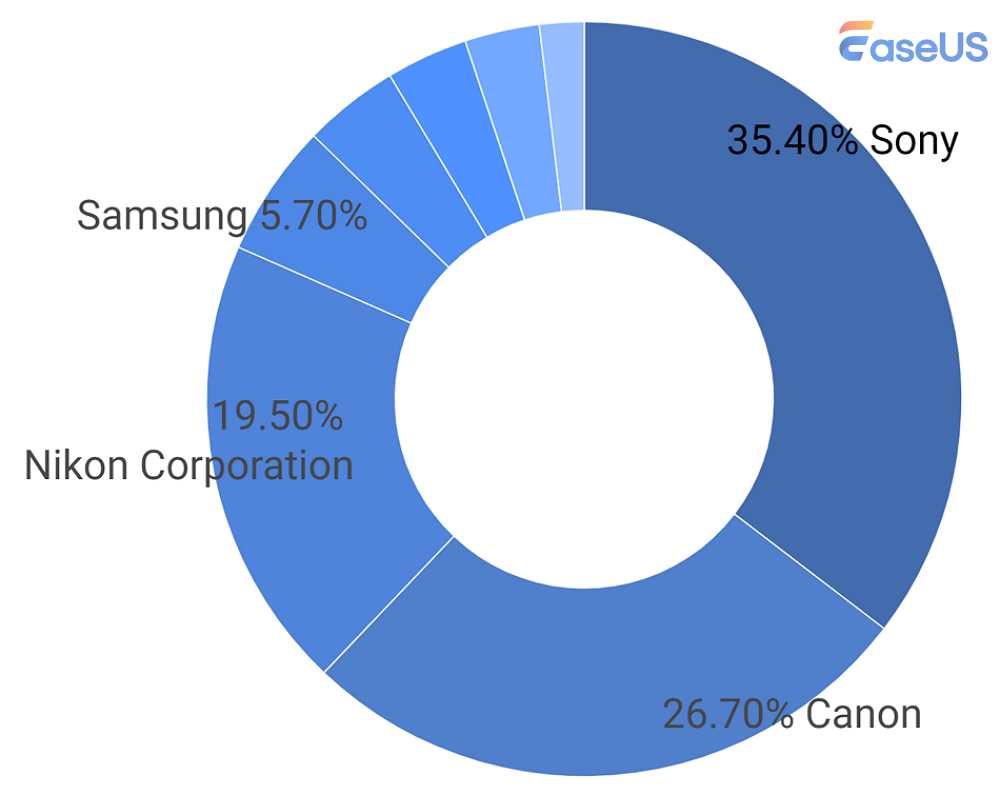
Data Loss Incidents in Common SD Card Host Devices: Market Analysis & Breakdown
Key data-loss challenges by device type: how do different camera brands "stress" SD cards differently?
1️⃣. GoPro: The "Fragmentation Killer"
High-Risk Combination: GoPro + SanDisk Ultra (extremely unstable)
❓Why failures happen:
GoPro users represent a disproportionate share of SD card failures. A widely known technical consensus on the r/gopro community is: "Never use a Sandisk ULTRA in a GoPro!" While these cards perform adequately in standard smartphones, GoPro's recording of HDR and high‑frame‑rate video demands extremely high random write speeds and sustained I/O stability.
SanDisk Ultra cards often suffer from cache‑scheduling mismatches, leading to recording interruptions, camera freezes, or even complete file system corruption on the entire card.
Technical Characteristic: Triple‑stream parallel write (.MP4 + .LRV + .THM)
Another distinctive failure signature of GoPro is its parallel write mechanism. To enable real‑time preview, the camera writes three streams simultaneously: .MP4 (high‑resolution video), .LRV (low‑resolution video), and .THM (thumbnail). This results in highly interleaved data streams at the physical sector level of the SD card.
In the event of sudden power loss (e.g., battery ejection), the FAT table often fails to update in time, leaving these interleaved fragments logically incomplete. For recovery tools that cannot recognize GoPro's triple‑stream characteristic, the recovered ".MP4" file may inadvertently contain low‑resolution ".LRV" data, causing visible flickering or blocky artifacts during playback.
Failure Manifestation: After an unexpected power loss, the video file appears to exist but cannot be opened because the MOOV atom (file header) was never written.

2️⃣. Sony Cameras: Database Dependency
Core Pain Point: Heavy reliance on the database located inside the PRIVATE folder.
⚠️Failure Manifestation
Deleting images directly on a computer leads to a camera error loop; RAW files may exhibit "top half normal, bottom half gray" (thumbnail written successfully, but raw data truncated).
Sony Alpha series users frequently encounter errors such as "Cannot read media. Reinsert the card" or "Recovering data…". A defining characteristic of Sony cameras is their heavy reliance on a dedicated database file stored in the card's root directory (typically within the PRIVATE folder).
- Notice:
- If a user deletes photos directly via the computer's file explorer instead of formatting the card in‑camera, the camera will detect a mismatch between the database index and the physical files on the next boot, triggering a persistent error loop.
Additionally, certain Sony models exhibit a subtle failure when the SD card's performance degrades: the photo appears normal on the camera's LCD screen, but after import to a computer, large gray blocks or color shifts appear in the middle of the RAW file. This happens because the camera displays the embedded JPEG preview (which was written successfully) inside the RAW header, while the large‑sized raw data itself was truncated in subsequent sectors due to a write timeout.
3️⃣. Canon (Older Models): Compatibility & Power Instability
Core Pain Point: Poor compatibility with SDXC (>32GB) protocol on older bodies (e.g., Canon 450D).
🛠️Special Phenomenon
Power draw fluctuations from a low‑quality card during high‑ISO shooting may directly produce "write‑induced noise" in the captured images.
Canon users frequently report compatibility issues with the SDXC standard on legacy camera models. For instance, when an older Canon EOS 450D (or similar‑era body) is used with an SDXC card larger than 32GB, the camera's firmware cannot recognize sector‑addressing algorithms beyond 32GB. This often results in a "disk error" message, "card cannot be accessed Canon" issue, or a false "card full" notification after a few shots.
In terms of image quality, Canon users may sometimes notice extremely fine, periodic horizontal lines in their photos. Shooting in low light with high ISO can cause lines and artifacts. "Looks like it was shot on a very high ISO, very common occurrence when you try to push the limits of the sensor."
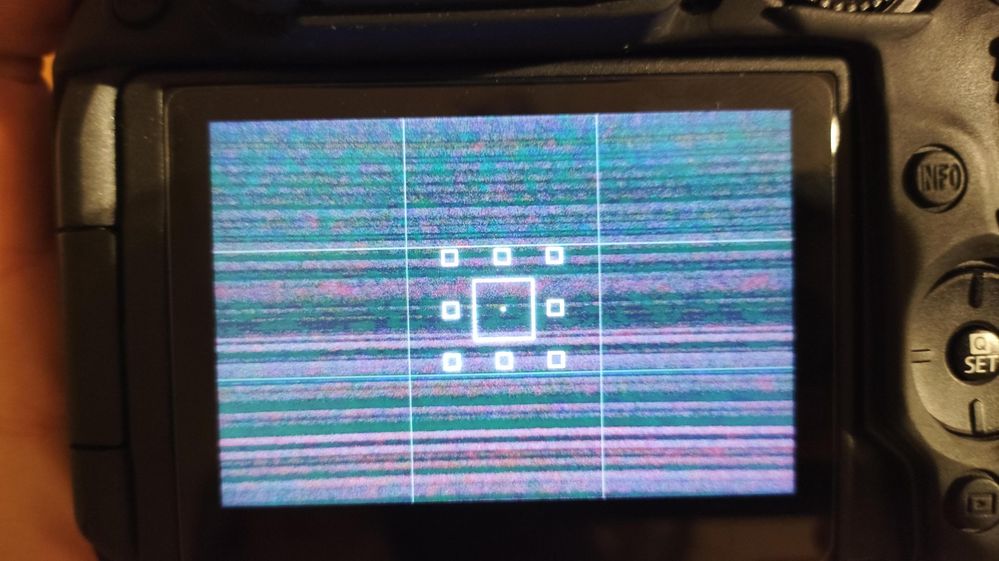
credit from the Canon community
Alternatively, bit‑flipping during the write process can introduce artifacts at the decoding stage.
Best SD Card Recovery Software Review: What Actually Works
Recovery Tool Comparison (Real-World Use Cases)
| Category | Tools | Advantages | Best For |
| Easy All-in-One | EaseUS Data Recovery Wizard | Minimalist interface; built-in camera video fragment reassembly algorithm; one-click scan | Home users / Photographers (seek efficiency and are unwilling to deal with low‑level code or manual tweaking) |
| Professional | DMDE, R-Studio | Strong low‑level control; transparent pricing | Technical experts (understand hexadecimal and partition table repair) |
| Specialized | GoProRecovery | Exclusively designed for repairing highly complex stream interruptions in GoPro action cameras | Commercial footage loss (cost is no object; the sole priority is recovering the video) |
| Free Tools | PhotoRec, Recuva | Completely free; suitable for simple photo and document recovery | Budget‑constrained users (with only extremely minor data corruption) |
Why EaseUS Data Recovery Wizard Works Best
For most users, especially non-technical ones, EaseUS Data Recovery Wizard delivers the highest success rate with minimal effort.
1. Advanced Video Reconstruction
- Automatically rebuilds fragmented video files
- Recognizes codec structures (MP4/MOV)
- Restores playable footage without manual sector editing
🆕PR News announcement that "EaseUS Tackles Fragmented SD Card Files with SmartSector Rebuild (SSR) in Data Recovery Wizard 20.1.0, Boosting Recovery by Up to 30%!" in EaseUS Data Recovery Wizard 20.1.0;
2. Visual Preview Before Recovery
- See actual photos/videos before paying
- Avoid "fake recovery" scenarios
3. Fully Automated Workflow
- Detects RAW partitions automatically
- Handles FAT32/exFAT corruption
- Requires zero technical knowledge
- Tip
- Is paid recovery software worth it? Free tools work for simple cases. However, advanced recovery requires powerful algorithms. For professionals, spending $50-$90 is minimal compared to the cost of lost data.
Final Words
Understanding the common causes of SD card data loss, such as improper ejection, virus attacks, or sudden power failure, helps users take preventive action and respond correctly when problems arise. Recovery success depends largely on acting quickly and avoiding further writes to the card.
If your data is lost, the chances of successful recovery are often high, especially when no overwriting has occurred. For reliable and user‑friendly results, it is strongly recommended to use a trusted tool that has proven effective at retrieving lost photos, documents, and other critical files from various SD card failure scenarios.
Key Takeaways:
- Most SD card data loss is recoverable
- Video recovery requires advanced tools
- Stop using the card immediately after data loss
- SD cards are not reliable for long-term storage
Frequently Asked Questions Based on SD Card Failure Research
1. What are the most common causes of SD card data loss?
Based on aggregated research from user communities and recovery datasets, the majority of SD card data loss incidents are linked to human error and logical failures. The most common causes include accidental deletion, formatting, improper ejection, and file system corruption. Together, these factors account for approximately two-thirds of observed cases, while hardware-related failures represent a smaller but more complex segment.
2. How often is data recoverable after an SD card failure?
Recovery likelihood varies significantly depending on the failure type. Logical issues, such as deletion or file system corruption, typically have high recovery potential. In contrast, scenarios involving physical damage, counterfeit storage media, or long-term data degradation tend to have lower success rates due to underlying hardware limitations or irreversible data loss at the storage level.
3. Why do recovered video files sometimes appear corrupted or incomplete?
Modern recording devices often store video data in fragmented segments across the storage medium. When recording is interrupted - due to power loss or system instability - critical metadata structures may not be properly finalized. As a result, recovered files may lack necessary headers or exhibit frame inconsistencies, leading to playback errors or visual artifacts.
4. What is "bit rot" and how does it affect stored data?
"Bit rot" refers to the gradual degradation of stored data due to charge leakage in flash memory cells over time. This phenomenon is more likely to occur in storage devices that remain unpowered for extended periods. Affected data may exhibit partial corruption, visual artifacts, or complete unreadability, particularly in older or heavily used SD cards.
5. Why are counterfeit or "expanded capacity" SD cards difficult to recover?
Counterfeit SD cards often misrepresent their actual storage capacity through firmware manipulation. When the true physical capacity is exceeded, new data overwrites previously stored information without the user's awareness. In such cases, the missing data was never securely written to valid storage sectors, making recovery technically infeasible.
6. What long-term storage considerations should users be aware of?
SD cards are not designed for long-term archival storage. Factors such as wear cycles, environmental exposure, and data retention limitations can affect reliability over time. For critical data, redundancy strategies, including multiple backups and periodic data verification, are recommended to mitigate the risk of silent data degradation.
Was this page helpful?

 Why Trust EaseUS
 Editor Reviews

20+
Years of experience

160+
Countries and regions

72 Million+
Downloads

4.9 +
Trustpilot Score





