





-
![]() Digital Camera Memory Card Recovery Software Free Download [100% Free]
Digital Camera Memory Card Recovery Software Free Download [100% Free] September 20,2026
 6 min read
 -
![]()
-
![]() My SD Card Needs to Be Formatted but I Have Pictures on It [Fixed]September 20,20266 min read
My SD Card Needs to Be Formatted but I Have Pictures on It [Fixed]September 20,20266 min read -
![]() PNY Recovery Tool: Recover Data from PNY SD Card/USB Flash DriveJuly 23,20266 min read
PNY Recovery Tool: Recover Data from PNY SD Card/USB Flash DriveJuly 23,20266 min read -
![]() SD Card Showing Wrong Size: Restore SD Card Full CapacitySeptember 18,20266 min read
SD Card Showing Wrong Size: Restore SD Card Full CapacitySeptember 18,20266 min read -
![]()
-
![]()
-
![]()
-
![]() Image Database File Not Ready? 3 Effctive Solutions in 2026 [No Data Loss]September 20,20266 min read
Image Database File Not Ready? 3 Effctive Solutions in 2026 [No Data Loss]September 20,20266 min read -
![]() Fix SD Card Not Initialized Error (Camera, Dashcam & More)September 20,20266 min read
Fix SD Card Not Initialized Error (Camera, Dashcam & More)September 20,20266 min read
Page Table of Contents
PAGE CONTENT:
What Causes Dashcam Footage to Be Lost
Hey guys I was sideswiped today and hit the dashcam icon to save the video. Unfortunately I was in park so it just bought up the dashcam viewer. We pulled over to the shoulder and was able to confirm the footage was there but in the chaos forgot to hit save again. Just checked again tonight and the footage is gone. Is there anyway to recover it? - from Reddit
The dashcam recordings are very important and can be the only evidence to explain an event of a car accident. However, such video recordings kept in a memory card are prone to loss or corruption, like mistaken deletion, abrupt removal of the SD card, SD card error asking you to format, etc.
Dashcam video loss typically occurs due to storage limitations, power interruptions, or SD card health issues. The most frequent causes include:
- Sudden power loss while recording
- Loop recording overwrites important clips
- SD card corruption or bad sectors
- Accidental deletion when reviewing footage
- Formatting prompts from camera or PC
- Removing SD card while dashcam is writing data
- Unsupported or low-quality memory cards
- Extreme heat causing card failure
Do not worry if you lose videos in the dashcam in such cases. Here, we introduce the best video recovery software to recover video files in a dashcam, or what you may call a car camera, vehicle camcorder, dashboard camera, and DVR. Understanding these causes helps users act quickly and avoid overwriting recoverable footage. Keep reading and find the best solution to recover deleted dashcam footage.
How to Recover Deleted Dashcam Footage with Video Recovery Software
The deleted videos on your dashcam are usually saved on the memory card. When the videos are deleted, you can still find data on the card with professional SD card recovery software. EaseUS Data Recovery Wizard is a professional dashcam video recovery software that supports the recovery of all types of video files, including the dashcam missing footage formats .mov, .avi, .mp4, .3gp, .wmv, .asf, .flv, .swf, .mpg, .mkv, etc.
✅ Why It Works Well for Dashcam Recovery
- Deep scan technology retrieves fragmented loop recordings
- Recover formatted SD card and save your videos/photos
- Preview before recovery to confirm usable footage
- Built-in video repair for partially corrupted files
- Deleted video recovery works with dashcam SD cards, microSD cards, and DVR storage
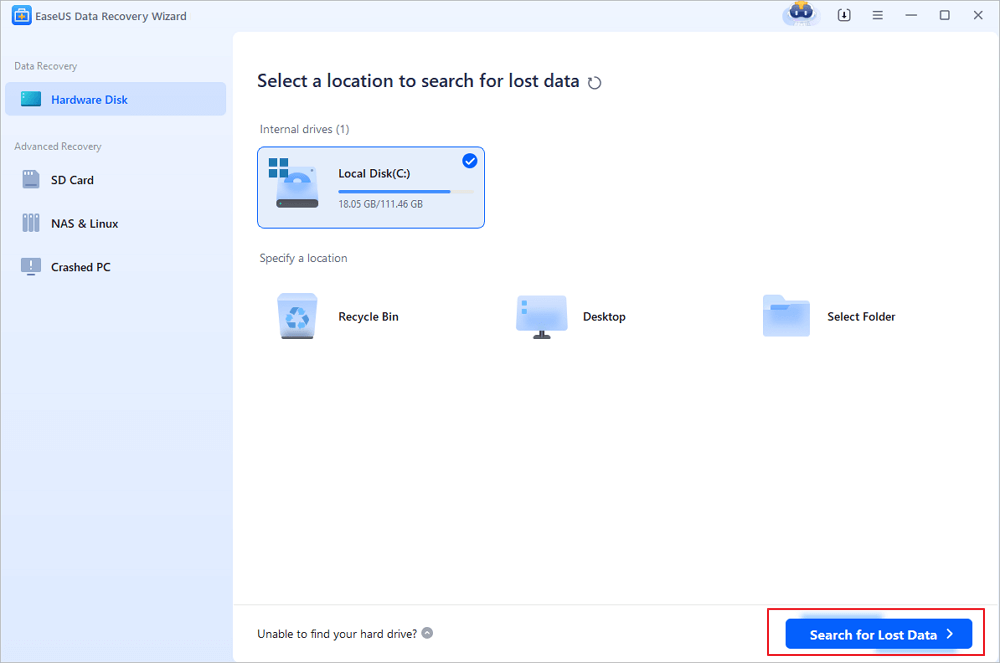
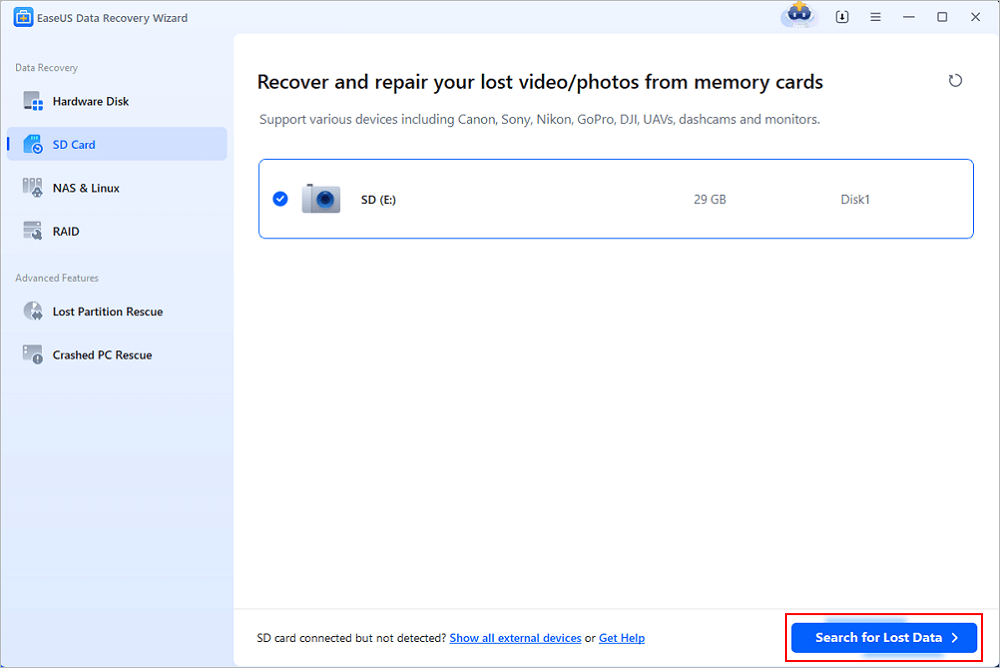
Step 1. Run EaseUS Data Recovery Wizard and select the location or device where you lost/deleted videos. Click "Search for Lost Data" to find the missing videos.
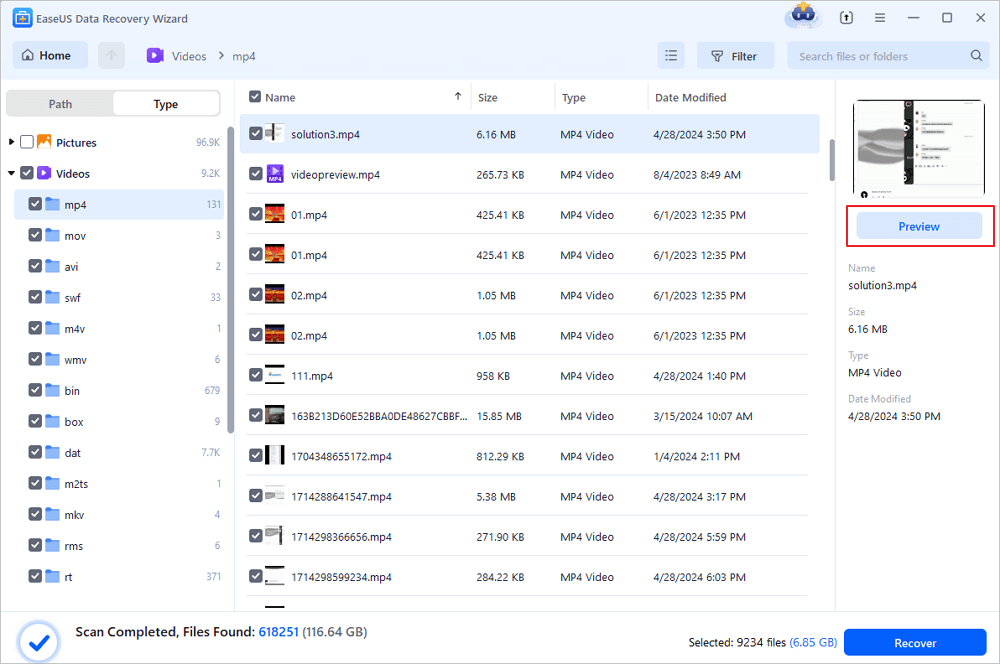
Step 2. After the scan, choose "Videos" in the left panel. You can directly type the files name in the search bar if you remember. Select the found videos and click "Preview".
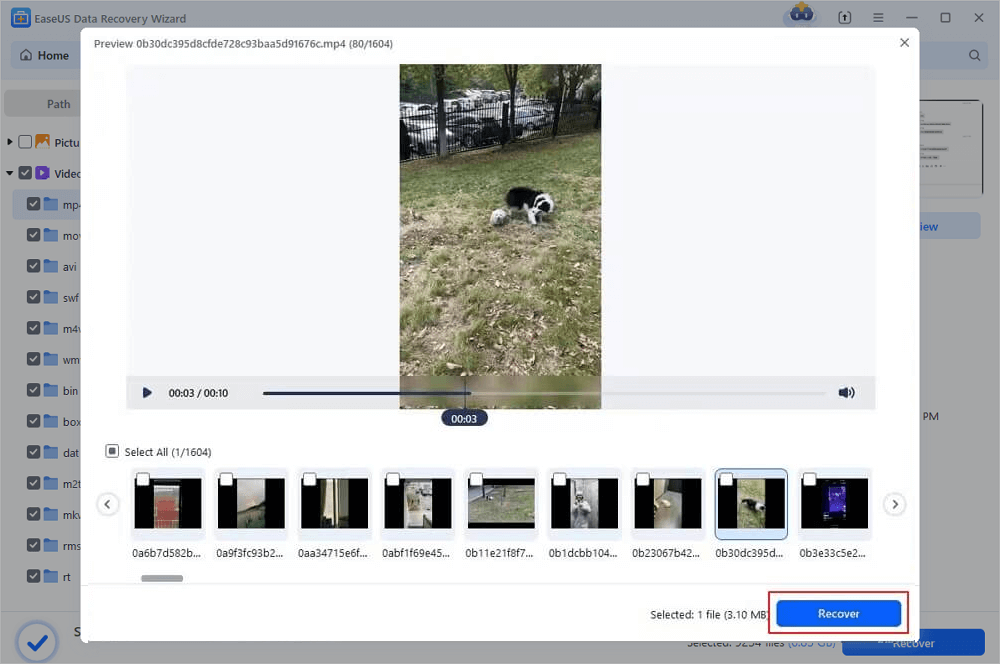
Step 3. Select the video files that you want to restore. Click "Recover" to save them to another secure location on your PC, external storage device or cloud storage.
With the help of the EaseUS data recovery tool, many users have recovered deleted videos:
- I would rate the easeusrecovery data software as a great tool to use if you need to get back lost video footage . I had a usb disk that would not open videos of family events and once I used this tool it recovered and ensured that the video was visible and accessible again.- from Trustpilot
- My SD card somehow became formatted apparently loosing all of my footage with no programs being able to pull the files. The employee at EaseUs which sorry I now forget his name worked with me through my terrible hotel internet connection and saved every file I recorded the first 2-3 days of my trip. Thank You so much! Life saver. - from Trustpilot
You can share this advanced video recovery software on social media to help more friends!

Here's also a video guide about dashcam footage data recovery, especially for Tesla car. Watch this video guide and learn more about footage video recovery.
- 00:44 Method 1. EaseUS Data Recovery Wizard
- 02:03 Method 2. Mac Disk Utility
- 02:54 Method 3. Data Recovery Service

Conclusion
Dashcam footage being missing can be stressful - especially when it contains critical accident evidence. Fortunately, most deleted or corrupted dashcam recordings remain recoverable if the SD card is not overwritten. Using professional recovery software and acting quickly greatly increases the success rate of restoring important video clips.
Deleted Dashcam Video Recovery FAQs
1. Can I recover dashcam footage after accidental deletion?
Yes. Deleted dashcam footage is often recoverable if the storage hasn't been overwritten. Stop using the SD card immediately and scan it with reliable recovery software like EaseUS Data Recovery Wizard to restore deleted videos.
2. Does dashcam footage automatically delete?
Most dashcams use loop recording, which automatically overwrites older footage when storage is full. However, locked or emergency videos are usually protected from deletion unless manually formatted or the storage becomes corrupted.
3. How can I recover deleted dashcam footage Tesla?
Remove the USB drive from your Tesla and connect it to a computer. Use recovery tools such as EaseUS Data Recovery Wizard to scan the TeslaCam folder and restore deleted or missing Sentry Mode recordings.
Was this page helpful?



 Why Trust EaseUS
 Editor Reviews

20+
Years of experience

160+
Countries and regions

72 Million+
Downloads

4.9 +
Trustpilot Score






