






Page Table of Contents
Reviews and Awards


To uninstall a program in Windows 10, users can use "Apps & Features" in Settings or "Programs and Features" in Control Panel. However, sometimes, you may encounter 'unable to uninstall program' errors. In this case, you can use the Microsoft Program Install and Uninstall troubleshooter or safe mode. A third-party program uninstaller usually can be of help to force remove the software you want to uninstall.
- Fix 1. Use Program's Own Uninstaller
- Fix 2. Use Microsoft Program Install and Uninstall Troubleshooter
- Fix 3. Use A Third-party Software Uninstaller
- Fix 4. Uninstall the Program in Safe Mode
- Fix 5. Use Registry Editor
- Fix 6. Perform System Restore
Now, let's read this article from EaseUS Software below for more details.
Unable to Uninstall Program Windows 10 - 6 Fix
If you are unable to uninstall programs from Control Panel on Windows 10, you can try one of the six tips in this tutorial to forcefully and correctly uninstall a program that cannot be uninstalled in Windows 10.
Fix 1. Use Program's Own Uninstaller
You can also uninstall programs in Windows 10 using the uninstaller that comes with the application. Most third-party programs have built-in uninstallers. Usually, it is located in the application root folder.
- Notice:
- 1. Ensure you run the correct uninstaller file in the program folder.
- 2. Confirm the installation path before proceeding.
Here is how to fix 'unable to uninstall program Windows 10.'
Step 1. Locate the installer's directory in File Explorer. If you don't know, you can right-click the target software icon and select "Properties" to see its location.
Step 2. Then, find the executable file named uninstaller.exe, uninstall.exe, or something similar in the directory.
Step 3. Double-click it to start the uninstaller.exe, and follow the prompts to uninstall the current software successfully.
This way may not remove all leftover files or registry entries. Keep reading to learn more solutions.
Fix 2. Use Microsoft Program Install and Uninstall Troubleshooter
Microsoft provides a free program installation and uninstallation troubleshooter for users to resolve such issues. If you cannot uninstall the current software on Windows 10, you can try this way.
- Notice:
- 1. This tool only allows you to uninstall classic Windows desktop programs, not built-in applications and programs installed from the Microsoft Store.
- 2. Some programs may require manual input if not listed.
How to uninstall programs on Windows 10 that cannot be uninstalled:
Step 1. Download the Microsoft Program Installation and Uninstallation Troubleshooter and run it.
Step 2. When you see "Having trouble installing or uninstalling a program?" click Uninstall.
Step 3. In the pop-up window, you'll see a list of installed programs on your computer.
Step 4. Select the programs that you will not uninstall in the normal way and click the "Next" button.
Step 5. Then click "Yes, try uninstalling" to start uninstalling the target program.
This method should help you uninstall programs that cannot be uninstalled in Windows 10.
Fix 3. Use A Third-party Software Uninstaller
When you cannot uninstall an application using Windows built-in Features, you may choose third-party software. EaseUS Todo PCTrans Free is one of the fastest and safest ways. It can help you move programs out of your computer correctly and safely.
In addition, if the program is not running properly, it cannot be uninstalled. The advantage of this tool is that it can first help you repair programs that are not running properly and then help you uninstall them safely. It can force uninstall stubborn programs and clean leftovers.
Here is how to uninstall apps on Windows 10 via EaseUS Todo PCTrans.
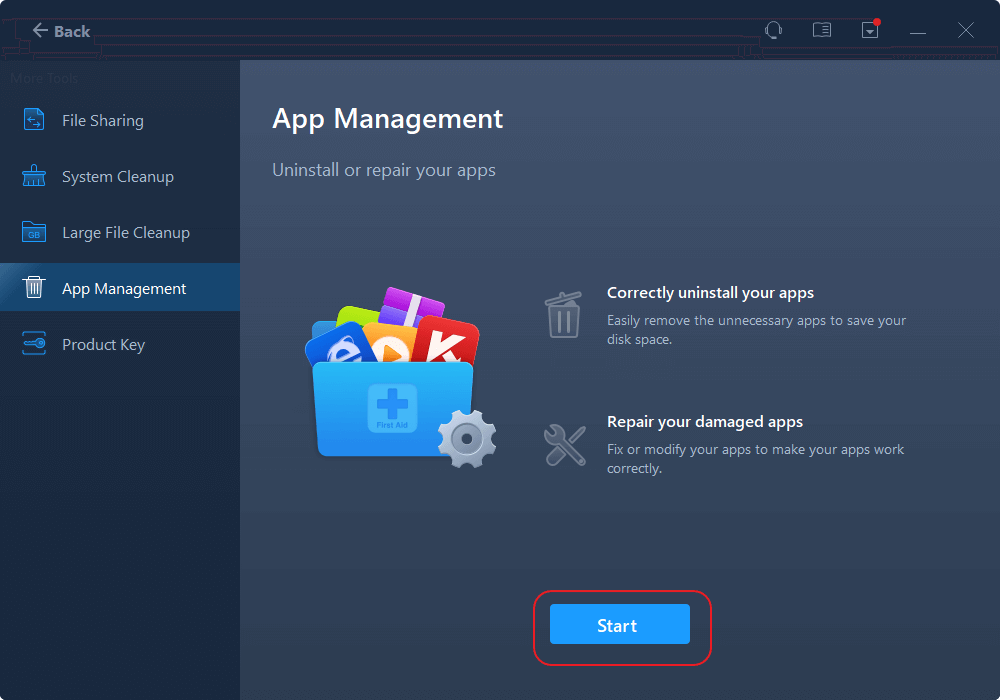
Step 1. Launch EaseUS Todo PCTrans, click "More Tools". Choose App Management, Click "Start" to securely uninstall your apps and repair your damaged apps.
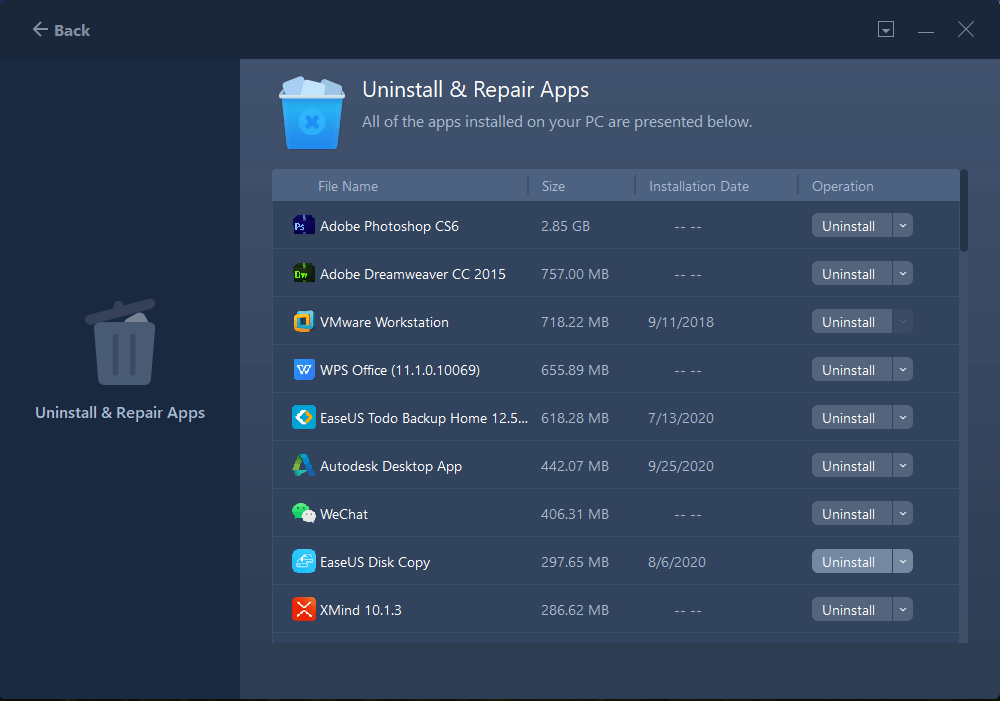
Step 2. All of apps installed on your PC, choose the selected one you want to uninstall or repair. (If your uninstall process fails, you can click the small triangle icon and select "Delete".)
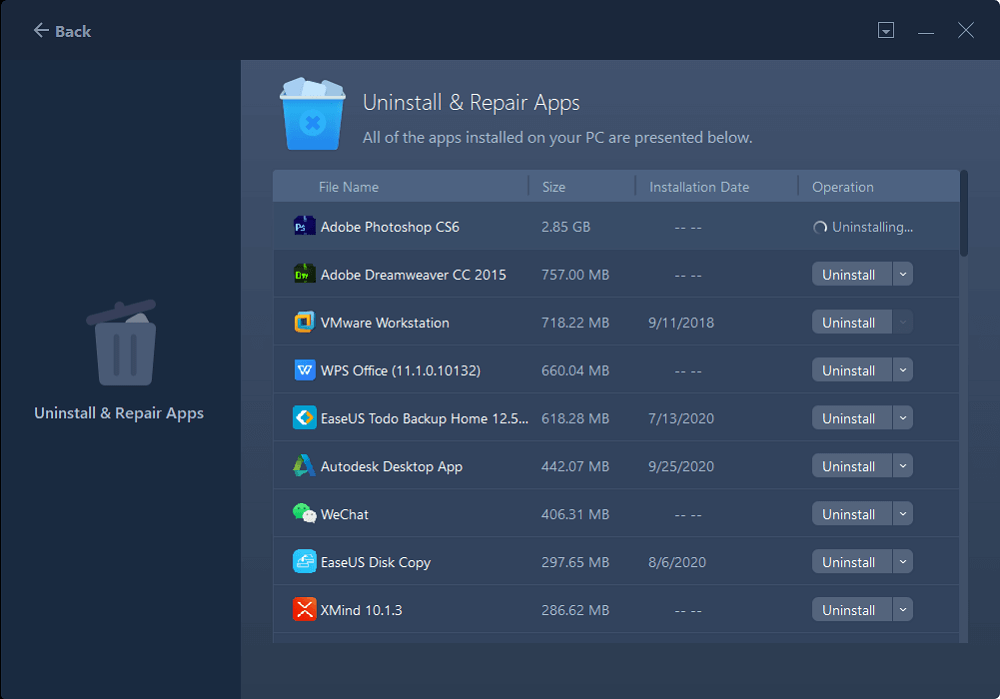
Step 3. Click "Uninstall". (If you want to repair apps, click the icon right behind "Uninstall" and choose "Repair".)
Install and use it to force uninstall programs you don't want anymore.
Do these fixes help you? Don't hesitate to share this article to help other users.

Fix 4. Uninstall the Program in Safe Mode
If you are unable to uninstall a program on Windows 10, it might be because the uninstall process is interfering with third-party processes. The solution is to boot your Windows 10 computer into Safe Mode and then remove the target program in Safe Mode.
- Notice:
- 1. Safe Mode disables interfering processes for smooth uninstall.
- 2. Restart to normal mode afterward and verify removal.
If you cannot uninstall app Windows 10, try the safe mode by following the steps.
Step 1. Press "Windows" + "I" to open Settings.
Step 2. Navigate to "System" (Windows 11) or "Update & Security" (Windows 10) > "Recovery."
Step 3. Under Advanced Startup, click "Restart now."
Step 4. After your PC restarts, select "Troubleshoot" > "Advanced options" > "Startup Settings" > "Restart."
Step 5. Once your PC restarts again, you'll see options. Press "4" or "F4" for Safe Mode.
Then, you can try to uninstall those stubborn programs in Safe Mode.
Fix 5. Use Registry Editor
Registry Editor is a utility that comes with Windows. It can also help uninstall programs on Windows 10/11 that won't uninstall. But this method is a little complicated.
- Notice:
- Incorrect editing of the registry may cause system errors or crashes. Please be cautious when operating. Always back up the registry before changes.
You can use Registry Editor to delete programs on Windows 10 like this:
Step 1. Press "Windows" + "R" to open the Run window. Type regedit and press "Enter" to open the Windows 10 Registry Editor.
Step 2. Follow the path below: HKEY_LOCAL_MACHINE/SOFTWARE/Microsoft/Windows/CurrentVersion/Uninstall.
Step 3. Find the target program under the Uninstall folder. Right-click, select the application, and click on the "Delete" option.
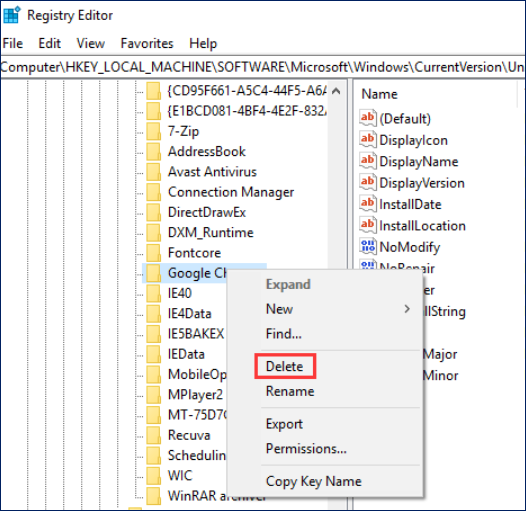
Step 4. Click "Yes" to confirm that you want to uninstall the current program.
Restart your computer to implement the changes. Finally, check if the program has been uninstalled from your Windows 10 computer.
💡Read Also:
Fix 6. Perform System Restore
Restoring your Windows 10 computer to a previous state can automatically uninstall any programs you have recently installed. But before performing a system restore, you should back up all important data on your computer.
- Warning
- This method can revert the system state and uninstall programs thoroughly, but it may result in the loss of recent data and settings. It may require reinstalling software after the restore.
Step 1. Type System Restore in the search box and select "Create Restore Point.
Step 2. Click the "System Restore" button to follow the instructions to restore the system to its previous state.
Extended Reading: Microsoft Office Removal Tool Download
Conclusion
Generally speaking, writing a program on a Windows computer should be straightforward. But if you can't uninstall a Windows 10 program from the Control Panel, Windows Settings, and Start menu, you can try one of the six tips in this tutorial to help force uninstall programs that won't uninstall in Windows 10. Here is a comparison of six solutions in this post.
| Solution | Difficulty | Advantages | Disadvantages |
| 1. Use Program's Own Uninstaller | Easy | Direct and quick, no extra tools needed | May leave leftover files and registry entries |
| 2. Use Microsoft Uninstall Troubleshooter | Moderate | Automatically fixes uninstall problems and leftovers; free and official | Only works with classic desktop programs, not Store apps |
| 3. Use EaseUS Todo PCTrans | Easy | Can forcibly uninstall stubborn programs and clean leftovers; can repair broken programs | Requires downloading software on Windows |
| 4. Uninstall in Safe Mode | Moderate to Hard | Disables interfering processes; good for stubborn programs | Requires a system restart and technical steps |
| 5. Use Registry Editor | Hard | Can remove programs that normal methods can't uninstall | Risk of system errors if done incorrectly; requires backup and technical skill |
| 6. Perform System Restore | Hard | Thorough uninstall by reverting system state | Lose recent data and settings; heavy operation |
EaseUS Todo PCTrans is highly recommended for uninstalling programs on Windows 10. It can repair malfunctioning programs, force uninstall stubborn software, and clean leftover files and registry entries thoroughly.
- Important
- Microsoft has officially announced that Windows 10 support will end on October 14, 2025. After this date, the system will no longer receive security updates, bug fixes, or technical support.
Unable To Uninstall Program Windows 10 FAQs
1. How do I uninstall a program that won't uninstall Windows 10?
To uninstall a program in Windows 10:
- Open the Start Menu > Click Settings > Choose Apps.
- Select Apps & features from the menu.
- Select the App you want to uninstall > Click the Uninstall button > follow the on-screen instructions.
If that fails, you can try the methods in this article, like Safe Mode, Microsoft troubleshooter, or a reliable third-party uninstaller tool.
2. Why some apps cannot be uninstalled?
There are many reasons why the software cannot be uninstalled. The details are as follows:
- The program is running. If the program is running, the computer cannot uninstall the software. You have to close the program and then uninstall it.
- The software is damaged. Computer viruses may damage the software, or an accident may occur during downloading, resulting in the inability to uninstall normally.
- Operation error. Some users accidentally delete important files related to the software without careful operation, causing the software to fail to be uninstalled normally.
- Registry error. The registry is a very important component in the Windows system. It stores software installation information and other system information. If some incorrect operations or malware modify the registry, the software will not be uninstalled normally.
- Administrator rights issue. Some software must be uninstalled with administrator rights. The software cannot be successfully uninstalled if the user does not have such rights.
3. How do I force Uninstall a program in Windows 10 using CMD?
To uninstall a program or application via Command Prompt, you first need to run Command Prompt as administrator:
- Type cmd in the Windows 10 search box > Choose the Command Prompt application > Click Run as administrator.
- Type wmic at the prompt and press Enter.
- You will see the wmic: root\clic> prompt to confirm that the Windows Management Instrumentation process is ready.
- Please enter product name and press Enter to get a list of installed programs on your computer.
- All apps and programs will show up. Run the following command to uninstall the target program: product where name= "program name" call uninstall.
- Then, Windows will ask you to confirm whether you want to continue or execute the command. Type Y to confirm your action, then hit Enter.
Share these fixes to help more users fix the "unable to uninstall app or program" error on Windows 10 computers.
About the Author

Updated by Tracy King
Tracy became a member of the EaseUS content team in 2013. Being a technical writer for over 10 years, she is enthusiastic about sharing tips to assist readers in resolving complex issues in disk management, file transfer, PC & Mac performance optimization, etc., like an expert.

Sherly joined EaseUS in 2022 and she has always loved writing articles and enjoys the fun they bring. She receives professional training here, focusing on product performance and other relative knowledge. She has written over 200 articles to help people overcome computing issues.
Reviews and Awards
-
EaseUS Todo PCTrans Free is a useful and and reliable software solution created to serve in computer migration operations, be it from one machine to another or from an earlier version of your OS to a newer one.
Read More -
EaseUS Todo PCTrans is by the folks at EaseUS who make incredible tools that let you manage your backups and recover your dead hard disks. While it is not an official tool, EaseUS has a reputation for being very good with their software and code.
![]() Read More
Read More
-
It offers the ability to move your entire user account from your old computer, meaning everything is quickly migrated. You still get to keep your Windows installation (and the relevant drivers for your new PC), but you also get all your apps, settings, preferences, images, documents and other important data.
Read More

Related Articles
-
9 Best PC to PC File Transfer Methods 2026 (Infographic Poster)
![Tracy King]() Tracy King/2026/11/03
Tracy King/2026/11/03 -
How to Transfer Files to Windows 11 New Computer [2026🏅]
![Tracy King]() Tracy King/2026/11/03
Tracy King/2026/11/03 -
Copying Files via Robocopy from One Server to Another Server
![Daisy]() Daisy/2026/11/03
Daisy/2026/11/03 -
How to Transfer Twitter from One Account to Another
![Tracy King]() Tracy King/2026/11/03
Tracy King/2026/11/03
 Daisy/2026/11/03

