






Page Table of Contents
Reviews and Awards


PS4 or PlayStation 4 from Sony has been an excellent option for your needs in an enhanced experience ever. However, if you want to use an external hard drive for PS4, you need to access a USB 3.0 hard drive with a storage capacity between 250GB and 8TB.
Follow the specific solutions to transfer your games successfully:
| Workable Solutions | Step-by-step Troubleshooting |
|---|---|
| Transfer games from PS4 to your external hard drive | Format the external drive > Transfer games from PS4 to your external hard drive...Full steps |
| Transfer PC games to your external hard drive | Step 1. Connect your external hard drive to your computer. Open EaseUS Todo PCTrans...Full steps |
How to transfer games from PS4 to your external hard drive
The tasks involved in transferring the games from PS4 to your external hard drive involve a lot of options and steps.
Format the external drive
Most of the storage devices need a specific format for functioning the best performance. Therefore, under ideal conditions, you would find that the file format supported by the hard drives would usually include FAT32/exFAT/NTFS/HFS.
Follow the steps here to format your hard drive –
- Go to the Settings menu from your PS4 home screen.
- Scroll down to the "Devices" menu.
- Choose "USB Storage Devices".
- Select your external HDD, then choose "Format as extended storage".
You should find several warnings displayed on your screen. Accept the warnings and format the drive. Do note that the data already available on your drive would get deleted. If you want to save any of the data, you can check out the data and download it before formatting the drive. You may want to know how to transfer save data between PS4 and PS5:
Transfer games from PS4 to your external hard drive
To transfer the games and other data from the PS4 to the external hard drive, you can simply press the Options icon on your game and pick the options for move to USB extended storage.
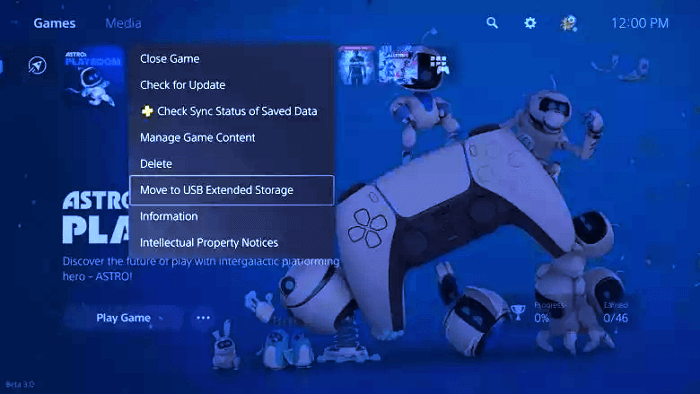
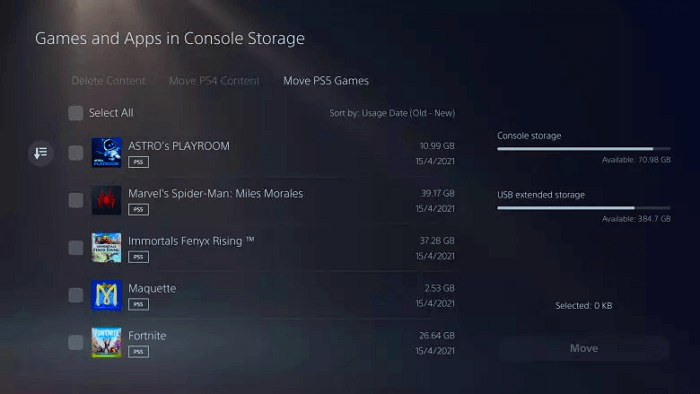
If you are trying to install more than one game, you can move to the options for transferring the content in one go. You can check out the options through the path - Settings > Storage > Console Storage > Games and Apps. These steps would be helpful in providing you access to the options for delete and moving the multiple gams at once. Tick all the games that you want to transfer and click on MOVE.
How to transfer PC games to your external hard drive
Games can actually take a lot of space on your PlayStation 4. That is exactly why it should be one of the excellent options to transfer your games and files to your external hard drive. This can be helpful in saving your precious storage space on your hard drive of your gaming console.
The steps explained and provided in the above discussion should be quite useful in letting you transfer your PlayStation games to an external hard drive. However, that can perhaps be a bit complicated and cumbersome process, and you may not be comfortable with the options. That is where you would find the third-party tools quite practical and useful in helping you transfer data between several devices with ease.
EaseUS Todo PCTrans Free is one such powerful tool that can prove to be quite essential and impressive in terms of its performance characteristics. You will find it one of the excellent options to transfer files, applications, user account, and settings for free between PCs, laptops, or between computer and external hard drives with simple clicks. Therefore, it can be considered to be one of the excellent and high-end options for a very professional level of the professional application transfer program.
It can be a few of the excellent options that you would find quite interesting. You can find the following features to be quite interesting and impressive for all your needs in how to transfer PlayStation gams to an external hard drive.
- It can be your one-stop solution for all your data migration requirements. It can be helpful in providing you with a great option to transfer the files from an old PC. You can even consider transferring the data to an external hard drive.
- A perfect data integration offered by the service can prove to be one of the perfect options ever. It provides you with complete seamless and free data migration. The transfer tool can be an excellent option for transferring your data with ease with no data loss of any nature.
- You can move your programs with ease with the software. The tool has been a great option for transferring practically every kind of program.
- You can even migrate user accounts and settings. The software can be one of the best options for helping you migrate the user accounts and other settings with ease and simplicity. This can be the best way that you can put to use for setting up your system right away.
EaseUS Todo PCTrans
- Transfer to a new PC: Steam, Origin, LOL, Blizzard.
- Transfer to a new drive: DIABLO, WORLD OF WARCRAFT,
OVERWATCH, HEARTHSTONE, HEROES OF THE STORM, etc. - 3 steps to migrate games apps to a new pc or a new drive.
Step 1. Connect your external hard drive to your computer. Open EaseUS Todo PCTrans and select "Local Migration > Start".
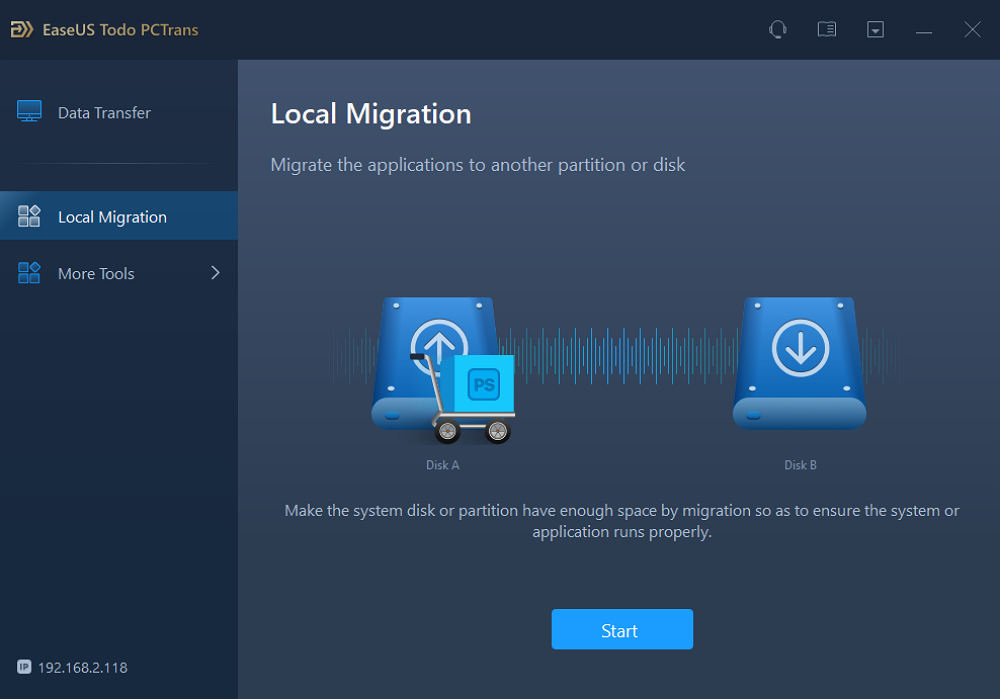
Step 2. Find and choose the applications (marked as "Yes") that you want to transfer. You can select multiple apps.
Click the triangle icon and select your external hard drive as the destination to store the apps.
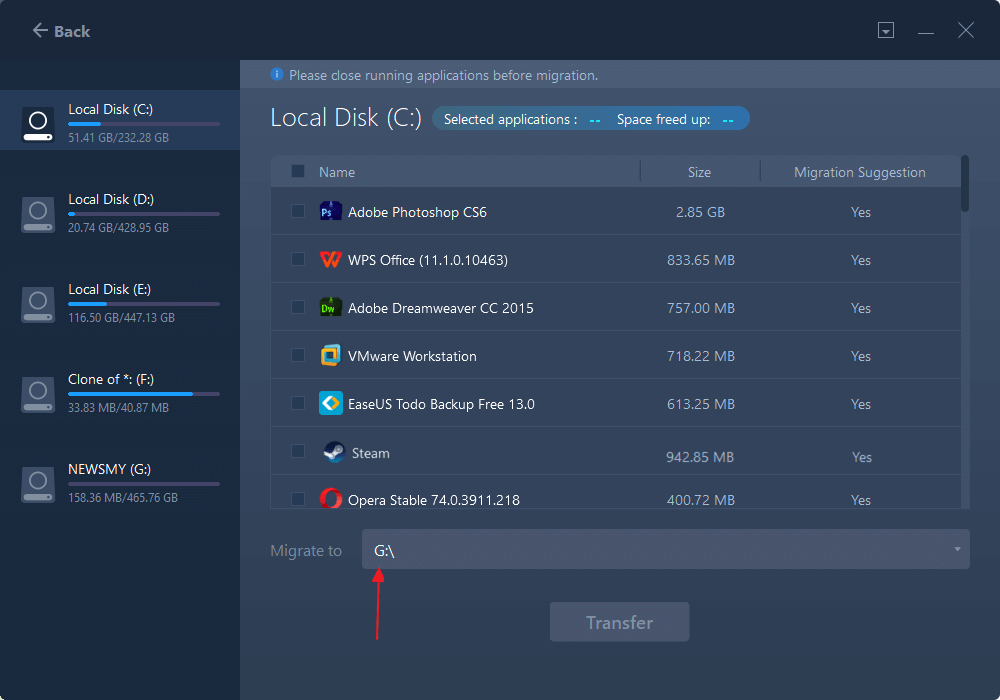
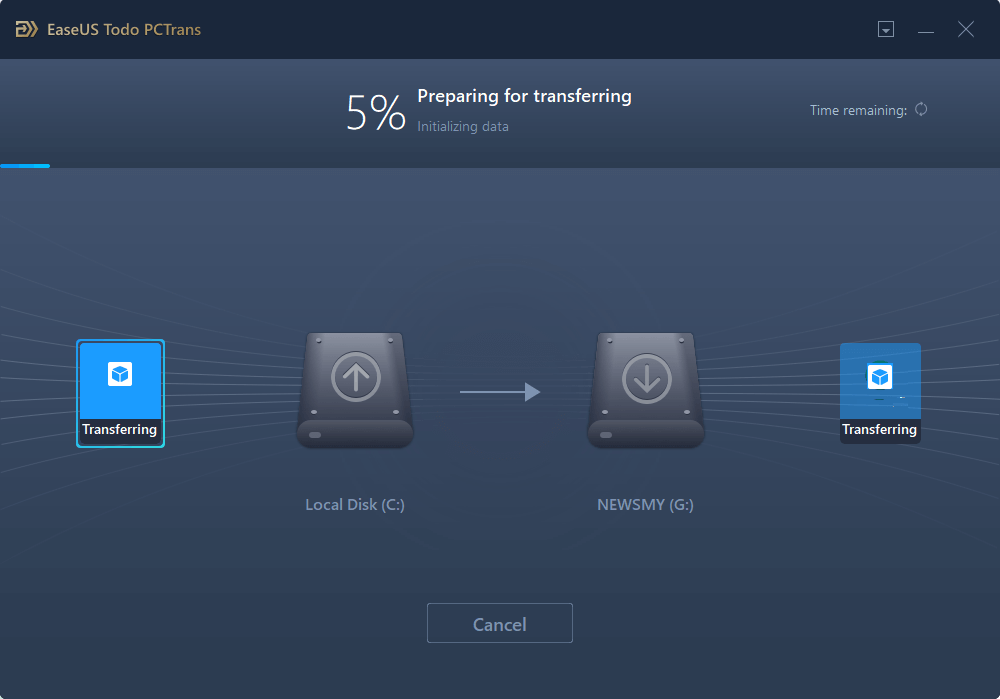
Step 3. Then, click "Transfer" to move your programs to an external hard drive.
A few other prime factors that we found quite interesting would include
- The software is completely automatic and easy to implement.
- You can easily transfer your custom files and favourites.
- The software developers also provide you access to complete technical support.
The software does provide you access to a great degree of experience through several advantages. A local transfer, a PC to PC transfer, and a transfer option through images are a few of the options that you would find quite interesting and effective.
The Closing Thoughts
The PlayStation 4 has been a great option, and you would find it to be one of the prime options for your gaming. The option to transfer games to an external hard drive can prove to be one of the practical options ever. Additionally, using the EaseUS Todo PCTrans can be one of the prime options for providing you access to a great degree of service quality.
It should be what would provide you with a vast degree of performance for practically for almost all your needs in an enhanced experience ever.
About the Author

Updated by Tracy King
Tracy became a member of the EaseUS content team in 2013. Being a technical writer for over 10 years, she is enthusiastic about sharing tips to assist readers in resolving complex issues in disk management, file transfer, PC & Mac performance optimization, etc., like an expert.

Brithny is a technology enthusiast, aiming to make readers' tech lives easy and enjoyable. She loves exploring new technologies and writing technical how-to tips. In her spare time, she loves sharing things about her game experience on Facebook or Twitter.
Reviews and Awards
-
EaseUS Todo PCTrans Free is a useful and and reliable software solution created to serve in computer migration operations, be it from one machine to another or from an earlier version of your OS to a newer one.
Read More -
EaseUS Todo PCTrans is by the folks at EaseUS who make incredible tools that let you manage your backups and recover your dead hard disks. While it is not an official tool, EaseUS has a reputation for being very good with their software and code.
![]() Read More
Read More
-
It offers the ability to move your entire user account from your old computer, meaning everything is quickly migrated. You still get to keep your Windows installation (and the relevant drivers for your new PC), but you also get all your apps, settings, preferences, images, documents and other important data.
Read More

Related Articles
-
How to Uninstall a Program Using CMD [Step by Step]
![Cici]() Cici/2026/10/29
Cici/2026/10/29 -
7 Best Uninstallers for Windows PCs 2026 Checklist
![Tracy King]() Tracy King/2026/10/29
Tracy King/2026/10/29 -
3 Ways to Transfer Files Between Two PCs in Windows 11/10🏅
![Tracy King]() Tracy King/2026/10/29
Tracy King/2026/10/29 -
Can I Install Adobe on D Drive: Everything You Should Know
![Cici]() Cici/2026/10/29
Cici/2026/10/29
 Cici/2026/10/29

