








Page Table of Contents
Reviews and Awards


Stop cracking! Any of you who request a cracked serial key or keygen should be aware of the risks as listed here:
| Pros of Using a Cracked Key | Cons of Using a Cracked Key |
|---|---|
|
|
Why Choose Official EaseUS Todo PCTrans License Key
You need to know that when you use the EaseUS Todo PCTrans crack version, the risks you take far outweigh the benefits you gain. Here is a comparison of the EaseUS Todo PCTrans official version vs. the crack serial key.
After reading the table, we believe you can easily tell that downloading and using EaseUS Todo PCTrans crack is not a wise choice.
| Comparison | Official Version | Crack Version |
|---|---|---|
| Full Transfer | Yes | No |
| Virus-Free | Yes | No |
| Information Leaking | No | Yes |
| Tech Support and Remote Consultation | Yes | No |
| Free Lifetime Upgrade | Yes | No |
| 30-Day Money-Back | Yes | No |
| Legal and Protected | Yes | No |
How to Fight Againts Cracked Software and Protect Your Data
Stop trying to get a cracked file transfer software like EaseUS Todo PCTrans crack online. Here is what to do when you have already downloaded or installed cracked software on your PC:
- 1. Close or end the task of running cracked software.
- 2. Turn on and run antivirus software immediately.
- 3. Uninstall the crack software and clean up all suspicious files from your device.
- 4. Turn to the official software site to download a genuine edition of the target software to protect your estate instantly.
Here, we'll provide you with official access in the next part to help you download EaseUS Todo PCTrans Professional for secure file transfer and privacy protection on your PC.
Free Download and Get Official EaseUS Todo PCTrans License Code
Instead of using the pirated version, we strongly recommend you use the genuine version of EaseUS Todo PCTrans/pc-transfer-software/pctrans-pro.html to transfer data, applications, and account settings from one PC to another in Windows 10, 8.1, 8, 7, Vista, XP, and Server 2016, 2012, 2008, 2003.
EaseUS Todo PCTrans key features:
- Transfer data between two PCs
Transfer applications, data, accounts, and settings to a different computer by network connection. You can share files between two laptops using WiFi in Windows 10.
- Move local applications without reinstallation
Cover most popular programs like Microsoft Office, Adobe software, Google Chrome, and Steam games. Support copying installed programs between hard drive partitions. For example, transfer programs from C drive to D drive.
- Transfer by backup and recovery
Transfer files from the source PC to the target PC by backup and recovery when there is no internet connection. Create images of your files, programs & account.
How to Use Licensed EaseUS Todo PCTrans to Transfer Files from One PC to Another
Now, download and activate EaseUS Todo PCTrans. Then, follow the steps below to learn how to easily transfer files from one PC to another with simple clicks.
Step 1. Install and open EaseUS Todo PCTrans on both of your laptops.
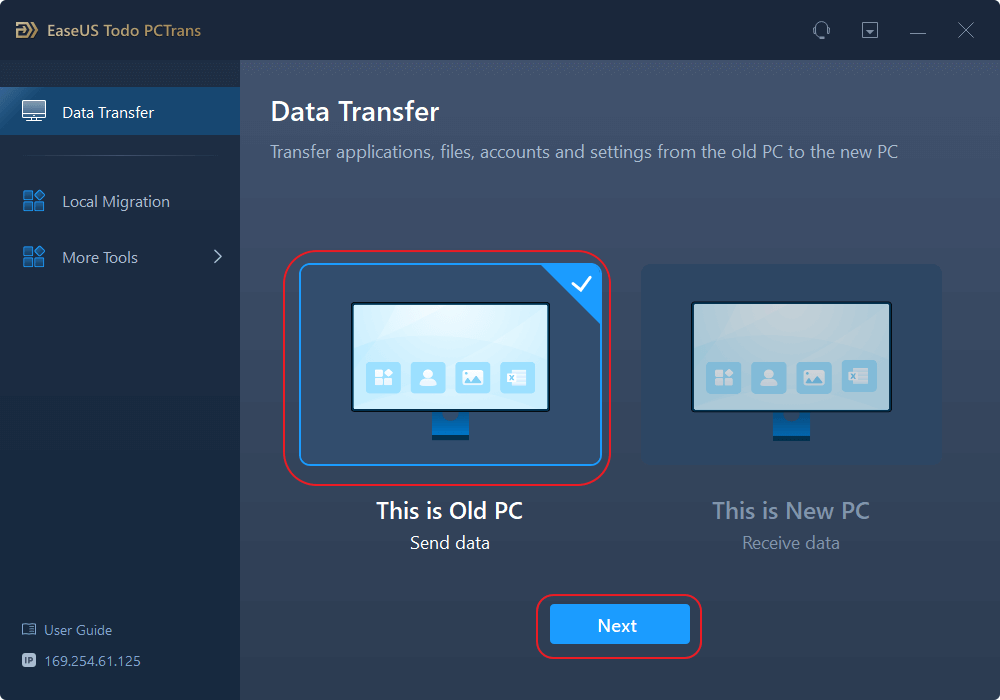
Step 2. In the Data Transfer tab, set up the proper transfer direction:
- On old laptop, select "This is Old PC."
- On new laptop, select "This is New PC."
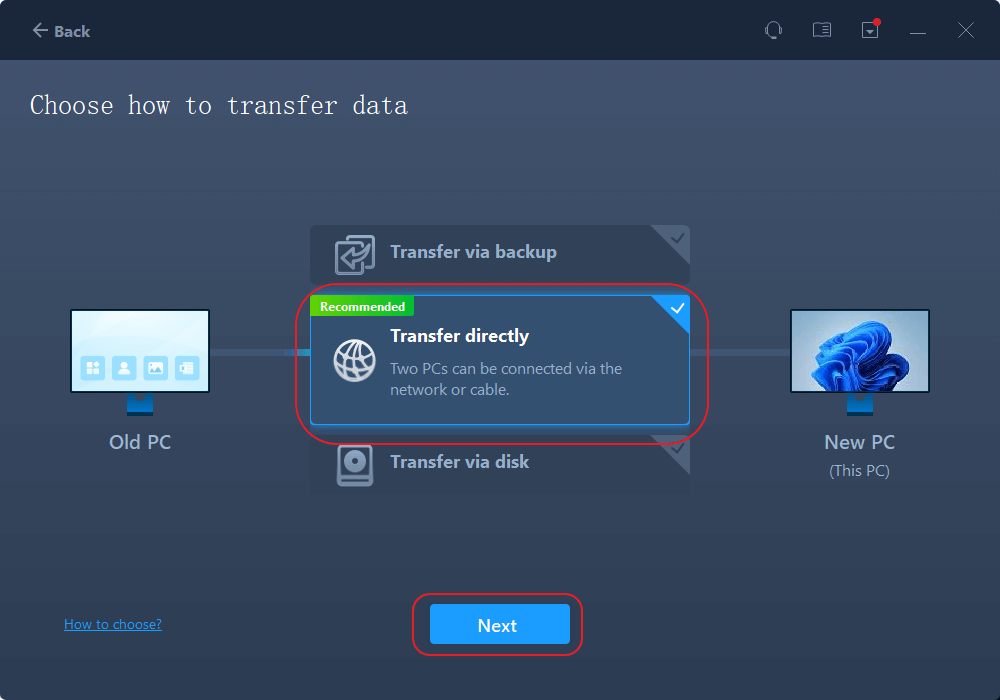
Step 3. Select "Transfer directly" on both laptops and click "Next" to continue.
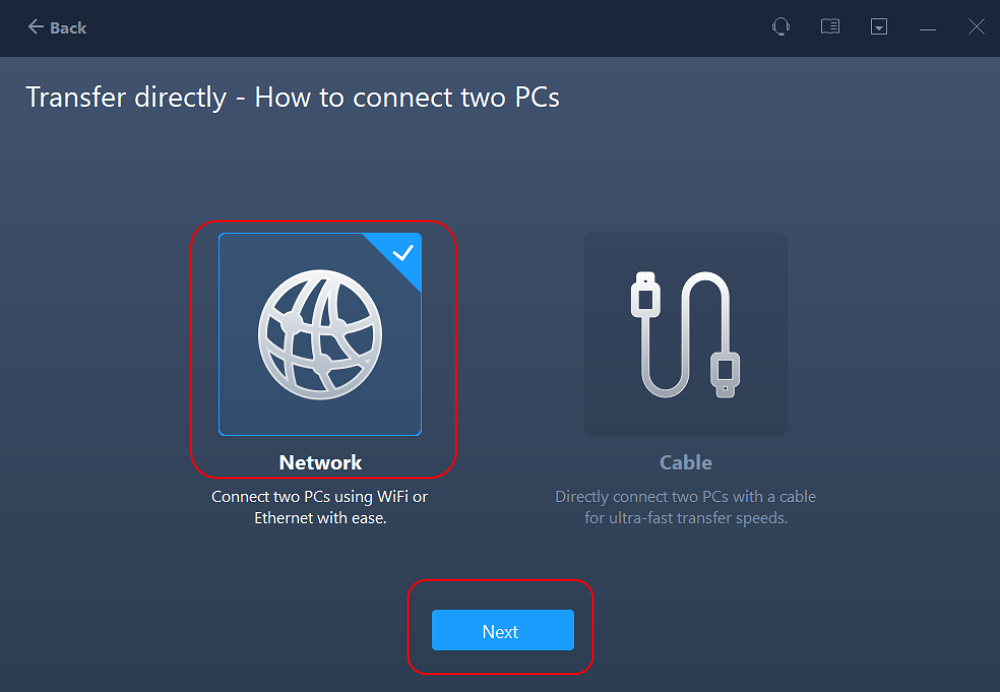
Step 4. On your new laptop, select "Network" and click "Next" to continue. This will automatically scan the old laptop. (Make sure the two PCs are connected to the same LAN.)
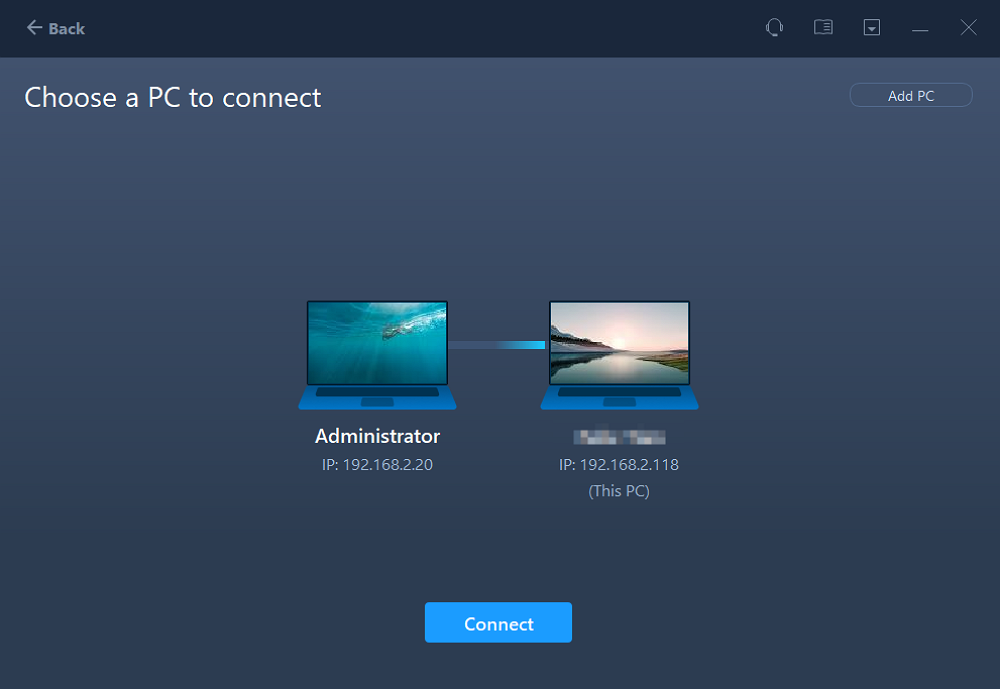
Step 5. Select the target laptop and click "Connect." Then, it will take some time to scan and analyze the data in old laptop.
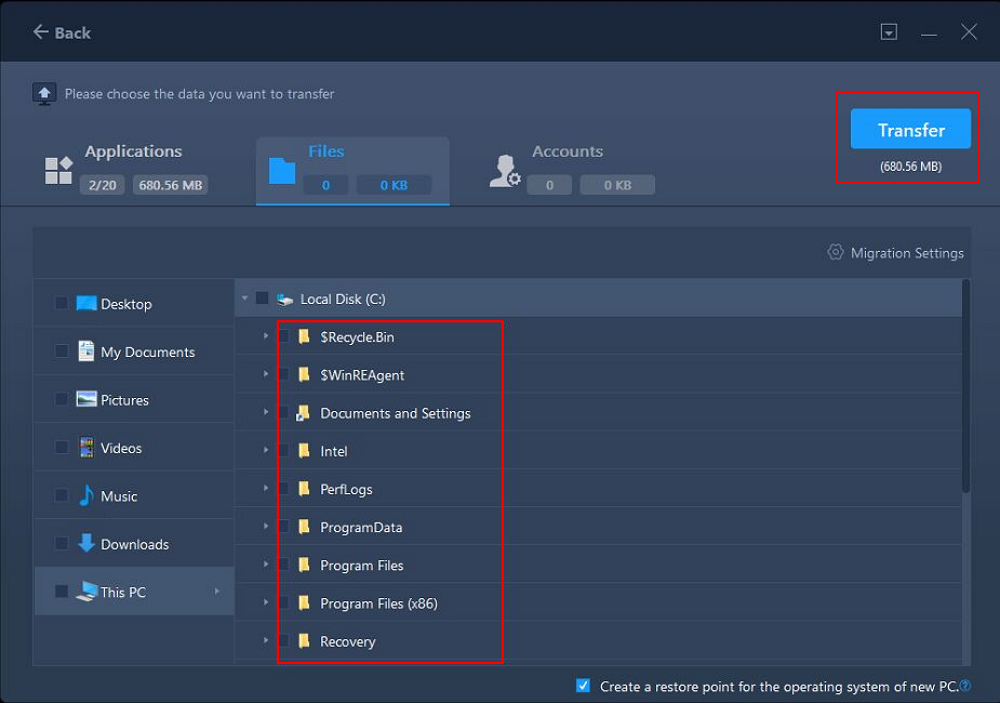
Step 6. Finally, on the new PC, select the files you want to transfer. Then, click "Transfer" to start.
If you like this amazing data transfer software between computers, share this tool with more of your friends online:

Conclusion: Using the Genuine Version of EaseUS Todo PCTrans
EaseUS Todo PCTrans is an efficient and user-friendly PC data transfer utility that migrates files, folders, programs, and accounts to a new computer or hard drive with complete solutions.
For users who are looking for EaseUS Todo PCTrans crack or EaseUS Todo PCTrans keygen, stop and use the official license code. Let's fight against piracy and support the genuine.
FAQs About EaseUS Todo PCTrans
Here is a list of some related questions about using EaseUS Todo PCTrans for file transfer; follow to find answers here if you are interested in:
1. Can I get EaseUS Todo PCTrans for free?
To get EaseUS Todo PCTrans for free, you can directly visit its product page and download it for free. Follow this link to download EaseUS Todo PCTrans for free.
2. What is EaseUS Todo PCTrans?
EaseUS Todo PCTrans is a reliable Windows PC Transfer software provided by EaseUS Software to assist PC and laptop owners in efficiently transferring their personal files, installed apps, and even their account settings between computers in only a few simple clicks.
Aside from this, you can also take this software to accomplish the following tasks:
- Move PC games to another new computer or a new disk
- Transfer files from C drive to D drive
- Migrate installed programs to a new SSD or a new PC
- Free up system C: drive
- Clean up large files
- Find Windows product key, etc
3. How do I move my PC content to another computer?
- Run EaseUS Todo PCTrans on both two computers.
- Connect two computers via EaseUS PCTransfer software.
- Select content on your PC - Files, Applications, or Settings.
- Confirm and click "Transfer" to start the data migration from PC to PC.
About the Author

Updated by Tracy King
Tracy became a member of the EaseUS content team in 2013. Being a technical writer for over 10 years, she is enthusiastic about sharing tips to assist readers in resolving complex issues in disk management, file transfer, PC & Mac performance optimization, etc., like an expert.

Jean is recognized as one of the most professional writers at EaseUS. She has continually improved her writing skills over the past 10 years and has helped millions of readers solve tech problems on PC, Mac, and iOS devices.
Reviews and Awards
-
EaseUS Todo PCTrans Free is a useful and and reliable software solution created to serve in computer migration operations, be it from one machine to another or from an earlier version of your OS to a newer one.
Read More -
EaseUS Todo PCTrans is by the folks at EaseUS who make incredible tools that let you manage your backups and recover your dead hard disks. While it is not an official tool, EaseUS has a reputation for being very good with their software and code.
![]() Read More
-
It offers the ability to move your entire user account from your old computer, meaning everything is quickly migrated. You still get to keep your Windows installation (and the relevant drivers for your new PC), but you also get all your apps, settings, preferences, images, documents and other important data.
Read More

Related Articles
-
How to Transfer Autocad to New Computer [2 Solutions]
![Tracy King]() Tracy King/2024/04/02
-
How to Transfer Files from Computer to Original Xbox
![Jean]() Jean/2026/10/07
-
How to Move User Folder to Another Drive on Windows 11🔥
![Tracy King]() Tracy King/2024/04/02
-
How to Transfer Files From SD Card to Computer Easily and Quickly
![Cici]() Cici/2024/06/03
 Cici/2024/06/03


