
Content
Page Table of Contents
About the Author
Hot Topics
HDClone is a well-known disk cloning utility for copying hard drives, SSDs, and other storage devices. While it performs cloning tasks reliably, many users look for alternatives because they need faster workflows, easier system migration, or additional disk management features. If you're upgrading to a larger SSD or replacing an aging hard drive, choosing the right cloning software can make the migration process much simpler.
What Is HDClone?
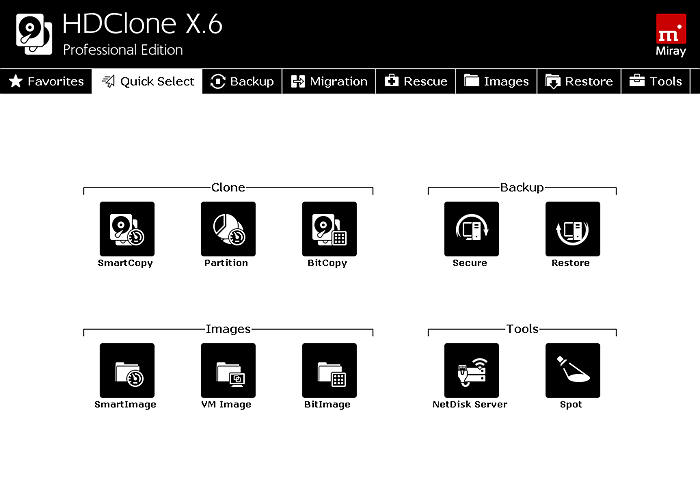 HDClone is a Windows-based disk cloning software developed by Miray Software. It is designed to create exact copies of storage devices, allowing users to migrate operating systems, replace old drives, back up disks, or recover data from failing storage media. The software supports a wide range of storage technologies, including HDDs, SATA SSDs, NVMe SSDs, USB drives, and memory cards.
Unlike traditional backup software, HDClone performs sector-level copying, making it suitable for transferring an entire operating system, installed applications, and personal files to another drive. Different editions provide different capabilities, with advanced cloning performance and enterprise features available in paid versions.
Key Features
- Disk Cloning: Create an exact copy of an entire hard drive or SSD, including the operating system, applications, partitions, and personal data.
- System Migration: Transfer Windows from an old drive to a new SSD or HDD without reinstalling the operating system.
- Sector-by-Sector Copy: Clone every sector of a drive, including hidden partitions and file system metadata, which is useful for backup and forensic scenarios.
- Drive Backup and Restore: Copy storage devices for backup purposes or restore cloned disks when replacing damaged hardware.
- Supports Multiple Storage Types: Compatible with SATA, NVMe, USB drives, memory cards, and many other storage devices.
- Bootable Recovery Environment: Some editions include bootable media for cloning drives outside the Windows operating system.
Pros and Cons
| Data recovery service provider | Hard drive data recovery software |
|---|---|
| Reliable disk cloning engine | Free edition has limited features and speed |
| Supports HDDs, SSDs, NVMe, and USB drives | Advanced functions require paid editions |
| Sector-by-sector cloning available | Primarily focused on cloning rather than complete disk management |
| Bootable environment available in higher editions | Some tasks require additional software after cloning |
| Suitable for drive replacement and migration | Interface may feel less intuitive for new users |
HDClone is a good choice if your primary goal is simply copying one drive to another. It works well for hardware upgrades, disk replacement, and creating exact disk copies. However, users who also need to migrate Windows, resize partitions after cloning, optimize SSD layouts, or perform additional storage management tasks may benefit from a more comprehensive solution. Feel free to share this post to help more people who are looking for an alternative to HDClone.

Best Alternative to HDClone in 2026 (Comparison)
For Windows users, EaseUS Partition Master is one of the strongest alternatives to HDClone because it combines disk cloning with system migration and post-cloning disk management in a single application. Instead of requiring multiple utilities to complete an SSD upgrade, EaseUS allows users to clone disks, migrate Windows, adjust partition sizes, optimize storage layouts, and verify disk health from the same interface. This makes it particularly suitable for users upgrading to larger SSDs or replacing aging hard drives without reinstalling Windows.
EaseUS Partition Master VS HDClone
| Feature | HDClone | EaseUS Partition Master |
|---|---|---|
| Clone entire HDD or SSD | ✅ | ✅ |
| Migrate Windows to SSD | ✅ | ✅ |
| Clone smaller drive to larger SSD | ✅ | ✅ |
| Intelligent sector cloning | Limited by edition | ✅ |
| Resize partitions during migration | Limited | ✅ |
| Adjust partition layout after cloning | Limited | ✅ |
| Convert MBR and GPT without data loss | ❌ | ✅ |
| Check disk health before migration | Limited | ✅ |
| Create WinPE bootable media | ✅ | ✅ |
HDClone remains a solid option if you only need to duplicate one storage device and already know the cloning workflow. However, if your project involves upgrading an SSD, migrating Windows, optimizing partitions after cloning, or preparing a new drive for Windows 11, EaseUS Partition Master offers a more complete workflow without requiring additional disk utilities.
How to Clone a Disk with EaseUS Partition Master
Step 1. Select the source disk.
- Click the "Clone" from the left menu. Select the "Clone OS Disk" or "Clone Data Disk" and click "Next".
- Choose the source disk and click "Next".
Step 2. Select the target disk.
- Choose the wanted HDD/SSD as your destination and click "Next" to continue.
- Read Warning message and confirm "Yes" button.
Step 3. View the disk layout and edit the target disk partition size.
Then click "Continue" when the program warns it will wipe out all data on the target disk. (If you have valuable data on the target disk, back up it in advance.)
You can select "Autofit the disk", "Clone as the source" or "Edit disk layout" to customize your disk layout. (Select the last one if you want to leave more space for C drive.)
Step 4. Click "Start" to start the disk cloning process.
Other HDClone Alternatives Available in 2026
1️⃣Clonezilla
Clonezilla is a free and open-source disk cloning solution that supports both individual computers and large-scale deployments. It offers excellent cloning performance but relies on a Linux-based interface, making it better suited for IT professionals and advanced users who are comfortable working outside Windows.
2️⃣Rescuezilla
Rescuezilla provides a graphical interface built on top of Clonezilla technology. It simplifies backup, restore, and disk cloning operations while remaining free to use. It is a good option for home users who prefer an easier recovery environment but still don't mind booting from external media.
3️⃣Macrium Reflect
Macrium Reflect has long been recognized for reliable disk imaging and cloning. It is widely used by professionals and businesses for system backup and disaster recovery. Users who need advanced imaging features and scheduled backups may find it suitable, although licensing changes have encouraged many home users to explore alternatives.
Conclusion
HDClone is a dependable disk cloning utility for copying drives and migrating storage devices. However, users who want a simpler migration experience, flexible SSD upgrades, and additional Windows disk management capabilities may find EaseUS Partition Master to be a more practical solution. Choosing the right tool ultimately depends on whether you only need disk cloning or a complete storage management platform.
FAQs About HDClone Alternative in 2026
1. What is the best alternative to HDClone?
EaseUS Partition Master is one of the best HDClone alternatives for Windows users because it combines disk cloning, OS migration, partition management, and disk optimization in a single application.
2. Is HDClone free?
HDClone offers a free edition, but it includes feature and performance limitations. More advanced cloning capabilities, higher speeds, and additional functions are available in the commercial editions.
3. Can HDClone clone Windows to an SSD?
Yes. HDClone can copy an entire Windows installation to another SSD or HDD, allowing users to replace their system drive without reinstalling Windows.
4. Why do people look for HDClone alternatives?
Many users need more than basic disk cloning. They may also want to migrate Windows, resize partitions after cloning, convert disk partition styles, or manage storage without switching between multiple tools.
5. Does EaseUS Partition Master clone SSDs?
Yes. EaseUS Partition Master supports cloning HDDs and SSDs, migrating Windows to a new SSD, and optimizing partition layouts during the migration process.
How Can We Help You
About the Author

Dany is an editor of EaseUS who lives and works in Chengdu, China. She focuses on writing articles about data recovery on Mac devices and PCs. She is devoted to improving her writing skills and enriching her professional knowledge. Dany also enjoys reading detective novels in her spare time.

Sherly joined EaseUS in 2022 and she has always loved writing articles and enjoys the fun they bring. She receives professional training here, focusing on product performance and other relative knowledge. She has written over 200 articles to help people overcome computing issues.
Product Reviews
-
I love that the changes you make with EaseUS Partition Master Free aren't immediately applied to the disks. It makes it way easier to play out what will happen after you've made all the changes. I also think the overall look and feel of EaseUS Partition Master Free makes whatever you're doing with your computer's partitions easy.
Read More -
Partition Master Free can Resize, Move, Merge, Migrate, and Copy disks or partitions; convert to local, change label, defragment, check and explore partition; and much more. A premium upgrade adds free tech support and the ability to resize dynamic volumes.
Read More -
It won't hot image your drives or align them, but since it's coupled with a partition manager, it allows you do perform many tasks at once, instead of just cloning drives. You can move partitions around, resize them, defragment, and more, along with the other tools you'd expect from a cloning tool.
Read More
Related Articles
-
MBR2GPT Alternatives Recommended for Windows
![author icon]() Cici/2026/10/22
Cici/2026/10/22 -
Best Diskpart Alternatives for Windows 11, 10, 8, 7 (New Guide 2026)
![author icon]() Tracy King/2026/10/22
Tracy King/2026/10/22 -
5 Best ISO Image Software Free Download [Pros & Cons]
![author icon]() Tracy King/2026/10/22
Tracy King/2026/10/22 -
HDD Low Level Format Tool Alternative: 4 Best Alternatives
![author icon]() Sherly/2026/10/22
Sherly/2026/10/22
 Cici/2026/10/22
  Tracy King/2026/10/22