Page Table of Contents

When searching for reliable backup and best disk cloning software, two names frequently appear: Paragon Hard Disk Manager and Acronis True Image. Both have been on the market for years and offer tools for data protection, system migration, and disaster recovery. However, despite serving similar audiences, they are designed with different priorities in mind.
In this comparison, we'll evaluate Paragon Hard Disk Manager vs Acronis True Image across the factors that matter most: disk cloning performance, backup reliability, ease of use, feature sets, and pricing. By the end, you'll have a clear understanding of which tool better fits your specific needs.
Quick Overview
If you're short on time, here's the simplified answer.
| 🎯Scenario | ✅Better Choice |
| Clone HDD to SSD | Paragon Hard Disk Manager |
| Migrate Windows to SSD | Paragon Hard Disk Manager |
| Full System Backup | Acronis True Image |
| Cloud Backup | Acronis True Image |
| Ransomware Protection | Acronis True Image |
| Advanced Partition Management | Paragon Hard Disk Manager |
| Long-Term Value | Paragon Hard Disk Manager |
| Beginner-Friendly Experience | Acronis True Image |
➡️Paragon Hard Disk Manager Review: It is generally the better choice for users focused on disk management and SSD migration. Its cloning tools, partition utilities, and one-time purchase options make it attractive for PC enthusiasts and users performing hardware upgrades.
➡️Acronis True Image Review: It delivers a broader backup experience. It combines system image/disk backups, disk cloning, cloud storage, cybersecurity features, and recovery tools into a single platform, making it better suited to users who prioritize ongoing data protection over occasional disk cloning.
What Are These Two Tools Designed For?
Although both products appear in searches for backup software and disk cloning software, they were built to solve different problems.
Paragon Hard Disk Manager: A Storage Management Suite
Paragon Hard Disk Manager is designed primarily for users who work directly with storage devices. Its core capabilities include:
- Disk cloning
- Data Migration
- Basic and Advanced Partition Management
- Disk conversion
- Boot correction
- Drive optimization
- Backup and restore
- Disk Wipe
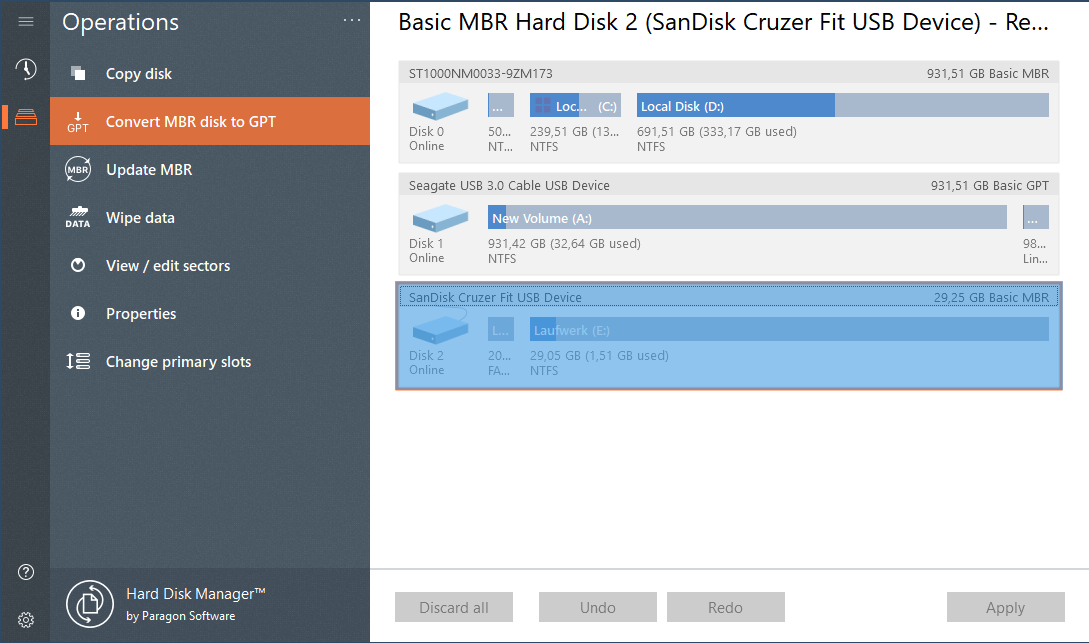
In many ways, Paragon functions as a complete disk management platform rather than a dedicated backup solution.
Acronis True Image: A Backup and Cyber Protection Platform
Acronis True Image takes a different approach. Rather than focusing on storage administration, it emphasizes long-term data protection.
Its key features include:
- Full image backups
- Incremental and differential backups
- Cloud backup
- Disaster recovery
- Ransomware protection
- Identity monitoring
- File synchronization
- Disk cloning
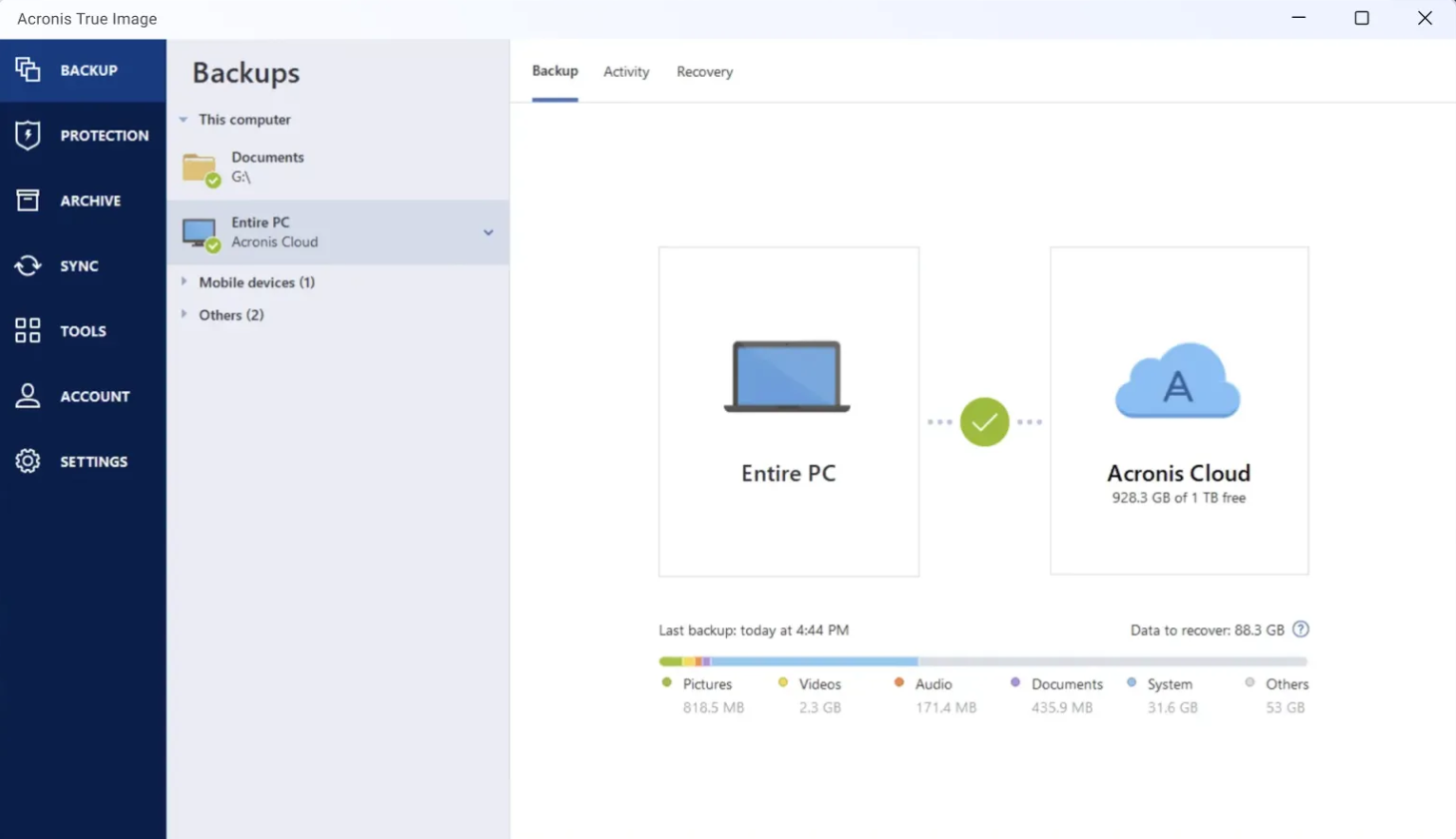
Acronis is often recommended for users who want an automated backup strategy rather than a one-time migration solution.
Simply put, Paragon is designed to help you manage drives, while Acronis is designed to help you protect data.
Share the blog on social media to help others learn about Paragon Hard Disk Manager and Acronis True Image.

Feature Comparison: Paragon Hard Disk Manager vs Acronis True Image:
| Paragon Hard Disk Manager | Acronis True Image | |
| Disk Cloning | ✅ | ✅ |
| Clone HDD to SSD | ✅ | ✅ |
| OS Migration | ✅ | ✅ |
| Partition Management | ✅ | ⚠️ Limited |
| Disk Conversion (MBR/GPT) | ✅ | ❌ |
| Boot Repair Tools | ✅ | Limited |
| Full System Backup | ✅ | ✅ |
| Incremental Backup | ✅ | ✅ |
| Differential Backup | ✅ | ✅ |
| Cloud Backup | ❌ | ✅ |
| File Sync | ❌ | ✅ |
| Ransomware Protection | ❌ | ✅ |
| Recovery Media Creation | ✅ | ✅ |
| NAS Backup | Limited | Better |
| Cross-Platform Support | Good | Better |
| Subscription Required | No | Usually Yes |
Key Takeaways: Both tools cover the essentials of backup and recovery, and disk cloning, but their priorities are noticeably different.
- Paragon Hard Disk Manager excels in areas related to storage administration. Users can resize partitions, convert disk formats, repair boot issues, and perform SSD migrations without relying on additional utilities. This makes it particularly appealing to power users and IT professionals.
- Acronis True Image provides a wider ecosystem around data protection. Features such as cloud backup, anti-ransomware protection, and automatic backup scheduling make it more suitable for users who want ongoing protection rather than occasional maintenance.
Disk Cloning Test: Which One Performs Better?
For many users, disk cloning performance is the deciding factor. After all, the goal of most SSD upgrades is simple: move everything from an old drive to a new one without reinstalling Windows.
We tested both tools to experience their performance, and this is the setup we used to simulate a common upgrade process
- Source Drive: 500GB SATA SSD
- Target Drive: 2TB NVMe SSD
- Operating System: Windows 11
- Data Size: Approximately 300GB
- Goal: Migrate Windows and all applications to the larger SSD
Paragon Hard Disk Manager
Paragon provides a dedicated migration workflow that guides users through selecting source and destination disks. The interface emphasizes storage operations and includes options for adjusting partition sizes during migration.
👍Advantages:
- Flexible partition resizing
- Clear disk-level controls
- Good compatibility with SSD upgrades
- Strong support for MBR-to-GPT migration scenarios
👎Potential drawbacks:
- The interface may feel technical for beginners
- More settings can increase complexity
Acronis True Image
Acronis offers a streamlined cloning wizard designed to simplify the migration process. Most users can complete the workflow with minimal configuration.
👍Advantages:
- Easy-to-follow wizard
- Beginner-friendly interface
- Reliable cloning engine
👎Potential drawbacks:
- Less granular control over partitions
- More focused on backup workflows than migration workflows
Cloning Verdict
For users specifically searching for "clone hard drive Windows 11" or "migrate Windows to SSD," Paragon generally provides more control and flexibility. For users who value simplicity and only perform occasional migrations, Acronis may offer an easier learning curve.
Backup and Recovery: Which One Is More Reliable?
While Paragon has strong cloning capabilities, backup reliability is where Acronis traditionally holds an advantage.
# System Image Backup
Both tools support full system image backups, allowing users to restore an entire operating system after hardware failure. However, Acronis has spent years refining image-based backup workflows and offers more automation options for regular protection.
# Incremental and Differential Backups
Both products support differential and incremental backups that save only changed data after the initial backup. This reduces storage requirements and speeds up backup operations.
# Recovery Environment
A good backup is only useful if recovery works when disaster strikes. Both solutions allow users to create bootable recovery media, but Acronis provides a more mature disaster recovery ecosystem, particularly for users managing multiple devices.
# Security Features
This is one area where Acronis clearly differentiates itself. Acronis includes ransomware protection, real-time threat monitoring, and secure cloud backup options. Paragon focuses primarily on storage management and does not position itself as a cybersecurity solution.
💰Pricing Comparison
Pricing often becomes the deciding factor for users comparing Paragon vs Acronis.
Paragon Hard Disk Manager
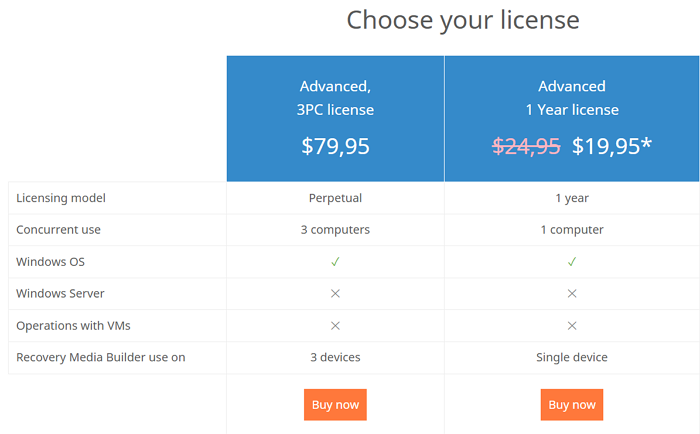
Paragon typically offers:
- Perpetual license options
- One-year purchase model
- Optional upgrade plans
- No mandatory cloud subscription
Acronis True Image
Acronis has increasingly moved toward subscription-based licensing.
Typical plans may include:
- Annual subscriptions
- Cloud storage tiers
- Security feature bundles
- Premium recovery services
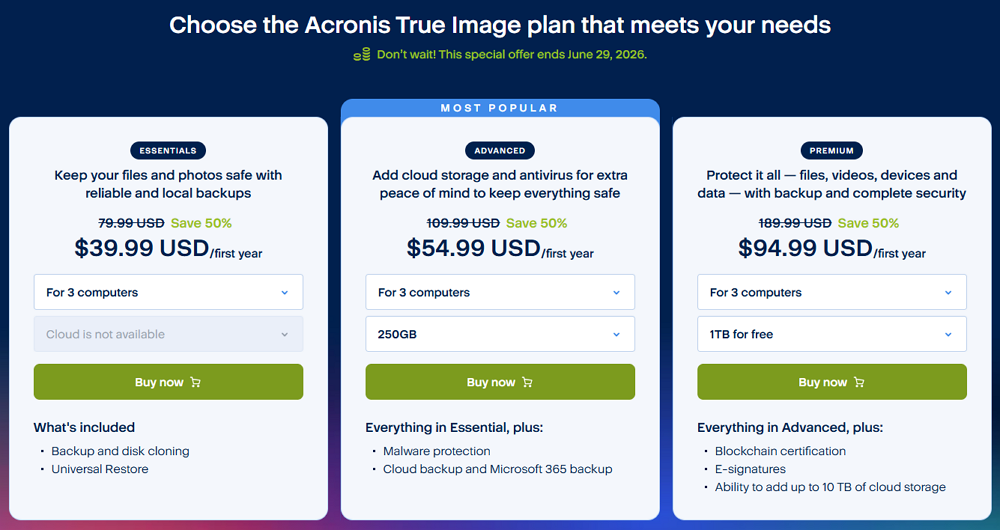
For users simply searching for an alternative to Acronis or the best software to migrate Windows to SSD, Paragon often provides a lower total cost of ownership. For users building a comprehensive backup strategy, Acronis may justify its recurring subscription through its broader feature set.
Best Alternative for Windows Disk Cloning
While Paragon Hard Disk Manager and Acronis True Image both support drive cloning, many users are actually looking for something more specific: a tool dedicated to migrating Windows to a new SSD quickly and reliably.
In these situations, a specialized disk cloning solution can sometimes be a better fit than a full backup suite. EaseUS Disk Copy is designed specifically for disk cloning and system migration. Ir has the following features:
- Clone HDD to SSD without reinstalling Windows
- Migrate Windows to a larger SSD
- Sector-by-sector cloning
- Clone entire disks or individual partitions
- Support for NVMe, SATA SSDs, and large-capacity drives
- Compatible with Windows 11, Windows 10, and older versions
 Free Download
Windows 11/10/8/7
Which Tool Is Best for Your Needs?
| Scenario | Recommended Tool |
| SSD Upgrade | EaseUS Disk Copy |
| Clone HDD to SSD | EaseUS Disk Copy |
| Advanced Disk Management | Paragon Hard Disk Manager |
| Full Backup Protection | Acronis True Image |
| Cloud Backup | Acronis True Image |
| Partition Management | Paragon Hard Disk Manager |
Share the blog on social media to help others learn about Paragon Hard Disk Manager and Acronis True Image.
Final Verdict
Choosing between Paragon Hard Disk Manager and Acronis True Image ultimately comes down to your primary objective. Although both products support backup and disk cloning, they excel in different areas.
Choose Paragon Hard Disk Manager If:
- You frequently manage storage devices.
- You need advanced partition management tools.
- You want greater control over disk operations.
- You regularly clone drives or migrate operating systems.
- You prefer a perpetual license over subscriptions.
Choose Acronis True Image If:
- Data protection is your top priority.
- You need automated backup workflows.
- You want cloud backup services.
- You value ransomware protection and security features.
- You need a comprehensive disaster recovery solution.
Consider EaseUS Disk Copy If:
- You need to clone a hard drive to an SSD.
- You're upgrading to a larger NVMe SSD.
- You want to migrate Windows without reinstalling.
- You prefer a dedicated disk cloning solution.
- You want a straightforward migration workflow without backup-related complexity.
Free Download
Windows 11/10/8/7
-
Updated by
![]()
Larissa
Larissa has rich experience in writing technical articles and is now a professional editor at EaseUS. She is good at writing articles about data recovery, disk cloning, disk partitioning, data backup, and other related knowledge. Her detailed and ultimate guides help users find effective solutions to their problems. She is fond of traveling, reading, and riding in her spare time.…Read full bio