
Content
Page Table of Contents
About the Author
Hot Topics
Are you looking for a way to download Norton Ghost on Windows 11? Before that, check this page to learn whether it is available on Windows 11 and whether it is safe to run Norton Ghost on Windows 11.
| Norton Ghost | |
|---|---|
| Status | Discontinued |
| Last Version | Ghost 15 |
| Discontinued | April 30, 2013 |
| Windows 11 | Not officially supported; primarily older Windows systems, including Windows XP, Vista, and Windows 7 |
| Main Problems |
Compatibility with UEFI/GPT, newer storage hardware, and modern Windows environments can be problematic. |
Is Norton Ghost Available in Windows 11?
No, Norton Ghost is not officially provided or supported for Windows 11. Norton Ghost was once the gold standard in disk cloning and system imaging, but the product was officially discontinued on April 30, 2013. Although some users still try to use older versions, running it on Windows 11 is unsupported and carries risks, such as:
- No Native UEFI/GPT Support: Norton Ghost was not designed for modern UEFI-based systems or GPT-partitioned drives, which are commonly used by Windows 11 PCs.
- Secure Boot and TPM Compatibility Issues: Windows 11 relies on features such as Secure Boot and TPM 2.0. These modern security requirements can interfere with legacy software and unsigned components, particularly during system recovery.
- No Official Windows 11 Support: Norton Ghost development ended long before Windows 11 was released, so there are no official updates, bug fixes, or patches to ensure reliable operation on modern systems.
- Bootable Media Limitations: Even if you create a Norton Ghost bootable recovery disc, it may fail to boot or recognize hardware on newer UEFI-based PCs due to outdated drivers and limited support for modern storage and file systems.
- You can still use the latest Norton Ghost release, version 15, on Windows 7 and earlier systems. However, if you choose to run Norton Ghost on Windows 7, keep in mind that it is no longer supported, so you will have to use it at your own risk.
- For Windows 11, the situation is even less favorable. Due to driver incompatibility, limited support for modern partition and UEFI configurations, and potential security risks associated with outdated software, Norton Ghost is not recommended for use on Windows 11.
Modern Norton Ghost Alternative for Disk Cloning
Norton Ghost is not officially supported on Windows 11, and forcing it to run may lead to compatibility issues or errors. This is where EaseUS Partition Master can help as one of the best Norton Ghost alternatives for Windows 11.
Ensuring reliable cloning and backup, along with access to support and guidance when needed, is essential for a dependable backup solution. Beyond the support issue, EaseUS Partition Master offers:
- Faster cloning
- Support for modern hardware and operating systems
- UEFI and GPT boot support
It is designed to work with hardware and software environments that Norton Ghost was never built to handle, while offering a range of features that make disk cloning and data migration easier and more secure.
EaseUS Partition Master VS Norton Ghost
| Comparison | Norton Ghost | EaseUS Partition Master |
|---|---|---|
| Disk Cloning | Yes | Yes |
| Partition Cloning | Yes | Yes |
| Windows Migration | Legacy workflow | Yes |
| Windows 11 Support | No official support | Yes |
| GPT Support | Limited by its era | Yes |
| Modern SSDs | Limited, not designed for modern NVMe environments | Yes |
| Active Development | No | Yes |
| Modern User Interface | No | Yes |
How to Clone HDD to SSD with EaseUS Partition Master?
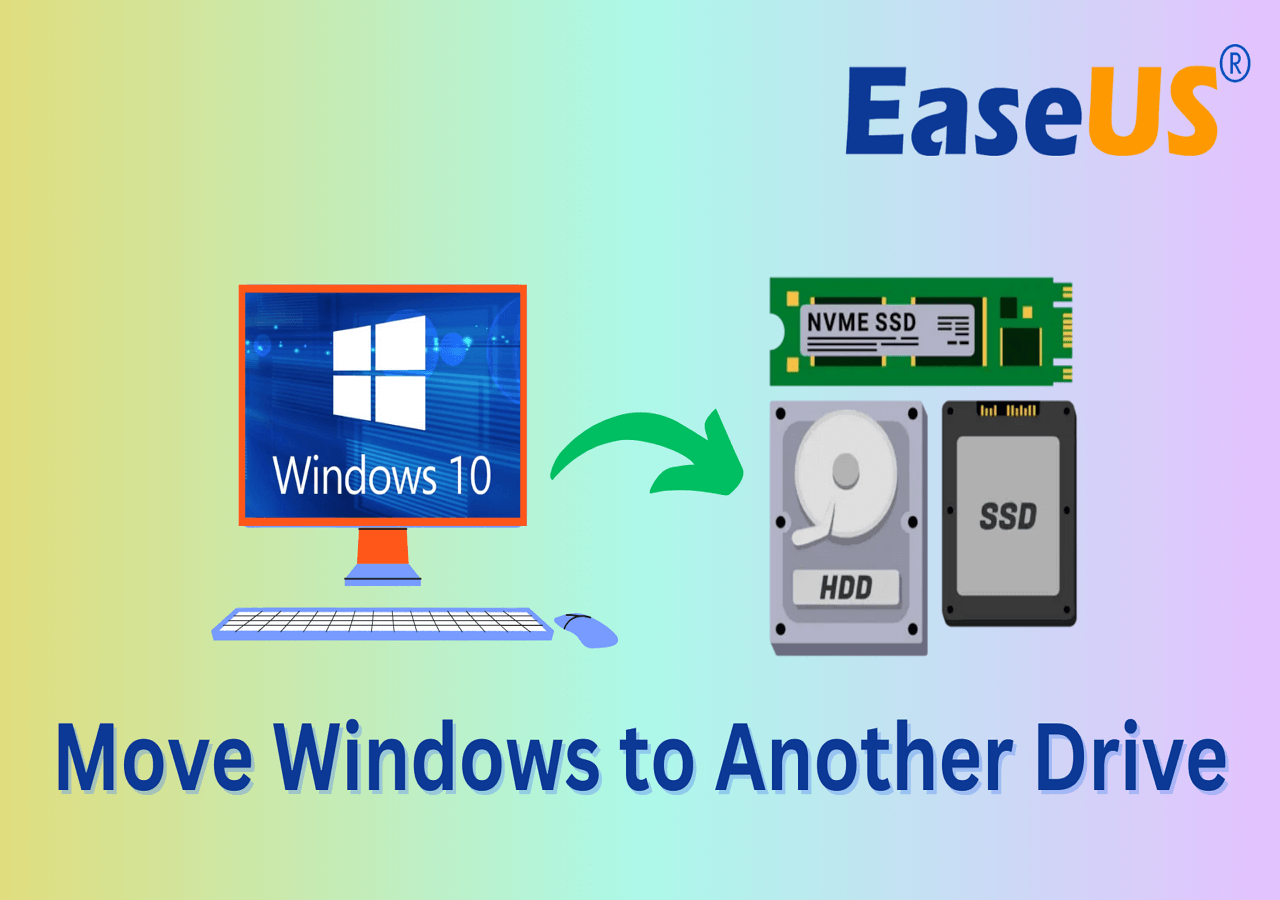
If you are looking for a Norton Ghost alternative to clone a hard drive or migrate Windows to another disk, EaseUS Partition Master provides a modern and straightforward solution. Its Disk Clone feature lets you copy your existing disk to a new HDD or SSD without reinstalling Windows.
Below is how to use EaseUS Partition Master to clone a disk step by step.
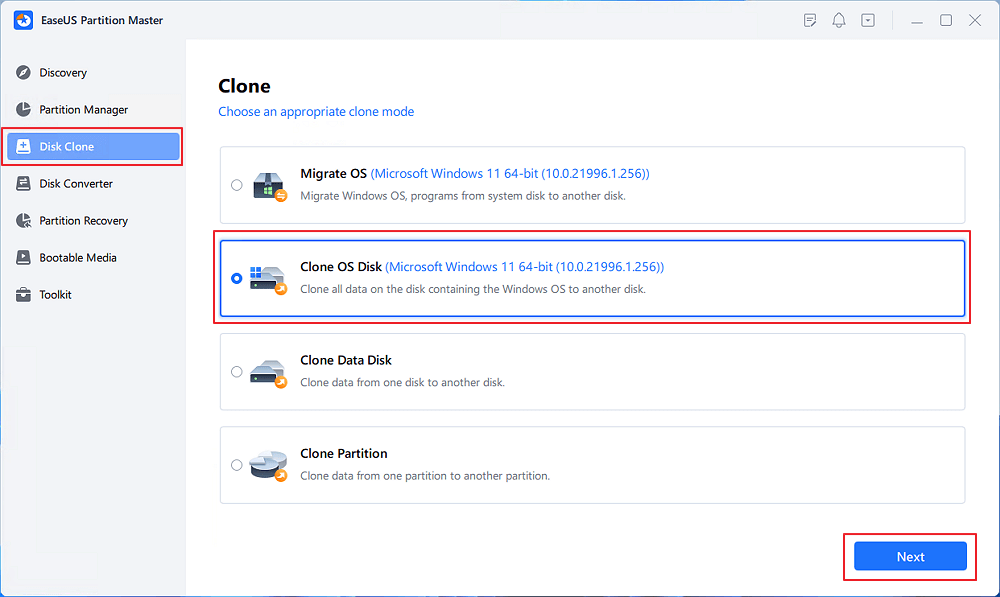
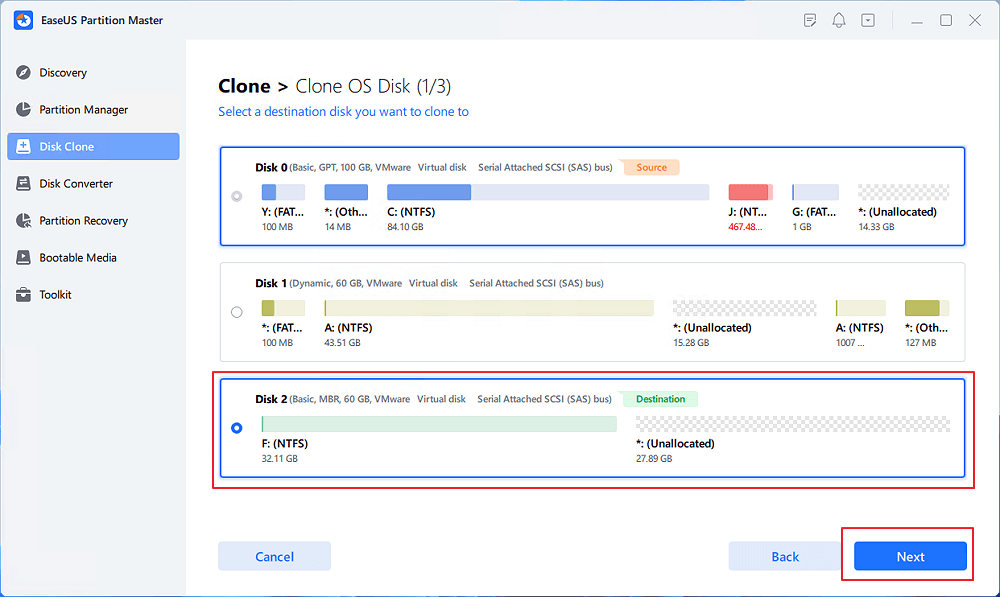
Step 1. Launch EaseUS Partition Master, go to the Disk Clone tab, select "Clone OS Disk" and click "Next".
Step 2. Select the target new drive where you want to clone the OS to, and click "Next".
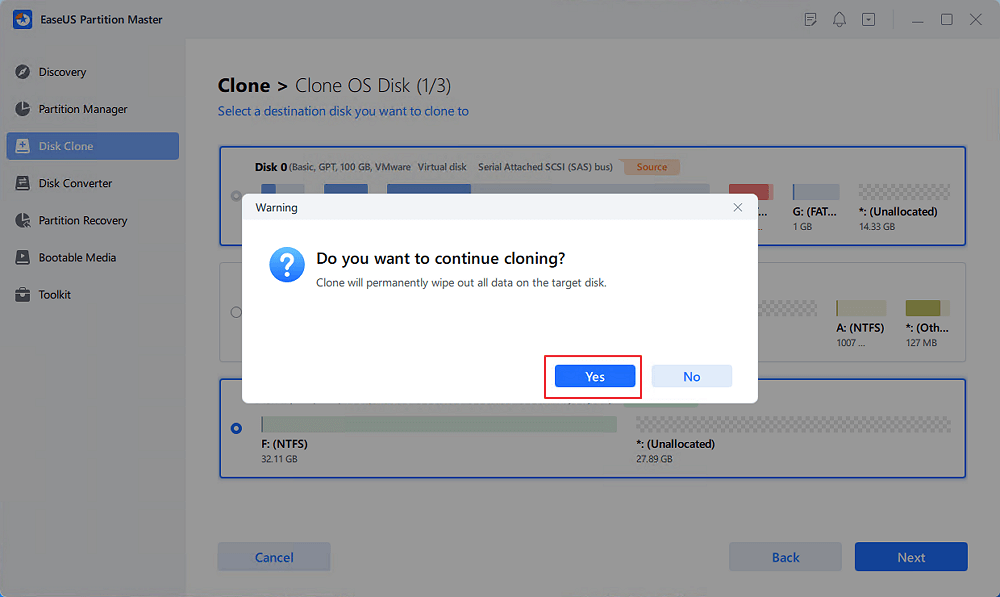
Click "Yes" to confirm that you want to continue the OS disk cloning process.
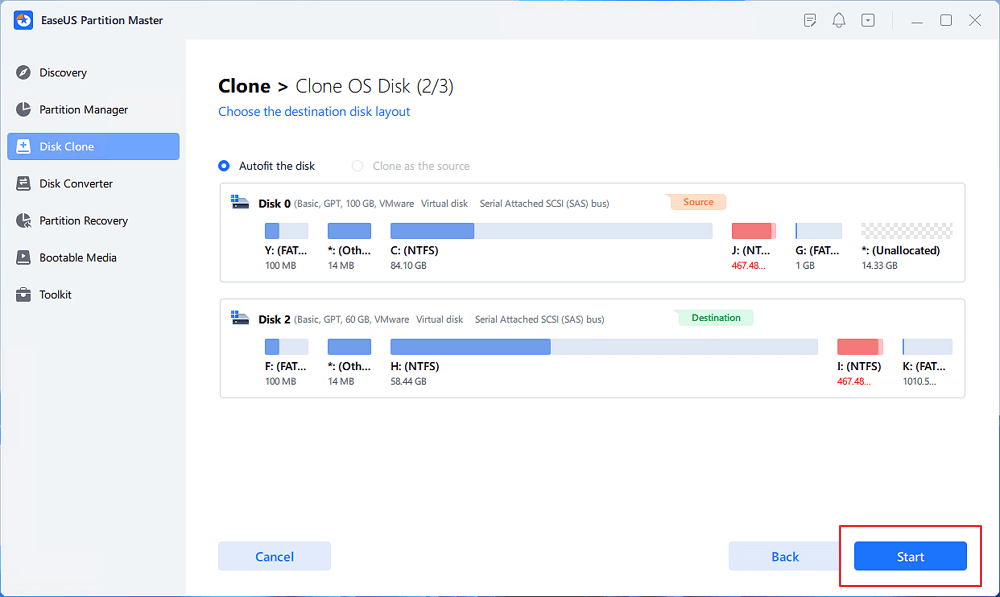
Step 3. View the disk layout, and click "Start" to begin the OS cloning process.
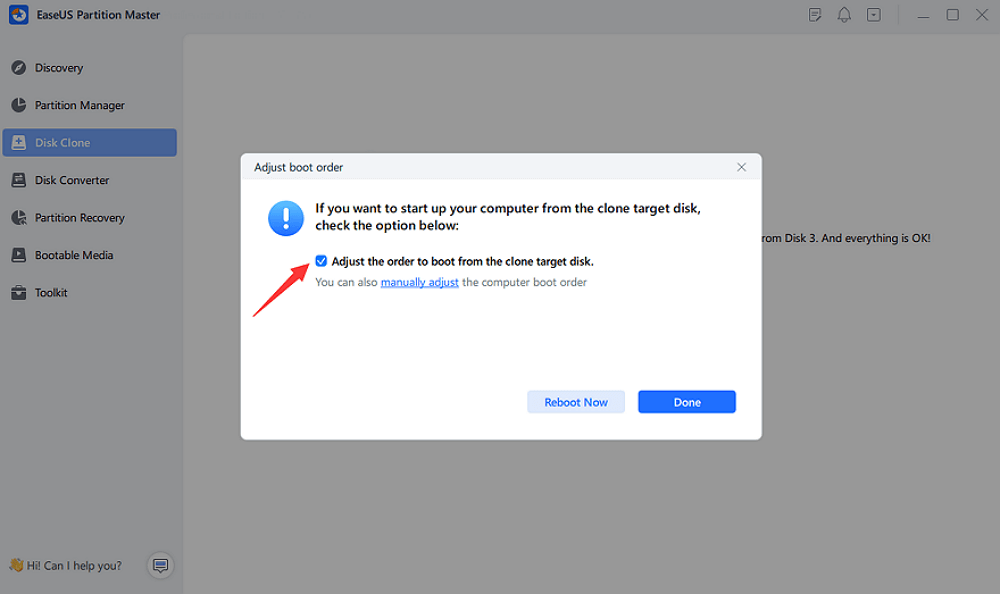
Step 4. When the process completes, you'll see a confirming message, asking "if you want to start up computer from the clone target disk".
- Reboot Now means to reboot your PC and configure the computer to boot OS from the new disk immediately.
- Done means you want to make the changes later.
- Tip
-
Once you have confirmed that Windows, your applications, and other data are working properly on the new SSD, you can format the old HDD and use it as additional storage space.
FAQs About Norton Ghost Windows 11
Is Norton Ghost still available?
Norton Ghost has been discontinued. Symantec stopped selling the product in 2013, and official support ended in 2014.
Can I still download Norton Ghost for free?
Old Norton Ghost installers may still appear on third-party download websites, but there is no current, actively supported Norton Ghost version for modern Windows PCs. Be careful with unofficial installers and modified downloads.
Is Norton Ghost compatible with Windows 11?
Norton Ghost was developed for older Windows versions and does not have official Windows 11 support. It is not recommended as a modern Windows 11 disk cloning solution.
What replaced Norton Ghost?
There is no single direct replacement for every Ghost function. Depending on your needs, modern backup, disk imaging, cloning, and partition management tools can replace different parts of the old Ghost workflow.
What is the best Norton Ghost alternative?
If you mainly need to clone disks, migrate Windows, upgrade from HDD to SSD, or manage partitions, EaseUS Partition Master is a practical modern alternative.
Can I clone an HDD to an SSD without Norton Ghost?
Yes. You do not need Norton Ghost to clone an HDD to an SSD. Modern disk cloning software can copy the operating system, applications, files, and partitions to a new SSD.
How Can We Help You
About the Author

Dany is an editor of EaseUS who lives and works in Chengdu, China. She focuses on writing articles about data recovery on Mac devices and PCs. She is devoted to improving her writing skills and enriching her professional knowledge. Dany also enjoys reading detective novels in her spare time.

Sherly joined EaseUS in 2022 and she has always loved writing articles and enjoys the fun they bring. She receives professional training here, focusing on product performance and other relative knowledge. She has written over 200 articles to help people overcome computing issues.
Product Reviews
-
I love that the changes you make with EaseUS Partition Master Free aren't immediately applied to the disks. It makes it way easier to play out what will happen after you've made all the changes. I also think the overall look and feel of EaseUS Partition Master Free makes whatever you're doing with your computer's partitions easy.
Read More -
Partition Master Free can Resize, Move, Merge, Migrate, and Copy disks or partitions; convert to local, change label, defragment, check and explore partition; and much more. A premium upgrade adds free tech support and the ability to resize dynamic volumes.
Read More -
It won't hot image your drives or align them, but since it's coupled with a partition manager, it allows you do perform many tasks at once, instead of just cloning drives. You can move partitions around, resize them, defragment, and more, along with the other tools you'd expect from a cloning tool.
Read More
Related Articles
-
How to Format Corrupted SD Card [Hard Format SD Card]
![author icon]() Tracy King/2026/10/22
Tracy King/2026/10/22 -
[Fixed] EmuDeck Not Recognizing SD Card on Steam Deck
![author icon]() Oliver/2026/10/22
Oliver/2026/10/22 -
How to Create a Bootable USB for Mac - Full guide
![author icon]() Cici/2026/10/23
Cici/2026/10/23 -
Cannot Delete A Protected Partition Without the Force Protected Parameter Set
![author icon]() Tracy King/2026/10/23
Tracy King/2026/10/23
 Tracy King/2026/10/22
  Oliver/2026/10/22
  Cici/2026/10/23