







Content
Page Table of Contents
About the Author
Hot Topics
For many PC technicians, Hiren's Boot CD was one of the first rescue tools they ever used. Long before Windows included built-in recovery environments, Hiren's provided a collection of utilities for repairing startup problems, recovering files, resetting passwords, and managing disks from a bootable USB drive. But a lot has changed since then.
Windows 11 has introduced Secure Boot requirements, UEFI firmware has replaced legacy BIOS on most systems, and SSD migration has become a common task for home users. So is Hiren's Boot CD still worth using? Is it safe?
In this review, we'll look at what Hiren's BootCD PE offers in 2026, where it still excels, and when a more specialized solution may be a better choice.
Share this post to help more people know about Hiren's Boot CD.

What Is Hiren's Boot CD?
The original Hiren's Boot CD was a bootable rescue toolkit that bundled dozens of utilities into a single environment. It became popular among computer repair shops because it allowed technicians to troubleshoot systems without installing software directly on Windows. The original project is no longer actively maintained. Today, most users download and use Hiren's BootCD PE, a Windows PE-based recovery environment designed for modern hardware.
After creating a bootable USB drive, users can start a computer directly into the recovery environment and access tools for: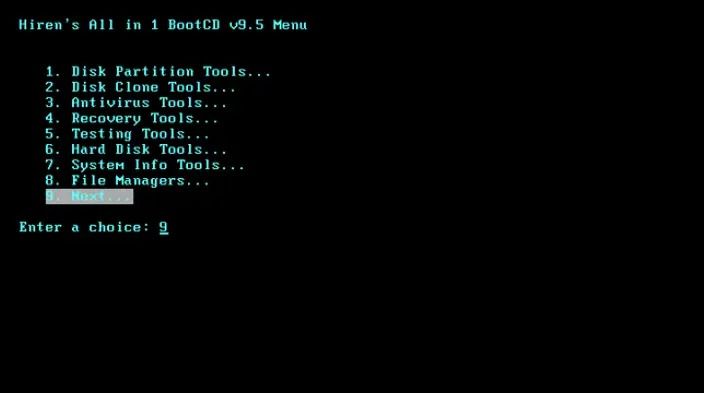
- Disk partition management
- Data recovery
- Startup repair
- Password reset
- Hardware diagnostics
- Backup and imaging
For troubleshooting an unbootable PC, it remains one of the most recognizable names in the Windows repair community.
Key Features of Hiren's BootCD PE
One reason Hiren's has remained relevant is the sheer number of tools included.
| Features | Available |
|---|---|
| Boot Repair | Yes |
| Password Reset | Yes |
| Data Recovery | Yes |
| Disk Partitioning | Yes |
| Registry Editing | Yes |
| Hardware Diagnostics | Yes |
| Backup Tools | Yes |
| SSD Migration | Limited |
| OS Migration | No |
Unlike standalone software, Hiren's functions more like a toolbox than a single application. Each task is handled by a separate utility inside the PE environment. For experienced technicians, this flexibility is often an advantage, but for casual users, it can sometimes feel overwhelming. For beginners, use an alternative to Hiren's Boot CD like EaseUS Partition Master, which offers a clear interface and supports finishing most tasks in Windows instead of WinPE environment.
Hiren's Boot CD Usages
To understand whether Hiren's still makes sense in 2026, it helps to look at common recovery scenarios.
- 1️⃣Fixing an Unbootable Windows PC
One of the main reasons people still download Hiren's BootCD PE is to troubleshoot computers that refuse to start. When Windows becomes stuck in a boot loop, displays startup errors, or fails to load after a system update, users can boot into the Hiren's PE environment and access a variety of repair tools without entering Windows itself.
- 2️⃣Resetting a Forgotten Windows Password
Hiren's includes password recovery utilities that can help regain access to local Windows accounts. This feature is particularly useful for older systems or computers that are no longer connected to Microsoft accounts.
- 3️⃣Diagnosing Hardware Problems
The package contains memory testing tools, drive health utilities, and hardware monitoring applications that can help identify failing SSDs, RAM issues, or overheating components.
- 4️⃣Migrating to a New SSD
This is where things become less straightforward. While Hiren's contains imaging and cloning utilities, the process often involves multiple tools, manual configuration, and additional troubleshooting.
For users who simply want to move Windows from an old drive to a larger SSD, there are easier options available today.
Pros and Cons
Like most recovery environments, Hiren's has clear strengths and weaknesses.
PROS
CONS
The biggest challenge isn't functionality but complexity. Many users only need to perform one specific task, such as cloning an SSD or repairing a boot issue. Navigating dozens of utilities can feel unnecessary when a dedicated solution can complete the same task in a few clicks.
Is Hiren's Boot CD Still Worth Using?
Hiren's BootCD PE is still worth using in 2026, especially when Windows won't boot and you need access to recovery or diagnostic tools outside the operating system. Its biggest advantage is that it brings together dozens of utilities in a single bootable environment, allowing users to repair startup issues, reset passwords, test hardware, recover files, and troubleshoot system failures without installing additional software.
That said, Hiren's was designed as a toolkit rather than a guided solution. For many common tasks, users are expected to choose the appropriate utility and perform the repair manually. This approach works well for IT technicians and experienced users who are comfortable working in a Windows PE environment.
For everyday disk management tasks, however, Hiren's may not be the most practical option. If your goal is to clone an SSD, migrate Windows to a new drive, resize partitions, or convert MBR to GPT, dedicated disk management software can often accomplish these tasks with fewer steps and a shorter learning curve.
Best Hiren's Boot CD Alternative for Boot Repair & Disk Management
While Hiren's BootCD PE remains a reliable recovery toolkit, it isn't always the easiest solution for everyday Windows users. Most tasks require booting from a USB drive and working with multiple utilities inside a Windows PE environment.
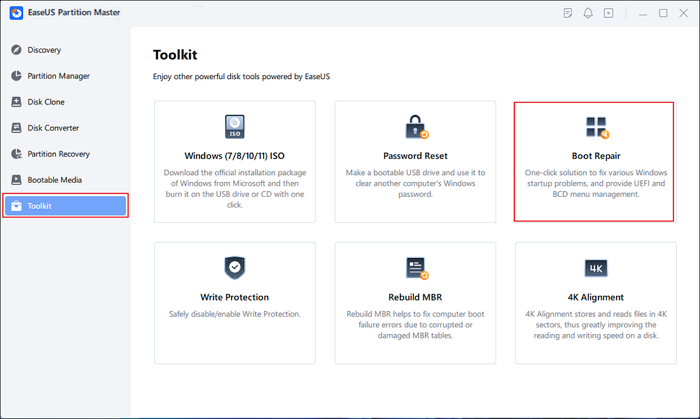
EaseUS Partition Master takes a more streamlined approach. In addition to boot repair and password reset, it allows users to manage partitions, recover lost partitions, clone disks, migrate Windows, and convert MBR to GPT directly within Windows. When a PC fails to boot, users can also access dedicated recovery tools through its WinPE environment.
With its beginner-friendly interface, guided workflows, regular updates, and 24/7 technical support, EaseUS Partition Master is often a more practical choice for users who want both boot repair and disk management capabilities in a single solution.
EaseUS Partition Master vs Hiren's BootCD PE
| Feature | Hiren's BootCD PE | EaseUS Partition Master |
|---|---|---|
| Fix Boot Issues | Manual Tools | Guided Workflow |
| Partition Recovery | Third-Party Utilities | Built-in |
| Windows Password Reset | Yes | Yes |
| SSD/HDD Cloning | Available |
|
| OS Migration | Limited | Yes |
| Create Bootable Media | Required for Most Tasks | Optional |
| Perform Tasks Directly in Windows | No | Yes |
| User Interface | Technical | Beginner-Friendly |
| Best For |
|
Home Users, Power Users & IT Professionals |
Hiren's BootCD PE remains an excellent emergency toolkit for troubleshooting computers that cannot boot. However, it is primarily designed for users who are comfortable working with multiple recovery utilities inside a Windows PE environment.
EaseUS Partition Master focuses on a different audience. By combining boot repair, password reset, disk management, partition recovery, SSD migration, and system migration into a single interface, it reduces complexity and makes advanced disk operations more accessible to everyday users. For most Windows users looking for an easier alternative to Hiren's BootCD PE, EaseUS Partition Master provides a more streamlined experience while covering many of the same recovery and maintenance scenarios.
Final Verdict
Hiren's Boot CD remains one of the most useful Windows recovery environments available today. Its strength lies in versatility. Few free tools provide such a broad collection of repair, recovery, and diagnostic utilities in a single bootable package.
However, modern users often need specific solutions rather than an entire toolbox. If you're an IT professional, Hiren's BootCD PE is still worth keeping on your USB drive.
If your primary goal is disk management, SSD migration, partition resizing, or boot repair, a dedicated solution such as EaseUS Partition Master will usually be easier to use and faster to deploy. In short, Hiren's Boot CD is still relevant in 2026—but it is no longer the only option, and for many Windows 11 users, it may not be the most convenient one.
FAQs About Hiren's BootCD PE
1. Is Hiren's BootCD PE still useful in 2026?
Yes. Hiren's BootCD PE is still a useful recovery toolkit for troubleshooting computers that cannot boot normally. It provides access to boot repair tools, password reset utilities, hardware diagnostics, and disk management software within a Windows PE environment. However, many users now prefer dedicated tools for routine tasks such as disk cloning, OS migration, and partition management because they require less manual work.
2. Can Hiren's BootCD PE repair Windows startup problems?
In many cases, yes. Hiren's includes tools that can help repair corrupted boot records, rebuild BCD entries, and troubleshoot startup failures. It is particularly useful when Windows is stuck in a boot loop or cannot reach the login screen. The effectiveness of the repair depends on the underlying cause of the problem, but it remains one of Hiren's most common use cases.
3. Does Hiren's BootCD PE work with Windows 11?
Yes. The latest versions of Hiren's BootCD PE support modern Windows 11 systems, including UEFI-based computers. However, some bundled utilities may not be updated as frequently as standalone commercial software, so compatibility can vary depending on the specific tool being used.
4. What is the best Hiren's BootCD PE alternative?
The best alternative depends on what you need to do. If your primary goal is system recovery and advanced troubleshooting, Hiren's remains a strong option. If you need boot repair, disk cloning, OS migration, partition recovery, and disk management in a beginner-friendly interface, EaseUS Partition Master is often a more practical choice because it combines these functions into a single application.
5. Do I need a bootable USB drive to use Hiren's BootCD PE?
Yes. Hiren's BootCD PE runs from a bootable USB drive or similar boot media. Users must create the bootable device before they can access its recovery environment. This requirement is one of the main differences between Hiren's and traditional Windows applications, many of which can perform common disk management tasks directly from within Windows.
How Can We Help You
About the Author

Sherly joined EaseUS in 2022 and she has always loved writing articles and enjoys the fun they bring. She receives professional training here, focusing on product performance and other relative knowledge. She has written over 200 articles to help people overcome computing issues.
Product Reviews
-
I love that the changes you make with EaseUS Partition Master Free aren't immediately applied to the disks. It makes it way easier to play out what will happen after you've made all the changes. I also think the overall look and feel of EaseUS Partition Master Free makes whatever you're doing with your computer's partitions easy.
Read More -
Partition Master Free can Resize, Move, Merge, Migrate, and Copy disks or partitions; convert to local, change label, defragment, check and explore partition; and much more. A premium upgrade adds free tech support and the ability to resize dynamic volumes.
Read More -
It won't hot image your drives or align them, but since it's coupled with a partition manager, it allows you do perform many tasks at once, instead of just cloning drives. You can move partitions around, resize them, defragment, and more, along with the other tools you'd expect from a cloning tool.
Read More
Related Articles
-
Newest Partition Magic Server Software Review and Download in 2026
![author icon]() Tracy King/2026/06/17
Tracy King/2026/06/17 -
EaseUS Partition Master Review 2026: Is It Worth Using?
![author icon]() Sherly/2026/09/28
Sherly/2026/09/28 -
Best Diskpart Alternatives for Windows 11, 10, 8, 7 (New Guide 2026)
![author icon]() Tracy King/2026/08/13
Tracy King/2026/08/13 -
Best Alternative to TreeSize: Tools to Manage Disk Space
![author icon]() Joey Albert/2026/08/16
Joey Albert/2026/08/16
 Tracy King/2026/06/17
  Joey Albert/2026/08/16









