
Content
Page Table of Contents
About the Author
Hot Topics
If you've ever tried formatting a USB flash drive larger than 32GB to FAT32 in Windows, you've probably noticed that FAT32 isn't even listed as an available option. This limitation has led many users to search for third-party formatting tools, and SmartDisk FAT32 Format Utility is one of the names that still appears in search results.
But is this lightweight formatter still worth using in 2026? In this review, we'll look at what SmartDisk FAT32 Format Utility does, its main features, advantages and disadvantages, and whether it still meets today's storage management needs. We'll also compare it with a modern alternative for users who need more than simple FAT32 formatting.
What Is SmartDisk FAT32 Format Utility?
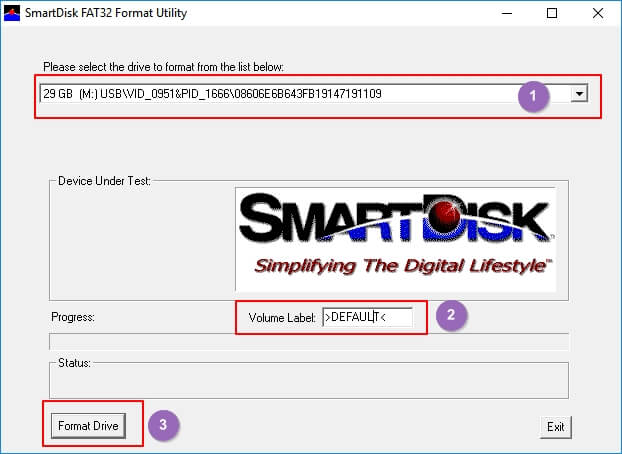 SmartDisk FAT32 Format Utility is a lightweight Windows application designed to format storage devices to the FAT32 file system. It is primarily used to bypass the 32GB FAT32 formatting limitation built into Windows File Explorer, allowing users to format larger USB flash drives, SD cards, and external hard drives that require FAT32 compatibility.
Although Windows can still read and write FAT32 partitions larger than 32GB, it doesn't allow users to create them through the built-in formatting tool. SmartDisk FAT32 Format Utility solves this problem by providing a simple interface dedicated to FAT32 formatting.
Unlike comprehensive partition management software, SmartDisk focuses on a single task - creating FAT32 partitions quickly and easily. This makes it a practical option for users who only need to prepare removable storage for devices that require the FAT32 file system, such as older gaming consoles, digital cameras, media players, automotive infotainment systems, or embedded devices.
Feel free to share this post if you found it helpful.

Key Features
1️⃣Format drives larger than 32GB to FAT32
- Windows does not allow formatting partitions larger than 32GB as FAT32 through File Explorer. SmartDisk removes this limitation and lets users create larger FAT32 volumes with just a few clicks.
2️⃣Support common removable storage devices
- The utility works with USB flash drives, SD cards, microSD cards, and many external hard drives, making it suitable for preparing storage devices for different hardware platforms.
3️⃣Simple and lightweight interface
- The software is easy to use and doesn't overwhelm users with advanced options. Even beginners can complete the formatting process without extensive technical knowledge.
4️⃣Fast formatting process
- Since the program focuses only on FAT32 formatting, the workflow is straightforward and typically takes only a few minutes, depending on the drive size.
5️⃣Compatible with many legacy devices
- FAT32 remains one of the most widely supported file systems across different operating systems and hardware. SmartDisk helps users create FAT32 drives for devices that don't support NTFS or exFAT.
Pros and Cons
PROS
CONS
SmartDisk FAT32 Format Utility is a good choice if your only goal is to format a USB flash drive or SD card to FAT32 for compatibility with older hardware. It works well for occasional formatting tasks and users who prefer a lightweight utility without unnecessary features.
However, if you regularly manage SSDs, external hard drives, or multiple partitions, you'll likely need more than a dedicated FAT32 formatter. Tasks such as resizing partitions, converting file systems, cloning disks, migrating Windows to an SSD, or recovering deleted partitions require more comprehensive disk management software. In these situations, a modern partition manager like EaseUS Partition Master offers significantly greater flexibility while still supporting FAT32 formatting.
Is SmartDisk FAT32 Format Utility Worth Using in 2026?
Yes, but only for basic FAT32 formatting. SmartDisk FAT32 Format Utility still does exactly what it was designed to do: format storage devices larger than 32GB to FAT32 when Windows cannot. For users preparing a USB flash drive for an older game console, digital camera, media player, or embedded device, it remains a lightweight and effective solution.
However, storage management needs have changed considerably over the years. Modern users often work with SSDs, large-capacity external hard drives, multiple partitions, and different file systems such as NTFS and exFAT. In these scenarios, SmartDisk quickly reaches its limits because it doesn't provide partition resizing, file system conversion, disk cloning, partition recovery, or operating system migration.
Another consideration is software maintenance. Compared with actively developed partition management software, SmartDisk has seen relatively little evolution in recent years. While it still performs its primary task reliably, its interface and feature set feel outdated by today's standards.
If you only need to format a drive to FAT32 once, SmartDisk FAT32 Format Utility is still a reasonable option. But if you expect to manage storage devices regularly or want an all-in-one solution for disk management, choosing a more feature-rich alternative will likely save time and eliminate the need for multiple utilities.
Best SmartDisk FAT32 Format Utility Alternative in 2026
EaseUS Partition Master is one of the most popular free alternatives to SmartDisk FAT32 Format Utility because it combines FAT32 formatting with a complete set of partition management tools in a single application. Besides formatting USB flash drives, SD cards, SSDs, HDDs, and external hard drives, it also supports multiple file systems, including FAT16, FAT32, exFAT, NTFS, EXT2, EXT3, and EXT4.
Unlike SmartDisk, which is designed solely for FAT32 formatting, EaseUS Partition Master helps users manage almost every aspect of disk storage. You can resize, move, merge, split, create, delete, and format partitions without switching between multiple utilities. It also includes advanced features such as disk cloning, Windows OS migration, MBR/GPT conversion, disk health monitoring, and partition recovery, making it suitable for both everyday users and IT professionals.
Another advantage is its support for non-destructive NTFS-to-FAT32 conversion. Instead of backing up your files, formatting the drive, and restoring the data, EaseUS allows eligible NTFS partitions to be converted to FAT32 without erasing existing files, saving both time and effort.
The software is compatible with virtually all mainstream Windows versions, including Windows XP, Vista, 7, 8, 10, and Windows 11, and is regularly updated to support new storage technologies and Windows releases.
SmartDisk FAT32 Format Utility VS EaseUS Partition Master
| Comparison | SmartDisk FAT32 Format Utility | EaseUS Partition Master |
|---|---|---|
| Supported file systems | FAT32 | FAT32, exFAT, NTFS, EXT2/3/4 |
| Price | Free | Free |
| Format drives larger than 32GB | Yes | Yes |
| NTFS to FAT32 conversion without data loss | No |
Yes |
| Convert FAT32 to exFAT without data loss | No | Yes |
| Low level format | No | Yes |
| Supported storage devices | USB drives, SD cards, HDDs, SSDs, external/internal drives | USB drives, SD cards, HDDs, SSDs, external/internal drives |
| User interface | Basic | Modern graphical interface |
If you simply need to format a USB flash drive to FAT32 once or twice, SmartDisk FAT32 Format Utility remains a practical lightweight option.
However, if you regularly manage storage devices, work with different file systems, or want a tool that can grow with your needs, EaseUS Partition Master offers significantly more functionality while keeping the formatting process simple enough for beginners.
How to format an External USB to FAT32?
Step 1. Launch EaseUS Partition Master, right-click the partition you intend to format and choose "Format".
Step 2. In the new window, enter the Partition label if you prefer to rename it, choose the FAT32/EXT2/EXT3/EXT4 file system, and set the cluster size according to your needs, then click "OK".
Step 3. Then you will see a warning window, click "Yes" in it to continue.
Step 4. Click the "Execute 1 Task(s)" button in the top-left corner to review the changes, then click "Apply" to start formatting the partition to FAT32/EXT2/EXT3/EXT4.
Conclusion
SmartDisk FAT32 Format Utility remains a useful utility for one specific purpose: formatting storage devices larger than 32GB to FAT32. Its lightweight design and straightforward interface make it a good choice for users who only need occasional FAT32 formatting for USB flash drives, SD cards, or legacy devices.
That said, modern storage management often involves much more than formatting. If you need to resize partitions, convert file systems, clone disks, migrate Windows, or recover lost partitions, SmartDisk's limited feature set may no longer be enough.
For users looking for a more complete and actively maintained solution, EaseUS Partition Master provides a wider range of disk management tools while still making FAT32 formatting fast and easy.
Frequently Asked Questions About SmartDisk FAT32 Format Utility
1. Is SmartDisk FAT32 Format Utility free?
Yes. SmartDisk FAT32 Format Utility is generally available as a free utility for formatting drives to FAT32. Since it focuses on a single function, it doesn't include premium partition management features found in more comprehensive disk management software.
2. Can SmartDisk FAT32 Format Utility format drives larger than 32GB?
Yes. One of its primary purposes is to bypass Windows' built-in 32GB FAT32 formatting limitation. It can create FAT32 partitions on larger USB flash drives, SD cards, and external hard drives that Windows File Explorer cannot format directly.
3. Does SmartDisk FAT32 Format Utility work on Windows 11?
In many cases, yes. The software can still run on modern Windows systems, although its interface and feature set have not evolved significantly in recent years. Users looking for better compatibility with newer storage technologies may prefer a modern partition manager.
4. What storage devices can SmartDisk FAT32 Format Utility format?
The utility supports most removable storage devices, including USB flash drives, SD cards, microSD cards, memory cards, and many external hard drives that require the FAT32 file system.
5. What is the best alternative to SmartDisk FAT32 Format Utility?
If you need more than basic FAT32 formatting, EaseUS Partition Master is a strong alternative. In addition to formatting drives, it supports partition management, disk cloning, operating system migration, partition recovery, and file system conversion, making it suitable for both beginners and advanced users.
How Can We Help You
About the Author

Sherly joined EaseUS in 2022 and she has always loved writing articles and enjoys the fun they bring. She receives professional training here, focusing on product performance and other relative knowledge. She has written over 200 articles to help people overcome computing issues.
Product Reviews
-
I love that the changes you make with EaseUS Partition Master Free aren't immediately applied to the disks. It makes it way easier to play out what will happen after you've made all the changes. I also think the overall look and feel of EaseUS Partition Master Free makes whatever you're doing with your computer's partitions easy.
Read More -
Partition Master Free can Resize, Move, Merge, Migrate, and Copy disks or partitions; convert to local, change label, defragment, check and explore partition; and much more. A premium upgrade adds free tech support and the ability to resize dynamic volumes.
Read More -
It won't hot image your drives or align them, but since it's coupled with a partition manager, it allows you do perform many tasks at once, instead of just cloning drives. You can move partitions around, resize them, defragment, and more, along with the other tools you'd expect from a cloning tool.
Read More
Related Articles
-
SmartDisk FAT32 Format Utility & FAT32 Format Tool Free Download [2026 Updated]
![author icon]() Jean/2026/06/30
Jean/2026/06/30 -
HDD Low Level Format Tool Review 2026: Is It Safe & the Best Alternative?
![author icon]() Sherly/2026/08/13
Sherly/2026/08/13 -
Clonezilla Review: Features, Pros and Cons, Pricing, and How to Use It
![author icon]() Joey Albert/2026/09/28
Joey Albert/2026/09/28 -
USB Flash Benchmark Download with Complete Review in 2026
![author icon]() Tracy King/2026/08/13
Tracy King/2026/08/13
 Jean/2026/06/30
  Joey Albert/2026/09/28
  Tracy King/2026/08/13