Page Table of Contents

- 🎯Key Takeaways
- Acronis True Image is worth it if you need more than basic backups, such as automatic backup schedules, ransomware protection, cloud storage, and disaster recovery.
- If your goal is simply cloning a hard drive or migrating Windows to a new SSD, Acronis may be more expensive and feature-rich than necessary.
- The best software depends on what you're trying to accomplish, your technical experience, and your budget, not just the feature list.
- One-time users, beginners, and budget-conscious buyers may benefit more from dedicated cloning software like EaseUS Disk Copy or free alternatives such as Clonezilla.
Acronis True Image is a powerful all-in-one solution that combines backup, disk imaging, cloud storage, and ransomware protection. It is widely regarded as a comprehensive tool for both Windows and macOS.
However, not everyone needs such an extensive feature set. If your goal is simply to clone a disk, upgrade to a larger SSD, or perform basic backups, Acronis may be more than necessary. In many cases, built-in system tools or lightweight alternatives can handle these tasks effectively.
Ultimately, the decision depends on your specific needs rather than whether Acronis is "good" or not.
Instead of reviewing every feature one by one, this guide focuses on which software makes the most sense based on your actual needs.
- ➡️When Is Acronis True Image Worth It?
- ➡️When Acronis Probably Isn't Worth It?
- ➡️Decision by User Type
- ➡️Decision by Budget
Is Acronis True Image Worth It? (Quick Answer)
The answer depends less on the software itself and more on how you plan to use it.
|
If you are... |
Is Acronis Worth It? |
Why |
|
You need automatic backups every day |
✅ Yes |
Excellent automation and recovery features |
|
You want ransomware protection |
✅ Yes |
Built-in cyber protection is a major advantage |
|
You manage multiple computers |
✅ Yes |
Centralized backup and management save time |
|
You only want to clone an SSD |
❌ Probably not |
Dedicated cloning software is simpler and cheaper |
|
You're upgrading your PC once |
❌ Not really |
Paying for a subscription offers limited long-term value |
|
You're on a tight budget |
❌ Consider alternatives |
Free or lower-cost options may be enough |
|
You're a beginner who wants something simple |
⚠️ Depends |
Powerful but may feel overwhelming at first |
|
You're an IT professional or power user |
✅ Yes |
Advanced backup and recovery justify the price |
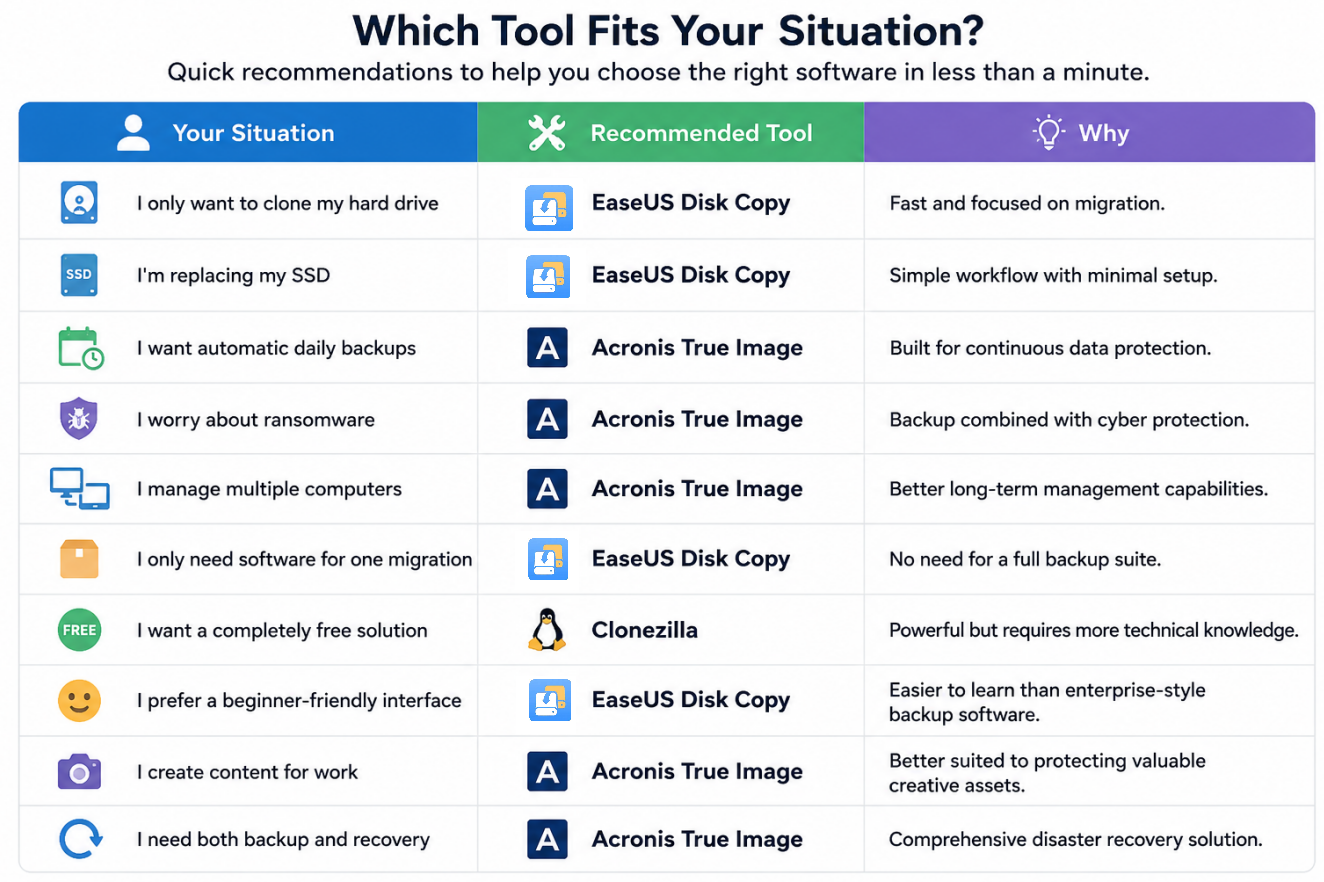
Choose Acronis True Image if your priority is long-term data protection and automated backups. Choose a dedicated cloning tool like EaseUS Disk Copy if your goal is simply moving Windows or upgrading to a new drive.
Share the blog on social media to help other users to make a better decision.

What Are You Actually Trying to Do?
Many people compare Acronis, Clonezilla, EaseUS Disk Copy, Macrium Reflect, and other tools as if they all do the same thing.
They don't. Although these applications often appear together in search results, they're designed for different priorities. Choosing software before defining your goal usually leads to paying for features you'll never use.
Scenario 1: I just bought a new SSD.
Maybe you're replacing an old SATA SSD with a larger NVMe drive, upgrading from an HDD, or installing a faster PCIe Gen4 or Gen5 SSD.
Your primary goal is to copy Windows, keep all programs and settings, and avoid reinstalling Windows. This is disk cloning, not backup.
While Acronis can certainly clone drives, many users only perform this task once every few years. If that's your situation, a dedicated cloning solution like EaseUS Disk Copy often provides a simpler workflow without paying for other features
 Free Download
Windows 11/10/8/7
Scenario 2: I don't want to lose my files.
When your laptop stores family photos, work documents, videos, etc, it is important to protect data if something goes wrong. In this case, scheduled backups become much more valuable than cloning.
Features like automatic daily backups, incremental backups, multiple restore points, and easy file recovery are exactly what backup software is designed to provide.
If this sounds like you, Acronis starts becoming much easier to justify.
Scenario 3: I'm worried about ransomware.
Cybersecurity threats have become a growing concern for both individuals and small businesses. In these situations, simply cloning your SSD isn't enough.
You also need versioned backups, offline recovery, Cloud backup, ransomware detection, and fast disaster recovery.
These are areas where Acronis offers significantly more value than traditional cloning software.
Scenario 4: I maintain several computers.
If you're responsible for family PCs, office laptops, mall business computers, or multiple workstations, managing backups manually across several devices quickly becomes time-consuming.
Centralized scheduling, monitoring, and cloud management can save hours over the course of a year. This is another scenario where Acronis' broader feature set makes sense.
When Is Acronis True Image Worth It?
Acronis True Image isn't designed for just one task, it's a complete data protection platform. That also means its value depends on how much of the platform you'll actually use. Here are the situations where Acronis is genuinely worth the investment.
Scenario 1. You Need Reliable, Automated Backups
Acronis can automatically back up your files, system, or entire disk based on a schedule. It also supports incremental and differential backups, reducing storage usage while allowing you to restore previous versions when needed.
This is especially valuable if you work from home, create content regularly, handle business documents, and store irreplaceable family photos and videos.
Scenario 2. Your Data Is More Valuable Than the Subscription
A common mistake is comparing software prices without considering the value of the data being protected. For users whose data has significant personal or financial value, Acronis offers peace of mind that many free tools simply can't match.
Instead of asking "Is Acronis expensive?" Ask, "How much would losing my data cost?"
Scenario 3. You Want Better Protection Against Ransomware
Acronis includes anti-ransomware technologies designed to detect suspicious encryption activity and protect backup files from being modified. If cybersecurity is one of your concerns, Acronis becomes much easier to justify than a cloning-only solution.
When Acronis Probably Isn't Worth It?
Although Acronis is one of the most capable backup solutions available, it isn't automatically the best choice for everyone. If your needs fall into one of the situations below, a dedicated cloning tool, or even a free Acronis True Image alternative, may provide better value.
Scenario 1. You Only Need to Clone a Drive Once
Your only objective is to move Windows, your applications, and your files to the new disk. Once the migration is complete, you'll probably uninstall the software and never use it again.
In this case, a dedicated cloning utility can make the migration process faster and less complicated.
Scenario 2. You Rarely Create New Data
If most of your important files are already stored in cloud services like OneDrive, Google Drive, or iCloud, you may not benefit much from advanced backup scheduling.
In this case, paying annually for enterprise-grade protection could be excessive.
Scenario 3. You're Looking for the Lowest-Cost Solution
Price matters. Compared with many competitors, Acronis sits in the premium end of the market because it bundles multiple services into one subscription.
Depending on your goal, alternatives may be more cost-effective:
- Clonezilla - free for experienced users
- EaseUS Disk Copy - focused on disk cloning and migration
- Windows Backup - suitable for basic backup needs
- Macrium Reflect - strong imaging capabilities for advanced users
Decision by User Type
Instead of asking whether Acronis is objectively "better," consider whether it matches your own workflow.
|
User Type |
Recommended Tool |
Why |
|
First-time PC upgrader |
EaseUS Disk Copy |
Simple interface, designed for one-time migrations |
|
Home user |
Depends |
Acronis if regular backups matter; cloning software if upgrading storage |
|
Student |
Clonezilla / EaseUS Disk Copy |
Budget-friendly solutions for occasional use |
|
Gamer |
EaseUS Disk Copy |
Fast SSD upgrades without unnecessary backup features |
|
Photographer / Content Creator |
Acronis True Image |
Valuable creative assets benefit from automated backup |
|
Freelancer |
Acronis True Image |
Protect client files with scheduled backups and recovery |
|
Small Business Owner |
Acronis True Image |
Comprehensive protection across multiple devices |
|
IT Administrator |
Acronis True Image |
Advanced deployment, management, and disaster recovery |
|
Power User |
Acronis True Image |
Makes full use of the platform's advanced capabilities |
Decision by Budget
Budget is often the deciding factor. Here's a practical way to think about it.
|
Budget Level |
Recommended Option |
Best For |
|
Free |
Clonezilla |
Experienced users comfortable with a technical interface |
|
Limited |
EaseUS Disk Copy |
One-time disk cloning and Windows migration |
|
Mid-range |
Macrium Reflect (where available) |
Users focused on disk imaging and backup |
|
Premium Subscription |
Acronis True Image |
Users who need continuous backup, cloud storage, and cyber protection |
Share the blog on social media to help other users to make a better decision.
What Real Users Say
User communities often reveal what day-to-day ownership actually feels like. Across Reddit discussions, opinions about Acronis tend to be surprisingly balanced.
👍What users like
Most positive comments focus on reliability rather than flashy features. Common reasons people recommend Acronis include:
- Reliable full-system backups
- Easy recovery after hardware failure
- Automatic scheduled backups
- Cloud backup integration
- Good all-in-one experience for people who want a single solution
Many long-time users say they continue paying for Acronis because restoring an entire computer is significantly easier than rebuilding Windows from scratch after a drive failure.
For professionals who cannot afford downtime, this convenience alone often justifies the subscription.
👎Common criticisms
The criticisms are also consistent. Many Reddit users mention:
- The subscription price is relatively high.
- The software installs background services that consume system resources.
- The interface includes features casual users never touch.
- It's overkill if your only goal is cloning an SSD.
In other words, users rarely complain that Acronis doesn't work. Instead, they question whether they actually need everything it offers.
If you summarize hundreds of user discussions into a single sentence, it would look something like this:
Acronis is an excellent backup platform, but not necessarily the best value for simple disk cloning.
Frequently Asked Questions
1. Is Acronis True Image good for SSD cloning?
Yes. Acronis supports disk cloning and OS migration. However, if SSD cloning is your only objective, dedicated cloning software such as EaseUS Disk Copy generally provides a simpler workflow with fewer unnecessary features.
2. What's the difference between Acronis True Image and EaseUS Disk Copy?
Acronis is an all-in-one backup and cyber protection platform that includes cloning as one of many features.
EaseUS Disk Copy focuses specifically on disk cloning, hard drive replacement, and Windows migration.
3. Is Acronis better than Clonezilla?
Clonezilla is free and highly capable but requires more technical knowledge. Acronis offers a modern interface, automation, customer support, and additional backup features in exchange for a subscription fee.
4. Is Acronis worth it for home users?
Many home users benefit from Acronis if they regularly back up important personal files. If your computer mainly stores replaceable data or you're only upgrading hardware, you may not need such a comprehensive solution.
5. What is the best alternative to Acronis True Image?
There isn't a single best alternative.
- For disk cloning, EaseUS Disk Copy is one of the strongest choices.
- For free cloning, Clonezilla remains popular.
- For advanced disk imaging, Macrium Reflect is frequently recommended.
Final Verdict
So, is Acronis True Image worth it? The answer isn't simply yes or no. It depends on what you're trying to accomplish. Ultimately, the best software isn't the one with the most features; it's the one that solves your problem efficiently.
Our Recommendations
|
Your Need |
Recommended Choice |
|
One-time SSD or HDD migration |
EaseUS Disk Copy |
|
Automatic backup and recovery |
Acronis True Image |
|
Cyber protection + cloud backup |
Acronis True Image |
|
Beginner-friendly cloning |
EaseUS Disk Copy |
|
Free cloning solution |
Clonezilla |
|
Advanced imaging for experienced users |
Macrium Reflect |
Related reading:
-
Updated by
![]()
Larissa
Larissa has rich experience in writing technical articles and is now a professional editor at EaseUS. She is good at writing articles about data recovery, disk cloning, disk partitioning, data backup, and other related knowledge. Her detailed and ultimate guides help users find effective solutions to their problems. She is fond of traveling, reading, and riding in her spare time.…Read full bio