Page Table of Contents

Upgrading from an old HDD to a faster SSD or from a smaller SSD to a larger SATA or NVMe SSD is one of the most common PC upgrades today. Before replacing your drive, you'll need reliable disk cloning software to transfer Windows, applications, settings, and personal files without reinstalling everything from scratch.
2 popular options are EaseUS Disk Copy and Acronis True Image. Both support disk cloning and system migration, but they target different audiences. EaseUS Disk Copy focuses on fast, straightforward cloning, while Acronis combines cloning with backup, ransomware protection, and disaster recovery features.
In this guide, we'll compare EaseUS Disk Copy vs Acronis True Image in detail to help you choose the right solution for your SSD upgrade or OS migration.
EaseUS Disk Copy vs Acronis True Image at a Glance
Before we dive into the details of Acronis True Image vs EaseUS Disk Copy, here is a quick comparison table of the 2 disk cloning programs.
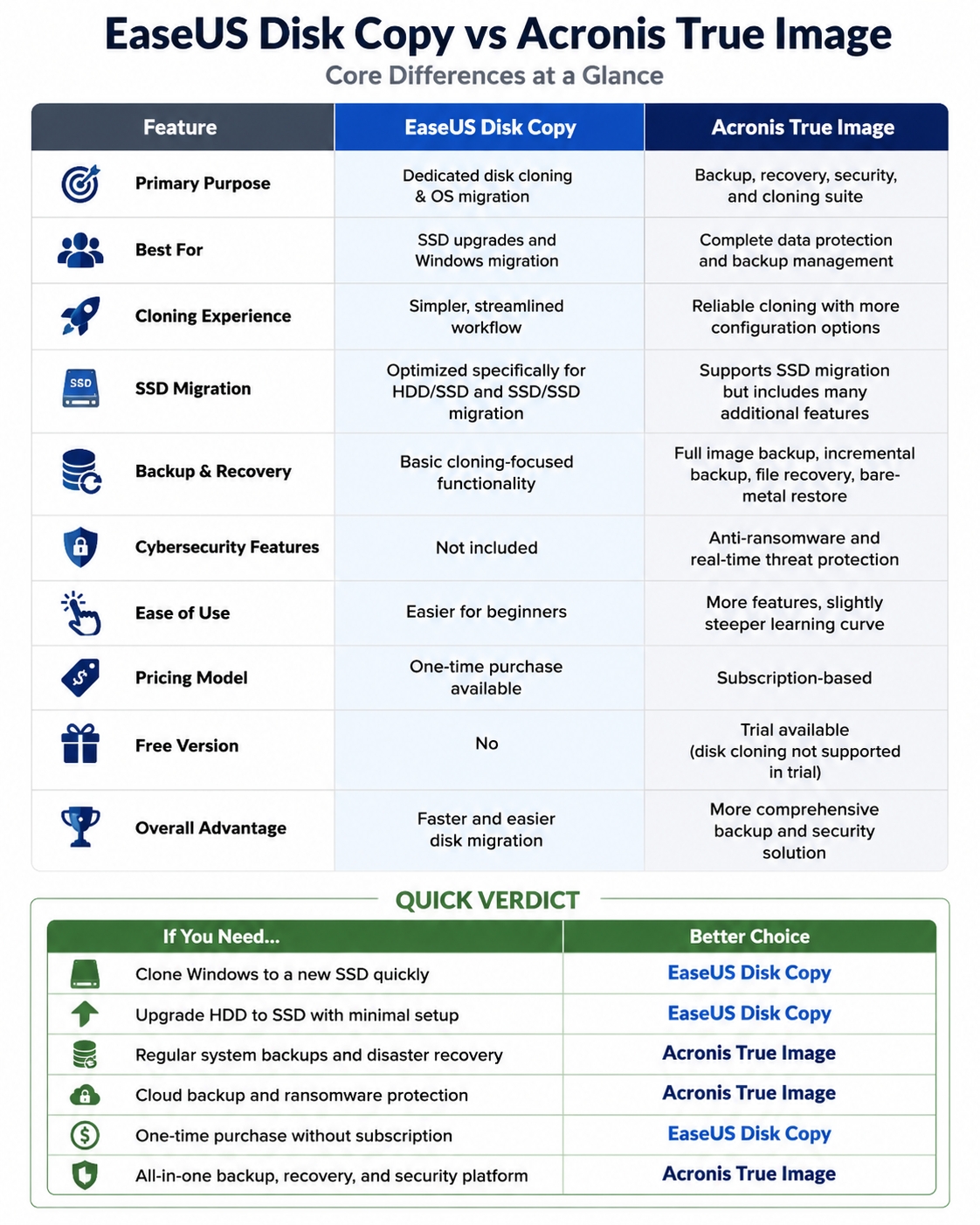
Share this article on social media to help others see the differences between EaseUS Disk Copy and Acronis True Image.

Overview of EaseUS Disk Copy
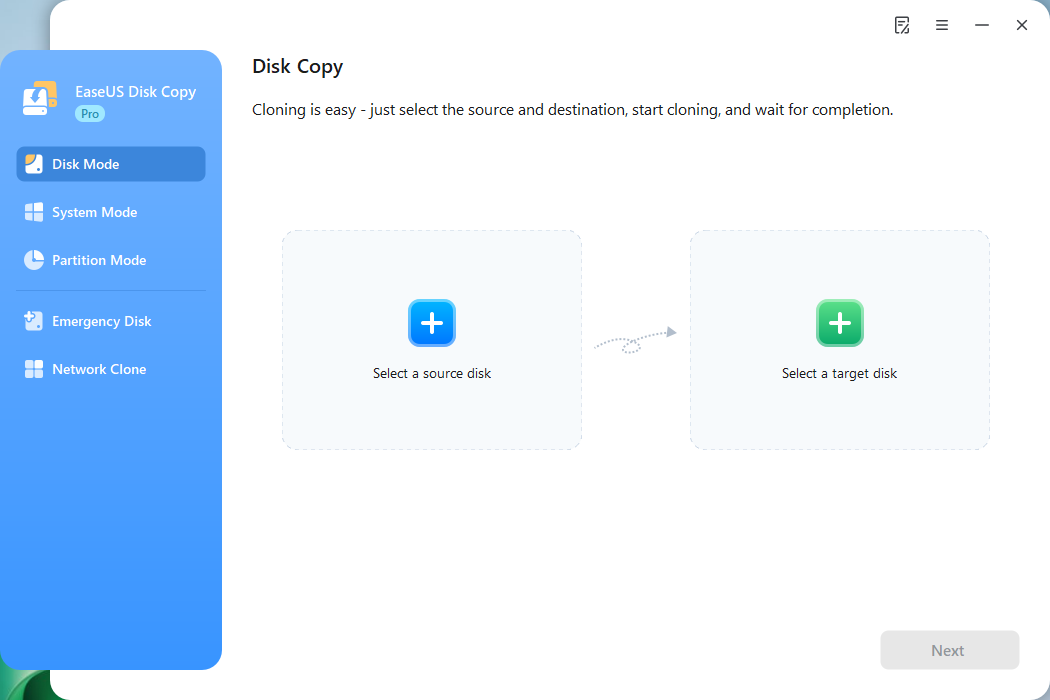
EaseUS Disk Copy is an intuitive, user-friendly tool built specifically for cloning entire hard drives or migrating operating systems. The software focuses on making the cloning process simple, even for beginners who have never cloned a hard drive before.
 Free Download
Windows 11/10/8/7
Main Features of EaseUS Disk Copy
1. Full Disk Cloning
Users can clone an entire hard drive, including:
- Windows OS
- Installed applications
- User settings
- Personal files
This makes it useful when upgrading to a new SSD without reinstalling Windows.
2. Sector-by-Sector Clone
The software supports sector-by-sector cloning, which copies every sector exactly as it exists on the source drive.
This is helpful for:
- Preserving hidden partitions
- Cloning a disk with bad sectors
- Cloning special disk structures
3. SSD Migration
EaseUS Disk Copy includes SSD optimization features such as:
- SSD alignment
- GPT/UEFI support
These features help improve SSD performance after migration.
| Pros | Cons |
|
|
Overview of Acronis True Image
Acronis True Image (formerly Acronis Cyber Protect Home Office) is a comprehensive backup and cyber protection solution that also includes powerful disk cloning capabilities. Unlike EaseUS Disk Copy, which focuses primarily on cloning, Acronis combines backup, recovery, cloning, cloud storage, and cybersecurity tools into a single platform.
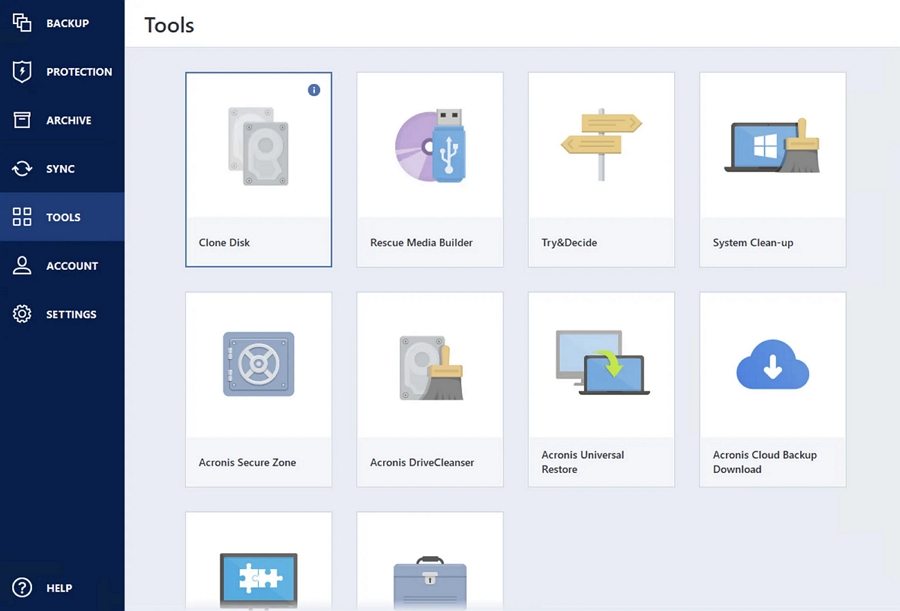
Main Features of Acronis True Image
1. Disk Cloning and System Migration
Acronis supports:
- Full disk cloning
- Operating system migration
- HDD-to-SSD upgrades
- SSD-to-SSD migration
- Automatic disk resizing
Users can migrate their entire Windows environment to a new drive while maintaining bootability.
2. Comprehensive Backup Solution
One of Acronis' biggest strengths is backup functionality. Features include:
- Full image backups
- Incremental backups
- Differential backups
- Scheduled backups
- Local and cloud backups
This provides ongoing protection beyond a one-time migration.
3. Cybersecurity Protection
Acronis includes built-in security features such as:
- Ransomware protection
- Real-time malware detection
- Backup integrity monitoring
- Secure recovery options
These features make it more than just a cloning tool.
| Pros | Cons |
|
|
Share this article on social media to help others see the differences between EaseUS Disk Copy and Acronis True Image.
EaseUS Disk Copy vs Acronis True Image: Full Comparison
Here is the detailed comparison of EaseUS Disk Copy vs Acronis True Image.
Disk Cloning Performance
Both products perform well when handling:
- HDD-to-SSD cloning
- SSD-to-SSD migration
- NVMe upgrades
- Windows migration
EaseUS Disk Copy focuses entirely on the cloning process and minimizes unnecessary settings. Most users can complete a migration in only a few steps. Acronis also offers highly reliable cloning technology and incorporates backup and recovery options throughout the workflow. This provides additional flexibility but may require slightly more configuration.
For pure cloning tasks, EaseUS feels more streamlined. For long-term data protection, Acronis provides greater value.
Bootable Clone Support
Both products support GPT disks, UEFI systems, Windows 7/8/10/11, and bootable rescue media. However, cloned systems may still fail to boot due to issues such as incorrect BIOS/UEFI boot order, missing EFI system partitions, GPT/MBR configuration mismatches, or Secure Boot compatibility problems.
Acronis generally offers more advanced recovery and boot-repair capabilities, while EaseUS emphasizes a simpler, more user-friendly cloning experience.
SSD Migration
For users simply upgrading to a larger SSD, EaseUS Disk Copy often provides a smoother experience.
It is particularly suitable for users searching for:
- How to clone Windows to SSD
- How to upgrade SSD without reinstalling Windows
- Clone HDD to SSD software
- Best SSD migration tool
Acronis handles SSD migration very well, too, but its broader feature set means the software is not solely focused on cloning.
Backup and Recovery
This is where Acronis has a significant advantage. Acronis includes:
- Full system image backups
- Incremental and differential backups
- Cloud backup storage
- File recovery
- Disaster recovery tools
- Bare-metal restore
EaseUS Disk Copy is primarily designed for disk migration and cloning. It does not offer the same level of ongoing backup protection.
Security and Data Protection
This category clearly favors Acronis. Acronis includes:
- Anti-ransomware protection
- Real-time threat monitoring
- Secure backup validation
- Recovery environment protection
EaseUS Disk Copy does not provide built-in cybersecurity tools and focuses strictly on migration functionality.
Ease of Use
EaseUS Disk Copy is generally easier for first-time users. The interface is cleaner and designed specifically for cloning tasks. Typical workflow of EaseUS Disk Copy:
- Select source disk
- Select destination disk
- Start cloning
The interface focuses exclusively on migration tasks.
Acronis remains user-friendly but includes many additional features such as backup scheduling, cloud storage management, and security settings. New users may need extra time to become familiar with the platform.
Pricing Comparison
| Category | EaseUS Disk Copy | Acronis True Image |
| Free Version | NO | Trial version available |
| One-Time Purchase | Yes | No |
| Subscription Required | No | Yes |
Note: The trial version of Acrnis True Image does not allow you to clone a disk to another disk.
EaseUS Disk Copy may be more economical for users who only need to clone a disk once or twice. Acronis becomes more attractive if you also require backup, cloud storage, and cybersecurity protection.
Which Tool Is Better for SSD Migration?
Choose EaseUS Disk Copy if you:
- Want the simplest cloning experience
- Need to migrate Windows to an SSD quickly
- Prefer a clean and dedicated cloning interface
- Only need disk migration functionality
- Are a beginner user
EaseUS Disk Copy is ideal for users who simply want to replace a hard drive without reinstalling Windows.
Choose Acronis True Image if you:
- Need regular backup protection
- Want ransomware protection
- Require cloud backup storage
- Frequently create system images
- Want an all-in-one backup and recovery solution
Acronis is better suited for users seeking both cloning and long-term data protection.
Share this article on social media to help others see the differences between EaseUS Disk Copy and Acronis True Image.
Final Verdict: EaseUS vs Acronis
Both tools are reliable disk cloning solutions, but they serve different purposes.
EaseUS Disk Copy specializes in fast, simple, and beginner-friendly disk migration. It removes complexity, focusing entirely on cloning and SSD upgrades. Acronis True Image goes beyond cloning by offering backup, recovery, cloud storage, and cybersecurity features in a single platform.
In short:
- EaseUS Disk Copy = Simple and efficient disk cloning
- Acronis True Image = Backup, security, and cloning combined
If your primary goal is upgrading from HDD to SSD with minimal effort, EaseUS Disk Copy is often the easier choice. If you want ongoing backup protection and disaster recovery capabilities after migration, Acronis True Image provides a more comprehensive solution.
Free Download
Windows 11/10/8/7
FAQs on EaseUS Disk Copy vs Acronis
1. Does Acronis True Image support disk cloning?
Yes. Acronis True Image includes full disk cloning capabilities, allowing users to migrate Windows, applications, settings, and files to a new HDD or SSD without reinstalling the operating system.
2. Which software is easier for beginners?
EaseUS Disk Copy is generally easier for beginners because it focuses exclusively on disk cloning and presents a simplified workflow. Acronis offers more features but requires additional setup and navigation.
3. Why does my cloned SSD not boot?
Common causes include:
- Incorrect BIOS boot priority
- Missing EFI or system partitions
- MBR/GPT mismatch
- Incomplete system cloning
- Secure Boot configuration issues
Verifying partition structure and boot settings usually resolves the problem.
4. Can I clone a larger HDD to a smaller SSD?
Yes, you can clone a larger drive to a smaller one, as long as the used disk space on the source drive is less than the target disk's capacity. You can also shrink the partition of the source drive or delete unnecessary files or programs on the source disk before cloning.
-
Updated by
![]()
Jerry
"I hope my articles can help solve your technical problems. If you are interested in other articles, you can check the articles at the bottom of this page, and you can also check my Facebook to get additional help."…Read full bio