







Content
Page Table of Contents
About the Author
Hot Topics
Yes, EaseUS Partition Master is safe to download, install, and use for easier disk and partition management. You can get this 100% safe, clean, virus-free installer from its official website.
Over the past decade, countless users have benefited from EaseUS Partition Master. Below is a real user case shared on forums - let's take a closer look.
I used EaseUS products for years. EaseUS was incredibly helpful to me, and it is 100% safe. I relied on it to effortlessly expand my C partition, giving me more space to update my system. The results were absolutely fantastic.
-from Reddit
Please note that EaseUS Partition Master is available in Free, Pro, and Enterprise versions for both personal and business use. You can choose the most suitable edition from the official EaseUS website based on your needs.
For everyday users, the Free version is often sufficient for basic disk partition tasks such as checking the file system or changing a drive letter.
Key Features of EaseUS Partition Master | Free VS Pro
The form compares the features of the free and paid versions of EaseUS Partition Master. Please have a closer look at it.
|
Features and Versions |
Free |
Pro |
|
Create, extend, shrink, resize/move, delete, merge, hide/unhide partitions |
✔️ |
✔️ |
|
Format partitions, wipe partitions/disk |
✔️ |
✔️ |
|
Change drive letter/partition label |
✔️ |
✔️ |
|
Check file system, disk surface test |
✔️ |
✔️ |
|
Convert basic to dynamic disk, convert to logical/primary |
✔️ |
✔️ |
|
Initialize disk to MBR/GPT, rebuild MBR |
✔️ |
✔️ |
|
Convert data disk to MBR/GPT, NTFS/FAT32 |
✔️ |
✔️ |
|
Clone partitions |
✔️ |
✔️ |
|
Resize/move, extend, shrink unlocked BitLocker partition |
✔️ |
✔️ |
|
Disable/Turn off BitLocker on Windows Home Edition |
✔️ |
✔️ |
|
One-click AI smart space adjustment |
❌ |
✔️ |
|
Clone system |
❌ |
✔️ |
|
Migrate OS to SSD/HDD, clone disk |
❌ |
✔️ |
|
Partition recovery, WinPE creator |
❌ |
✔️ |
Tech Spec of EaseUS Partition Master
Below are the technical specifications of EaseUS Partition Master. Please review the details for more information. You can also check another guide about EaseUS Partition Master Review.
Supported Operating Systems:
- Windows 11/10/8.1/8/7/Windows Vista/Windows XP
Supported File Systems:
- NTFS, Ex2/3/4, FAT12/16/32, ReFS, exFAT
Supported Storage Devices:
- HDD: Parallel ATA (IDE), Serial ATA (SATA), External SATA (eSATA), IEEE 1394 (FireWire)
- SSD: SATA SSD, M.2 SSD, NVMe SSD, large capacity hard disk (GPT and MBR disks)
- Removable devices: USB 1.0/2.0/3.0, flash drives, memory cards, SD cards, SCSI, IDE, and SATA RAID Controllers, and Hardware RAID.
Please share this post to help more users learn more about EaseUS Partition Master!

How Does EaseUS Partition Master Work
EaseUS Partition Master works via a visual interface that mimics Windows Disk Management but provides more advanced features, such as migrating an operating system (OS) to an SSD, converting between partition styles, and creating bootable media.
The software simplifies complex disk operations with an intuitive step-by-step process for easier disk management.
- Virtual Operations: When you resize partitions, such as shrinking one drive to extend another, the software first creates a virtual layout instead of making immediate changes to your physical hard drive.
- Applying Changes: After confirming the partition layout, click “Apply” to let the software execute the changes directly on your drive's file system.
- Data Protection: To prevent data loss during partition resizing, the software securely moves data blocks in the background before updating the disk partition table, even in the event of a power outage or system crash.
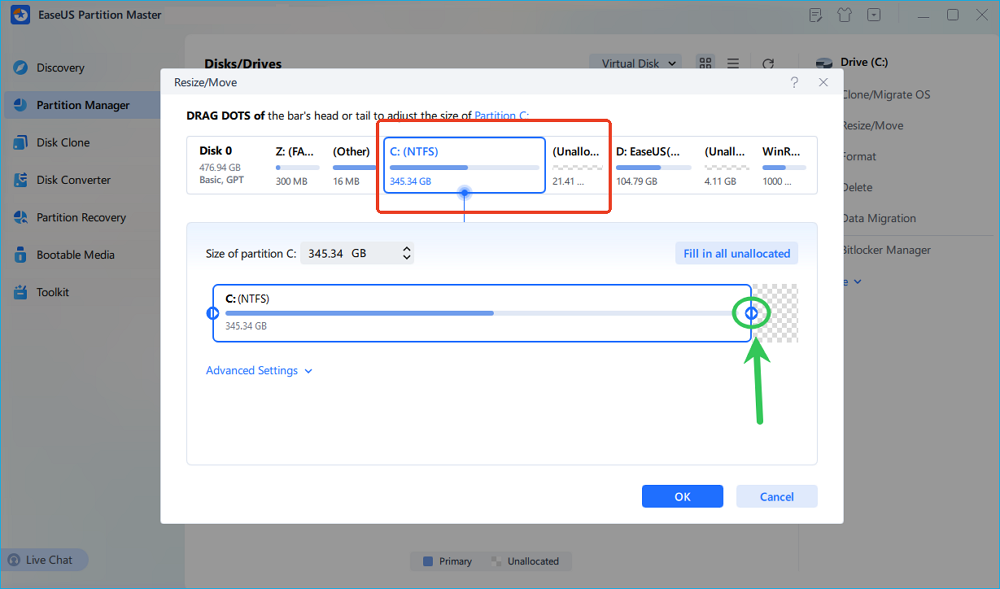
Let's take the Unallocated space as an example and show how to extend the C drive by merging the Unallocated space below. 👇
How to Move Unallocated Disk Space to C Drive Windows 10/11
Compared with Windows built-in tools, EaseUS Partition Master offers a more user-friendly interface and a wider range of disk management features. It allows you to merge the C drive with non-adjacent unallocated space and extend the C drive using adjacent unallocated space.
- Notice:
- If there's no Unallocated space on the disk that includes your system drive, you need to release some Unallocated space from another partition to create unallocated space.
Please refer to the following steps.
- Launch EaseUS Partition Master > click Partition Manager > right-click on the C drive > choose Resize/Move to merge the non-adjacent Unallocated space to your C drive > click OK > click Execute 1 Task(s) to finish this process.
Before following the step-by-step guide, watch the video and skip to 1:11 to learn how to add unallocated space and extend the C drive on Windows 10/11.
Conclusion
Is EaseUS Partition Master safe? The answer is YES. EaseUS products are 100% safe and reliable when downloaded or purchased from the official EaseUS website. Avoid using pirated or cracked versions, as they may pose serious security risks to your system and personal data.
FAQs about EaseUS Partition Master
This section also highlights several tips for using EaseUS Partition Master. Please get an overview of them below.
1. Is EaseUS Partition Master free?
Yes, EaseUS has a free edition, EaseUS Partition Master Free, designed for home users and with limited access to advanced features.
2. Is EaseUS Partition Master worth it?
If you frequently manage disks, partitions, or system migrations on Windows, EaseUS Partition Master Professional with an original license key is a worthwhile investment. It offers strong reliability, enhanced safety, and advanced features, making it suitable for both professional and home users.
3. Is EaseUS Partition Master better than Disk Management?
EaseUS Partition Master is a more powerful and user-friendly alternative to Windows Disk Management, offering advanced features like disk cloning, OS migration, and MBR to GPT conversion.
Please share this post to help more users learn more about EaseUS Partition Master!
How Can We Help You
About the Author

Sherly joined EaseUS in 2022 and she has always loved writing articles and enjoys the fun they bring. She receives professional training here, focusing on product performance and other relative knowledge. She has written over 200 articles to help people overcome computing issues.

Cici is the junior editor of the writing team of EaseUS. She accepted the systematic training on computers at EaseUS for over one year. Now, she wrote a lot of professional articles to help people resolve the issues of hard drive corruption, computer boot errors, and disk partition problems.
Product Reviews
-
I love that the changes you make with EaseUS Partition Master Free aren't immediately applied to the disks. It makes it way easier to play out what will happen after you've made all the changes. I also think the overall look and feel of EaseUS Partition Master Free makes whatever you're doing with your computer's partitions easy.
Read More -
Partition Master Free can Resize, Move, Merge, Migrate, and Copy disks or partitions; convert to local, change label, defragment, check and explore partition; and much more. A premium upgrade adds free tech support and the ability to resize dynamic volumes.
Read More -
It won't hot image your drives or align them, but since it's coupled with a partition manager, it allows you do perform many tasks at once, instead of just cloning drives. You can move partitions around, resize them, defragment, and more, along with the other tools you'd expect from a cloning tool.
Read More
Related Articles
-
We Couldn't Update the System Reserved Partition Win 10/11
![author icon]() Brithny/2026/09/22
Brithny/2026/09/22 -
How to Fix Pagefile.sys Huge Issue on Windows 11/10
![author icon]() Oliver/2026/09/24
Oliver/2026/09/24 -
How to Format SD Card to exFAT on Windows & Mac
![author icon]() Joey Albert/2026/09/29
Joey Albert/2026/09/29 -
Best Disk Partition Manager for Mac in 2026
![author icon]() Cici/2026/09/28
Cici/2026/09/28
 Brithny/2026/09/22
  Oliver/2026/09/24
  Joey Albert/2026/09/29









