







Content
Page Table of Contents
About the Author
Hot Topics
EaseUS Partition Master has been around for years and remains one of the most recognizable disk management tools on Windows. But in 2026, with Windows 11 improving native storage tools and competitors offering increasingly aggressive free plans, is it still worth using?
We tested EaseUS Partition Master across disk operations, including partition resizing, SSD cloning, OS migration, bad-sector detection, and disk conversion, to evaluate how it performs beyond its marketing claims.
EaseUS Partition Master Review: Our Quick Comparison & Verdict
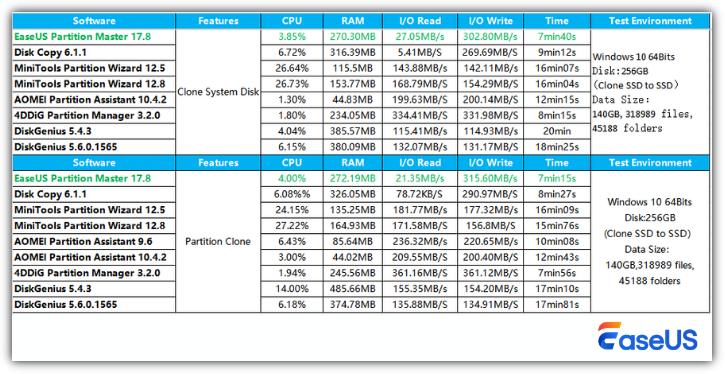
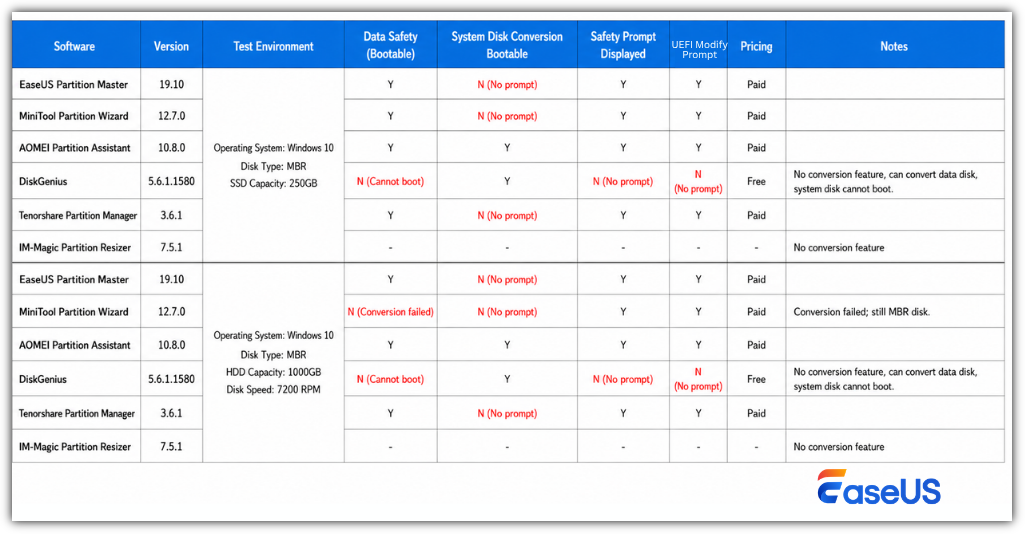
We compared EaseUS Partition Master with other partition managers in Disk Cloning, Partition Cloning, MBR to GPT, exFAT support. Check the details here.
- 1️⃣System Disk Clone & Partition Clone
- 2️⃣MBR to GPT
- 3️⃣exFAT Support
EaseUS Partition Master 20.0 redefines what exFAT management means by treating exFAT with the same stability and operational depth traditionally reserved for NTFS. Rather than offering partial compatibility, this release delivers a complete exFAT toolkit covering the entire storage lifecycle. - from PR newswire
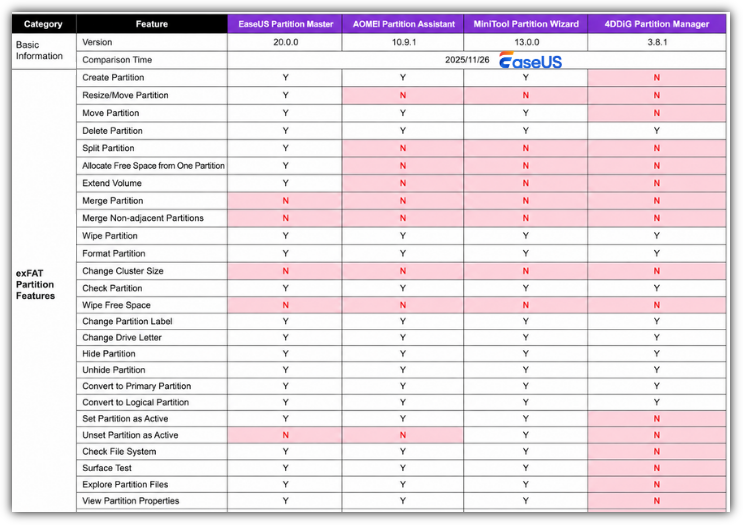
Our testing showed that each partition manager has its own strengths depending on the workflow and user type. EaseUS Partition Master stood out for its balance between usability, feature depth, and operational consistency across multiple disk tasks. In particular, its partition movement, disk cloning, exFAT management, and overall interface experience felt more approachable for mainstream Windows users compared to some technically stronger but more complex alternatives.
The latest exFAT improvements in version 20.0 are also noteworthy. While competitors generally support basic exFAT operations, EaseUS currently provides a broader range of editable actions and maintenance utilities under exFAT environments, which may matter for users working with portable SSDs, large USB drives, Steam libraries, or cross-platform storage devices.
What Is EaseUS Partition Master?
EaseUS Partition Master is a Windows disk management and partition utility designed to help users organize storage, migrate systems, repair boot-related disk issues, and manage partitions more flexibly than Windows Disk Management. The software supports both everyday storage tasks and more advanced workflows such as GPT conversion, OS migration, WinPE boot repair, and BitLocker-related partition operations.
Main Features of EaseUS Partition Master
| Module | Main Features | Notes |
|---|---|---|
| Basic Disk & Partition Management | Create, delete, resize, move, merge, split, format partitions | Easier to use than DiskPart for most users |
| C Drive & System Partition Management | Extend C drive, allocate free space, migrate OS to SSD, clone system disk | Particularly useful when Windows cannot extend partitions due to nonadjacent space |
| Disk Clone & Migration | Disk clone, partition clone, SSD migration, sector-level copy | Commonly used during SSD upgrades or laptop replacements |
| Boot & Rescue Toolkit | WinPE bootable media, boot repair, rebuild MBR, password reset | Useful when Windows fails to boot properly |
| BitLocker Management | Unlock BitLocker partitions, resize/move encrypted partitions, retrieve BitLocker recovery key | Some operations may still require BitLocker to be disabled completely |
| Disk Health & Diagnostics | Surface test, bad sector scan, file system check, SMART info, disk speed, disk health | Intended more for maintenance and early detection than professional forensic analysis |
| Storage Optimization | 4K alignment, cluster size adjustment, low-level format, cleanup | Especially relevant for SSD optimization and older HDD maintenance |
| exFAT Management | Create, resize, move, clone, convert exFAT partitions | Version 20.x significantly expanded exFAT support |
Pros and Cons of EaseUS Partition Master:
| Pros | Cons |
|---|---|
|
|
Tech Spec of EaseUS Partition Master
- Supported Operating Systems: Windows 11, Windows 10, Windows 8.1, Windows 8, Windows 7, Windows Vista, Windows XP
- Supported File Systems: NTFS, Ext2/3/4, FAT12/16/32, ReFS, exFAT
- Supported Storage Devices:
- HDD: Parallel ATA (IDE), Serial ATA (SATA), External SATA (eSATA), SCSI, IEEE 1394 (FireWire)
- SSD: SATA SSD, M.2 SSD, NVMe SSD, Large Capacity Hard Disk(GPT and MBR Disk)
- Removable Devices: USB 1.0/2.0/3.0, flash drive, memory card, memory stick, etc.
- SCSI, IDE and SATA RAID Controllers, RAIDed Configurations (Hardware RAIDs)
Is It Safe to Use EaseUS Partition Master
In general, yes, EaseUS Partition Master is considered safe for normal disk and partition management tasks when downloaded from the official source. The software is digitally signed, widely used, and has been available in the Windows utility space for many years. For most normal users, EaseUS Partition Master is reasonably safe when used for disk management tasks. It is especially safer than manual DiskPart operations for beginners because the visual interface reduces configuration mistakes.
We strongly recommend you back up your data before any risky operations. EaseUS Partition Master is generally safe as a disk management utility, but no partition software is risk-free when modifying live system disks.
Real Reviews from Forums:
I used EaseUS products for years, EaseUS was incredibly helpful to me, and it is 100% safe. I relied on it to effortlessly expand my C: partition, allowing me to acquire more space for updating my system. The results were absolutely fantastic. - from Reddit
It automatically detects connected drives and shows a colorful representation of partitions on the drive. The design gives a clear idea of the drive’s composition. You can select a partition, choose one of the many options on the right side, and modify the drive/partition. For instance, you can use a slider-based UI to resize or move a partition. It also lets us choose presets like Filling In All Allocated Space. - from the SweetBits
Who Should Use EaseUS Partition Master
|
😆Good Fit For:
|
😦Probably Not Ideal For
|
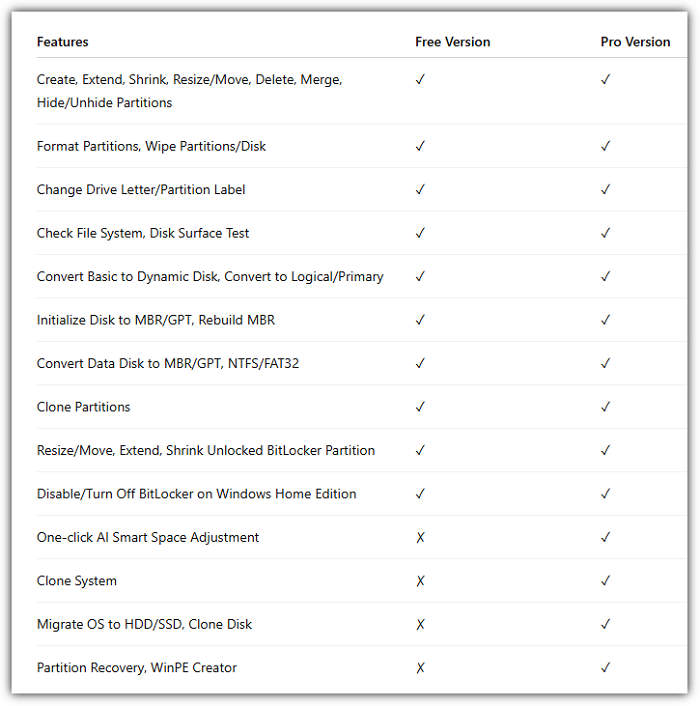
EaseUS Partition Master Free VS EaseUS Partition Master Professional
Conclusion
EaseUS Partition Master remains one of the strongest consumer-focused partition management tools available for Windows in 2026. Its biggest advantage is not raw technical power. It is accessibility. Many disk utilities can technically resize partitions or clone drives, but EaseUS simplifies workflows that are traditionally risky or intimidating for ordinary users.
The free version is useful for lighter tasks, while the Professional edition makes more sense for users actively upgrading systems or managing storage regularly. If your workflow regularly involves partition resizing, cloning, or disk restructuring, it provides significantly more flexibility than Windows Disk Management while remaining approachable for nontechnical users.
More About EaseUS Partition Master
Is EaseUS Partition Master free?
Yes. There is a free edition that supports basic partition management tasks, though advanced features like OS migration and some cloning operations require the Professional version.
Can EaseUS Partition Master resize partitions without losing data?
In most normal scenarios, yes. The software is designed for nondestructive resizing, though backups are still recommended before modifying partitions.
Does EaseUS Partition Master support Windows 11?
Yes. It supports Windows 11, Windows 10, and several Windows Server editions depending on the license type.
Can EaseUS convert MBR to GPT without formatting?
Yes. During testing, GPT and MBR conversions completed without deleting partitions.
Is EaseUS Partition Master better than Disk Management?
For advanced workflows, yes. It supports partition movement, flexible resizing, cloning, and conversion tasks that Windows Disk Management cannot handle easily.
Can EaseUS repair bad sectors?
Not physically. Consumer software cannot truly repair physical sector damage. EaseUS can detect unstable sectors and help isolate problematic areas during disk management workflows.
How Can We Help You
About the Author

Sherly joined EaseUS in 2022 and she has always loved writing articles and enjoys the fun they bring. She receives professional training here, focusing on product performance and other relative knowledge. She has written over 200 articles to help people overcome computing issues.
Product Reviews
-
I love that the changes you make with EaseUS Partition Master Free aren't immediately applied to the disks. It makes it way easier to play out what will happen after you've made all the changes. I also think the overall look and feel of EaseUS Partition Master Free makes whatever you're doing with your computer's partitions easy.
Read More -
Partition Master Free can Resize, Move, Merge, Migrate, and Copy disks or partitions; convert to local, change label, defragment, check and explore partition; and much more. A premium upgrade adds free tech support and the ability to resize dynamic volumes.
Read More -
It won't hot image your drives or align them, but since it's coupled with a partition manager, it allows you do perform many tasks at once, instead of just cloning drives. You can move partitions around, resize them, defragment, and more, along with the other tools you'd expect from a cloning tool.
Read More
Related Articles
-
GParted Review: Is It Safe and Reliable for Disk Partitioning?
![author icon]() Joey Albert/2026/10/22
Joey Albert/2026/10/22 -
Clonezilla Review: Features, Pros and Cons, Pricing, and How to Use It
![author icon]() Joey Albert/2026/10/22
Joey Albert/2026/10/22 -
CrystalDiskMark Review: Is It Worth Using for SSD and HDD Benchmark?
![author icon]() Joey Albert/2026/10/22
Joey Albert/2026/10/22 -
USB Flash Benchmark Download with Complete Review in 2026
![author icon]() Tracy King/2026/10/22
Tracy King/2026/10/22
 Joey Albert/2026/10/22
  Tracy King/2026/10/22









