







Content
Page Table of Contents
About the Author
Hot Topics
HDD Low Level Format Tool has long been a popular utility for wiping hard drives and removing partitions. However, as storage technology has evolved, many users have started looking for a more modern HDD Low Level Format Tool alternative that offers better compatibility with Windows 11, SSD support, advanced disk management features, and improved usability. Whether you want to securely erase a drive before selling your computer, repair disk errors, manage partitions, or simply find a more powerful replacement, several alternatives provide capabilities that go far beyond basic disk wiping.
In this guide, we'll compare the best HDD Low Level Format Tool alternatives and help you choose the right solution for your needs.
What Is HDD Low Level Format Tool?
HDD Low Level Format Tool is a utility designed to erase data from hard drives by overwriting sectors and removing existing partitions. It is often used to prepare a drive for reuse, remove malware, or permanently delete sensitive information.
PROS
Effective Data Erasure. By overwriting every sector, the software can remove partitions, file systems, and user data, making standard recovery methods much less effective.
CONS
For users who only need to erase a drive, HDD Low Level Format Tool may still be sufficient. However, if you need SSD support, partition management, disk cloning, or advanced storage tools, a modern HDD Low Level Format Tool alternative, like EaseUS Partition Master, may be a better choice.
Overview of HDD Low Level Format Tool Alternatives
We've selected 4 alternatives of HDD Low Level Format Tool. Check the table below and get a quick look at the features of each.
| Feature | HDD Low Level Format Tool | EaseUS Partition Master | GParted | DBAN | DiskPart |
|---|---|---|---|---|---|
| Disk Wipe | ✅ | ✅ | ✅ | ✅ | ✅ |
| SSD Secure Erase | ❌ | ✅ | ❌ | ❌ | ❌ |
| Partition Resize & Move | ❌ | ✅ | ✅ | ❌ | Limited |
| Partition Merge/Split | ❌ | ✅ | Limited | ❌ | ❌ |
| MBR/GPT Conversion | ❌ | ✅ | Limited | ❌ | ✅ |
| Isolate Bad Sectors | ❌ | ✅ | ❌ | ❌ | ❌ |
| Bootable Media Required | ❌ | ❌ | Usually Yes | Yes | ❌ |
| GUI Interface | ✅ | ✅ | ✅ | Limited | ✅ |
| Windows 11 Compatibility | Moderate | ✅ | Moderate | Moderate | ✅ |
If your drive contains bad sectors, wiping the disk will not necessarily fix the problem. HDD Low Level Format Tool, DBAN, and DiskPart are primarily designed for data erasure rather than disk repair. If you need to detect, mark, or isolate bad sectors to prevent further data corruption, choose a disk management tool that includes disk health and surface testing features. Share this post if you found it helpful.

4 Best HDD Low Level Format Tool Alternatives
#1. EaseUS Partition Master
HDD Low Level Format Tool remains a useful utility for basic disk wiping, but modern standards limit its functionality. While it can overwrite sectors and erase data, it lacks many of the features users now expect when managing HDDs, SSDs, and large-capacity storage devices. For example, HDD Low Level Format Tool cannot resize partitions, migrate operating systems, clone disks, convert partition styles, or optimize SSDs. Users often need to install several additional utilities to complete these tasks.
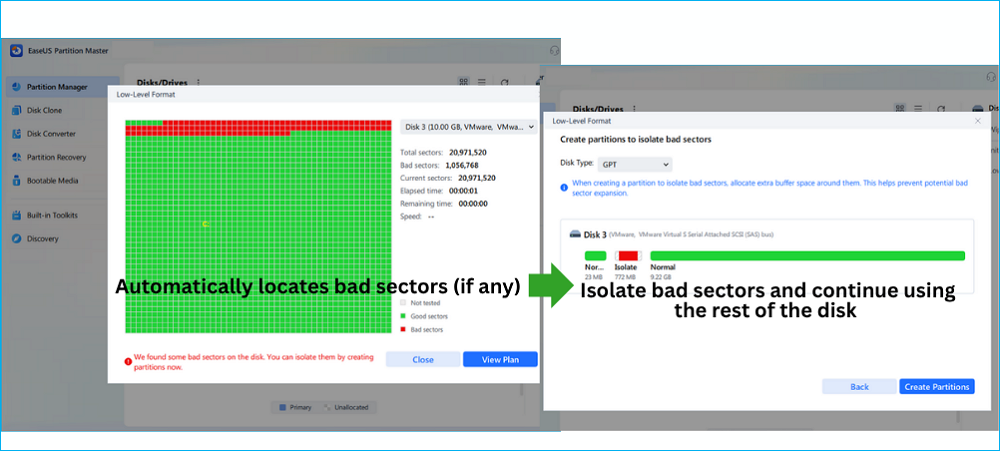
EaseUS Partition Master addresses these limitations by providing a complete disk management toolkit rather than a single-purpose wiping tool.
- ✔️Supports bad sectors isolation during the low level format
- ✔️Supports Windows 11/10/8/7
👍Pros
- Complete disk management and wiping solution
- Securely erase HDDs and SSDs
- Resize, merge, split, and move partitions
- Clone disks and migrate operating systems
- Supports GPT, UEFI, and NVMe SSDs
- Modern and beginner-friendly interface
👎Cons
- Some advanced features require a paid license
🧑💻Best For
Users who want a modern replacement for HDD Low Level Format Tool that combines secure data erasure, partition management, disk cloning, and SSD optimization in a single application.
🔊Review:
EaseUS Partition Master did an impressive job assisting us in rearranging disk partitions on our PC running Windows 11. Compared to the built-in disk manager and other third-party partition managers we've tried, EaseUS Partition Master seemed more intuitive and straightforward. The UI aspect has been well thought out as well. As soon as you open the tool, you can navigate to Partition Manager. - From TheSweetBits
#2. GParted
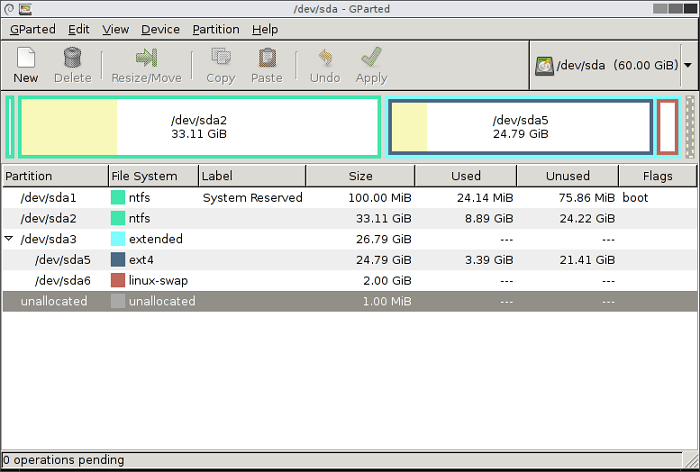
Unlike HDD Low Level Format Tool, which focuses primarily on disk wiping, GParted is designed for partition management. It allows users to create, resize, move, delete, and format partitions across a wide range of file systems. For users who are looking for more control over disk layouts, GParted offers capabilities that HDD Low Level Format Tool simply does not provide.
One reason many users consider GParted as an alternative is that it can perform partition-related tasks without requiring additional software. After wiping or formatting a drive, users can immediately create new partitions, reorganize storage space, or prepare a disk for a new operating system.
However, GParted is not specifically built for secure data destruction. It also lacks SSD Secure Erase, disk cloning, and operating system migration features. In addition, most users will need to create bootable media before using it, which can be inconvenient for beginners.
👍 Pros
- Free to use with no feature restrictions
- Powerful partition management capabilities
- Supports multiple file systems
- Works across different storage devices
👎 Cons
- Requires more technical knowledge than most Windows tools
- No dedicated secure erase functionality
- No graphical Windows installation version
🧑💻 Best For
Advanced users who need a free partition manager and are comfortable working with bootable environments.
🔊 Review
GParted is a free disk partitioning tool that runs from outside of the operating system, meaning that you don't need an OS installed to use it, nor will you ever have to reboot to apply any changes. - From LifeWire
Share this post and let more people learn about these alternatives to HDD Low Format Tool.
#3. DBAN
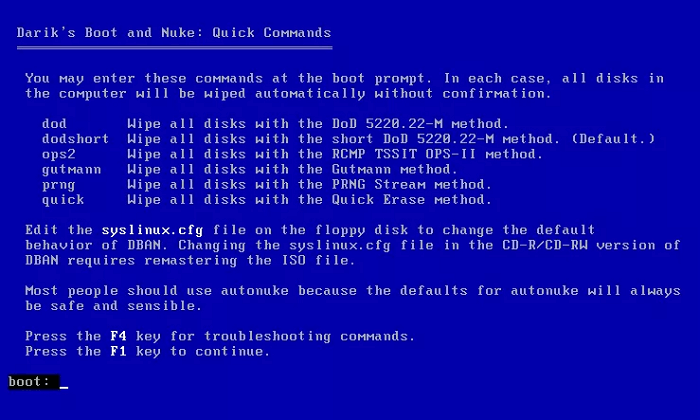
DBAN (Darik's Boot and Nuke) is one of the most recognized data erasure tools ever created. It focuses almost entirely on permanently destroying data stored on traditional hard drives. If your goal is to erase a drive before disposal, resale, or recycling, DBAN remains a popular choice. It supports multiple wiping methods and is designed to make data recovery extremely difficult after the wiping process is complete.
That said, DBAN's narrow focus is also its biggest limitation. It cannot resize partitions, manage storage space, clone disks, migrate operating systems, or isolate bad sectors. Support for modern SSDs and some UEFI-based systems is also limited compared to newer disk management solutions.
👍 Pros
- Effective for securely erasing HDDs
- Trusted by IT professionals for data destruction
- Multiple overwrite methods available
- Lightweight and free
👎 Cons
- Not suitable for SSD optimization
- No disk management functionality
- No cloning, migration, or partition tools
- Outdated compared to modern storage utilities
🧑💻 Best For
Users who only need to permanently erase data from traditional hard drives.
🔊 Review
Darik's Boot And Nuke (also known as DBAN) is the best free data destruction program available, at least among those that erase entire hard drives. - From LifeWire
4. DiskPart
DiskPart is Microsoft's built-in command-line disk management utility available in all modern versions of Windows. While HDD Low Level Format Tool provides a graphical interface for disk wiping, DiskPart gives users direct control over disks, partitions, and volumes through command-line commands.
Many users turn to DiskPart because it can perform several tasks that HDD Low Level Format Tool cannot, including partition creation, partition deletion, and MBR-to-GPT conversion. Since it is included with Windows, there is no need to download or install additional software.
The tradeoff is usability. DiskPart is designed for experienced users and administrators. A single incorrect command can remove partitions or erase an entire drive. It also lacks advanced features such as SSD Secure Erase, disk cloning, operating system migration, and bad sector isolation.
- ✔️ Built into Windows
- ✔️ Supports disk cleaning and partition management
- ✔️ Supports MBR/GPT conversion
👍 Pros
- No installation required
- Available on Windows 11, 10, 8, and 7
- Powerful disk and partition management commands
- Useful for troubleshooting storage issues
👎 Cons
- Steep learning curve
- No graphical interface
- Easy to make irreversible mistakes
- Lacks advanced disk management features
🧑💻 Best For
Experienced Windows users who prefer built-in system tools and are comfortable using command-line utilities.
🔊 Review
DiskPart is a command-line disk partitioning utility included in Windows 2000 and later, replacing fdisk. It ticks a lot of boxes in what I believe is a good command-line tool. Does one job, and does it well. It is available on a wide array of systems (Windows 2000, XP, Vista, 7, 8, 10, Server 2003 onwards), meaning it’s available on over 80% of personal computers and in some of the servers you might encounter. - From Tpaschalis
You can see more reviews of DBAN from our full guide: DBAN Reviews 2026
Which HDD Low Level Format Tool Alternative Is Right for You?
| If You Want To... | Recommended Tool | Why It Stands Out |
|---|---|---|
| Wipe a drive and manage partitions in one place | EaseUS Partition Master | Combines disk wipe, SSD Secure Erase, partition management, and GPT/MBR conversion, and supports bad sectors isolation |
| Completely erase an old HDD before selling or recycling it | DBAN | Designed specifically for secure HDD data destruction. |
| Use a free open-source partition manager | GParted | Powerful partition editing and disk management at no cost. |
| Use a built-in Windows tool without installing software | DiskPart | Command-line utility included with Windows. |
Free download the HDD Low Level Format tool aternative here.
Got the ideal alternative tool to the HDD Low Level Format Tool? Then, do not hesitate to share this post to help more people.
Conclusion
HDD Low Level Format Tool is still useful for basic disk wiping, but it lacks many features needed for modern storage management. If you only need secure data erasure, tools like DBAN may be sufficient. For partition management, GParted is a solid free option. However, if you need disk wiping, partition management, SSD optimization, cloning, and system migration in one solution, EaseUS Partition Master is the most complete alternative.
FAQs About Low Level Format Tool Alternatives
1. What is the best HDD Low Level Format Tool alternative?
The best HDD Low Level Format Tool alternative for most users is EaseUS Partition Master. It supports disk wiping, SSD Secure Erase, partition management, disk cloning, OS migration, and GPT/MBR conversion in a single application.
2. Is HDD Low Level Format Tool safe to use?
Yes, HDD Low Level Format Tool is generally safe to use when downloaded from a trusted source. However, it permanently erases data, so users should back up important files before starting the process.
3. Does HDD Low Level Format Tool perform a true low-level format?
No. Modern hard drives and SSDs do not allow users to perform a true factory-level low-level format. HDD Low Level Format Tool primarily performs a zero-fill operation that overwrites existing data.
4. Can HDD Low Level Format Tool fix bad sectors?
No. HDD Low Level Format Tool is designed for data erasure, not bad sector repair. While wiping a drive may help identify problematic sectors, it does not repair physical damage on the disk.
5. What is the difference between HDD Low Level Format Tool and DBAN?
Both tools can erase data, but DBAN is designed specifically for secure data destruction using multiple wiping methods. HDD Low Level Format Tool focuses on overwriting sectors and preparing drives for reuse.
How Can We Help You
About the Author

Sherly joined EaseUS in 2022 and she has always loved writing articles and enjoys the fun they bring. She receives professional training here, focusing on product performance and other relative knowledge. She has written over 200 articles to help people overcome computing issues.
Product Reviews
-
I love that the changes you make with EaseUS Partition Master Free aren't immediately applied to the disks. It makes it way easier to play out what will happen after you've made all the changes. I also think the overall look and feel of EaseUS Partition Master Free makes whatever you're doing with your computer's partitions easy.
Read More -
Partition Master Free can Resize, Move, Merge, Migrate, and Copy disks or partitions; convert to local, change label, defragment, check and explore partition; and much more. A premium upgrade adds free tech support and the ability to resize dynamic volumes.
Read More -
It won't hot image your drives or align them, but since it's coupled with a partition manager, it allows you do perform many tasks at once, instead of just cloning drives. You can move partitions around, resize them, defragment, and more, along with the other tools you'd expect from a cloning tool.
Read More
Related Articles
-
HP USB Disk Storage Format Tool Review 2026 [Benefits and Drawbacks]
![author icon]() Tracy King/2026/07/19
Tracy King/2026/07/19 -
Best HDClone Alternative in 2026: A Complete Comparison
![author icon]() Sherly/2026/09/28
Sherly/2026/09/28 -
Paragon Hard Disk Manager Review: Features, Pros, Cons, and Pricing
![author icon]() Joey Albert/2026/09/28
Joey Albert/2026/09/28 -
Newest Partition Magic Server Software Review and Download in 2026
![author icon]() Tracy King/2026/06/17
Tracy King/2026/06/17
 Tracy King/2026/07/19
  Joey Albert/2026/09/28









