







Content
Page Table of Contents
About the Author
Hot Topics
Getting locked out of your computer because you forgot the administrator password can feel overwhelming, especially when you can't access important files or settings. The good news is that you can reset the administrator password without reinstalling Windows or losing data.
This guide from EaseUS Software focuses on three proven and effective methods, including a beginner-friendly tool, a command-line workaround, and a Windows installation approach, along with a deeper explanation of why lockouts happen and how to prevent them.
How to Reset Administrator Password When Locked Out
Below are the most reliable methods. They are arranged from easiest to more advanced, so you can choose based on your technical comfort level.
Way 1. Use EaseUS Partition Master (Easiest & Safest)
If you're not familiar with command-line tools or system recovery environments, EaseUS Partition Master offers the simplest and most user-friendly way to reset an administrator password. This method works by launching a pre-boot environment outside of Windows. Since the operating system isn't actively running, the software can safely access and modify system account data directly. It removes or resets the password stored in the Windows Security Account Manager (SAM) database without needing the original credentials.
Why it's recommended:
No technical knowledge required
No risk of damaging system files
Works even when you're completely locked out
Preserves all data and settings
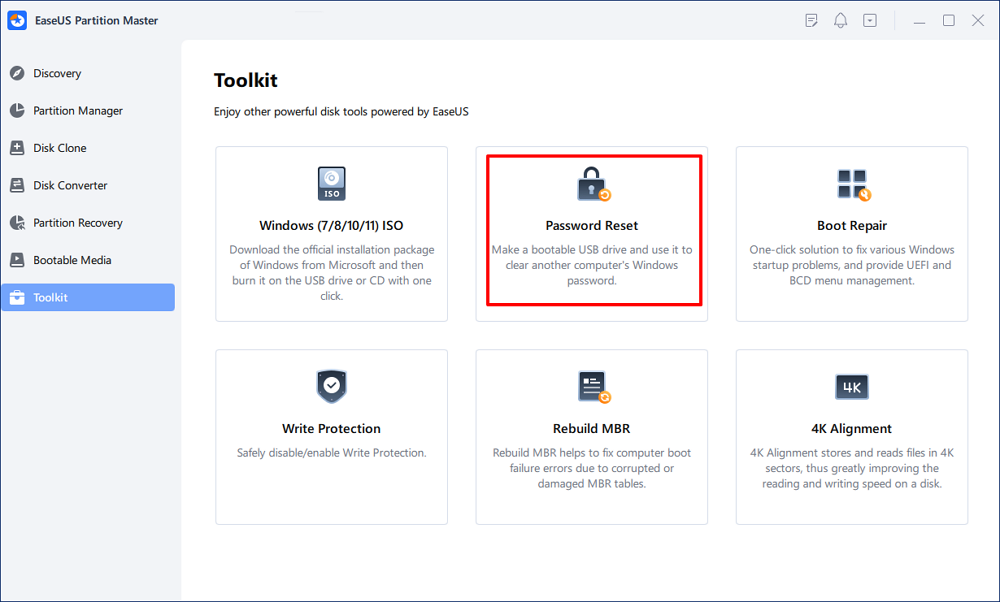
Step 1. Insert the target USB disk into the computer, download and run EaseUS Partition Master, and click "Toolkit" > "Password Reset."
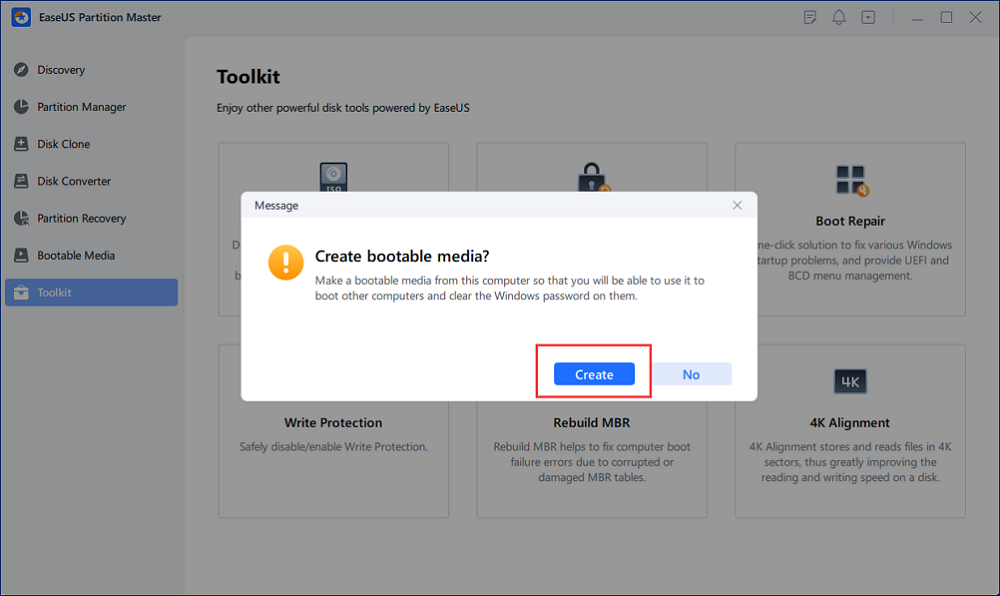
Step 2. A small window will pop up. After reading it carefully, click "Create".
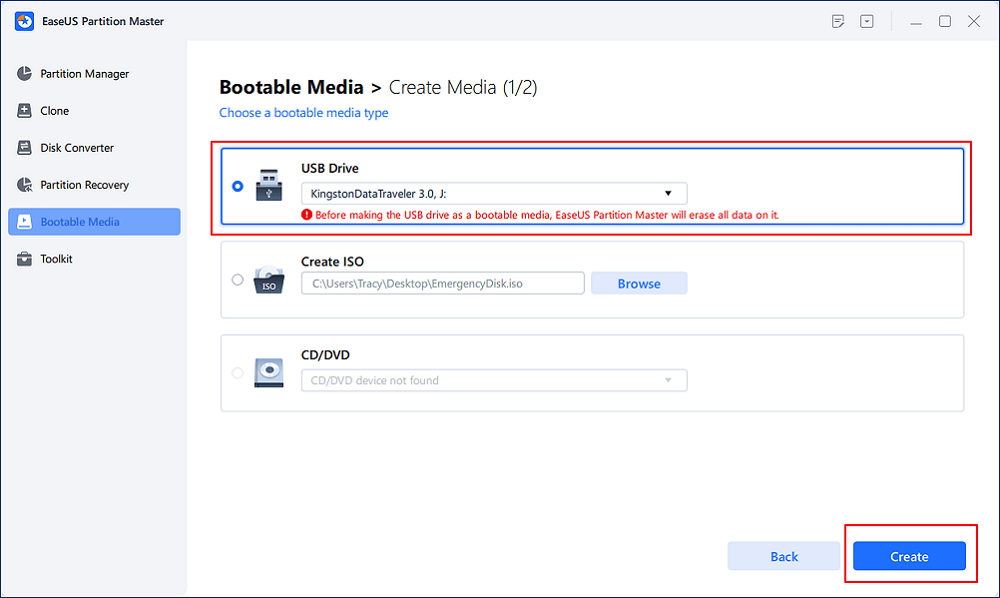
Step 3. Select the correct USB flash drive or external mobile hard disk and click "Create" again. Wait patiently. After the password reset USB flash drive is created, click "Finish."
Step 4. Remove the password reset USB, insert it into the locked PC, and restart. You will be asked to change the boot drive to boot the PC from USB. Once completed, the system will automatically boot from USB.
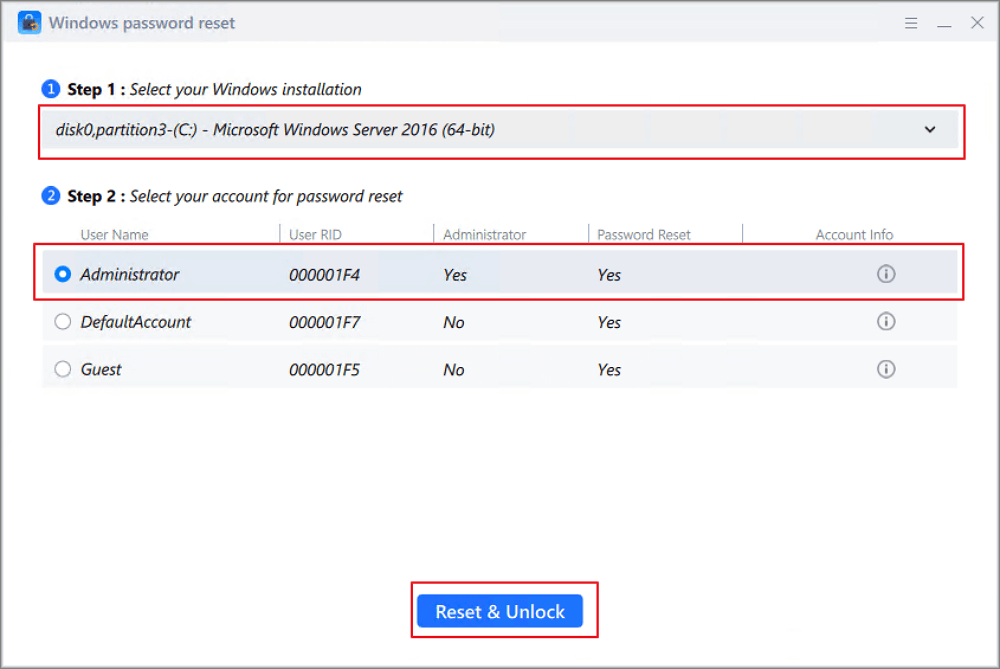
Step 5. After restarting, find EaseUS Partition Master again and go to "Password Reset." All accounts on the PC will be displayed in the interface; click on the target account and check "Reset & Unlock."
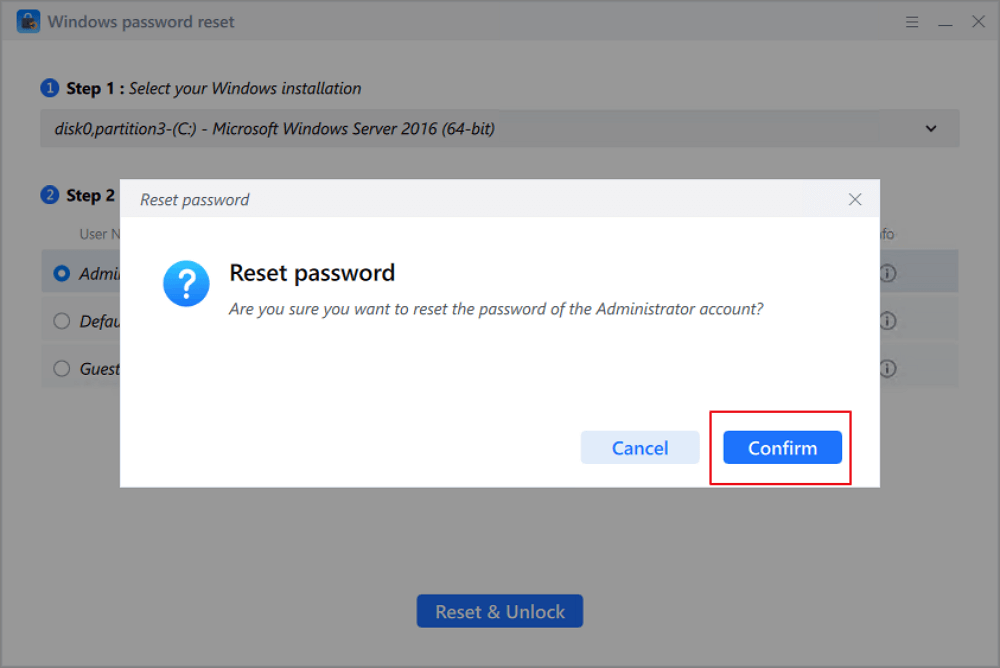
Step 6. When you receive this prompt, click "Confirm" to continue. Your password will be erased.
Way 2. Use Command Prompt from the Login Screen
This method is more advanced and involves using a workaround to access the Command Prompt before logging in to Windows. Windows allows certain accessibility tools (like Sticky Keys) to run before login. By temporarily replacing one of these tools with Command Prompt, you gain system-level access without logging in. This gives you permission to execute commands that modify user accounts, including resetting passwords.
- Boot your PC into the Windows Recovery Environment (WinRE) or installation media
- Open Command Prompt
- Replace a system accessibility tool (like Sticky Keys) with Command Prompt
- Restart and trigger Command Prompt from the login screen
- Run the command: net user username newpassword
Way 3. Use Windows Installation Media
If you don't have access to third-party tools, using a Windows installation USB is a powerful built-in solution. The Windows installation environment provides full system-level access independent of your installed OS. This allows you to modify system files, enable administrative access, or reset account credentials even if your system is locked.
- Boot your computer from a Windows installation USB/DVD
- Click Repair your computer instead of installing Windows
- Open Command Prompt from recovery options
- Use command-line methods to reset or bypass the password
- Restart and log in with the new credentials
Why You Get Locked Out of the Administrator Account
Understanding why administrator lockouts happen can help you avoid them in the future. Below are the most common and important causes explained in detail.
- Forgotten or Changed Password: This is the most common reason. Many users set complex passwords for security, but forget them over time—especially for accounts used infrequently. In some cases, passwords may also be changed unintentionally or by another user.
- Using a Local Account Without Recovery Options: Local accounts do not have built-in online recovery like Microsoft accounts. If you don't set up security questions or password reset disk, you may have no direct recovery path, making lockouts more difficult to resolve.
- No Password Reset Disk Created: Windows allows you to create a password reset disk in advance, but many users skip this step. Without it, you must rely on external tools or advanced methods to regain access.
- Disabled or Inaccessible Administrator Account: Some systems only have one administrator account. If it becomes inaccessible, there is no backup admin account, and the built-in administrator account may be disabled. This creates a situation where no account has permission to reset passwords internally.
- System Updates or Configuration Changes: Certain Windows updates, system restores, or registry changes can affect user account settings, corrupt login credentials, or cause synchronization issues. This can result in unexpected lockouts even if the password hasn't changed.
- Corrupted User Profile or System Files: If the user profile or authentication-related files become corrupted, Windows may reject correct passwords. This often happens due to improper shutdowns, disk errors, malware, or software conflicts.
Conclusion
Getting locked out of your administrator account is fixable with the right methods. EaseUS Partition Master offers the simplest and safest way to reset your password, especially for beginners. Alternatively, Command Prompt or Windows installation media are effective for more advanced users. To prevent future lockouts, always set up recovery options, create a password reset disk, and maintain backups.
How Can We Help You
About the Author

Updated by Tracy King
Tracy became a member of the EaseUS content team in 2013. Being a technical writer for over 10 years, she is enthusiastic about sharing tips to assist readers in resolving complex issues in disk management, file transfer, PC & Mac performance optimization, etc., like an expert.

Cici is the junior editor of the writing team of EaseUS. She accepted the systematic training on computers at EaseUS for over one year. Now, she wrote a lot of professional articles to help people resolve the issues of hard drive corruption, computer boot errors, and disk partition problems.
Product Reviews
-
I love that the changes you make with EaseUS Partition Master Free aren't immediately applied to the disks. It makes it way easier to play out what will happen after you've made all the changes. I also think the overall look and feel of EaseUS Partition Master Free makes whatever you're doing with your computer's partitions easy.
Read More -
Partition Master Free can Resize, Move, Merge, Migrate, and Copy disks or partitions; convert to local, change label, defragment, check and explore partition; and much more. A premium upgrade adds free tech support and the ability to resize dynamic volumes.
Read More -
It won't hot image your drives or align them, but since it's coupled with a partition manager, it allows you do perform many tasks at once, instead of just cloning drives. You can move partitions around, resize them, defragment, and more, along with the other tools you'd expect from a cloning tool.
Read More
Related Articles
-
How to Clone PS4 HDD to SSD | No Data Loss ⚒️
![author icon]() Cici/2026/09/15
Cici/2026/09/15 -
FREE MBR Repair Tool: How to Fix MBR on Internal and External Hard Disk
![author icon]() Jean/2026/09/15
Jean/2026/09/15 -
9 Tips to Solve Hard Drive Full for No Reason in Windows
![author icon]() Jean/2026/10/04
Jean/2026/10/04 -
[Fixed] Windows Resource Protection Found Corrupt Files but Was Unable to Fix Some of Them
![author icon]() Jean/2026/07/12
Jean/2026/07/12
 Jean/2026/09/15









