
Content
Page Table of Contents
About the Author
Hot Topics
- Why Extend Volume Is Not Showing on C Drive
- Scenario 1. Extend Volume Not Showing on C Drive Only
- Scenario 2. Extend Volume Not Showing after Deleting a Partition
- Scenario 3. Extend Volume Not Showing After Cloning SSD
- Scenario 4. Extend Volume Missing in Windows 11 but Works in CMD
- How to Fix C Drive Extend Volume Not Showing Easily🔥
- Another Way to Fix C Drive Extend Volume Not Showing
If the Extend Volume option is not showing on your C drive in Windows 11/10, it means Windows Disk Management cannot detect a valid disk layout that supports extending the partition. This usually does not indicate a lack of disk space. Instead, it is almost always related to how partitions are arranged on the disk.
In Windows, the Extend Volume option only appears when there is unallocated space directly adjacent to the right side of the C drive. If this condition is not met, the option will not be shown.
This article from EaseUS Software explains the root causes of the C drive extend volume not showing up and how to fix it safely across different scenarios.
Why Extend Volume Is Not Showing on C Drive
The key rule behind Windows disk extension is:
Windows Disk Management can only extend a partition into contiguous unallocated space located immediately to its right.
Unlike third-party tools, Windows Disk Management cannot move partitions automatically. Therefore, even if free space exists elsewhere on the disk, it cannot be used unless it is in the correct position. This is the fundamental reason behind almost all cases of the C drive extend Volume not showing up.
If you've figured out why extend volume is not showing on C drive, please share it to your social media to help more!

Scenario 1. Extend Volume Not Showing on C Drive Only
In some cases, the issue affects only the C drive while other partitions work normally. Users often see free space on the disk but find that the Extend Volume option is missing when right-clicking the C drive.
Why this happens
1️⃣. The recovery or OEM partition is blocking the layout
A very common disk layout looks like this:
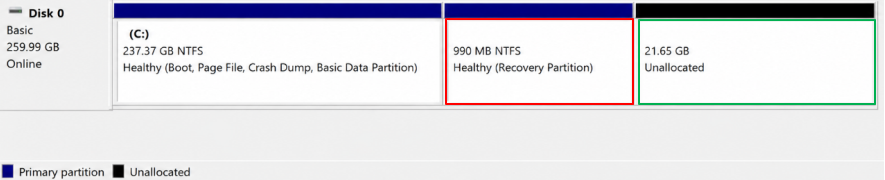
Even though unallocated space exists, it is not directly adjacent to the C drive. Since Windows requires strict adjacency, the C drive extend volume option does not show up or has disappeared.
2️⃣. System drive layout dependency
The C drive is usually the system boot partition and is commonly followed by system-related partitions (Recovery or OEM). These partitions often interrupt the required contiguous space needed for extension. However, this is not a restriction on the C drive itself; it is simply a result of how Windows partitions are typically structured.
3️⃣. BitLocker or encryption state
If BitLocker is enabled, Disk Management may require the drive to be temporarily suspended for certain operations. While this does not directly hide the Extend Volume option in all cases, it can affect how disk changes are processed.
Scenario 2. Extend Volume Not Showing after Deleting a Partition
Many users expect that deleting a partition (such as the D drive) will automatically allow the C drive expansion. However, this is not always the case.
Why this happens
1️⃣. Unallocated space is not adjacent to the C drive
After deleting a partition, the disk layout may still look like this:
Since the Recovery partition remains between the C drive and the free space, Windows cannot extend the volume.
2️⃣. The partition structure does not automatically reorganize
Deleting a partition only frees space at its original location. Windows does not move or rearrange partitions automatically.
3️⃣. MBR extended partition behavior
On MBR disks, deleted logical partitions may become "Free Space" inside an extended partition. However, Disk Management only allows extension into Unallocated Space, not Free Space inside extended partitions.
Scenario 3. Extend Volume Not Showing After Cloning SSD
This issue commonly appears after migrating or cloning Windows to a larger SSD.
Why this happens
1️⃣. Partition layout is replicated during cloning
Disk cloning tools typically copy the original partition structure exactly, including the EFI system partition, the Recovery partition, and the OEM partitions.
2️⃣. Extra space is placed at the end of the disk
After cloning to a larger SSD, the additional space is usually located at the end of the disk rather than next to the C drive.
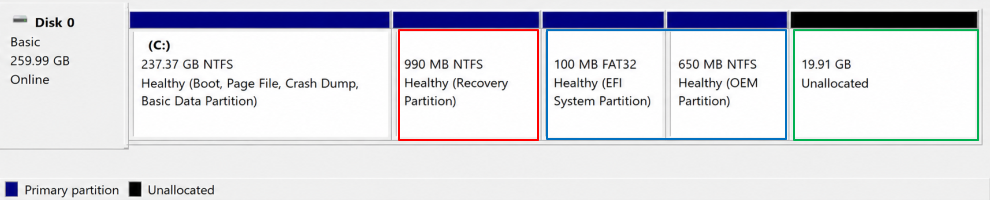
Since the Unallocated space is not adjacent to the C drive, the C drive extend volume not showing up.
3️⃣. Disk structure alignment differences
Depending on the cloning method and disk type (GPT/UEFI), partition alignment and layout may change slightly, which can affect how Windows evaluates the availability of extensions.
Scenario 4. Extend Volume Missing in Windows 11 but Works in CMD
In some cases, Disk Management does not show the Extend Volume option, but DiskPart (Command Prompt) can still perform the operation.
Why this happens
1️⃣. Disk Management interface limitation (MMC)
Disk Management relies on the Microsoft Management Console (MMC). If it fails to refresh disk information properly, available actions may not be displayed correctly.
2️⃣. Virtual Disk Service state inconsistency
Disk Management depends on the Virtual Disk Service. If the service does not refresh correctly, the UI may not accurately reflect the disk's condition.
3️⃣. DiskPart uses direct disk-level access
DiskPart interacts directly with the system's disk subsystem and does not rely on the graphical interface. Therefore, it can sometimes detect valid extension conditions even when Disk Management does not display them.
If the Extend Volume option is unavailable, you may need to try other ways to manage your disk space. If your C drive is also running low on storage, check out these solutions for a full C drive to learn how to free up space and resolve low disk space issues.
How to Fix C Drive Extend Volume Not Showing Easily🔥
If you confirm that there are blocking partitions between your C drive and the Unallocated space, you might have no choice but to use a powerful partition manager like EaseUS Partition Master to resize/move the C drive. More precisely, EaseUS Partition Master can easily merge or extend the C drive with the adjacent or non-adjacent Unallocated space on the same disk.
For most users, especially after cloning or complex partition layouts, a partition manager is the safest solution. And it can fix layout issues that Windows Disk Management cannot handle.
Extend System C drive with unallocated space
- 1. Right-click on the System C: drive and select "Resize/Move".
- 2. Drag the system partition end into the unallocated space so to add it to the C: drive. And click "OK".
- 3. Click "Execute Task" and "Apply" to execute the operations and extend the C drive.
Another Way to Fix C Drive Extend Volume Not Showing
DiskPart can help verify disk structure and perform extensions when Disk Management cannot. Here are the steps.
Step 1. Press Windows + X key > Windows PowerShell (Admin) to the elevated Command Prompt window.
Step 2. Type the following command lines in order.
- diskpart > press Enter
- list volume > press Enter
- select volume x > hit Enter
- extend size = number > hit Enter
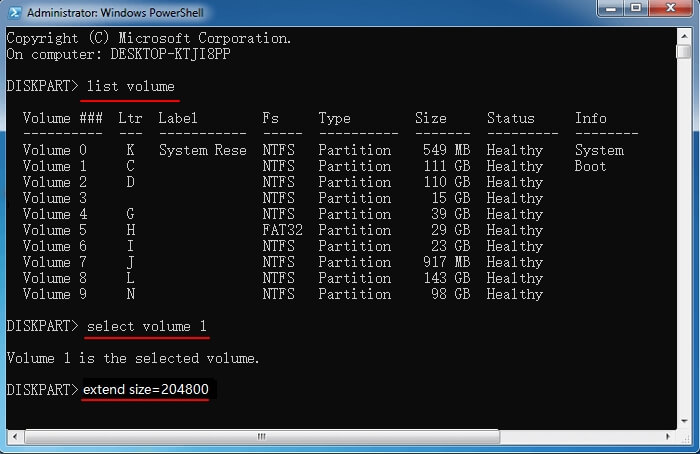
Step 3. After extension, type exit to exit the Command Prompt window.
Learn how to extend C drive when the option is unavailable and explore alternative approaches.
Conclusion
In short, the C drive extend volume not showing issue is not caused by insufficient disk space. Instead, it is caused by disk partition layout constraints defined by Windows Disk Management. In most cases, the solution is to ensure that unallocated space is directly adjacent to the C drive or to adjust the partition structure using partition manager software like EaseUS Partition Master.
FAQs
Furthermore, this section also includes several useful tips about this topic. Check them out below.
1. Why is Extend Volume greyed out instead of missing?
If your Extend Volume greyed out, which means the option exists, but conditions are not met. Missing means Windows does not detect any valid adjacent unallocated space.
2. Can I extend C drive without deleting partitions?
Only if unallocated space is already directly next to C drive. Otherwise, partitions must be moved or removed.
3. Why does unallocated space not work?
Because it is not adjacent to C drive, or is separated by a Recovery/OEM partition.
Please share this post to help more users learn how to fix the C drive extend volume not showing up!
How Can We Help You
About the Author

Updated by Joey Albert
Joey is an enthusiast of science and technology. With a passion for uncovering the latest tech innovations, she creates clear, engaging how-to guides that make technology accessible and enjoyable for all.

Cici is the junior editor of the writing team of EaseUS. She accepted the systematic training on computers at EaseUS for over one year. Now, she wrote a lot of professional articles to help people resolve the issues of hard drive corruption, computer boot errors, and disk partition problems.
Product Reviews
-
I love that the changes you make with EaseUS Partition Master Free aren't immediately applied to the disks. It makes it way easier to play out what will happen after you've made all the changes. I also think the overall look and feel of EaseUS Partition Master Free makes whatever you're doing with your computer's partitions easy.
Read More -
Partition Master Free can Resize, Move, Merge, Migrate, and Copy disks or partitions; convert to local, change label, defragment, check and explore partition; and much more. A premium upgrade adds free tech support and the ability to resize dynamic volumes.
Read More -
It won't hot image your drives or align them, but since it's coupled with a partition manager, it allows you do perform many tasks at once, instead of just cloning drives. You can move partitions around, resize them, defragment, and more, along with the other tools you'd expect from a cloning tool.
Read More
Related Articles
-
How to Shrink C Drive without Losing Data [Full Guide]
![Cici]() Cici/2026/10/29
Cici/2026/10/29 -
How to Clean C Drive Without Losing Data in Windows 11 (Safe & Easy Guide)
![Sherly]() Sherly/2026/10/29
Sherly/2026/10/29 -
Fix "We Can't Tell If Your PC Has Enough Space to Continue Installing Windows 11" Error [5 Methods]
![Jean]() Jean/2026/10/29
Jean/2026/10/29 -
How to Format C Drive Using Command Prompt | Step-by-Step Guide
![Joey Albert]() Joey Albert/2026/10/29
Joey Albert/2026/10/29
 Sherly/2026/10/29
  Jean/2026/10/29