Page Table of Contents

If you recently installed a Samsung SSD, you may have seen Samsung Magician recommended alongside it. But do you really need another piece of software running on your PC? Is Samsung Magician safe? Does it improve SSD performance? And if you're upgrading to a new SSD, is Samsung Magician good for cloning?
This guide explains what Samsung Magician actually does, whether it is safe, whether you need it running all the time, and when a dedicated cloning tool such as EaseUS Disk Copy may make more sense.
Key Takeaways
- ✅Samsung Magician is worth installing for many Samsung SSD owners, but it is not required.
- ✅It is primarily an SSD management and maintenance utility, not a driver required for normal storage operation. Its most useful features include firmware updates, SSD health monitoring, performance benchmarking, and optimization tools.
- ✅If you need to clone a data-only drive, use different drive brands, resize partitions, or handle a more complex migration, a dedicated disk cloning tool may provide greater flexibility.
What Is Samsung Magician?
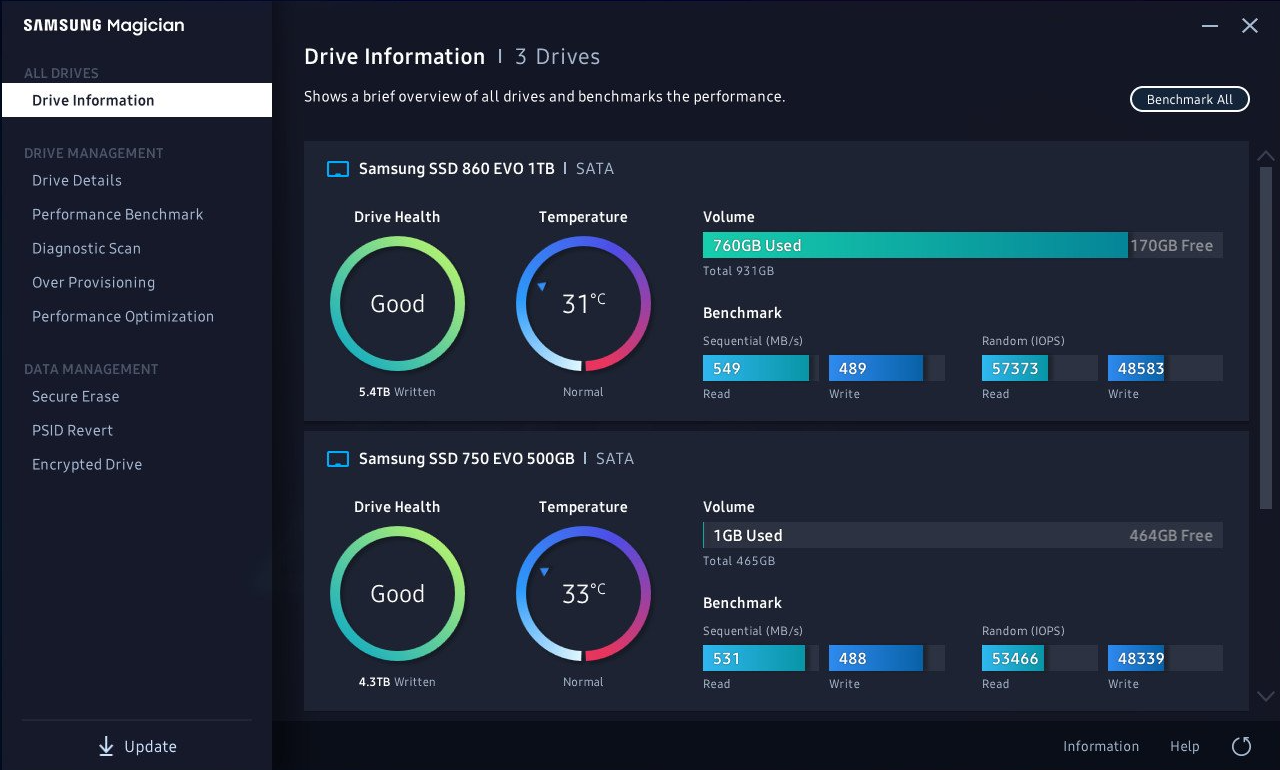
Samsung Magician is Samsung's software for managing supported Samsung memory products, including internal and portable SSDs. Depending on the connected device, it provides tools for drive details, drive health checks, performance optimization, Secure Erase, PSID Revert, and Data Migration. Available features vary by product and operating system.
For example, you might install a new Samsung SSD and use Magician to:
- Check whether the drive is recognized correctly.
- Check its firmware version.
- Look at drive health information.
- Run a performance benchmark.
- Enable supported optimization features.
Samsung states that Magician does not require an Internet connection to run, although an Internet connection is recommended for receiving firmware, feature, and application updates.
Is Samsung Magician Worth Installing?
Samsung Magician is useful, but it is not necessary for a Samsung SSD to work normally. You can use a Samsung SSD in Windows without installing Magician. However, the software can be worth installing if you want convenient access to firmware updates, health monitoring, diagnostics, performance testing, and Samsung-specific management features.
1. Firmware Updates
Firmware is one of the strongest reasons to install Samsung Magician. Manufacturers may release updates to address bugs, improve compatibility, or make other improvements. Samsung provides a way to check and update supported SSD firmware through Magician.
This is particularly useful when you:
- Install a new Samsung SSD.
- Want to verify its firmware version.
- Are troubleshooting unusual SSD behavior.
- Want to keep the drive's firmware current.
So, if you own a Samsung SSD, firmware management alone makes Magician worth having available.
2. SSD Health Monitoring
Magician can also show information about supported SSDs, including drive health and SMART-related information.
This can be useful for keeping an eye on a drive that contains important files or is used heavily for gaming, work, video editing, or other demanding workloads.
However, there is an important limitation: a health indicator is not a guarantee that an SSD will never fail. Therefore, use Magician as a monitoring tool—not as a replacement for backups.
3. Performance Benchmarking
Samsung Magician includes performance benchmarking for supported drives. This lets you compare the SSD's measured read and write performance with its advertised specifications or with previous benchmark results.
Remember that benchmark results depend on the entire system. CPU load, motherboard, PCIe generation, thermal throttling, available free space, background applications, and other factors can affect the result.
It is worth using when you need to verify performance; unnecessary if you never benchmark your storage.
4. SSD Optimization and Management
Magician also provides additional features for supported drives, including Performance Optimization, Secure Erase, and other management functions.
These are more useful for advanced users than for everyday users. For example, Secure Erase can be useful when you are retiring or repurposing an SSD. Over Provisioning may be relevant when you want to reserve part of the drive's capacity for SSD management and specific workloads.
Share this blog to help others know if Samsung Magician is worth installing.

Is Samsung Magician Necessary?
No. Samsung Magician is not necessary for normal Samsung SSD operation. This is where it helps to distinguish between necessary and useful.
| Your situation | Is Magician necessary? | Is it useful? |
| Using a Samsung SSD normally | ❌ | Optional |
| Checking SSD health | ❌ | ✅ |
| Updating firmware | ❌ | ✅ |
| Benchmarking performance | ❌ | ✅ |
| Using advanced SSD features | ❌ | ✅ |
| Migrating OS to a Samsung SSD | ❌ | ✅ |
| Complex disk cloning | ❌ | A dedicated cloner may be better |
Samsung Magician is a management utility, not a required system component.
Is Samsung Magician Good for Cloning?
Samsung Magician can be good for cloning when your migration fits Samsung's supported Data Migration workflow. Samsung's current Magician software integrates Data Migration, which is designed to help migrate an existing operating system, applications, and user data to a supported Samsung SSD.
If your Windows PC currently boots from an older HDD and you purchase a larger Samsung SSD, Data Migration can be used in a supported configuration to move the existing Windows environment to the new drive.
Instead of reinstalling Windows and your applications manually, migration can transfer the existing system environment to the new SSD. That makes it attractive for a common SSD upgrade scenario.
- Samsung Data Migration Limitations
- The limitations become important when your requirements go beyond a straightforward OS migration.
- It Is Designed Around Samsung SSDs - Samsung Magician is optimized for Samsung-branded memory products, and supported features can vary for OEM and non-Samsung SSDs.
- It Is Primarily an OS Migration Tool - Samsung's Data Migration documentation specifies that the source drive must contain an operating system for the supported cloning workflow. It cannot simply clone a drive that contains only data.
- Some Disk Configurations Are Not Supported - Samsung documentation lists additional restrictions for Data Migration, including limitations involving OEM drives, encrypted drives, supported Windows versions, and certain source-drive configurations.
Before cloning, check Samsung's current compatibility requirements rather than assuming that every SSD migration will work. Read this blog to know more details: Can Samsung Data Migration Clone Non-Samsung SSD.
Is Samsung Magician Safe?
Samsung Magician is Samsung's official software for managing supported Samsung memory products when downloaded through Samsung's official channels. Samsung's current support pages provide Magician installers and documentation.
So, is Samsung Magician safe? Generally, yes—provided that you download it from Samsung rather than an unofficial third-party download site.
❓Why Do Some Users Avoid Samsung Magician?
The existence of negative user experiences does not automatically mean the software is unsafe.
Some users simply do not want another storage utility installed when their SSD already works normally. Others have reported installation issues, interface problems, resource usage concerns, or compatibility problems in particular environments. Reddit discussions include examples of users reporting high memory usage or deciding to uninstall the application because they only needed it occasionally.
These reports are worth considering, but they should be interpreted as individual experiences rather than universal behavior.
Samsung Magician Review: Pros and Cons
| Pros | Cons |
| Official Samsung SSD management utility | Not required for normal SSD use |
| Convenient firmware updates | Many users only need it occasionally |
| SSD health and S.M.A.R.T. information | Features vary by drive and OS |
| Performance benchmarking | Some users report usability or resource concerns |
| SSD optimization features | Mainly designed around Samsung storage |
| Integrated Data Migration | Data Migration has specific limitations |
Overall rating: Samsung Magician is a useful Samsung SSD management utility, but it is not an essential Windows application. Its value is highest when you actively need Samsung-specific maintenance features.
Samsung Magician Alternative: EaseUS Disk Copy
EaseUS Disk Copy is designed specifically for disk cloning and OS migration. It can clone disks or partitions and can resize the destination in supported scenarios; a larger source disk can be cloned to a smaller target when the target has enough capacity for the actual contents and sector-by-sector copying is not selected.
Related reading: Samsung Data Migration Alternative
| Task | Samsung Magician | EaseUS Disk Copy |
| OS migration | Yes, only supports Samsung SSD | ✅ |
| HDD to SSD cloning | Limited | ✅ |
| SSD to SSD cloning | Limited | ✅ |
| Data-only disk cloning | Limited | ✅ |
| Cross-brand cloning | Limited | ✅ |
| Larger disk to smaller disk | Subject to Samsung migration requirements | Supported when used space fits the target |
| Sector-by-sector cloning | Limited | ✅ |
| 4K Alignmnet | ❌ | ✅ |
| Adjust partitions befoew cloning | ❌ | ✅ |
| Samsung SSD firmware | ✅ | ❌ |
| Samsung SSD health monitoring | ✅ | ❌ |
| SSD benchmarking | ✅ | ❌ |
| Samsung SSD optimization | ✅ | ❌ |
This means the choice should depend on the task. Use Samsung Magician to manage your Samsung SSD. Use dedicated cloning software when disk migration is your primary goal.
 Free Download
Windows 11/10/8/7
Final Verdict: Is Samsung Magician Worth Installing?
Yes, for many Samsung SSD owners, but you don't have to keep it installed permanently.
Samsung Magician is valuable for firmware updates, SSD health monitoring, benchmarking, and Samsung-specific management features. It is official Samsung software and is generally safe when downloaded from Samsung's official channels.
At the same time, Samsung Magician is not necessary for normal SSD operation.
If you only want to use your Samsung SSD for everyday storage, you can skip it. If you want convenient SSD maintenance, install it and use it when needed.
For cloning, the answer depends on your migration scenario. Samsung Data Migration is a convenient option for supported OS-to-Samsung-SSD migrations, but its limitations make it less suitable for some data-only, cross-brand, or more complex cloning tasks.
Share this blog to help others know if Samsung Magician is worth installing.
FAQs
1. Do I need Samsung Magician running all the time?
No. You can open it when you need to check health, update firmware, benchmark the SSD, or perform another supported task. It does not need to be your everyday SSD management application.
2. Is Samsung Magician worth installing if my SSD works perfectly?
It can still be useful for checking firmware and drive health, especially after installing a new SSD. However, if you do not need those features, you can use the SSD normally without it.
3. What is the best alternative to Samsung Magician for cloning?
If your main goal is disk cloning rather than Samsung SSD management, EaseUS Disk Copy is a dedicated option. It supports disk and partition cloning, OS migration, sector-by-sector copying, and flexible destination layouts for supported scenarios.
-
Updated by
![Larissa]()
Larissa
Larissa has rich experience in writing technical articles and is now a professional editor at EaseUS. She is good at writing articles about data recovery, disk cloning, disk partitioning, data backup, and other related knowledge. Her detailed and ultimate guides help users find effective solutions to their problems. She is fond of traveling, reading, and riding in her spare time.…Read full bio