





Table of Contents
 About the Author
 Related Posts
MySQL database corruption, while concerning, is often recoverable through appropriate methods. For minor issues, built-in MySQL database repair tools like REPAIR TABLE and mysqlcheck provide effective solutions.
However, when facing severe file-level corruption or when built-in methods fail, specialized tools like EaseUS Fixo File Repair offer superior repair capabilities, higher success rates, and user-friendly interfaces.
Why MySQL Databases Get Corrupted
MySQL Database corruption occurs when the stored data becomes unreadable, inconsistent, or damaged. Common causes include hardware failures, software issues, human error, virus attacks, storage issues, etc.
Here are the main reasons why a MYSQL database gets corrupted:
- Accidental deletion of database files, improper server configuration, or incorrect manual edits.
- File system errors or insufficient disk space.
- Sudden power outages, disk failures, or bad sectors on storage devices.
- Bugs in MySQL or the operating system, improper shutdowns, or crashes during write operations.
- Malicious software targeting database files.
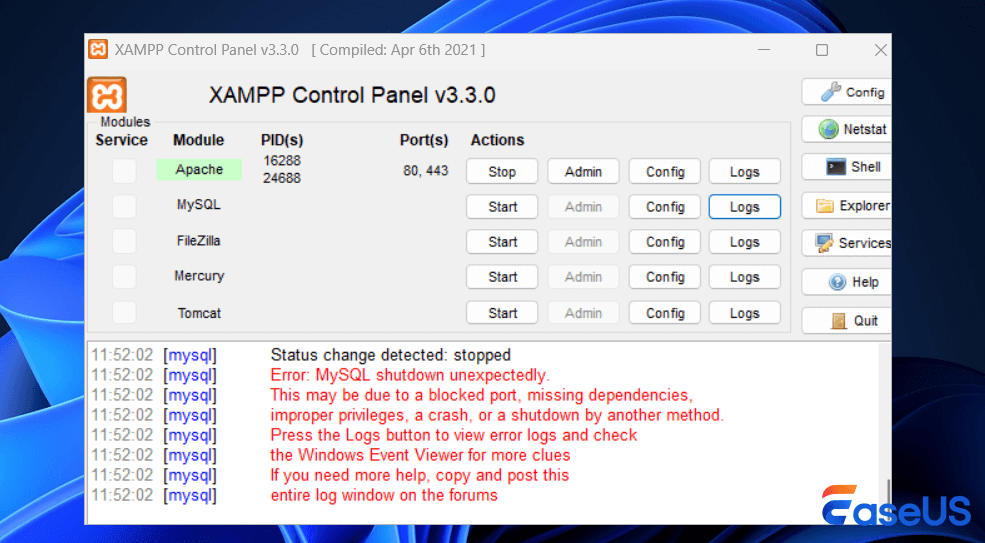
Signs of Database Corruption:
- a. MySQL server fails to start or crashes unexpectedly.
- b. Error messages mentioning "table is marked as crashed", "corrupted", or "repair".
- c. Inconsistent query results or missing data.
- d. Slow performance even with simple queries.
- e. Inability to access specific tables or databases.
MySQL database repair can be performed using built-in command-line tools, administrative interfaces, or third-party software solutions. The specific tool you use often depends on the storage engine (MyISAM or InnoDB) and the severity of the corruption.
#1. Built-in MySQL Repair Tools (Command-Line)
These methods are often the first steps recommended by experts and are included with the MySQL installation.
| Command Lines | Description | Remark |
| REPAIR TABLE table_name; | You can run this SQL command directly within the MySQL client or phpMyAdmin. | This is simple for minor issues in MyISAM tables. |
| mysqlcheck -r [database_name] | This command-line utility is used to check, repair, optimize, or analyze tables. The -r flag is specifically for repairing tables. | This tool generally works well for MyISAM tables. |
| myisamchk --recover [table_path] | A dedicated command for MyISAM tables, used when the MySQL server is stopped. It provides more robust repair options than mysqlcheck. | You must stop the MySQL service before running this command. |
🔔Tips: For InnoDB tables, which are more self-healing, you might need to enable the innodb_force_recovery option in the my.cnf configuration file to start the server and export your data using mysqldump.
The built-in MYSQL repair tools require technical expertise and command-line familiarity and may not repair all data, especially with severe corruption.
Share this post with your friends and help more people choose a suitable MYSQL database repair tool!

#2. EaseUS Advanced Repair Tool to Fix Corrupted MYSQL
When database files are severely corrupted or built-in tools fail, third-party specialized software like EaseUS Fixo becomes the optimal choice. This file repair tool is particularly effective for file-level corruption that MySQL's internal repair mechanisms cannot address.
Why EaseUS Fixo is the First Choice for File Data Corruption?
- Handles various MySQL file formats, including ".frm", ".MYD", ".MYI", and ".ibd" files.
- Examines database files at the binary level to identify and reconstruct damaged structures
- Graphical interface eliminates complex command-line operations
- Allows verification of repairable data before final restoration
Check out the following steps to repair corrupted files using EaseUS Fixo:
Step 1. Download and launch Fixo on your PC or laptop. Choose "File Repair" to repair corrupted Office documents, including Word, Excel, PDF, and others. Click "Add Files" to select corrupted documents.
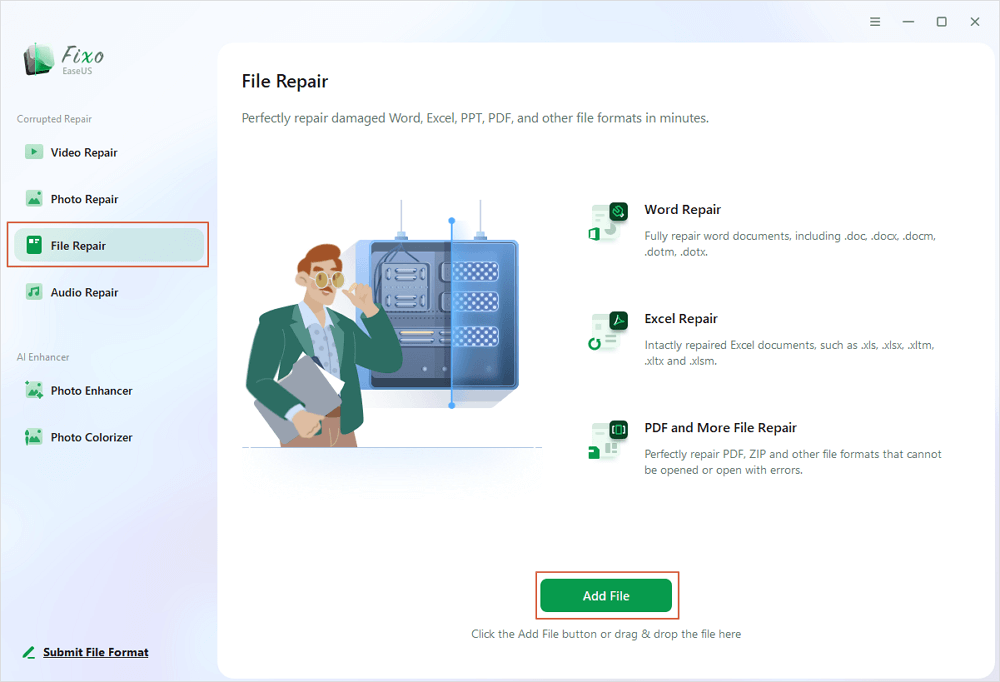
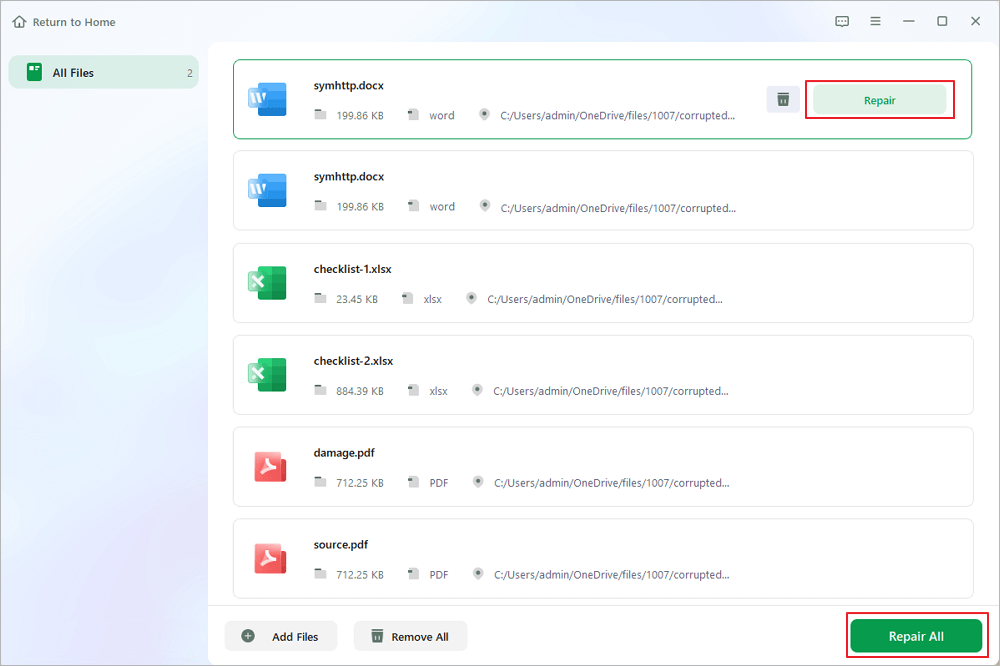
Step 2. To repair multiple files at once, click the "Repair All" button. If you want to repair a single document, move your pointer to the target file and choose "Repair". You can also preview the documents by clicking the eye icon.
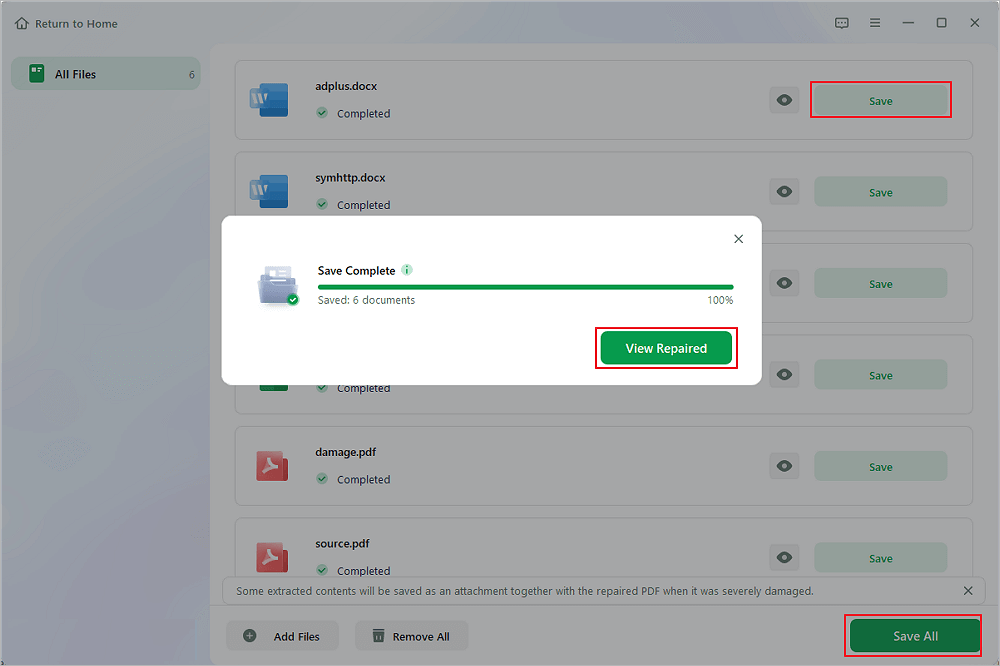
Step 3. Click "Save" to save a selected document. Select "Save All" to save all the repaired files. Choose "View Repaired" to locate the repaired folder.
Conclusion
The key to effective database management lies in prevention: regular backups, stable hardware environments, proper shutdown procedures, and monitoring systems can significantly reduce the risk of corruption.
When MTSQL corruption occurs, a systematic approach, starting with built-in tools and escalating to specialized software, EaseUS Fixo File Repair, as needed, maximizes recovery chances while minimizing data loss.
MYSQL Database Repair Tool FAQ
1. How do you repair a MySQL database?
You can repair MySQL databases using built-in commands like REPAIR TABLE for accessible tables, myisamchk for offline MyISAM table repair, or mysqlcheck for checking and repairing multiple tables. For severe corruption, third-party tools like EaseUS Fixo provide advanced file-level recovery options.
2. How to repair a corrupted SQL database?
Start by identifying the extent of corruption using CHECK TABLE. For MyISAM tables, use REPAIR TABLE or myisamchk. For InnoDB, enable the innodb_force_recovery option in the configuration. Always back up first. If these methods fail, consider specialized recovery software that can repair database files directly.
3. How to fix a database error in MySQL?
First, identify the specific error from MySQL logs. Common fixes include: repairing tables with REPAIR TABLE, restarting the MySQL service, checking disk space, verifying file permissions, or using recovery mode for InnoDB tables. Persistent errors may require restoring from backups or using advanced recovery tools.
4. How to repair a DB?
Database repair methods vary by system. For MySQL: 1) Use built-in repair commands 2) Utilize utility programs like mysqlcheck 3) For file-level issues, employ specialized recovery software 4) As a last resort, restore from backups. Always work on copies of corrupted files and document each step of the repair process.
Was This Page Helpful?
About the Author

Brithny is a technology enthusiast, aiming to make readers' tech lives easy and enjoyable. She loves exploring new technologies and writing technical how-to tips. In her spare time, she loves sharing things about her game experience on Facebook or Twitter.


