







Content
Page Table of Contents
About the Author
Hot Topics
Want a lightweight disk partition tool that runs directly from a USB drive without installation? A portable partition manager is especially useful for IT technicians, system administrators, or users who need to manage disk partitions on multiple computers.
In this guide, we will explain what Partition Magic Portable is, why the original software is no longer supported, and provide a free portable partition manager download that allows you to manage disk partitions anytime and anywhere.
Overview of Partition Magic Portable
So what is Partition Magic? Partition Magic was once one of the most popular disk partition tools for Windows. It allowed users to resize, create, delete, and format partitions without reinstalling Windows, which was revolutionary at the time.
However, development stopped many years ago.
PartitionMagic 8.0.5, released by Symantec on May 5, 2004, was the final version of the software. Although it supports Windows XP, it is not fully compatible with Windows XP SP2 or SP3.
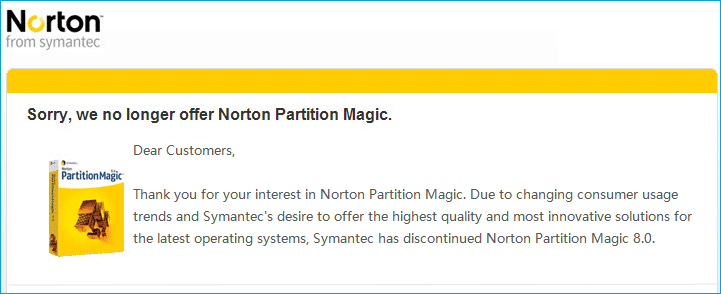
Starting with Windows Vista, Microsoft introduced a new boot manager and updated file systems. Because of these changes, Partition Magic cannot properly support Windows Vista, Windows 7, Windows 10, or Windows 11.
Running outdated Partition Magic may lead to serious risks, including:
- Partition corruption
- System boot failure
- Data loss during partition resizing
To solve this problem, we offer a free, portable partition manager that lets you safely manage disk partitions without installation. Share this post if you found it helpful.

Best Portable Partition Magic Software Free Download
 If you are searching for a Partition Magic portable alternative, EaseUS Partition Master Portable is one of the most reliable options. It provides similar features to Partition Magic but is designed for modern Windows environments.
The portable version can run directly from a USB flash drive, making it ideal for technicians or users who manage multiple machines. EaseUS Partition Master Portable allows you to manage disks and partitions anytime, anywhere, without modifying system files.
- Free Portable Tool – Run directly from a USB drive without installation
- Manage Partitions Anywhere – Use it on multiple computers anytime
- Wide Compatibility – Supports Windows 11/10/8/7/Vista/XP
- No System Installation Required – Does not write files to the Windows system folder
- Easy to Copy and Transfer – Simply copy the portable folder to another device
- Same Functions as Installed Version – Full disk partition management features
- Easy Removal – Just delete the folder to uninstall
- Cleaner Interface – Modern UI that is clearer and more user-friendly than older tools
What Can EaseUS Partition Master Portable Do?
EaseUS Partition Master Portable provides both basic partition management and advanced disk utilities.
| Functions | Details |
|---|---|
| Basic Partition Operations |
|
| Advanced Disk Management |
|
| Disk Repair & Recovery |
|
| Disk Cloning & OS Migration |
|
| Boot & System Repair |
|
Compared with the original Partition Magic, this portable tool provides far more modern disk management capabilities while remaining simple to use.
How to Download and Use EaseUS Portable Partition Manager
As mentioned earlier, EaseUS Partition Manager Portable is derived from EaseUS Partition Master Free, which means both versions share the same core features. The portable version simply packages the software so that it can run without installation, making disk management more convenient for users who need mobility.
Before proceeding, remember that partition operations always involve disk structure changes. It is recommended to back up important data before resizing or modifying partitions.
Follow the steps below to download and use the portable partition manager.
Step 1. Download and Extract the Portable Partition Manager
- Download the EaseUS Portable Partition Manager to your USB flash drive and extract the ZIP package.
Step 2. Run the Portable Tool on Any Windows Computer
- When you need to manage disks on Windows 11, Windows 10, Windows 8.1, or Windows 7, insert the USB drive into the target computer, and click open EaseUS Partition Master, Portable. You can now safely perform operations such as resizing partitions, cloning disks, or repairing disk structures.
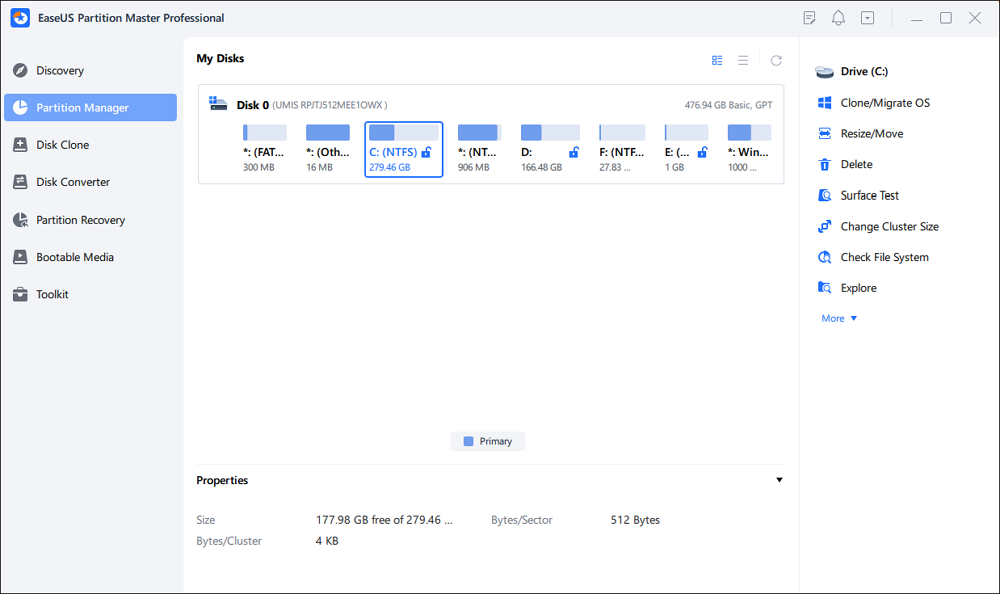
Because the tool runs from a USB, you can simply plug the drive into any Windows computer that needs partition management.
Conclusion
Partition Magic Portable is no longer compatible with modern Windows systems and may cause serious disk errors. A modern solution like EaseUS Partition Master Portable provides the same classic partition management capabilities while adding powerful new features such as disk cloning, partition recovery, and boot repair.
By running directly from a USB drive, the portable version makes it easy to manage disk partitions on multiple computers without installation, making it an excellent choice for technicians and everyday users alike. Share this post and help more users know about this portable partition manager.
FAQs About Partition Magic Software Free Download.
1. Is Partition Magic Portable still available?
No, the original Partition Magic software is no longer maintained. The last version (8.0.5) was released in 2004 and does not support modern Windows systems such as Windows 10 or Windows 11.
2. Is Partition Magic compatible with Windows 10 or Windows 11?
No. Partition Magic was designed for Windows XP and earlier systems. Running it on modern Windows versions may cause partition errors or system boot issues.
3. What is the best alternative to Partition Magic Portable?
Modern tools like EaseUS Partition Master Portable provide similar functionality while supporting current Windows versions and advanced disk management features.
4. Can I run a partition manager without installing it?
Yes. Portable partition managers can run directly from a USB flash drive. This allows users to manage disk partitions without installing software on the computer.
5. Is it safe to resize partitions with a portable partition manager?
Yes, but it is recommended to back up important data first. Any partition modification changes the disk structure, so backups help prevent unexpected data loss.
How Can We Help You
About the Author

Sherly joined EaseUS in 2022 and she has always loved writing articles and enjoys the fun they bring. She receives professional training here, focusing on product performance and other relative knowledge. She has written over 200 articles to help people overcome computing issues.
Product Reviews
-
I love that the changes you make with EaseUS Partition Master Free aren't immediately applied to the disks. It makes it way easier to play out what will happen after you've made all the changes. I also think the overall look and feel of EaseUS Partition Master Free makes whatever you're doing with your computer's partitions easy.
Read More -
Partition Master Free can Resize, Move, Merge, Migrate, and Copy disks or partitions; convert to local, change label, defragment, check and explore partition; and much more. A premium upgrade adds free tech support and the ability to resize dynamic volumes.
Read More -
It won't hot image your drives or align them, but since it's coupled with a partition manager, it allows you do perform many tasks at once, instead of just cloning drives. You can move partitions around, resize them, defragment, and more, along with the other tools you'd expect from a cloning tool.
Read More
Related Articles
-
How to Securely Erase or Wipe SSD in Windows 11/10
![author icon]() Tracy King/2026/09/22
Tracy King/2026/09/22 -
Fix Error Code 0x8007025D When Installing Windows
![author icon]() Cici/2026/09/24
Cici/2026/09/24 -
Resize Dynamic Disk to Extend or Shrink Dynamic Disk
![author icon]() Tracy King/2026/09/21
Tracy King/2026/09/21 -
Lenovo Laptop Stuck on Lenovo Screen? 9 Easy Fixes Here!
![author icon]() Sherly/2026/09/23
Sherly/2026/09/23
 Tracy King/2026/09/22
  Cici/2026/09/24









