




-
![]() How to Use TestDisk to Recover Data on Windows/Mac
How to Use TestDisk to Recover Data on Windows/Mac July 23,2026
 6 min read
 -
![]() Data Recovery Software Review Hub | Tests, VS & Top PicksJuly 23,20266 min read
Data Recovery Software Review Hub | Tests, VS & Top PicksJuly 23,20266 min read -
![]()
-
![]() PhotoRec vs EaseUS Data Recovery: Full Comparison & 2026 ReviewJuly 23,20266 min read
PhotoRec vs EaseUS Data Recovery: Full Comparison & 2026 ReviewJuly 23,20266 min read -
![]() Data Rescue vs EaseUS Data Recovery: Full Comparison & 2026 ReviewJuly 23,20266 min read
Data Rescue vs EaseUS Data Recovery: Full Comparison & 2026 ReviewJuly 23,20266 min read -
![]()
-
![]() How to Use PhotoRec to Recover Files [Detailed Guide]July 23,20266 min read
How to Use PhotoRec to Recover Files [Detailed Guide]July 23,20266 min read -
![]()
-
![]()
-
![]() R-Studio Review (A Comprehensive Data Recovery Solution)July 23,20266 min read
R-Studio Review (A Comprehensive Data Recovery Solution)July 23,20266 min read
Page Table of Contents
💎TL;DR
While both R-Studio Data Recovery and EaseUS are powerful tools capable of recovering lost files, EaseUS Data Recovery Wizard consistently delivered better recovery speeds, a more intuitive interface, and convenient features, like previewing your data when scanning, BitLocker drive recovery, etc.
R-Studio remains a competent tool with strong data recovery features for deleted files. Still, for most users seeking a reliable, straightforward, and high-performance recovery application, EaseUS is the recommended choice.
 For high-value files (photos, videos, client work), EaseUS consistently recovers more usable data.
R-Studio and EaseUS Data Recovery Wizard are two of the most widely used consumer-level data recovery tools. This post explains how they compare in data recovery performance, including deletion, formatting, partition loss, file system corruption, RAW format, etc., features, real-world recovery results, and pricing.
Read on to learn detailed information about these two professional data recovery software, R-Studio Data Recovery vs EaseUS Data Recovery Wizard, and learn which one is better!
What Are R-Studio & EaseUS Data Recovery Wizard
Suppose you deleted essential files, then emptied the Recycle Bin by mistake. How to recover deleted files from an emptied Recycle bin folder? Data recovery software can be a strong option, especially when you have no recent backups.
What Is R-Studio Data Recovery Software
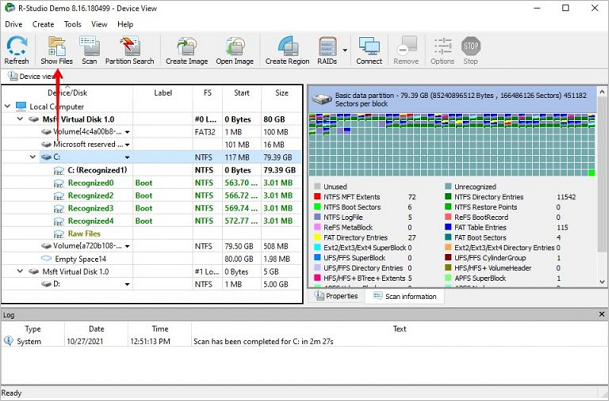
R-Studio is a powerful, cross-platform data recovery utility designed primarily for IT professionals and advanced users. It employs advanced data recovery techniques to handle complex scenarios like severe file system corruption, RAID reconstruction, and network recovery.
Its core strength lies in providing granular control over the recovery process, supporting a wide range of file systems, including NTFS, FAT, exFAT, Ext2/3/4 (Linux), and UFS (BSD). As noted in your tests, it offers configurable scan levels (simple, usual, deep) and detailed recovery options.
What Is EaseUS Data Recovery Wizard
EaseUS Data Recovery Wizard is a user-focused data recovery solution. It prioritizes a simple, guided interface that allows users of all skill levels to attempt data recovery through a straightforward three-step process.
It is compatible with Windows and macOS and supports standard file systems and devices, such as hard drives, SSDs, and USB drives, and supports over 1000 file types. A key advantage highlighted in your testing is its ability to perform in-scan preview and recovery, which significantly streamlines the workflow by avoiding the wait for a full scan to complete.
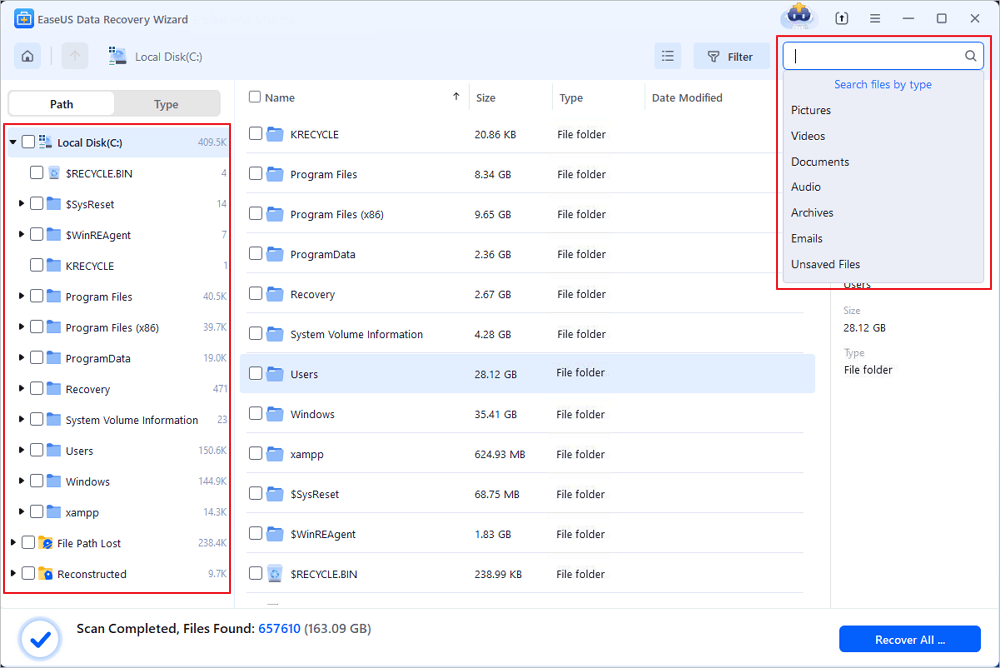
EaseUS Data Recovery Wizard Free offers up to 2 GB of free data recovery, including 500 MB available by default and an extra 1.5 GB unlocked after sharing on Facebook and X.
Feature-by-Feature Deep Comparison: R-Studio vs EaseUS
Below is a full data recovery software review of R-Studo vs EaseUS. Test scenarios include deleted files, formatted media, RAW images, fragmented video files, and lost partitions:
#1️⃣. Recovery from EXFAT Partition Loss or RAW Corruption
Test Scenario: 32GB partition with 16.2GB data (262 files); partition deleted directly.
R-Studio:
Performance: Scan completed in 6 minutes with a recovery success rate of 98.8%. Recovery quality was excellent.
✅Key Strengths:
- Offers configurable scan modes (Simple, Usual, or Deep), providing control and resulting in faster initial response.
- Features detailed recovery options for file attributes, recovery method, and completion notifications.
- R-Studio is highly regarded by professional data recovery labs. Lots of professional labs use it as their primary go-to.
😕Notable Limitations:
- Using default recovery settings can trigger frequent interactive prompts during the process, potentially disrupting workflow.
- No preview or recovery is possible during the scanning phase; users must wait for the scan to complete.
EaseUS Data Recovery Wizard:
Performance: Scan completed in 9 minutes 30 seconds with a marginally higher recovery success rate of 99.2%. Performance in restoring original directory structures was notably excellent.
✅Key Strengths:
- Superior original path and structure reconstruction.
- Can quickly list lost partitions and display partial data within them.
- Critical Advantage: Supports live preview and file recovery while scanning, significantly improving user efficiency.
😕Notable Limitations:
- The process may generate duplicate file listings (from quick and deep scans) requiring post-scan deduplication.
- The total scan duration was longer compared to R-Studio in this test.
#2️⃣. Recovery after NTFS Partition Deletion
Test Scenario: 128GB partition with 70GB data (1200+ files) deleted, followed by creation of a new 546MB partition (51 files).
R-Studio:
Performance: Scan time was 19 minutes with a recovery rate of 71.20%. Both RAW recovery and original path restoration performed well.
✅Key Limitation: The actual file recovery process was significantly slower, especially for large files, often causing the progress to appear unresponsive.
EaseUS Data Recovery Wizard:
Performance: Demonstrated markedly superior efficacy with a recovery rate of 88.50%. RAW and original path recovery were also excellent.
✅Key Strengths:
- Achieved a substantially higher recovery rate in this challenging overwrite scenario.
- Exhibited more stable and consistent file recovery speeds.
✒️Our Verdict
Successfully repaired corrupted video files during recovery, ensuring restored media files were playable, a critical differentiator of EaseUS.
R-Studio, however, failed to reconstruct the video fragments properly; the recovered files remained corrupted and unopenable. This indicates that EaseUS possesses a profoundly more sophisticated capability for handling complex, fragmented multimedia file recovery, a critical feature for professional photographers and videographers.
#3️⃣. Recovery from a Lost/Deleted BitLocker-Encrypted (RAW) Partition
Test Scenario: 260 files totaling 45.8GB (documents, images, videos, audio).
This test represents a decisive victory for EaseUS Data Recovery Wizard:
- EaseUS Data Recovery Wizard scanned the drive in 15 minutes and achieved a 100% recovery rate for all test files.
- R-Studio does not support data recovery from BitLocker-encrypted partitions, making it ineffective for this use case.
Here's the test result in summary: (Check out the 👉real-world data recovery result in the next part.)
| Feature |
R-Studio |
EaseUS Data Recovery |
| Recovery Success Rate | ⭐⭐⭐⭐ | ⭐⭐⭐⭐⭐ |
| Deep Scan Quality | Advanced | Advanced |
| Formatted SD Card Recovery | Excellent | Excellent |
| RAW Photo Formats (CR2/CR3/NEF/ARW) | Partial support | Strong support |
| Video Recovery (4K/8K, GoPro, DJI) | Moderate | Excellent |
| Lost Partition Recovery | Excellent | Excellent |
| File System Support | NTFS, FAT, exFAT, HFS+, APFS | NTFS, FAT, exFAT, HFS+, APFS |
| Usability | Excellent | Excellent |
| Free Version | Scan-only on Windows | 2GB |
| Best For | Complex cases | User-friendly recovery tasks |
✒️Our Verdict
EaseUS offers a more user-friendly, efficient workflow with in-scan preview/recovery. R-Studio provides more granular scan control but requires waiting for scan completion.
For NTFS partitions with overwritten data and especially for BitLocker-encrypted drives, EaseUS demonstrated superior or exclusive recovery capability. EaseUS showed an advanced ability to repair certain corrupted files (e.g., video recovery) post-recovery, adding significant value.
R-Studio remains a powerful tool for technical users prioritizing scan customization in non-encrypted scenarios. EaseUS Data Recovery Wizard presents a more robust, user-accessible, and feature-complete solution, particularly for common data loss scenarios involving deleted partitions, overwritten data, and critically, recovering BitLocker-encrypted partitions.
Share this post with your friends to help them decide which data recovery software is suitable for them!

R-Studio vs EaseUS: Real-World Recovery Results
Here are the real-world results of R-Studio data recovery software and EaseUS Data Recovery Wizard in different scenarios:
Deleted File Recovery
| Success Rate | Scan Time | File-structure retention | ||
 |
R-Studio | 99.00% | 9m | 82% |
 |
EaseUS | 98.30% | 28m | 98% |
Formatted Recovery
| Success Rate | Scan Time | File-structure retention | ||
|
R-Studio | 98.00% | 6min48s | 60% |
|
EaseUS | 99.80% | 11min55s | 100% |
Lost Partition Recovery
| Recovered Usable Videos | ||
|
R-Studio | ~98.80% |
|
EaseUS | ~99.20% |
Crashed OS Recovery
| Result | ||
|
R-Studio | Partial recovery |
|
EaseUS | Successful partition reconstruction |
RAW Recovery
| Support Formats | CR2/CR3 | NEF | ARW | |
|
R-Studio | Good | Good | Limited |
|
EaseUS | Excellent | Excellent | Excellent |
✒️Our Verdict:
Here's a full review of R-Studio Data Recovery. If you are interested in this trusted tool, read on to learn detailed information here!

R-Studio Review (A Comprehensive Data Recovery Solution)
In order to help you solve data loss problems using R-Studio, this post will give an in-depth R-Studio review. Read more >>
Pricing Comparison
Both R-Studio and EaseUS data recovery software offer multiple editions to suit different needs and budgets. Specific prices can vary by region, retailer, and ongoing promotions.
✒️Free Tier:
- EaseUS allows 2GB of free recovery
| Edition | Price (USD) | Key Licensing Terms |
| R-Studio (Standard) | From $79.99 | Perpetual license for one platform (Windows, Mac, or Linux). |
| R-Studio Technician | From $899.00 | Perpetual license for commercial use, includes more advanced features. |
| EaseUS Data Recovery Wizard Pro | $69.95 for a month $99.95 for a year |
Main plan for Windows or Mac. Often sold as a yearly/monthly license. Unlimited data recovery. |
| EaseUS Data Recovery Wizard (Lifetime License) | $149.95 | One-time purchase with lifetime upgrades. |
Final Verdict
Here's a summary of the advantages and disadvantages of both data recovery software, R-Studio and EaseUS Data Recovery Wizard.
| Aspect | R-Studio | EaseUS Data Recovery Wizard |
| Target User | Technical experts, IT professionals, and data recovery specialists. | Beginners, home users, and general business users. |
| Interface & Ease of Use | Features a dense, technical interface that can be intimidating for non-specialists. | Clean, modern, and guided interface. The three-step "wizard" process is intuitive. |
| Scanning & Recovery Workflow |
Pro: Offers high customizability (scan modes, parameters). Con: Cannot preview or recover files during the scan; must wait for completion. |
Pro: Allows real-time preview and recovery while scanning. This is a significant efficiency advantage. |
| Effectiveness (Based on Tests) |
Pro: Excellent with EXFAT/NTFS RAW/lost partitions (98.8%/71.2% recovery). Con: Does not support BitLocker-encrypted drives, a critical limitation. |
Outstanding recovery rates in tests, especially for NTFS overwritten data (88.5%) and BitLocker drives (100%). Superior original path reconstruction. |
| Advanced & Niche Features | Pro: Unmatched advanced features: Network recovery, advanced RAID reconstruction, hex editor, support for many niche file systems. | Con: Lacks deep RAID and network recovery features of R-Studio. Basic RAID support may require manual service. |
| File Repair | Not a primary function. | Integrates with or offers features to repair corrupted videos and documents post-recovery. |
| Stability |
May occasionally freeze or crash during deep scans of large, problematic drives, requiring troubleshooting. |
Generally stable for complex operations. |
Based on comprehensive test data and functional comparisons, EaseUS Data Recovery Wizard has a clear overall advantage for the vast majority of users. It demonstrated superior or equal effectiveness across all tested recovery scenarios, especially excelling where it matters most, with a remarkable 88.5% recovery rate on overwritten NTFS partitions. It perfectly recovers BitLocker-encrypted hard drive that R-Studio cannot match.
Coupled with its user-friendly interface, the ability to preview and recover files during scanning, and useful file-repair features, EaseUS provides a more efficient and reliable out-of-the-box experience for everyday data loss situations.
For general home users, small business owners, or anyone facing accidental deletion, formatting, partition loss, or encryption issues, R-Studio's steep learning curve, lack of BitLocker support, and less streamlined workflow make it a less optimal choice. Therefore, unless your specific need involves advanced enterprise-level storage troubleshooting, EaseUS Data Recovery Wizard is the more effective and recommended solution.
Frequently Asked Questions
Don't know which data recovery software is better in your case? Don't worry! Here are the questions people frequently ask about "R-Studio Data Recovery vs EaseUS Data Recovery Wizard". Check the following questions out and choose the suitable data recovery tool for you!
1. Which software has a better free trial?
EaseUS offers a more practical free trial. Its free version allows you to scan and preview all found files and recover up to 2GB of data. In contrast, R-Studio's demo version is severely limited, typically only allowing the recovery of very small files (e.g., 256KB), which is more for testing functionality than actual recovery.
2. Can these tools recover files from a formatted or RAW drive?
Yes, both are highly capable in these common scenarios. Your tests confirm this: both achieved near-perfect recovery (over 98%) on a lost EXFAT partition. EaseUS is particularly noted for its effectiveness in RAW recovery and restoring the original folder structure.
3. Which tool is better for photographers?
This depends on the primary need. EaseUS Data Recovery Wizard has a significant advantage if your recovered photos or videos are likely to be corrupted. Photographers may need to weigh the superior recovery engine of R-Studio against the specialized repair utility of EaseUS.
4. I recovered a file, but it won't open. What happened?
This means the file was recovered but is corrupted. This can happen if the original data was overwritten or heavily fragmented. EaseUS has an advantage here, as it offers dedicated file repair tools, like EaseUS Fixo, specifically designed to fix corrupted photos, videos, and Office documents after recovery. R-Studio focuses on data retrieval rather than post-recovery repair.
5. Which one should I choose for a BitLocker-encrypted drive?
EaseUS Data Recovery Wizard is the clear and only choice for this scenario. Your test results show it achieved a 100% recovery rate from a lost BitLocker partition, while R-Studio does not support recovery from BitLocker-encrypted drives at all.
Was this page helpful?

 Why Trust EaseUS
 Editor Reviews

20+
Years of experience

160+
Countries and regions

72 Million+
Downloads

4.9 +
Trustpilot Score






