





-
![]() [Free] TestDisk for Mac - File Recovery Software Review
[Free] TestDisk for Mac - File Recovery Software Review October 13,2026
 6 min read
 -
![]() What Are the Best Alternatives to EaseUS Data RecoveryOctober 14,20266 min read
What Are the Best Alternatives to EaseUS Data RecoveryOctober 14,20266 min read -
![]() 10 Best Data Recovery Software for Windows 7 Free DownloadOctober 14,20266 min read
10 Best Data Recovery Software for Windows 7 Free DownloadOctober 14,20266 min read -
![]() Top 4 Disk Drill Alternatives in 2026 [Free Download]October 14,20266 min read
Top 4 Disk Drill Alternatives in 2026 [Free Download]October 14,20266 min read -
![]() EaseUS Data Recovery Wizard VS. DMDE: 2026 Full ReviewOctober 14,20266 min read
EaseUS Data Recovery Wizard VS. DMDE: 2026 Full ReviewOctober 14,20266 min read -
![]() R-Studio Review (A Comprehensive Data Recovery Solution)October 14,20266 min read
R-Studio Review (A Comprehensive Data Recovery Solution)October 14,20266 min read -
![]()
-
![]() EaseUS Data Recovery Wizard Free Version Safe Download (2026)October 14,20266 min read
EaseUS Data Recovery Wizard Free Version Safe Download (2026)October 14,20266 min read -
![]() How to Use TestDisk to Recover Data on Windows/MacOctober 14,20266 min read
How to Use TestDisk to Recover Data on Windows/MacOctober 14,20266 min read -
![]() Recuva for Mac Free Download - Recover Deleted Files!September 22,20266 min read
Recuva for Mac Free Download - Recover Deleted Files!September 22,20266 min read
Page Table of Contents
PAGE CONTENT:
Is It Safe to Use Free EaseUS License Codes
When people type "EaseUS data recovery license code" into Google, let's be real, they're usually looking to dodge the payment wall. It sounds like an easy fix, but grabbing codes from sketchy websites opens the door to some serious trouble.
Most of these "free" license codes float around on shady corners of the internet. They often come wrapped up with cracked versions of the software, and that's where things get risky.
And let's not ignore the legal side. Pirated software isn't just unfair to the creators; it's against the law. If you're running a business, using these cracked codes could even put you in legal hot water. Worst of all, those codes usually stop working after an update, so you're left stranded when you need help most.
How to Get a Valid EaseUS Data Recovery License Code
If you want a legit EaseUS Data Recovery Wizard license code, steer clear of sketchy sources. You've got better options that give you full features, updates, and real support, stuff you definitely need when your data's at risk.
Step 1. Buy it from the official EaseUS website
That's the safest way to download and buy it from the official EaseUS website. You get an authentic activation key, all the premium stuff, regular updates (depending on the plan), and help if things go wrong. They offer different plans like monthly, yearly, and lifetime. Most people go with the Pro version, but if you're running a business, the Technician edition has extras you'll probably need.
Step 2. Try free trial version before spending money
EaseUS lets you scan and preview files with the free version. You can usually recover up to a limited amount (like 2GB), which is perfect for checking if your files are actually recoverable.
Step 3. Look for promotions and discounts
Keep an eye out for deals. Big events like Black Friday, New Year's, or back-to-school sales often pop up with good discounts. Sometimes you can use coupon codes or catch a limited-time deal that cuts the cost.
Using a real license keeps your recovery process safe and hassle-free, and you won't have to worry about the headaches that come with pirated codes.
How to Activate EaseUS Data Recovery Wizard (Step-by-Step)
After downloading EaseUS Data Recovery Wizard from the official website or other reliable sources, buy a license code, and then activate EaseUS data recovery software. Here are the detailed steps you can follow:
Step 1. Download the Official Software
Visit the official EaseUS website and download the latest version of Data Recovery Wizard. Avoid third-party download sites to prevent installing the modified or EaseUS Data Recovery Wizard crack.
You can directly download EaseUS Data Recovery Wizard by clicking the following buttons.
Step 2. Install and Launch Data Recovery Software
Then, run the installer to install it and launch this data recovery software. Make sure you install the software on a different drive than the one where data was lost to avoid overwriting files.
Step 3. Click the Key Icon and Activate
Click the key icon in the top-right corner. Copy and paste your valid license key into the activation field, then confirm.
Step 4. Check and Experience the Full Version
After successful activation, the software should display the full version status. You will now have access to unlimited recovery and advanced features.
Following these steps ensures a smooth activation process and allows you to start recovering your files immediately:
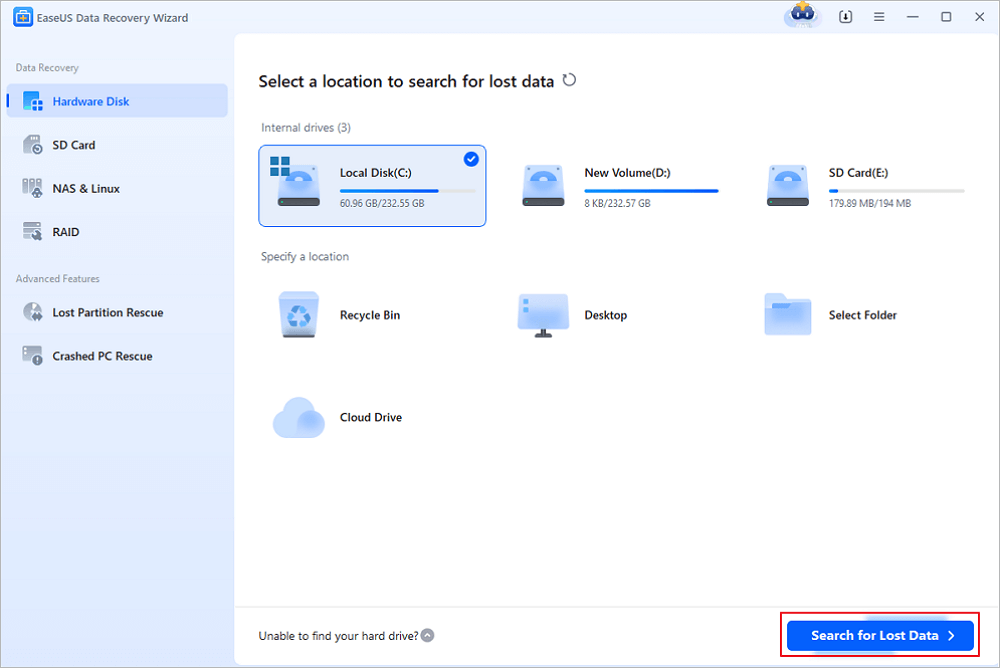
Step 1. Launch EaseUS file recovery software on your Windows computer. Choose the exact location where you lost the files and click the "Search for Lost Data" button.
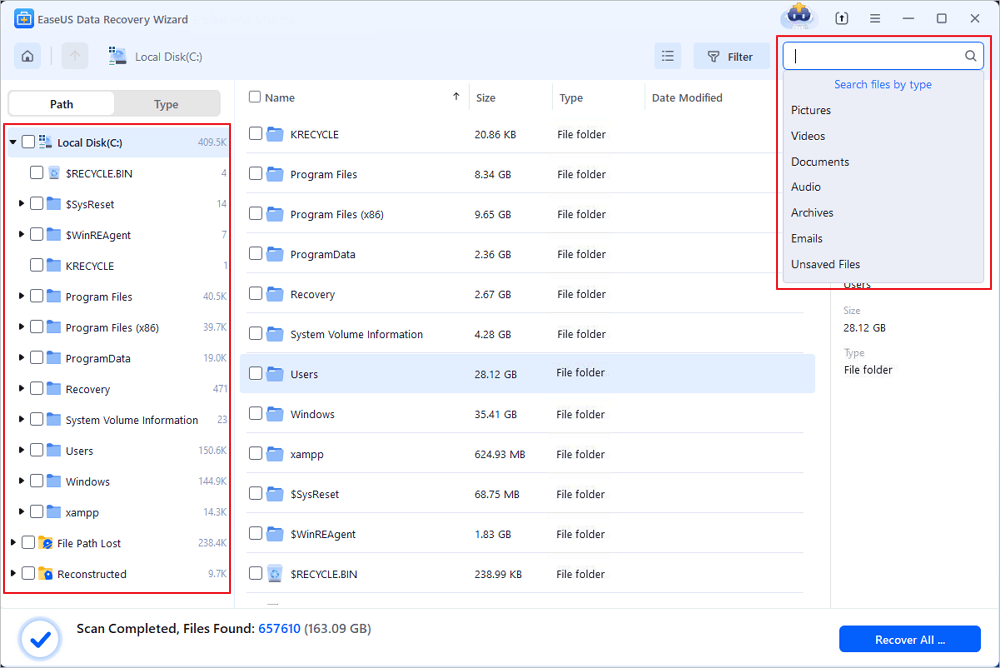
Step 2. The software will immediately start scanning the drive, and the deleted files will be displayed soon. If you find the files you need during the scan, you can stop the scan. In order to find the target file quickly, you can use the file format filter or search in the search box.
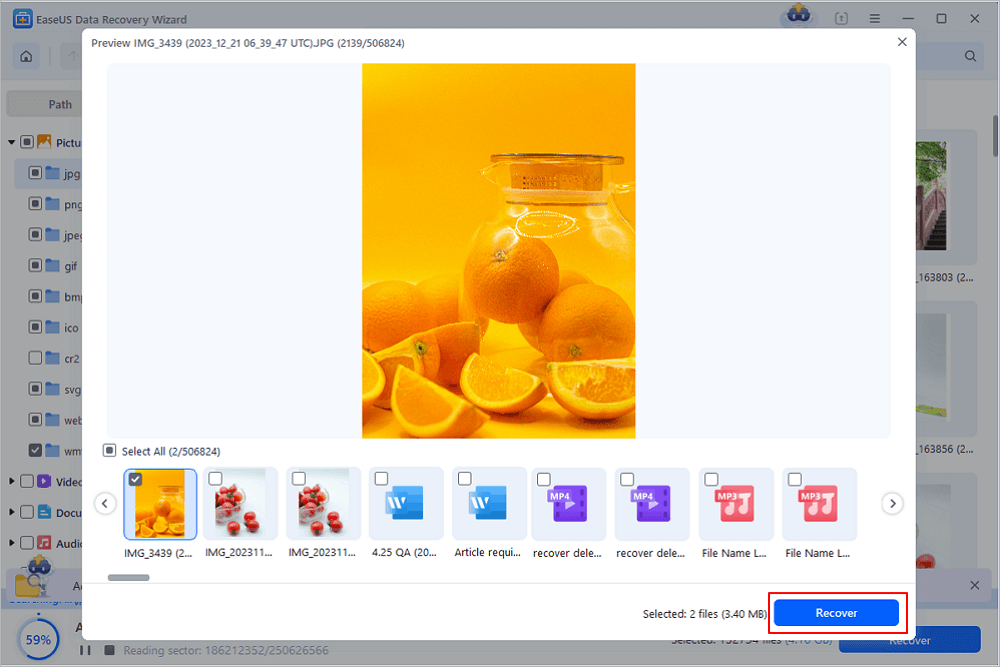
Step 3. Select files, such as Word, Excel, PDF, photos, videos, or emails and click the "Recover" button. You can browse for a different location or Cloud drive to keep the recovered files.
You can share the whole tutorial on social media to help more users learn how to activate EaseUS Data Recovery Wizard and recover data!

Alternative Free Data Recovery Options
There are more free data recovery options if you need more recovery solutions on your computer:
1. Windows File History
Windows gives you some built-in recovery features, things like File History let you restore files if you have backups set up. There's also "Previous Versions", which can help you grab earlier versions of files or folders. Of course, both only work if you turn them on before losing anything.
2. Open-Source Data Recovery Tools
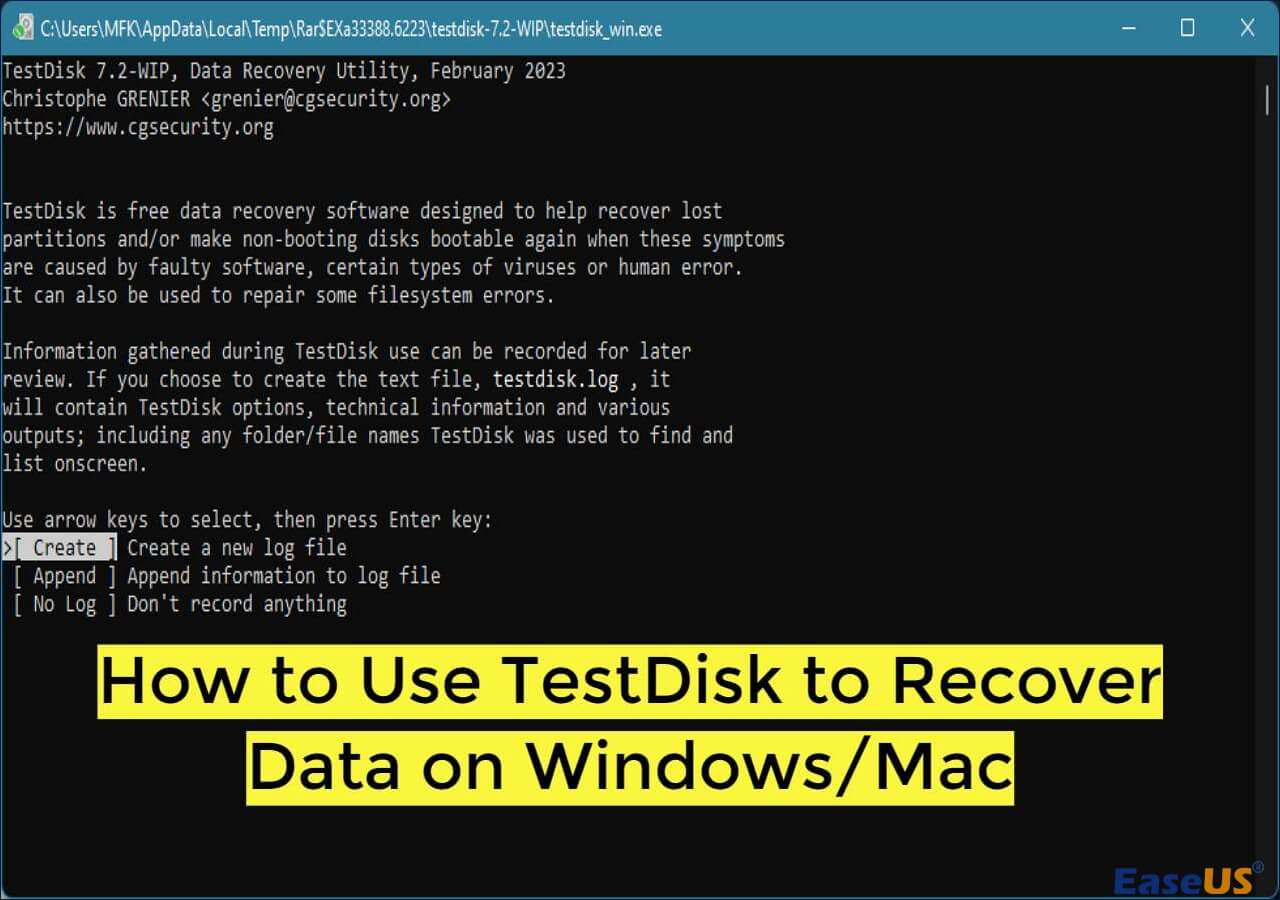
You can also try open-source tools like TestDisk or PhotoRec. They're free and pretty versatile; they'll recover deleted files, fix partitions, and handle different file systems. But honestly, they're not the easiest to use. Most run on command-line interfaces, and they don't always play nice with newer file systems. Plus, you're not guaranteed a complete recovery.

PhotoRec Review: Still Capable of Recovery [Complete Review]
PhotoRec is a file recovery program designed to recover lost files, including video, documents, and archives, from hard disks... Read more >>
And free data recovery solutions often lack important features. You won't get deep scans, file previews, or reliable success rates. Forget about technical support, too.
Summary
After learning all these free data recovery solutions and detailed tutorials, you should understand that buying a license code or a serial key from the official website is the most reliable. Ultimately, when it comes to data recovery, the value of your data far outweighs the cost of reliable software. Choosing a trusted and legal solution is always the smarter decision.
FAQs About EaseUS License Codes
Check more questions and answers about the EaseUS license code:
1. Can I get a free EaseUS license code legally?
Sure, you can get a free EaseUS license code legally from some EaseUS official activities. You can also download the free version to get 2GB of data recovery storage.
2. Is it safe to use cracked EaseUS software?
No, it's not safe and also illegal. Cracked EaseUS software may contain malware or computer viruses. Your data will not be safe if you have installed these cracked versions.
3. What happens if I use an invalid license key?
With an invalid key, you cannot activate the software. In some cases, repeated attempts may result in temporary restrictions.
Was this page helpful?
-
Dany is an editor of EaseUS who lives and works in Chengdu, China. She focuses on writing articles about data recovery on Mac devices and PCs. She is devoted to improving her writing skills and enriching her professional knowledge. Dany also enjoys reading detective novels in her spare time. …
 Why Trust EaseUS
 Editor Reviews

20+
Years of experience

160+
Countries and regions

72 Million+
Downloads

4.9 +
Trustpilot Score





