





-
![]() EaseUS Data Recovery Wizard for Mac Review [Update in 2026]
EaseUS Data Recovery Wizard for Mac Review [Update in 2026] October 13,2026
 6 min read
 -
![]() SD Card Data Disappeared? User Recovered Critical Tax Files with EaseUSOctober 23,20266 min read
SD Card Data Disappeared? User Recovered Critical Tax Files with EaseUSOctober 23,20266 min read -
![]() R-Studio vs EaseUS Data Recovery Wizard: Full Comparison & ReviewOctober 22,20266 min read
R-Studio vs EaseUS Data Recovery Wizard: Full Comparison & ReviewOctober 22,20266 min read -
![]() 10 Best Data Recovery Software for Windows 7 Free DownloadOctober 23,20266 min read
10 Best Data Recovery Software for Windows 7 Free DownloadOctober 23,20266 min read -
![]() Recuva for Mac Free Download - Recover Deleted Files!September 22,20266 min read
Recuva for Mac Free Download - Recover Deleted Files!September 22,20266 min read -
![]() Data Recovery Software Review Hub | Tests, VS & Top PicksOctober 22,20266 min read
Data Recovery Software Review Hub | Tests, VS & Top PicksOctober 22,20266 min read -
![]() PhotoRec Review: Still Capable of Recovery in 2026 [Complete Review]October 23,20266 min read
PhotoRec Review: Still Capable of Recovery in 2026 [Complete Review]October 23,20266 min read -
![]() R-Studio for Mac: Ultimate Guide to R-Studio on macOSOctober 13,20266 min read
R-Studio for Mac: Ultimate Guide to R-Studio on macOSOctober 13,20266 min read -
![]()
-
![]() EaseUS Data Recovery Wizard 20.1 Review: Major UpdatesOctober 22,20266 min read
EaseUS Data Recovery Wizard 20.1 Review: Major UpdatesOctober 22,20266 min read
Page Table of Contents
PAGE CONTENT:
Data loss frequently occurs unexpectedly. Important files can vanish in a matter of seconds due to a system crash, an unintentional format, a mistaken deletion, or even an unexpected power loss. Finding a dependable recovery solution soon becomes a top priority for many users, particularly those without technical expertise. EaseUS Data Recovery Wizard Free can help with it.
EaseUS Data Recovery Wizard Free is intended for everyday data loss situations, including lost files from USB flash drives, SD cards, and external hard drives; unintentional deletion; formatted drives; corrupted partitions; and OS crashes. Photographers, office workers, students, and home users all deal with these issues on a daily basis.
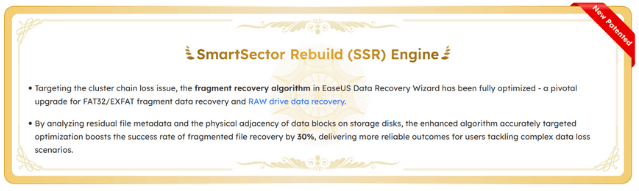
EaseUS improved scanning accuracy and recovery rate with the latest SmartSector Rebuild (SSR) techniques in version 20.1. All things considered, the tool is appropriate for the majority of non-physical data loss scenarios, making it a sensible first option prior to using expert recovery services.
This EaseUS data recovery software review closely examines the software's capabilities, how the paid and free versions differ, and whether it is indeed reliable for recovering data in the real world. Keep reading to find out more information about the EaseUS data recovery tool and recover deleted files!
What Can EaseUS Data Recovery Wizard Do
EaseUS Data Recovery Wizard is a data recovery program that utilizes a wizard (software) user interface to guide users through the data recovery process. The free edition recovers deleted files, even if you've emptied the Recycle Bin or deleted them directly.
EaseUS Data Recovery Wizard Free offers up to 2 GB of free data recovery, including 500 MB available by default and an extra 1.5 GB unlocked after sharing on Facebook and X.
✅Supported Data Loss Situations
The EaseUS Data Recovery Wizard is designed to address a variety of data loss scenarios. The program can thoroughly search for recoverable data regardless of whether files were inadvertently erased, a drive was mistakenly formatted, or a whole sector vanished. Additionally, it supports OS crash scenarios, such as system failures, blue screen of death, or boot problems, as well as lost partition recovery. Because of these features, it can be used for both routine users and more complicated recovery situations.
✅Supported File Types
More than 1,000 file types, including almost all widely used data formats, are supported by the EaseUS recovery program. Photos, documents, music files, movies, emails, and zipped archives can all be easily recovered by users. EaseUS Data Recovery Wizard guarantees wide compatibility across personal and professional data, from office files like Word, Excel, and PDF to media formats like JPG, MP4, MP3, and RAW camera files.
✅Supported Storage Devices
Nearly any kind of storage device may be used with EaseUS Data Recovery Wizard. Data may be recovered from SD cards, memory cards, SSDs, USB flash drives, internal and external hard drives, PCs, and laptops. It is a versatile option for both home and office users because it also enables recovery from devices like digital cameras, camcorders, and other external storage.
✅Supported Operating Systems
Numerous Windows versions, including Windows 11, 10, 8.1, 8, 7, Vista, and XP, are completely compatible with the program. It is appropriate for both individual users and enterprise-level recovery requirements, as it supports multiple Windows Server versions, including 2003, 2008, 2012, 2016, and 2019. This program also supports most macOS operating systems, including the latest macOS 26.
Three Steps to Get This Software
It only takes three steps to get this file recovery software:
- Turn off all download managers on PC
Turn off all download managers before selecting your product. Some download managers will cause this operation to work incorrectly.
- Check your system and download EaseUS file recovery software
Make sure you are using the right OS and have enough free space.
- Recover data with EaseUS Data Recovery Wizard Free Edition
Then, you can recover data with this software. Besides, here's a video guide that might be helpful for you to learn how to download the free version of EaseUS Data Recovery Wizard:
To help more users know more about EaseUS Data Recovery Wizard, feel free to share this article on social media!

EaseUS Data Recovery Wizard Free vs Pro Version
Luckily, both the free and pro versions of EaseUS Data Recovery Wizard are offered; users can instantly recover 500MB of data with EaseUS Data Recovery Wizard Free. Share the software on your Facebook or Twitter to grow to a limit of 2GB. And you can click the following buttons to download the pro version.
While the EaseUS Data Recovery Wizard Pro eliminates limitations and includes sophisticated recovery and restoration tools, the free version concentrates on basic file recovery with a storage limit. You may easily choose which version is better suited for your particular data loss scenario by looking at the detailed comparison table that follows.
| Features | FREE | PRO |
| Price | 0$ | $69.95 |
| Recover data | 2 GB | Unlimited |
| Recover any type of files | ✅ | ✅ |
| Recover data from any storage media | ✅ | ✅ |
| Restore data from all file systems | ✅ | ✅ |
| BitLocker data recovery | ✅ | ✅ |
| Preview files before recovery | ✅ | ✅ |
| NAS data recovery | ❌ | ✅ |
| Remote consultation and assistance | ❌ | ✅ |
| Corrupted video repair | ❌ | ✅ |
| Advanced photo repair | ❌ | ✅ |
| Crashed PC recovery with a bootable USB in WinPE | ❌ | ✅ |
How to Recover Data with EaseUS Data Recovery Wizard
Here is a brief guide on how to recover the 2GB worth of data for free. You can also read the step-by-step guide:
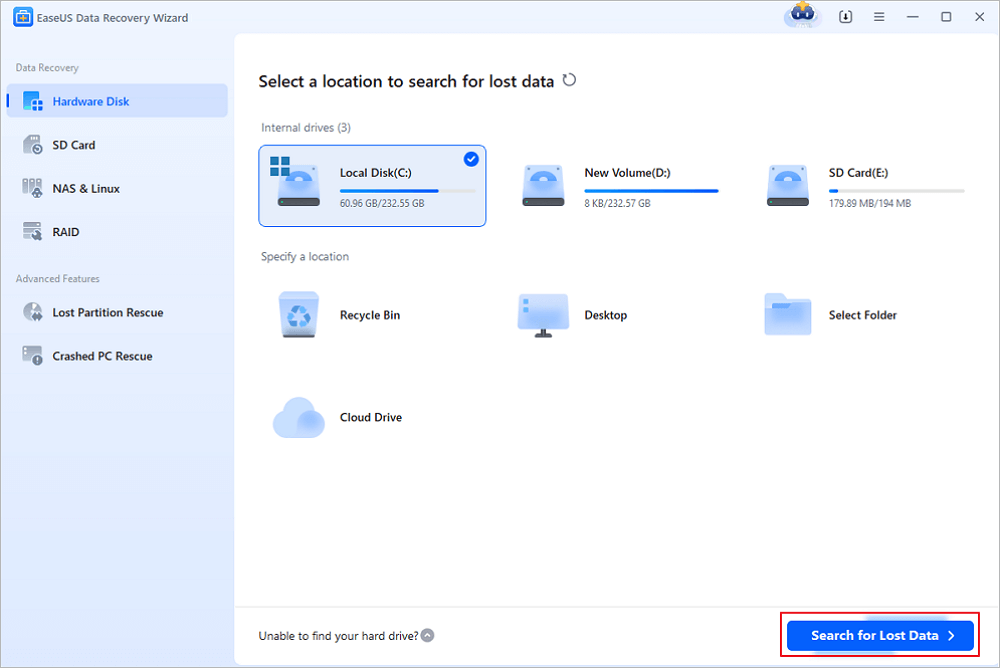
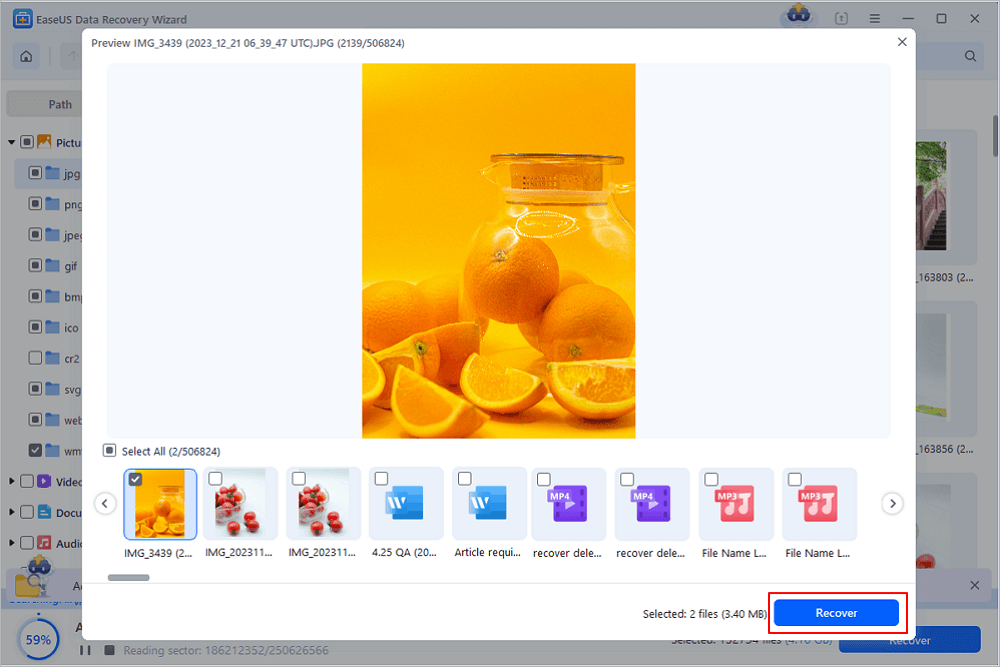
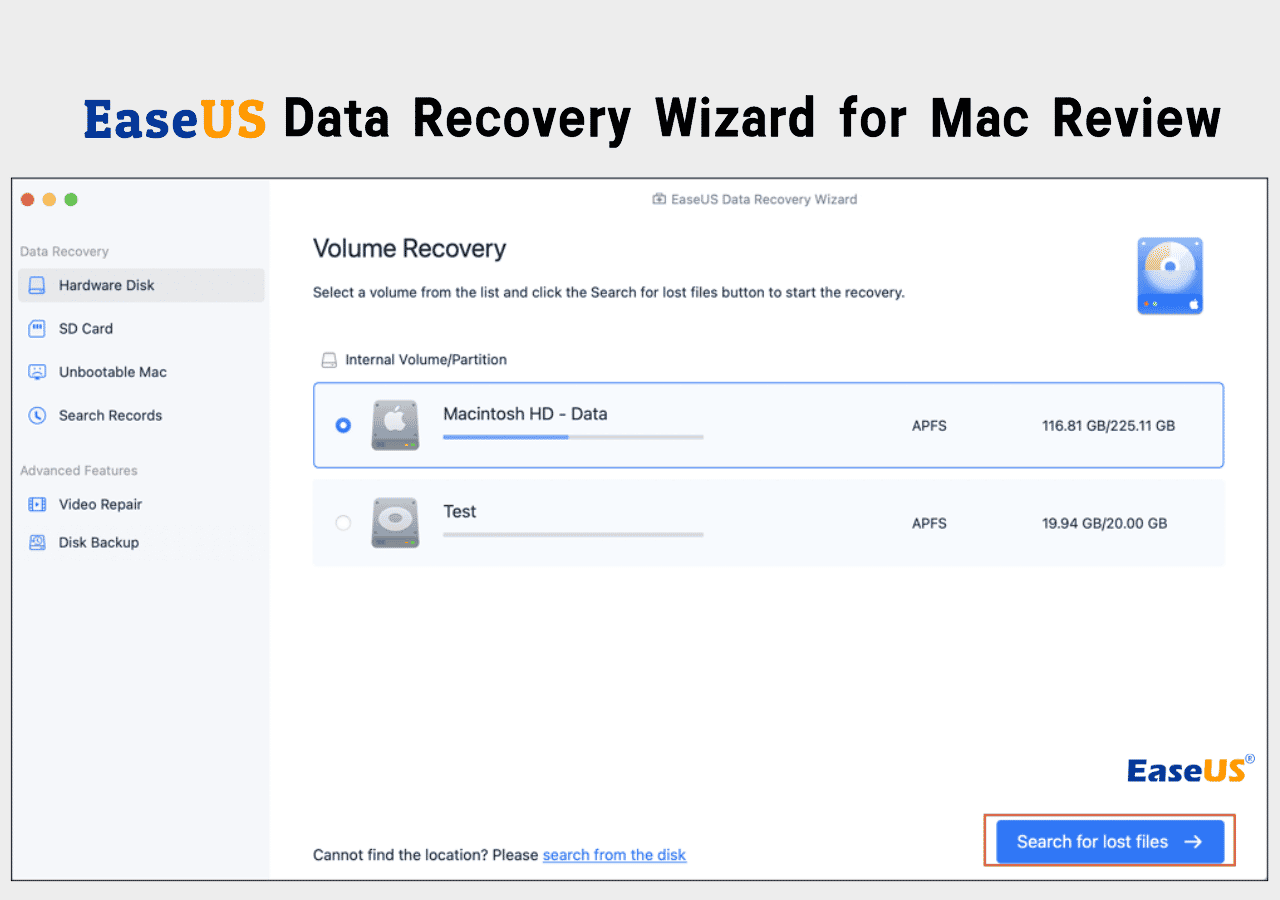
Step 1. Run EaseUS Data Recovery Wizard on your computer. Choose the drive where you lost files and click "Search for Lost Data". If your lost files were on an external storage device, connect it to your computer firstly.
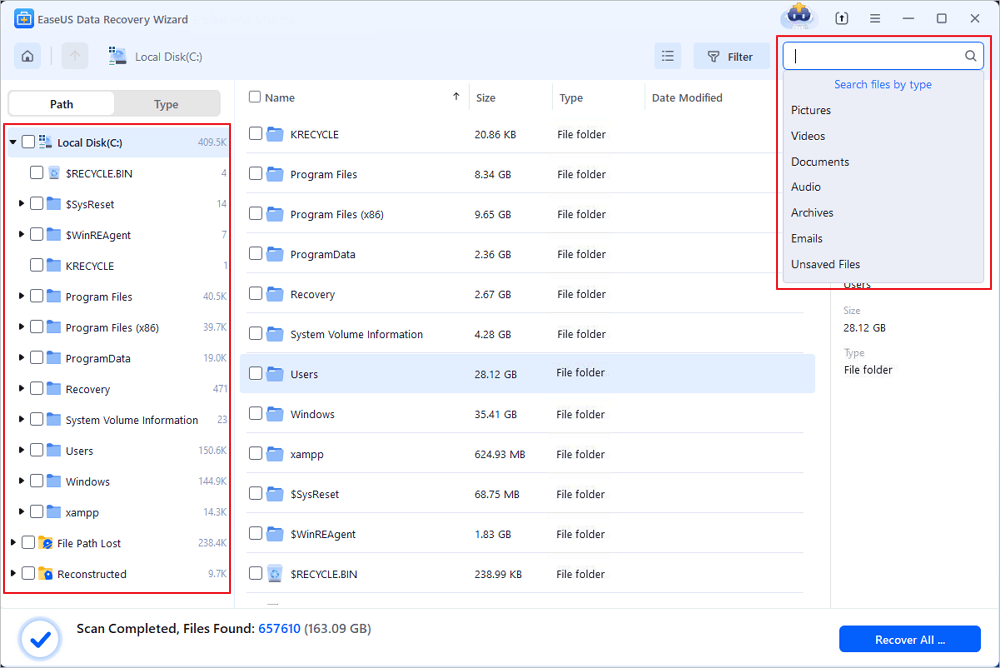
Step 2. The software will quickly scan the deleted files immediately, and then automatically perform a deep scan to find more lost files. After the scan is completed, you can use "Filter" or "Search box" to quickly locate specific file types.
Step 3. Click the "Preview" button or double-click on a file for a full preview. Finally, select the desired files, click "Recover" and choose another safe location or Cloud drive to save all the files at once.
Can I Trust EaseUS Data Recovery Wizard
You may have questions like "Is EaseUS safe?" "Can I trust the free version of EaseUS data recovery software?" You should know that it's 100% safe to recover data with EaseUS Data Recovery Wizard, and EaseUS has been in the data recovery industry for nearly two decades and serves millions of users worldwide. EaseUS also offers reliable customer support for paid users; if you encounter any questions, just contact our support team at any time.
You Can Trust EaseUS Data Recovery Software
EaseUS Data Recovery Wizard has acquired an extensive technical base in data recovery and has been trusted by billions of users since 2005. Check out reviews on Trustpilot.
Besides Trustpilot, EaseUS Data Recovery Wizard is trusted by other authoritative websites and users:
EaseUS Data Recovery Wizard is a professional data recovery software for you to get what you have lost back simply. It is a handy and powerful tool for you to recover data in various situations, like format, virus attack, accidental file deletion, or sudden system crash.
EaseUS Data Recovery Wizard 20.1.0 gains a new recovery engine that can improve results on USB drives, SD cards, and external hard drives that have seen years of repeated use. SmartSector Rebuild (or SSR for short) can reconstruct files that have been split across storage sectors over time, a condition that often prevents standard recovery tools from restoring usable data.
EaseUS is one of the biggest names in the world of data recovery software, and its Data Recovery Wizard has been around since 2005 – so, after such a long time, you'd hope it's a top option when it comes to photo recovery.
I have researched every were in the internet for a program like this,as i wanted to recover some photos from my sd card. this program was the best as it is very easy to follow.A simple app and clear guidance . very fast recovery. i loved it
Conclusion
For regular users, EaseUS Data Recovery Wizard free is a reliable, user-friendly data recovery tool. It makes it simple to recover deleted data without the need for complex technical knowledge by combining robust scanning technology with an easy-to-use interface. The free version is a great method to test the program before upgrading, even if it has a clear recovery limit.
Free EaseUS Data Recovery Wizard FAQs
Check more information about this topic in the following Q&As:
1. Is EaseUS data recovery no longer free?
EaseUS data recovery software still offers a free version for all users, and users can recover up to 2 GB of data for free. If users need larger recovery capacity or advanced features, upgrading to the EaseUS Data Recovery Wizard Pro version is required.
2. Can I get an EaseUS data recovery activation key for free?
No legitimate free activation key is available. Users need to pay for the license keys, and it's not recommended to download any cracked versions. Using a cracked version is illegal and unsafe, and it's possible to cause further data loss and even encounter blackmail viruses.
3. Is there an EaseUS Data Recovery Wizard free version for Mac?
Yes, EaseUS Data Recovery Wizard is supported on both Windows and macOS computers, and free versions are available on both Windows and Mac. The Mac free edition allows users to scan lost files for free, but data recovery is limited like the Windows version.
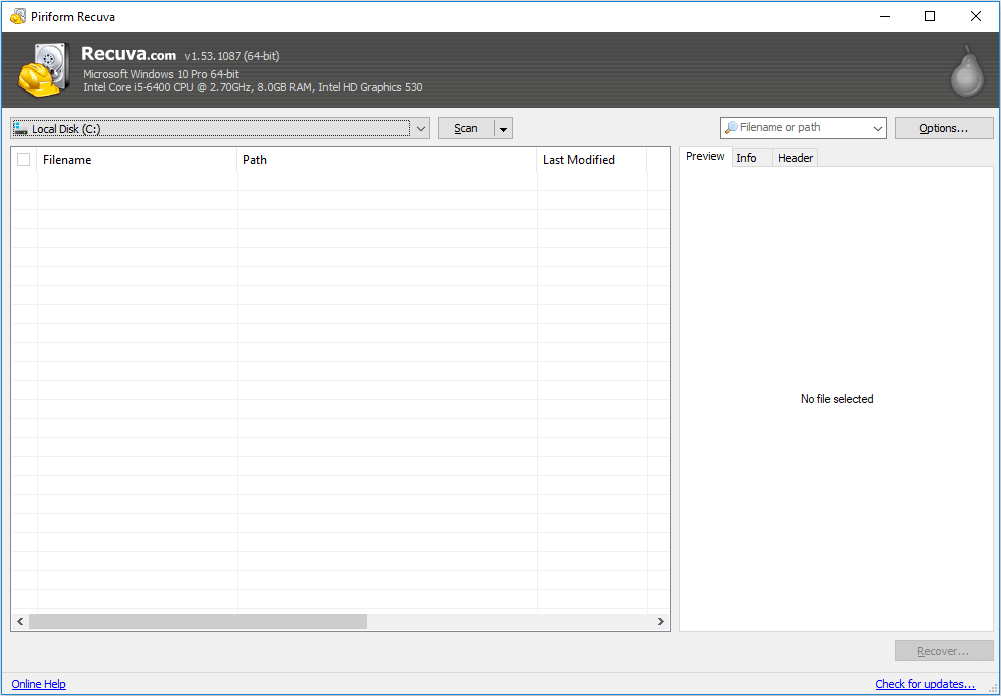
4. Recuva and EaseUS Data Recovery Wizard Free: Which one is better?
Recuva is a good choice for simple data loss situations like accidental deletion, and this software is totally free for users. For some tricky situations like disk formatting and RAW drive, EaseUS Data Recovery Wizard is a good choice.
Was this page helpful?

 Why Trust EaseUS
 Editor Reviews

20+
Years of experience

160+
Countries and regions

72 Million+
Downloads

4.9 +
Trustpilot Score





