





-
![]()
-
![]()
-
![]()
-
![]()
-
![]()
-
![]()
-
![]() How to Recover Data from 2TB External Hard Drive in Windows 11/10/8/7
How to Recover Data from 2TB External Hard Drive in Windows 11/10/8/7 October 20,2026
 6 min read
 -
![]()
-
![]() How to Recover Data from RAID 1 Disk with Raid 1 Recovery SoftwareOctober 20,20266 min read
How to Recover Data from RAID 1 Disk with Raid 1 Recovery SoftwareOctober 20,20266 min read -
![]()
Page Table of Contents

Christmas Tips:
Christmas is a peak time for data loss across cameras, SD cards, smartphones, Windows, and Mac computers. If your holiday photos or MP4 videos were deleted, formatted, or became unplayable, stop using the device immediately. EaseUS Data Recovery Wizard can help to recover lost Christmas photos and videos before they are overwritten.

PAGE CONTENT:
The twinkling lights are stored away, the last carol has disappeared, but the reality of Christmas is living on in your photographs and videos—the speedy moments of happiness, surprise, and warmth. While it is awesome to relive the festival environment, your computer memories can disappear in splits when you delete formatted SD cards, mistakenly delete photographs, or all videos turn rusty for no reason. Still, you always have the chance to recover lost Christmas photos and videos to bring back those cherished memories.
Why Christmas Is Peak Season for Data Loss
Christmas is one of the busiest and most wonderful times of the year for capturing memories—and, unfortunately, one of the riskiest for data loss. New cameras, phones, and drones are pulled out of boxes and put straight into action. SD cards are swapped between devices in the rush to keep shooting, and non-professional users often face hurried transfers or accidental deletions while clearing space. This perfect storm of activity puts your priceless holiday moments on thin ice.

What Kinds of Christmas Files May Be Restored
Even after formatting your SD card, you can recover most files related to Christmas if they haven't been overridden by fresh data. This is the most comforting part about holiday data recovery. Whether they are in physical or digital form, and regardless of how they have been lost, the likelihood that you might recover these holiday photos is:
- 🎄Christmas Photos: Family photos in JPG or PNG format, photos from smartphone cameras in HEIC format, or even RAW files from DSLR cameras.
- 🎅Holiday Videos: Unboxing videos in MP4, Christmas dinner videos in MOV, and high-definition footage from new cameras or drones, shot in 4K or 8 K.
- 📹Precious Recording/Documents: Family singing Christmas carols, Reaction of your child with Santa Claus, Seasonal vlog.
- 💼All Loss Scenarios: Files that have been lost as a result of deletion, formatting, failed transfer, or file corruption.
Recover Christmas Photos from SD Card
During the Christmas time, devices you use, like cameras, drones, or dashcams, show "No Images," or SD cards were accidentally formatted, or files disappeared after transfer. Don't worry if you lose those precious Christmas memories from your SD card through deletion, formatting, or corruption – they can be easily recovered. You can perform SD card recovery with a data recovery tool like EaseUS Data Recovery Wizard to free scan SD card, preview your images, and save the restored photos to a different storage location—never back to the same SD card.
To perform Camera Photo Recovery and SD card photo recovery, you can run the Chkdsk command if you have specific knowledge. For physically damaged cards, consider professional recovery services. To avoid future loss, remember to back up your memories regularly and handle your storage devices with care.
Recover Christmas Videos from Camera & Drone
Video recording was interrupted, files are corrupted, or the card was formatted mid-holiday. Holiday videos are large and complex, and really take effort to restore. You can use a drone app, such as DJI Go, to locate the video cache and recover your lost files. Also, running the CHKDSK command can be an effective solution to help perform video recovery. But one of the easiest and safest methods is to consult a data recovery tool like EaseUS Data Recovery Wizard to perform Sony, Nikon, and Canon Christmas photo recovery. This tool specializes in recovering fragmented video files and can often repair slightly corrupted MP4/MOV files, bringing your moving memories back to life.

Recover Christmas Photos from iPhone/Android
In addition to using cameras and drones to record the precious moment, users nowadays tend to use mobile devices like iPhones or Androids. Data on mobile devices is prone to loss because it's easy to delete it permanently.
Perhaps you ruined your holiday memories by deleting them while cleaning up space on your smartphone. Even after upgrading your operating system on iOS? Or maybe you lost them when you switched phones? Do not worry; your Christmas pictures and videos could be restored. Begin by looking through the "Recent Deletions" folder on your iPhone or the "Trash" section on your Android photo album. This is because files automatically reside within these folders for 30 days. Nonetheless, if the files were not there and already purged, use EaseUS MobiSaver.
EaseUS MobiSaver for Android & iPhone is a powerful recovery tool that helps you retrieve deleted photos, contacts, messages, and other valuable files if your phone deletes data due to an update, a switch to a new phone, or a deletion you made yourself. The EaseUS MobiSaver will scan your phone's storage to seek any files that are not visible in your phone's folders, in case you are searching to recall some Christmas memories from your deleted files.
Here is how you can recover lost files on your Android and perfrom iPhone Christmas Photos recovery:
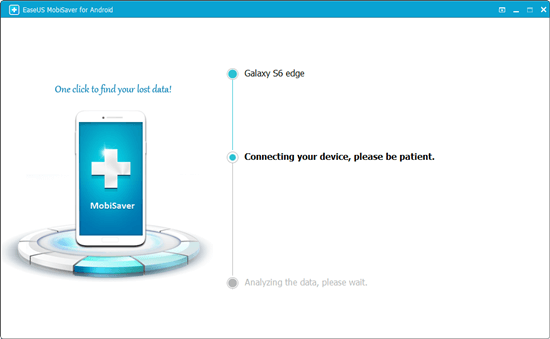
Step 1. Install and run EaseUS MobiSaver for Android and connect your Android phone to the computer with a USB cable. Then click the "Start" button to let the software recognize and connect your device.
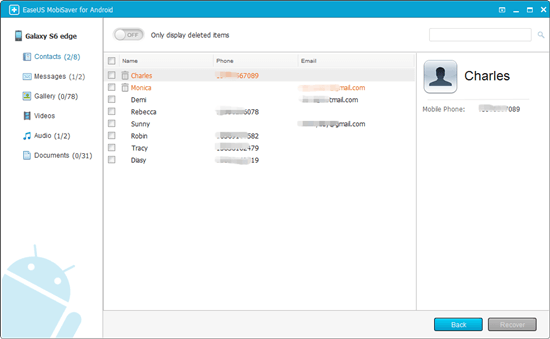
Step 2. After connected your Android phone, the software will quickly scan the device to find all the existing and lost data. You can easily find the photos you want by choosing the correct file types.
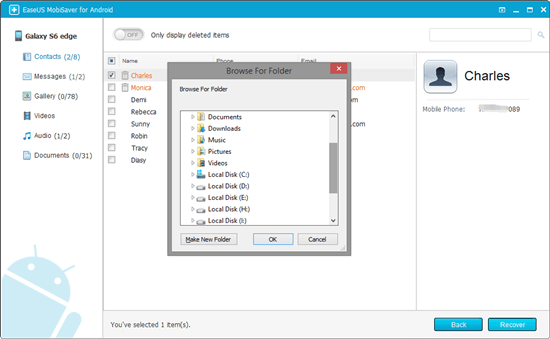
Step 3. Preview all found photos and select out what you want to restore. Finally, click the "Recover" button to restore the selected data to the computer. After this, you can keep a copy of those recovered photos as a backup on the computer and then transfer them into your Android phone, so to continue using them again.
How to Recover Christmas Files (3 Simple Steps)
Losing holiday pictures, videos, and documents containing Christmas memories can be the loss of the very essence of this festive occasion. It could be that you lost these files through accident, storage loss, or system failure. However, the bright part is that recovery is only a click away.
EaseUS Data Recovery Wizard is a powerful, user-friendly photo recovery software that supports recovery from a wide range of devices, including computers, external hard drives, USB sticks, and even camera SD cards.
It supports more than 1,000 file formats—from festive photos, JPG, RAW, PNG, and videos MP4, MOV, to holiday documents PDF, DOCX. Within three easy steps of stopping use of the affected device, scanning with EaseUS Data Recovery Wizard, and safely saving your found memories onto a new location, you could confidently reclaim those irreplaceable Christmas moments.
With this easy three-step procedure, you can quickly recover your lost memories:
Step 1. Connect & Choose: Fire up EaseUS Data Recovery Wizard. Connect the SD card in your camera, a phone, or a drive from your camera to your computer, and choose that device.
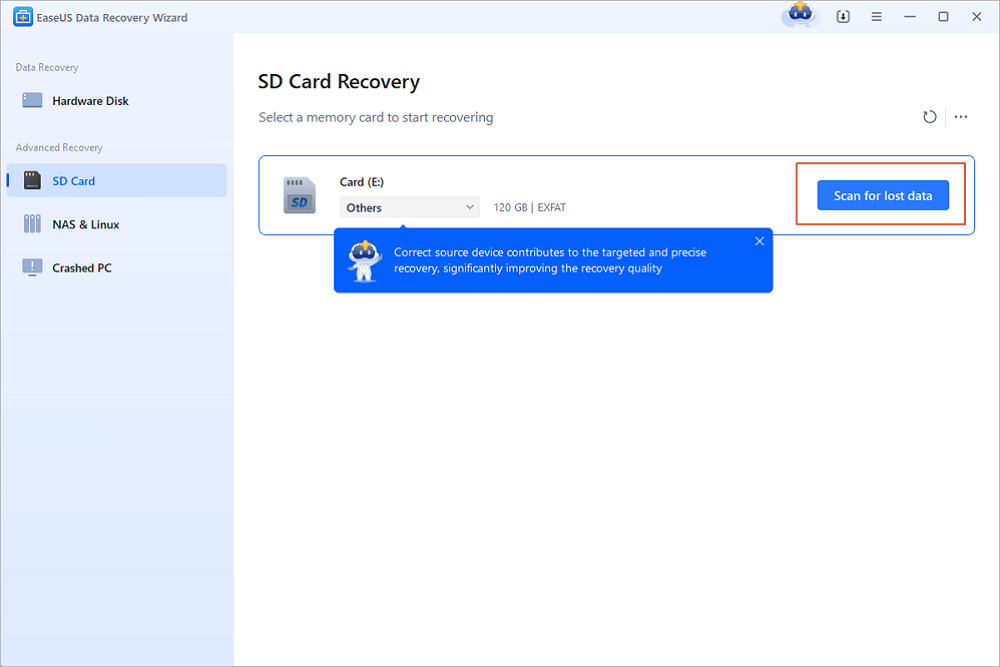
Step 2. Scan for Memories: Click "Scan." The software will make a quick preliminary scan followed by a deeper, more thorough scan to find every shred of your lost Christmas photos and videos.
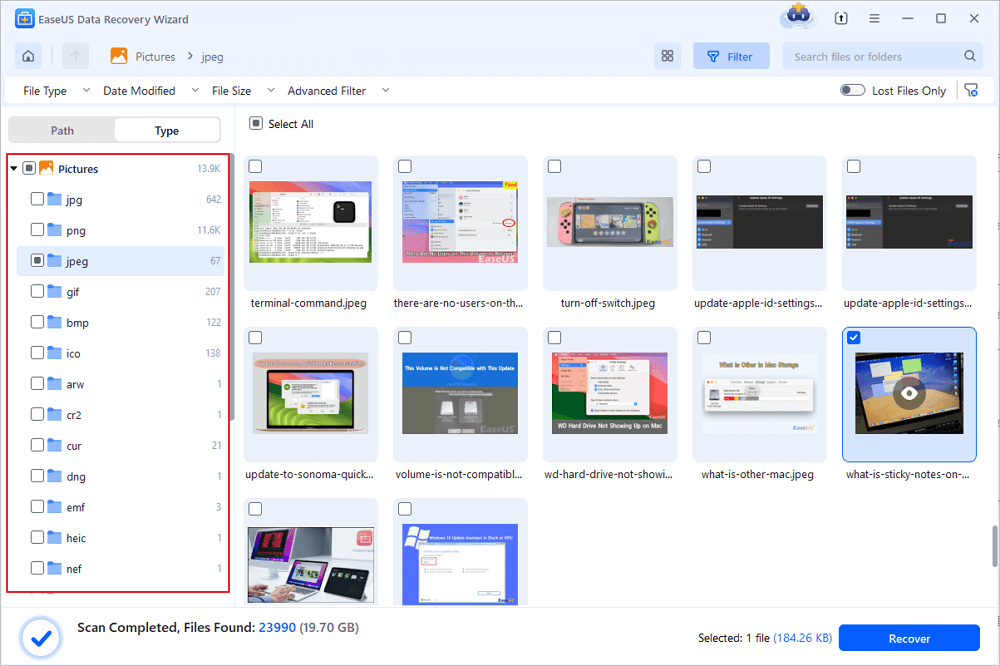
Step 3. Preview & Recover: Easily filter the results by file type, such as JPG and MP4, or by path. You can preview the found files to confirm that they are intact. Then you select the precious holiday memories and click "Recover" to store them in a safe location (different from the original device where they were lost!).
Common Christmas Data Loss Scenarios (Highly Searchable)
Here are some common data loss scenarios during Christmas. You can tailor the remedy to the case and find out how you can get your files back:
- ❤️Accidentally deleted Christmas photos: Don't empty the Recycle Bin/Trash! Stop using the device immediately. Use EaseUS data recovery software to scan the drive or card. The sooner you act, the better your chances of recovery.
- 💛Formatted SD card during the holiday shooting: This is common when trying to clear space quickly. Formatting does not immediately erase data. Stop using the card and use EaseUS Data Recovery Wizard to recover data from a formatted SD card.
- 💙Lost videos after transferring to a new computer: Interrupted transfers can corrupt or hide files. Scan both the source device (camera/card) and the destination computer drive with recovery software.
- 💜The camera shows "No files" after Christmas: This could be a logical error or corruption. A recovery scan can often read the card and extract files even when your camera cannot. Avoid trying to "fix" the card in-camera.
Tips to Avoid Losing Holiday Photos Again
Although regaining lost Christmas memories is a relief in itself, finding such memories can sometimes be a stressful and frustrating process. Prevention can be a better solution to avoid experiencing such stressful feelings in the future. By adopting some simple practices, you can make sure to preserve Christmas memories for the next year too:
- Never Format Before Backing Up : Always format your memory card only after backing up all your files on the card into at least two different locations (computer & cloud/external hard drive).
- One Card Per Device: It is advisable not to share cards among cameras, drones, and phones.
- Copy the files to the computer before transferring: If you are going to change cards, copy your files to the computer first.
- Don't Shoot on a Nearly Full Card: A nearly full memory card is prone to file damage. Keep high-capacity cards on hand.
Conclusion
Losing photographs or videos of Christmas memories can feel like losing the spirit of Christmas itself—but, as we know, it doesn't have to be that way. Whether you are dealing with accidental deletions, a bad SD card, or an unexpected device failure, recovery is possible. And all it takes is following a set of instructions that include stopping use of the device, selecting recovery software that really works, such as EaseUS Data Recovery Wizard or MobiSaver after Christmas deleted files, and putting your recovered files somewhere safe.
FAQ on Recover Lost Christmas Photos & Videos
Read this frequently asked question part to get more information on how to get your losy Christmas videos and photos back:
1. Can I really recover Christmas photos after formatting the SD card?
Yes, most the time. Usually formatting wipes out only the index of the file, not the data itself. EaseUS Data Recovery Wizard and such software can rebuild this index in an effort to find your files, provided you have not recorded new content over them.
2. Are my deleted holiday videos gone?
No, not right away. The files remain on your storage until they get overwritten. That is where the immediacy of action comes in. The "Deep Scan" mode searches for these residual fragments of files, and video recovery in such cases is very probable. Q: Is it safe to recover files from an SD card using software? A: Yes, it is very safe if you are using a renowned software such as EaseUS. The software works in read-only mode while it is scanning and thus won't be able to write on your card or further damage it. Always recover the files on another different drive so as not to overwrite the same drive.
3. Is it safe to use software to recover files from my SD card?
Yes, if you use reputable software like EaseUS. It operates in read-only mode during scanning, meaning it won't write to or further damage your card. Always recover files to a different drive to avoid overwriting.
Was this page helpful?





 Why Trust EaseUS
 Editor Reviews

20+
Years of experience

160+
Countries and regions

72 Million+
Downloads

4.9 +
Trustpilot Score





