





-
![]()
-
![]() Word Found Unreadable Content, How to Fix (Windows/Android)
Word Found Unreadable Content, How to Fix (Windows/Android) October 14,2026
 6 min read
 -
![]() Reliable Ways to Fix I Saved a Word Document and Can't Find It IssueOctober 14,20266 min read
Reliable Ways to Fix I Saved a Word Document and Can't Find It IssueOctober 14,20266 min read -
![]() How to Fix Steam Uninstalled My Game Automatically [PC Solutions]October 14,20266 min read
How to Fix Steam Uninstalled My Game Automatically [PC Solutions]October 14,20266 min read -
![]() Free Download EaseUS Data Recovery Wizard Torrent, Serial KeyOctober 14,20266 min read
Free Download EaseUS Data Recovery Wizard Torrent, Serial KeyOctober 14,20266 min read -
![]() Look! 5 Methods to Fix PNG Files Not Opening in Windows 10/11October 14,20266 min read
Look! 5 Methods to Fix PNG Files Not Opening in Windows 10/11October 14,20266 min read -
![]() [Solved] Recover Data from Ext4/3/2 NAS/Linux DeviceOctober 14,20266 min read
[Solved] Recover Data from Ext4/3/2 NAS/Linux DeviceOctober 14,20266 min read -
![]() How to Recover PowerPoint Files Not Saved | Free PowerPoint Files Recovery MethodsOctober 14,20266 min read
How to Recover PowerPoint Files Not Saved | Free PowerPoint Files Recovery MethodsOctober 14,20266 min read -
![]() How to Recover Files and Data Deleted by CCleaner [Updated 2026]October 14,20266 min read
How to Recover Files and Data Deleted by CCleaner [Updated 2026]October 14,20266 min read -
![]() Fixed: Samsung 860 EVO Not Detected in Windows 10/11October 14,20266 min read
Fixed: Samsung 860 EVO Not Detected in Windows 10/11October 14,20266 min read
Page Table of Contents
PAGE CONTENT:
Reliable data recovery software can assist people in getting data back after accidental deletion, formatting or virus infection. However, to achieve the commercial goal, most software providers release a trial or demo version to obtain full assistance.
While professional tools like GetData Back offer robust recovery features, their paid price can be costly for casual users or one-time needs. Fortunately, several free alternatives provide quick, safe, and effective data recovery without compromising your wallet.
Why Seek a Free Alternative to GetData Back
GetData Back is a powerful paid tool for recovering data from damaged drives, but its premium pricing (starting at $79) may not suit everyone. Furthermore, the user interface makes it difficult for novice users to perform the data recovery procedure. Furthermore, the outdated Runtime website makes getting helpful and detailed instructions difficult for users. Those annoyances will force us to look for another user-friendly, feature-rich, yet potent substitute.
Free alternatives are ideal for:
- Budget-conscious users: Students, freelancers, or individuals needing a one-time recovery.
- Recovery needs: Retrieving recently deleted files or recovering data from formatted drives.
- Testing feasibility: Verifying if files are recoverable before investing in paid software.
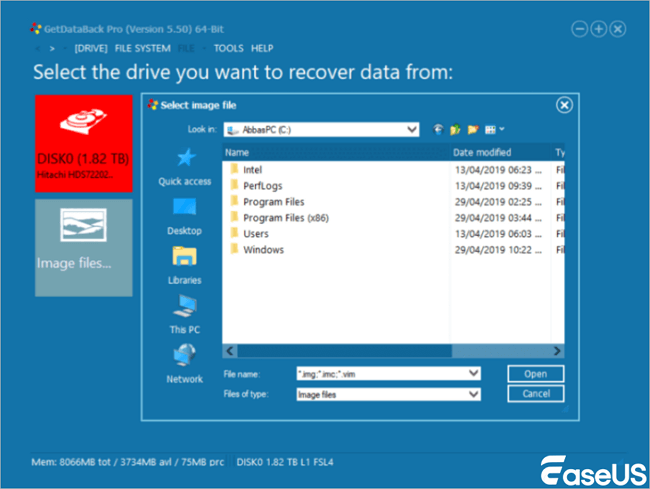
Paid tools like GetData Back are better suited for advanced cases (e.g., RAID recovery, physically damaged drives), which most users rarely encounter.
When to Go Free:
- Restoring a few photos or documents.
- Recovering data from a drive that was quickly formatted.
Download GetData Back Free Alternative Software
Is there any cost-effective or free data recovery software that replaces GetData? Yes!
Many alternative free software programs support NTFS, FAT, FAT32, exFAT, and EXT recovery can replace GetData Back. Here we'd like to offer you reliable software - EaseUS Data Recovery Wizard Free to restore your lost files from hard drive, USB memory stick, and memory card.
# 1. Download EaseUS Free File Recovery Software ( 2GB Data Recovery)
EaseUS Data Recovery Wizard can recover up to 2GB of files for free. With it, you can restore multiple files, including mail, documents, pictures, music, and video files for free on storage devices.
EaseUS Data Recovery Wizard Free offers up to 2 GB of free data recovery, including 500 MB available by default and an extra 1.5 GB unlocked after sharing on Facebook and X.
Key Features:
- Recovers files from formatted, corrupted, or virus-attacked drives.
- Filters results by file type (photos, videos, documents).
- Supports APFS, HFS+, NTFS, FAT32, and exFAT.
Tutorial: Full Data Recovery in 3 Steps:
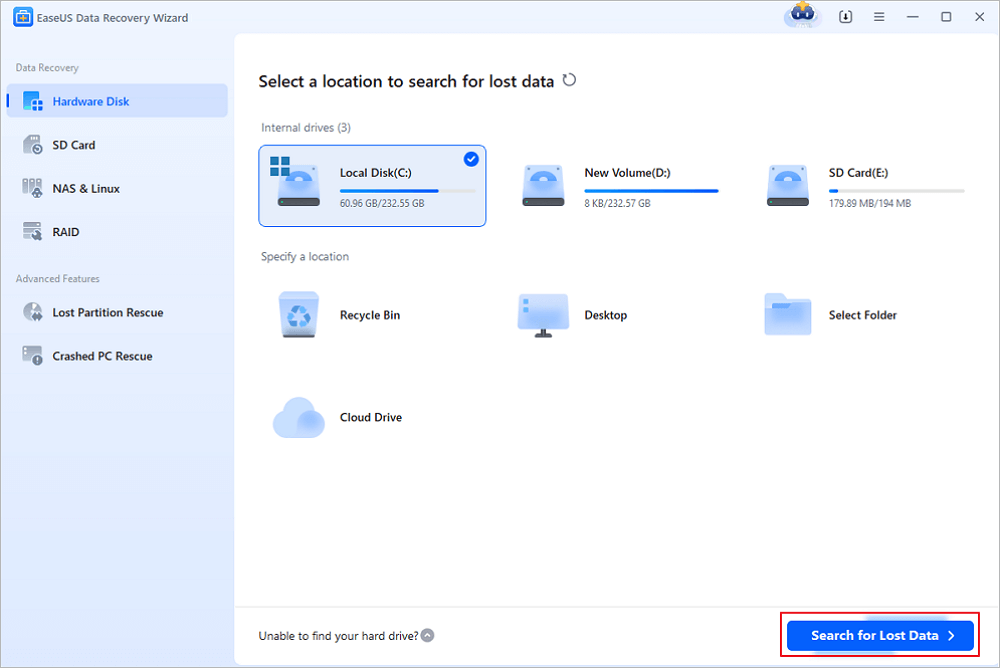
Step 1. Run EaseUS Data Recovery Wizard on your computer. Choose the drive where you lost files and click "Search for Lost Data". If your lost files were on an external storage device, connect it to your computer firstly.
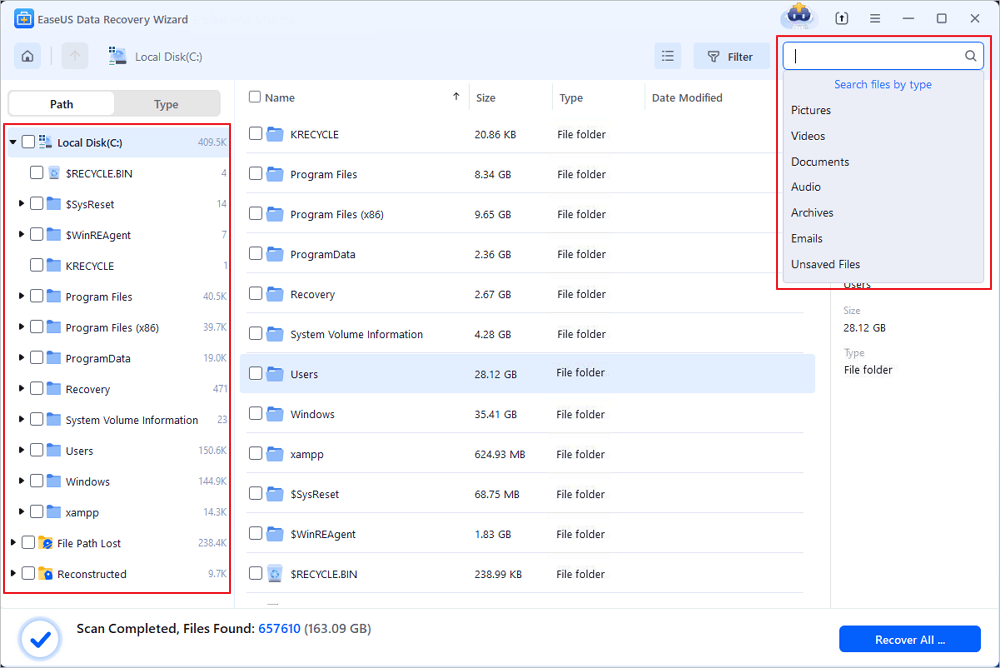
Step 2. The software will quickly scan the deleted files immediately, and then automatically perform a deep scan to find more lost files. After the scan is completed, you can use "Filter" or "Search box" to quickly locate specific file types.
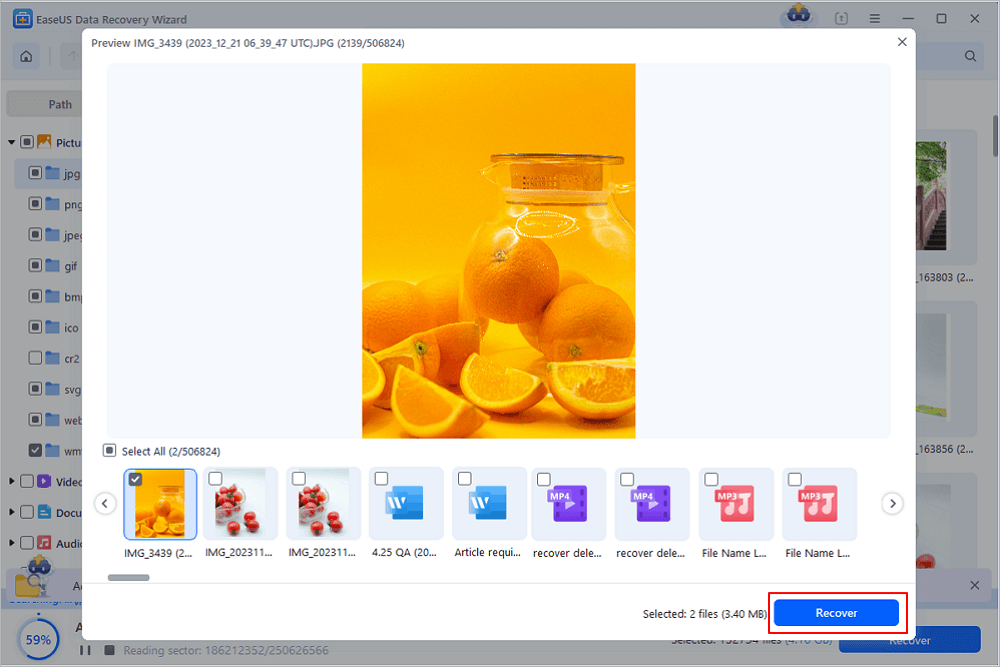
Step 3. Click the "Preview" button or double-click on a file for a full preview. Finally, select the desired files, click "Recover" and choose another safe location or Cloud drive to save all the files at once.
If you find this information helpful, please share it with others on social media to assist them in overcoming this common challenge.
# 2. TestDisk or PhotoRec (Open-source Tools)
TestDisk repairs partitions and recovers lost file systems, while PhotoRec focuses on retrieving files (even without a file system). These open source software programs are free and can provide alternative options for computer-savvy users.
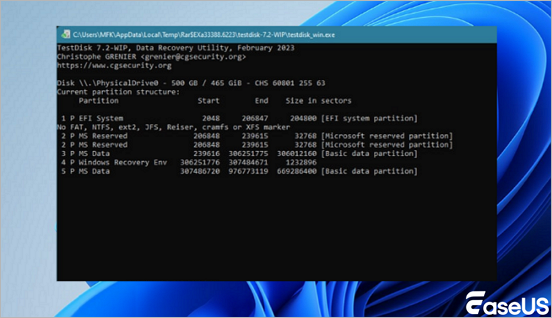
Key Features:
- Recovers 300+ file formats (PhotoRec).
- Fixes boot sectors and partition tables (TestDisk).
- Works on Windows, macOS, and Linux.
Conclusion
To sum up, whenever you lose files on storage devices, turn to reliable data recovery software for help. EaseUS Data Recovery Wizard is always ready to help. Besides, always remember to create a backup of your valuable files on your computer, hard drive, and external storage devices. You'll survive whenever a data loss issue occurs.
GetData Back Free Version Alternative Download FAQs
If you still have some questions about GetData Back alternative, check the quick answers below to help yourself out:
1. Is There a Free Version of GetData Back?
No, GetData Back does not offer a free version. It is a paid tool with prices starting at $79. However, several free alternatives provide similar basic recovery features.
2. Are Free Data Recovery Tools Safe?
Yes, if downloaded from official sources. Avoid:
- Pirated versions (may contain malware).
- Unofficial download sites (could bundle adware).
Was this page helpful?


 Why Trust EaseUS
 Editor Reviews

20+
Years of experience

160+
Countries and regions

72 Million+
Downloads

4.9 +
Trustpilot Score





