





Table of Contents
 About the Author
 Related Posts
The DJI Neo is an excellent compact drone for capturing aerial footage, but like any drone, it can sometimes produce corrupted, unplayable, or glitchy videos. Whether your video won't open, freezes mid-playback, shows pixelation or color distortion, or has audio sync issues, this guide will help you repair corrupted drone video from DJI Neo Drone.
Common Causes of DJI Neo Video Corruption
Before attempting repairs, it helps to understand what went wrong. DJI Neo footage can become corrupted due to several common reasons :
- Sudden power loss – The drone shuts off while recording, leaving an incomplete video file
- Improper SD card ejection – Removing the card during writing can corrupt the file structure
- SD card file system errors – A damaged card can produce unreadable or glitchy videos
- Firmware bugs – Outdated drone firmware may cause recording errors
- File transfer interruptions – Interrupting a copy operation can corrupt the video
- Audio-video sync issues – Some DJI Neo users have reported audio and video becoming out of sync, especially when recording audio separately
- Image transmission loss – Transmission signal issues during flight can affect recording quality
Method 1. Try Video Recovery Tool to Repair Corrupted Drone Video from DJI Neo Drone
When your DJI Neo footage is corrupted, EaseUS Fixo Video Repair is a reliable, dedicated repair tool. It is designed to repair corrupted videos from action cameras and drones, supporting common formats like MP4 and MOV, as well as codecs like H.264 and H.265.
Here are some features of this video repair tool from EaseUS:
- Repair corrupted videos within 3 steps
- Fix common errors like MP4 not playing or video cannot be opened
- Also repair corrupted photos and documents
Here is how you can repair corrupted videos with EaseUS Fixo Video Repair:
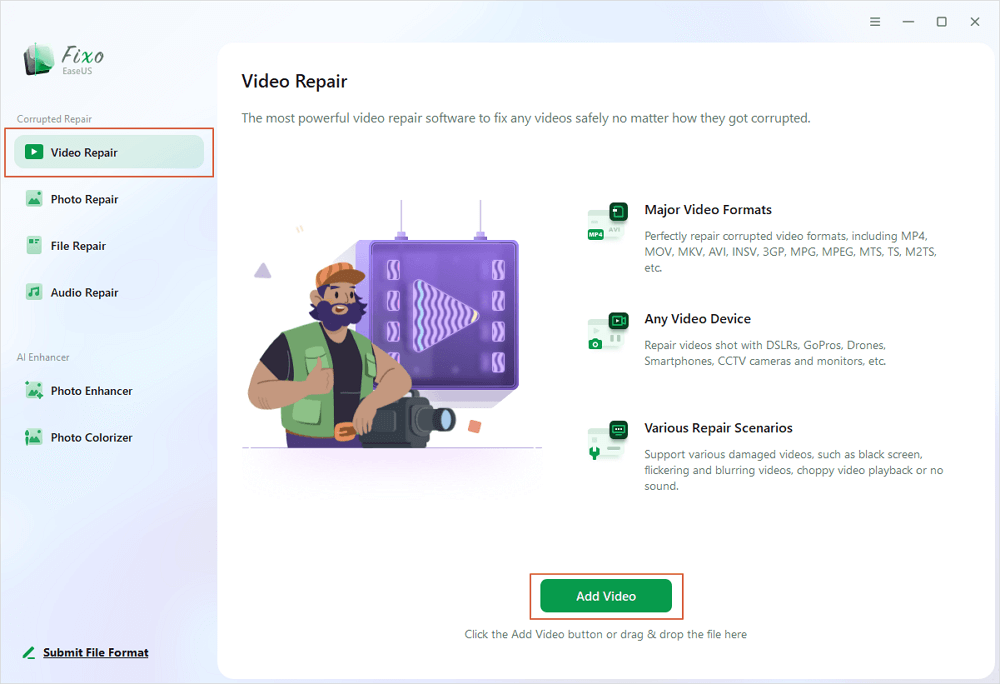
Step 1. Open Fixo on your local PC. Click "Video Repair" and add the corrupted MP4/MOV/AVI/MKV/3GP/FLV/MKV/WMV video files by clicking "Add Videos".
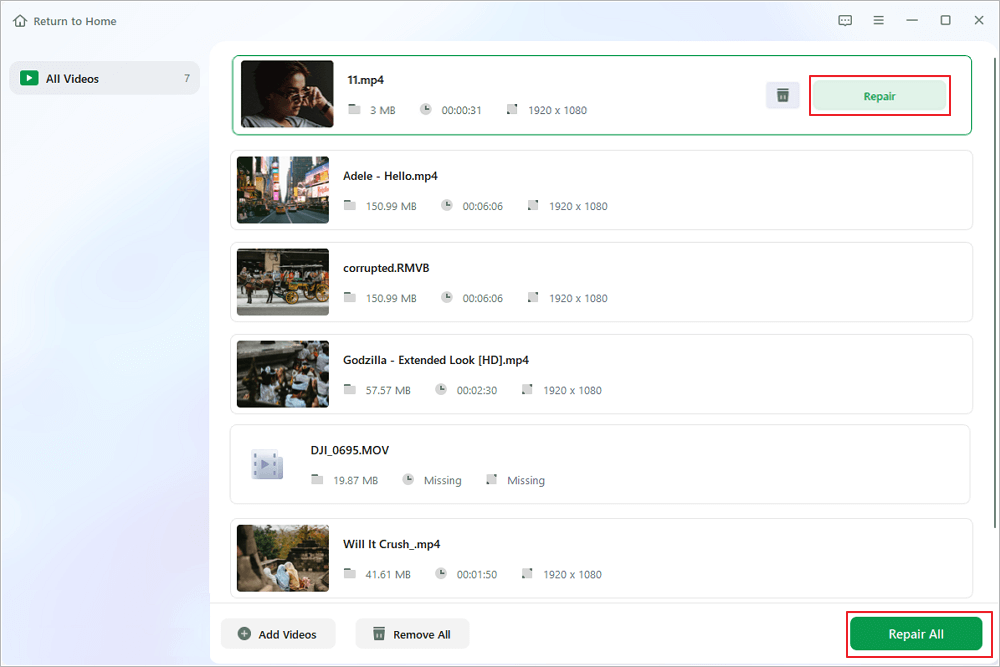
Step 2. Move the pointer to a video and click the "Repair" button to start the single video repairing process. If you want to repair all the videos, click "Repair All".
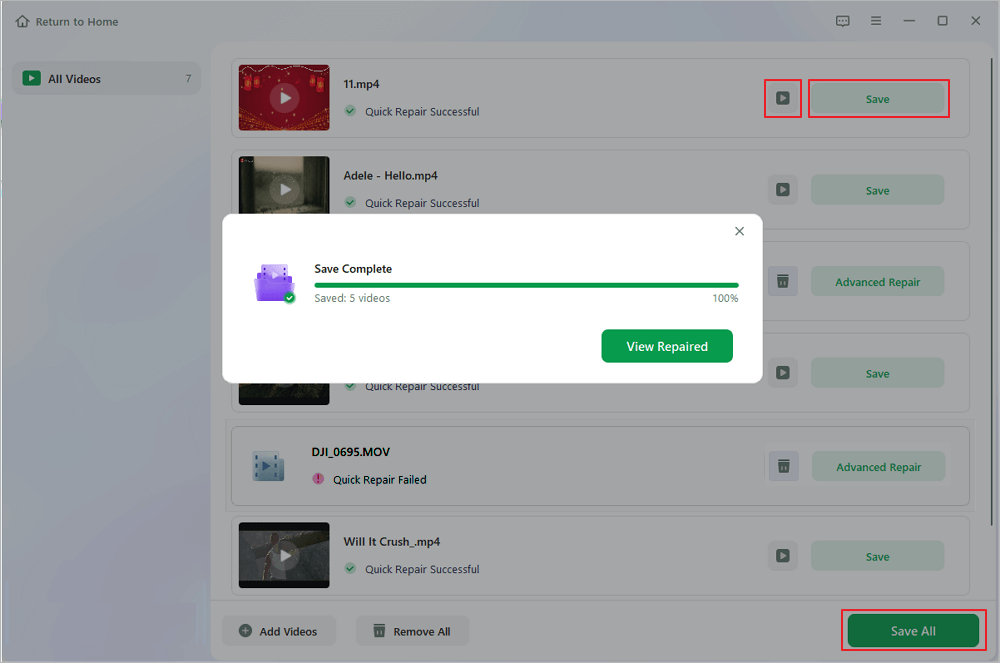
Step 3. Wait a few minutes, and the corrupted videos will be repaired. Click the play icon to preview the videos. You can save a single video by clicking the "Save" button next to the play icon. If you want to save all the repaired videos, choose "Save All".
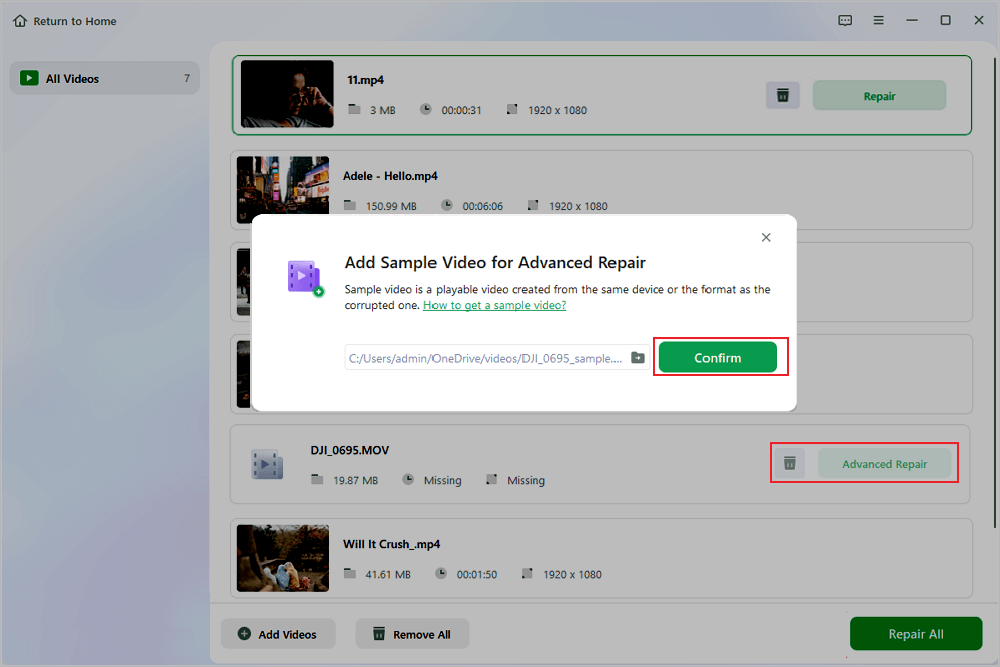
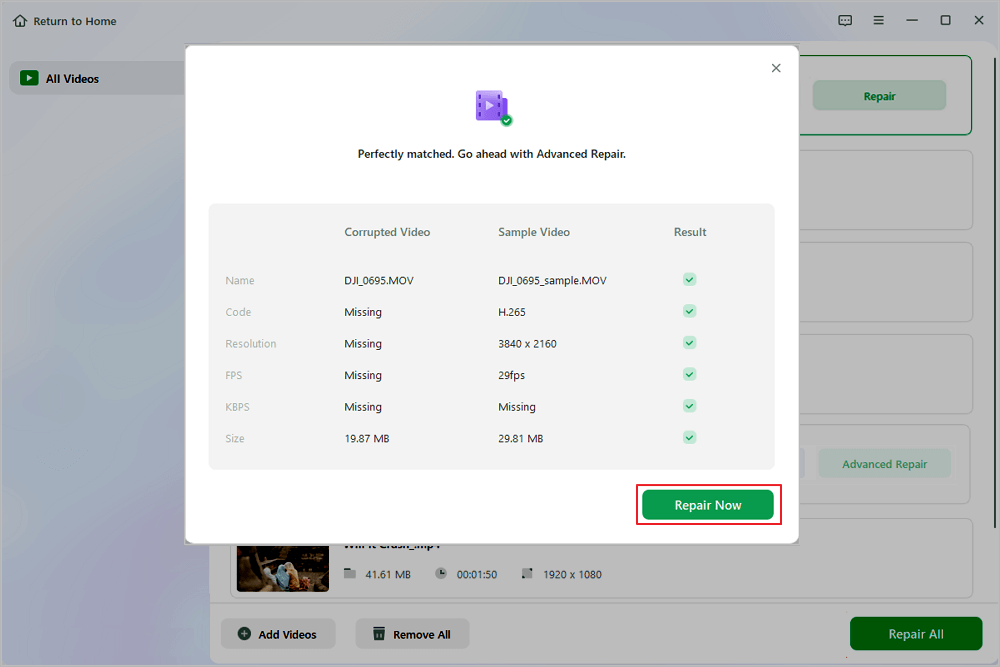
Step 4. If the quick repair fails, you should utilize the advanced repair mode. Click "Advanced Repair" and add a sample video. Choose "Confirm" to ensure.
Step 5. A list of detailed information on corrupted and sample videos will show up. Click "Repair Now" to start the advanced video repair process. When the repair is complete, you can view the videos and click the "Save" button to save the repaired video files to an appropriate destination.
Remember to share this post with users who are facing the same video corruption error:

Method 2. Fix Audio Sync Issues on DJI Neo
Some DJI Neo users have encountered audio-video synchronization problems, particularly when recording audio separately. The video file may be recorded at 29.97 FPS while the audio file is recorded at 30 FPS, causing them to drift apart .
Recommended solution: Download the video directly to your phone via the DJI Fly app. This process often combines the separate video and audio files into a properly synced version. However, some users have reported lingering audio glitches even after this process.
Prevention Tips for DJI Neo Footage
Prevention is always better than repair. Follow these tips to protect your DJI Neo footage :
- Always use the "Safely Remove Hardware" option before unplugging your SD card
- Format your SD card inside the DJI Neo camera before each important shoot
- Keep your DJI Neo firmware up to date with the latest version
- Use high-quality, fast SD cards (U3 or V30 rated) to avoid write errors
- Avoid sudden power loss – carry spare batteries and don't let the drone die mid-recording
- If possible, download videos through the DJI Fly app to ensure proper file combination
What to Do If the SD Card Itself Is Corrupted
If your SD card is corrupted and you cannot access your video files, first recover them from the SD card using a data recovery tool like EaseUS Data Recovery Wizard, then use EaseUS Fixo Video Repair or another video repair tool to fix the recovered footage.
Important Note on File Extension Changes
Do not attempt to fix corrupted DJI Neo footage by changing the file extension. Renaming or converting a corrupted file typically makes it worse. Always repair the original file first with proper software, then convert if needed.
With the right tools and approach, most corrupted DJI Neo video files can be successfully repaired. EaseUS Fixo Video Repair offers a straightforward, three-step solution, while alternatives like Repairit and Stellar Repair for Video provide additional options. Remember to stop using the problematic file immediately, repair it with dedicated software, and always save fixed footage to a different drive.
Conclusion
Encountering corrupted footage from your DJI Neo drone can be frustrating, but it rarely means permanent data loss. Whether the issue stems from sudden power loss, improper SD card removal, firmware bugs, or audio-video sync glitches, most corrupted videos can be successfully restored with the right tools and methods.
EaseUS Fixo Video Repair stands out as a reliable, user-friendly solution that can fix unplayable, glitchy, or frozen MP4/MOV files in just three simple steps. For severely damaged files, its advanced repair mode using a sample video provides an extra layer of recovery capability.
FAQs on Repairing Corrupted DJI Neo Drone Video
Here are some frequently asked questions you may be curious about:
1. Can corrupted DJI Neo drone video be repaired?
Yes, in most cases. Tools like EaseUS Fixo Video Repair specialize in fixing corrupted, glitchy, or unplayable videos from action cameras and drones. Whether your video won't open, freezes during playback, or shows pixelation, dedicated repair software can often rebuild the damaged file structure and restore your footage.
2. What causes DJI Neo video corruption?
Common causes include:
- Sudden power loss while recording (battery dies mid-shot)
- Improper SD card ejection during writing
- SD card file system errors or using a card with low write speed (always use U3 or V30 rated cards)
- Outdated drone firmware with recording bugs
- Interrupted file transfers
- Audio-video sync issues when recording audio separately from video
3. What video formats and codecs does EaseUS Fixo support for DJI Neo?
EaseUS Fixo Video Repair supports the common formats used by DJI Neo, including MP4 and MOV, and is compatible with H.264 and H.265 codecs. It can handle various corruption issues such as files that won't open, videos that freeze, playback with green or pixelated frames, and audio-video desynchronization.
Was This Page Helpful?
About the Author

Finley is interested in reading and writing articles about technical knowledge. Her articles mainly focus on file repair and data recovery.


