





Table of Contents
 About the Author
 Related Posts
Crashing your drone is bad enough, but nothing stings quite like realizing the footage you just recorded won't play. Maybe you were filming a sweeping landscape, a construction project, or something important you wanted to capture. Losing that data feels like a punch in the gut.
But here's the thing: just because your drone video won't play doesn't mean it's gone for good. Most of the time, the data is still there on the SD card; it's just that the crash probably stopped the recording, so the file isn't finalized. That usually leaves you with an MP4 or MOV file your computer refuses to open.
Why Is My Drone Video Not Playable After a Crash
When a drone goes down, a bunch of things can happen at once. The battery might pop out, the camera could suddenly stop filming, or the SD card might not work because of the jolt. Drones keep writing video to the memory card while recording, so if something interrupts that, you're probably left with an incomplete video file.
Here's the upside: a crash usually messes up the video's structure, but not always the actual frames you recorded. If you know what went wrong when you encountered issues like an MP4 file not playing, you've got a shot at recovering your footage.
Here are some common reasons that can cause your drone videos not to be played:
1. Sudden Power Loss: Sudden power loss can cause the machine not to get a chance to finish writing the file's metadata, the tiny details at the end of each video that make the clips playable.
2. Missing MOOV Atom: Drones usually save footage as MP4 or MOV files, and these formats rely on a piece of metadata called the MOOV atom. Without it, media players stay clueless; they don't know how long the video is, where each frame sits, or even what codec to use.
3. SD Card File System Corruption: Sometimes, a hard crash doesn't just mess up the video; it corrupts the SD card. You run into things like a damaged file allocation table or weird FAT32 or exFAT errors. Directory entries may even vanish for no clear reason.
4. Physical Damage to the Memory Card: Not all problems are digital. A rough crash might actually break the microSD card: maybe the contacts snap, parts inside fail, or connectors get bent.
Can You Repair a Drone Video After a Crash
Drones don't just record video; they're constantly saving each frame to your SD card. But here's the thing: the important metadata that ties those frames together usually gets written only when you stop recording the normal way.
So, if your drone crashes before finishing that process, the actual video footage is still on the card. It's just the file structure or container that's messed up.
Specialized repair tools can reconstruct the following:
- Missing headers
- Video indexes
- MOOV atoms
- Metadata and timing info
- File structure
That's why even after a nasty crash, videos from brands like DJI, Autel, Parrot, Skydio, Holy Stone, Potensic, and others actually stand a good chance of being saved. Repair software digs through the chaos to rebuild what's missing.
How to Repair Drone Videos After a Crash
A drone crash doesn't always destroy your footage. In most cases, the recording is interrupted before the video file is properly finalized, leaving behind a corrupted MP4 or MOV file. Since the actual video frames are often still stored on the SD card, using professional video repair software gives you the highest chance of restoring the recording.
While there are several methods available, EaseUS Fixo Video Repair is one of the most effective solutions for repairing drone footage from DJI and other drone brands.
Besides repairing MP4 files and MOV files, this video repair tool also supports AVI, MKV, M4V, FLV, and other popular video formats. Its Advanced Repair feature uses a healthy sample video recorded by the same drone to rebuild severely damaged files, making it particularly suitable for crash-related corruption.
Follow the detailed steps below to repair your drone videos safely.
✨Step 1. Download, install, and launch EaseUS Fixo Video Repair
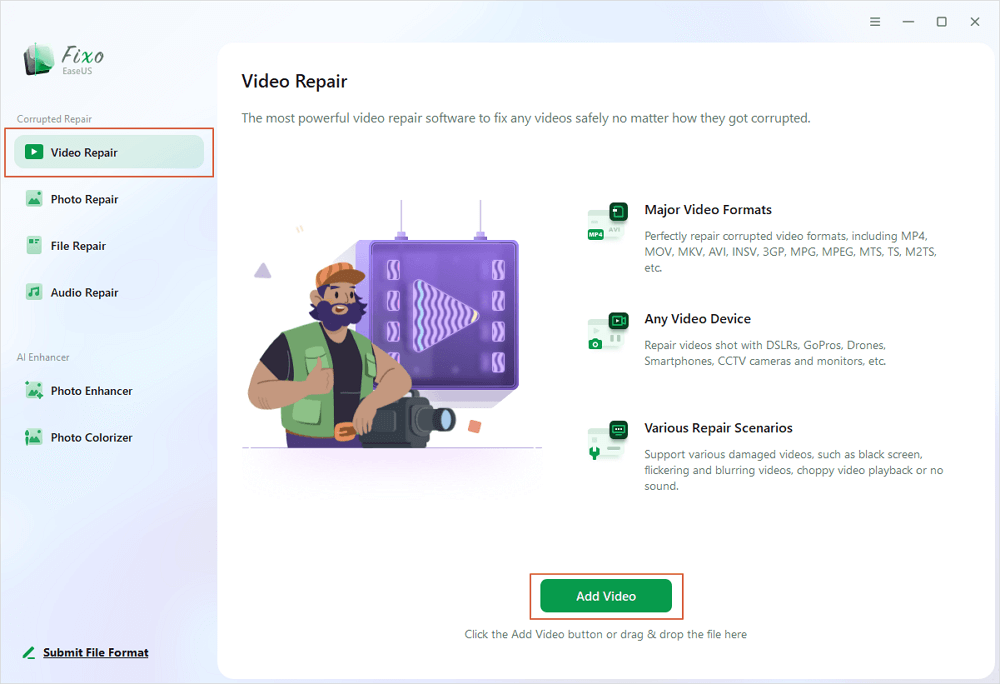
Click the download button or visit Fixo official website to download and install this video repair tool, In the interface, click "Video Repair" > "Add Videos" to upload movies, recordings, or other video files from various storage devices.
✨Step 2. Start the video repair now
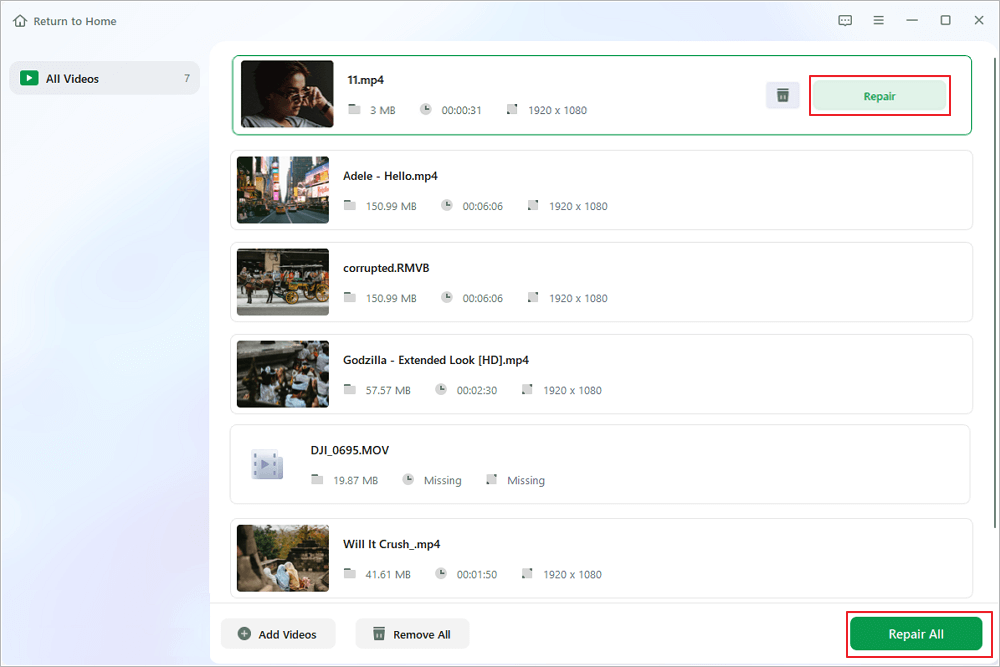
If you don want to repair all the videos at once, you can select a singe one and choose "Repair". Click the trash button to remove the video from the repair list.
✨Step 3. Preview and save repaired videos
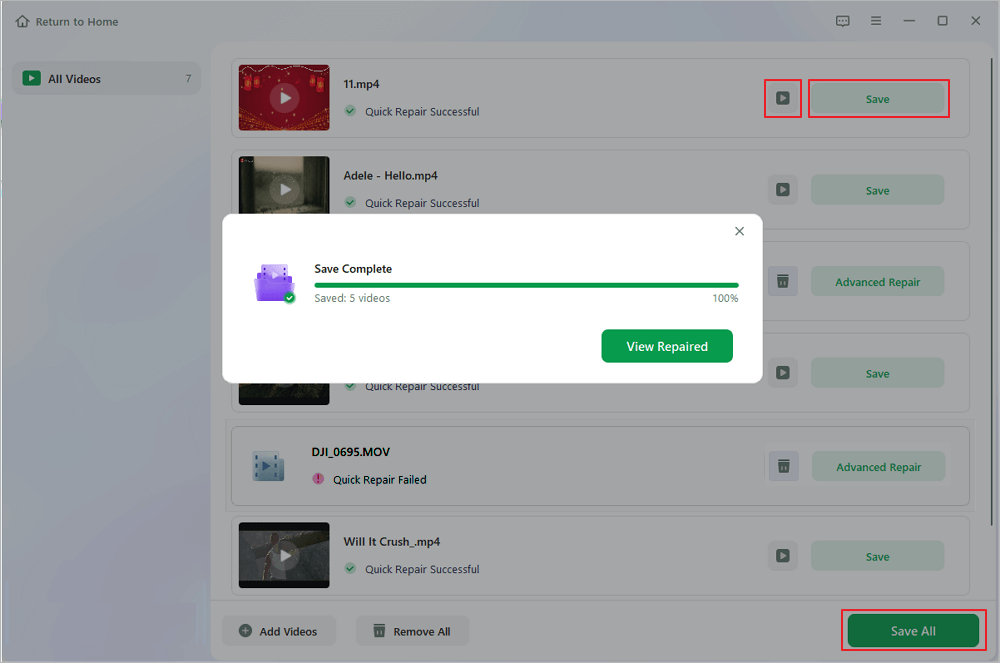
It may takes longer to repair large videos. Click the play icon to preview the repaired videos, and click "Save All" to save these video files. The "View Repaired" button will lead you to the repaired folder directly.
✨Step 4. Apply advanced repair if fails
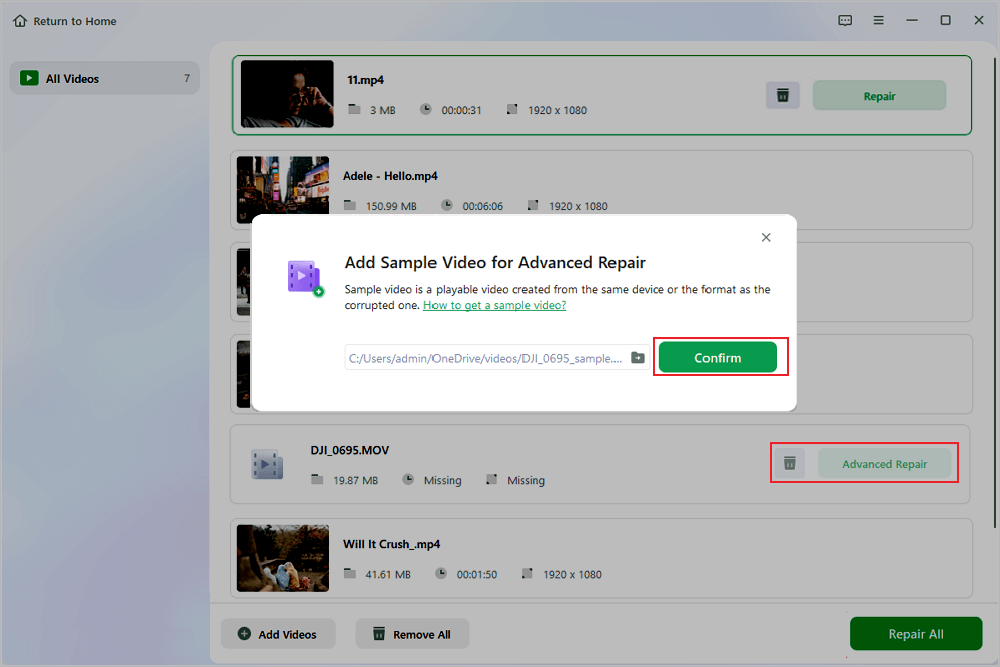
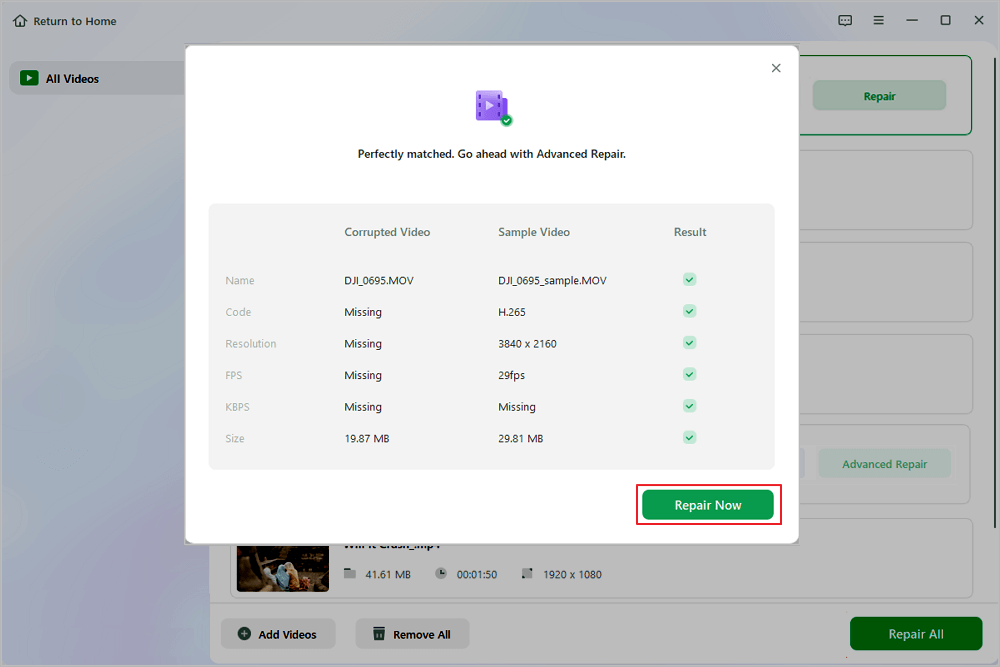
If the video shows "Quick Repair Failed", that means the video is seriously damaged and it's better to utilize the advanced repair mode. Click "Advanced Repair" > the folder icon > "Confirm" to add a sample video.
✨Step 5. Check the match result
You'll know whether the sample video can help repair the corrupted videos or not in the pop-up window. A list of detailed information on corrupted and sample videos will show up. Click "Repair Now" to start the advanced video repair process.
You can share this video repair guide on social media and help more readers fix corrupted drone video clips!

How to Prevent Drone Videos from Becoming Corrupted
You can fix a lot of corrupted drone videos, but honestly, if you stick to a few simple habits, you'll avoid most issues before they even start.
- 💡Stop Recording Before Powering Off the Drone. That way, it wraps up the video properly. Same goes for the battery: after landing, wait just a bit before you pull it out. The drone needs that time to finish saving everything to the card.
- 💡Use a High-Speed Memory Card. Grab a reliable one, U3, V30, or something better. That's what gives you smooth, high-resolution videos without hiccups. And when it comes to formatting, just use your drone's built-in tool. It keeps the card compatible and cuts down on those annoying errors.
- 💡Avoid Recording with a Critically Low Battery. Stop filming before you hit that critical low; otherwise, you risk losing your footage if the drone powers off suddenly.
- 💡Keep Your Drone's Firmware Updated. It makes everything run smoother, improves recording, improves the camera, and reduces headaches with SD cards.
- 💡Remove Your SD Card Safely. Eject it properly to protect your latest videos. And back up your footage right after every flight. This saves you from losing your work to accidental deletions or card failures.
A few habits like these go a long way in keeping your drone videos safe.
Drone Crash Video Repair FAQs
1. Can corrupted drone videos be repaired?
Yes. In many cases, corrupted drone videos can be repaired because the actual video frames remain on the SD card. Professional software like EaseUS Fixo Video Repair can rebuild damaged headers, metadata, indexes, and missing MOOV atoms to restore normal playback.
2. Can VLC repair a drone video after a crash?
VLC Media Player can repair certain types of damaged AVI files, but it has very limited success with modern drone footage recorded in MP4 or MOV format. If your recording is missing metadata or the MOOV atom due to a crash, dedicated repair software provides a much higher repair success rate.
3. Should I format my SD card if my drone video won't play?
VLC Media Player can repair certain types of damaged AVI files, but it has very limited success with modern drone footage recorded in MP4 or MOV format. If your recording is missing metadata or the MOOV atom due to a crash, dedicated repair software provides a much higher repair success rate.
Summary
Before attempting any repair, stop using the SD card immediately to avoid overwriting valuable data. If the memory card itself is damaged or asks to be formatted, recover the video files first and then repair the recovered recordings.
Was This Page Helpful?
About the Author

Dany is an editor of EaseUS who lives and works in Chengdu, China. She focuses on writing articles about data recovery on Mac devices and PCs. She is devoted to improving her writing skills and enriching her professional knowledge. Dany also enjoys reading detective novels in her spare time.


