Data Recovery Wizard

EaseUS Data Recovery Wizard

SD Card Recovery & Repair: Recover Data from Damaged, Deleted, or Formatted SD Cards

  • Repair corrupted SD card and recover data from deleted, formatted, damaged, or inaccessible memory cards.
  • Intelligent detection and reconstruction with advanced SD card recovery technologies to help restore photos, videos, documents, and other files.
  • Support All Brands of SD Cards (SanDisk/Kingston/Transcend/Lexar and more)

Free Download

Windows 11/10/8/7 and Server

Free Download

macOS 26 ~ 10.9


Advanced SD Card Rescue Technology for Different Scenarios

Not every SD card data loss problem should begin with a standard scan. EaseUS uses different technologies to detect card issues, repair corrupted structures, recover lost files, and reconstruct fragmented media based on the condition of your SD card.

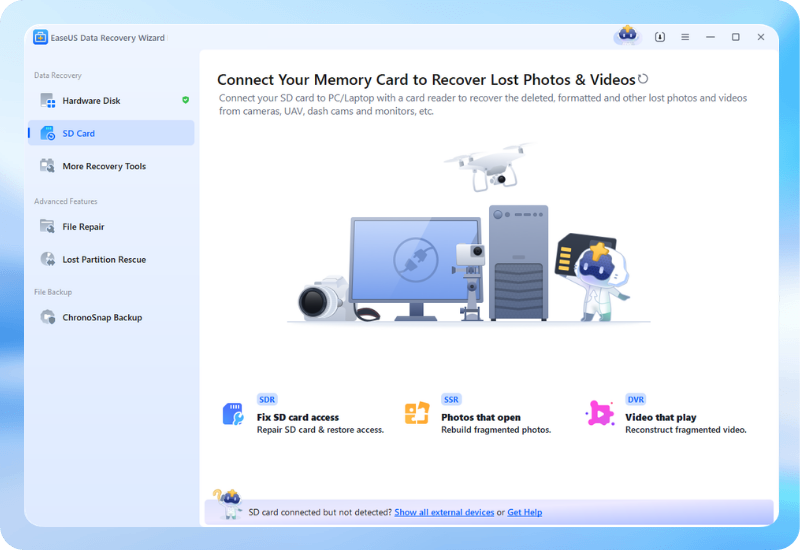
SD Card Rescue SDR

Repair Before Recovery When Possible

Instead of immediately treating an inaccessible SD card as a conventional file recovery case, SD Card Rescue (SDR) focuses on helping repair a damaged SD card and restore access whenever possible. It analyzes logical issues and provides a repair-first path before deeper data recovery is required.

SmartSector Rebuild SSR

Rebuild Fragmented Data Structures

SSR-SmartSector Rebuild is designed for challenging recovery scenarios involving fragmented or irregularly organized data. It helps identify and rebuild recoverable content when files are incomplete, fragmented, or difficult to restore through standard SD card recovery methods.

Deep Video Reconstruct DVR

Reconstruct Videos from Fragmented Data

DVR can help recreate fragmented video data in a frame-by-frame process. It is designed for severely damaged situations where normal file recovery may not be enough, helping reconstruct playable video files when original file structures have become incomplete or fragmented.

What Are SDR, SSR, and DVR?

Technology Full Name Primary Purpose Best For
SDR SD Card Rescue Repair and restore SD card access Repair and restore SD card access
SSR SmartSector Rebuild Reconstruct fragmented storage data Photo recovery
DVR Deep Video Reconstruct Reconstruct fragmented video data Camera and action-camera video recovery

SD Card Recovery for All Situations: Deleted, Formatted, or Corrupted

From accidentally deleted photos to corrupted memory card recovery, EaseUS provides different recovery paths for damaged, formatted, inaccessible, or undetected SD cards and helps match the problem with the appropriate solution.

Accident Deletion

Accidentally Deleted

Accidental deletion when cutting the files from SD card to a computer or other device.

Recovery Path:

Stop using the SD card as soon as possible, then scan it with SD card recovery software to locate deleted photos, videos, documents, and other files that can still be recovered.

Card Formatting

Formatted SD Card

Wrongly format the SD card on the computer or directly in the camera.

Recovery Path:

While formatting will result in file loss, the data is not completely lost. Professional format recovery software can recover formatted SD card.

>Virus Attack

Corrupted SD card

The SD card damage, like I/O error, SD card need to be formatted, etc.

Recovery Path:

When an SD card becomes corrupted, EaseUS first evaluates whether SD Card Rescue (SDR) can repair the SD card. After that, SSR or DVR technologies can provide a deeper recovery.

RAW Memory Card

RAW SD Card

SD card reports it becomes RAW and needs format to reopen on PC.

Recovery Path:

ForRAW SD card recovery, the process begins by checking whether the card can be repaired and accessed again. If camera photos or videos are fragmented, SSR and DVR can help recover images and reconstruct video content.

Card Corruption

SD Card Not Detected

SD card can't be detected by computer or appears as "No media", or just becomes an unreadable SD card.

Recovery Path:

SDR can attempt to repair logical issues and restore accessibility. Once the card becomes accessible, you can scan it for lost files and perform inaccessible SD card recovery.

Uninitialized

SD card not Initialized

SD card partition is lost and is identified as uninitialized by the disk manager.

Recovery Path:

If your SD card is not detected, first check the card reader, USB port, computer, adapter, and connection. Once the SD card becomes detectable by the system, you can evaluate its condition and begin repair or data recovery.

SD Card Recovery Software for All Devices: Camera, Android, Drone & More

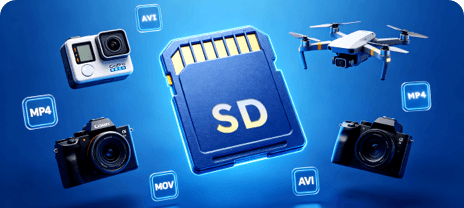
EaseUS memory card recovery software helps recover data from many types of memory cards used in cameras, Android devices, drones, action cameras, and other digital devices. Recover lost files from SD cards, microSD cards, SDHC cards, CF cards, and other camera memory cards. Whether you need camera SD card recovery, drone SD card recovery, or recovery from a damaged memory card, EaseUS helps scan and restore accessible lost data.

TypesApplications
SD card

SD Card

SanDisk, SanDisk Extreme PRO recovery, Transcend, Sony, Lexar, PNY, Samsung, Kingston, Toshiba, Silicon Power, Gigastone, Patriot, Verbatim, Delkin Devices, ProGrade Digital, Angelbird, Netac, Kodak, HP

CF card

CF Card

SanDisk, Lexar, Transcend, Sony, Kingston, Verbatim, Delkin Devices, ProGrade Digital, Angelbird, Kodak, MyMemory, EgoDisk

Micro SD card

Micro SD Card

SanDisk, Samsung, Kingston, Lexar, PNY, Silicon Power, Gigastone, Patriot, Netac, Verbatim, Delkin Devices, Toshiba

Memory stick

Memory Stick

Sony, SanDisk, Lexar, Transcend

XD card

XD Card

Olympus, Fujifilm, Kodak, Lexar, SanDisk

MMC card

MMC Card

SanDisk, Kingston, Transcend, Gigastone, Verbatim, Netac, Silicon Power, Canon, Kodak

SD Card Recovery for 1000+ File Types: Photos, Videos, Documents & More

EaseUS Data Recovery Wizard supports 1,000+ file types, including photos, videos, documents, audio files, archives, and other commonly used formats. Whether files were deleted, lost after formatting, or affected by SD card corruption, you can recover photos from an SD card, restore documents, and recover videos from an SD card with a targeted recovery workflow.

Image

Images

JPG/JPEG, TIFF/TIF, PNG, BMP, GIF, PSD, CRW, CR2, NEF, ORF, RAF, SR2, MRW, DCR, WMF, DNG, ERF, RAW, SWF, SVG, DWG, NRW, etc

Video

Videos

AVI, MOV, MP4, M4V, 3GP, 3G2, WMV, MKV, ASF, FLV, SWF, MPG, RM/RMVB, MPEG, etc

Document

Documents

DOC/DOCX, XLS/XLSX, PPT/PPTX, PDF, CWK, HTML/HTM, INDD, EPS, etc.

Audio

Audios

AIF/AIFF, M4A, MP3, WAV, WMA, APE, MID/MIDI, RealAudio, VQF,FLV, MKV, MPG, M4V, RM/RMVB, OGG, AAC, WMV,APE, etc.

Archives

Archives

ZIP, RAR, SIT, ISO, JAR, PST, RAR5, TAR, etc.

Other Files

Other Files

Such like exe, html, SITX, etc.

What Determines SD Card Recovery Success?

Several factors influence whether your data can be recovered. Understanding them helps you take the right actions immediately after data loss, whether you need to repair corrupted SD cards, recover videos from SD cards, or tackle damaged SD card recovery.

Card Accessibility

Whether the SD card can still be detected and accessed by a computer or card reader. Repairable cards have higher success rates.

Data Overwriting

Whether new data has been written to the card after deletion or formatting. Stop using the card immediately to maximize recovery chances.

File System Corruption

The extent of file system damage determines whether SDR can repair the card. Minor corruption is usually fully repairable.

File Fragmentation

How fragmented the files are on the card. SSR and DVR technologies are specifically designed to handle fragmented photo and video data.

Photo/Video Damage

Whether individual photos or videos have corrupted headers or partial data. DVR can reconstruct playable videos from frame fragments.

Physical Damage

Whether the storage device has physical damage (cracked, bent, burnt). Severe physical damage may require professional recovery services.

You can evaluate your recovery possiblities with the corresponding data loss scenarios:

HIGH - SD Card Formatting

EaseUS Data Recovery Wizard can easily recover files from the formatted SD card if you don't overwrite the data with new content.

HIGH - Accidental Deletion

If you delete a file from the SD card, you only remove the entry but not the file itself. The sooner you do the data recovery after deletion, the recovery chances will be higher.

HIGH - SD Card Logical Corruption

SD card corrupts logically is frequently caused by malware and file system defects. With SD Card Rescue (SDR) tech, majority of files can be recovered.

LOW - Part Overwritten

Certain types of files, such pictures and videos, can be restored even after being partially overwritten.

LOW - Massive Overwritten

Files that have been overwritten to an excessive extent are exceedingly difficult to recover.

LOW - Physical Damage

Severe physically damaged cards might need to be sent to a professional data recovery service.

How to Perform SD Card Recovery in 3 Steps

Recovering lost files from an SD card doesn't have to be complicated. Whether you need to repair corrupted SD cards, recover photos, or reconstruct videos, follow these three simple steps powered by SDR, SSR, and DVR technologies.

Step 1. Connect and Detect the SD Card

Insert the memory card into your computer. EaseUS detects accessible storage and helps identify whether the problem involves deleted files, formatting, corruption, or an SD card not detected issue.

Step 2. Repair or Scan the SD Card

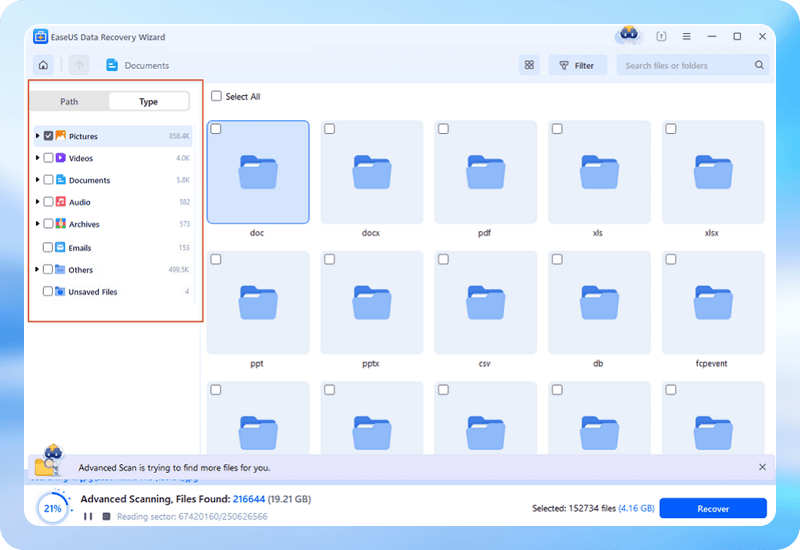
If the SD card is corrupted, SDR will repair the card and restore access when possible. If repair is unnecessary, scan the SD card to search for deleted, formatted, or otherwise lost photos, videos, and files.

Step 3. Preview and Recover the Data

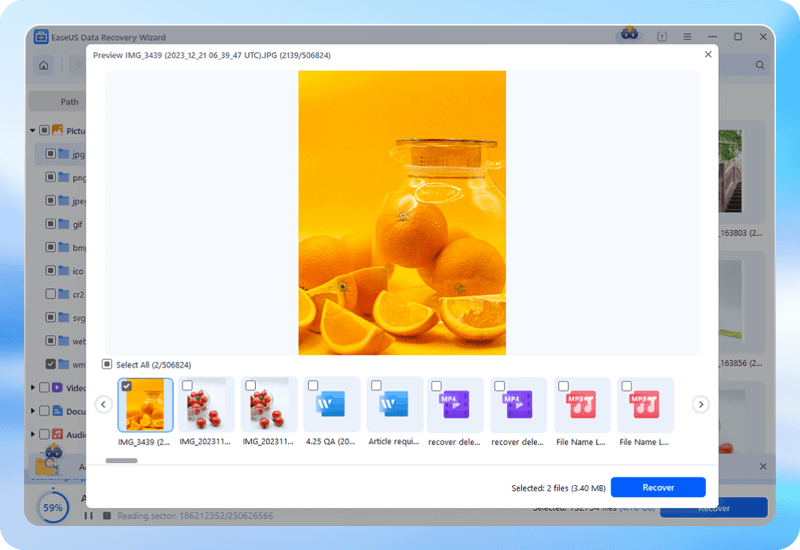
Preview recoverable files and restore the data you need to a safe location. If the card cannot be repaired, use data recovery with SSR or DVR technology to recover photos and reconstruct videos from severely damaged or fragmented storage.

  • choose a disk
  • scan for lost data
  • preview and recover data

More Tips About SD Card Recovery

Here are three methods to recover lost data from memory card/SD card/CF card, which are suitable for Mac users, Android users and digital camera users.

How to Prevent the SD Cards from Data Loss?

  • 👍Safely Store the SD Card

    It's essential to store the SD card so that it won't get scratched or crushed by bulky items. Additionally, all SD cards should be kept in a cool, dry place.

  • 🔵Ensure Device Compatibility

    Errors and data loss may result from using an SD card on a device that isn't compatible with the file system or capacity of the card. Before utilizing an SD card, make sure your device is compatible.

  • 📌 Maintain SD Card's Partition

    If partition management mistakes are not handled effectively, data loss may ensue from merging or expanding partitions, among other mistakes. To avoid this, you should correctly manage and maintain the partitions on your SD card.

  • ➡️Nicely Eject the SD Card

    When taking an SD card from its reader, always use your computer's "Eject" feature because it can still send or retrieve data from the card. Simultaneously, you extract it from the computer's USB port, perhaps harming the SD card.

What Can I Do After My Data Disappear from SD Card?

  • 1. Stop Using the SD Card Immediately

    It's vital to cease any read or write operations on the SD card to prevent the potential overwriting of lost data.

  • 2. Connect the SD Card to a Computer

    Use an appropriate card reader to connect the SD card to your computer.

  • 3. Perform Data Recovery with Software

    Download and install the EaseUS Data Recovery Wizard. This tool is designed to scan the SD card for lost, deleted, or corrupted files and attempt to restore them. Follow the software's instructions carefully to scan the SD card thoroughly.

  • 4. Assess SD Card Health

    After data recovery, consider checking the health status of your SD card. This step helps determine whether the card is reliable for future use or needs replacement.

    Finally, please regularly back up your data from the SD card to prevent loss in case of damage or corruption.


Recover Deleted Files from SD Card Android 📱

Most users store files like pictures, videos, music, documents, etc on SD cards to save internal memory on Android phones or tablets. But unfortunately, various factors such as accidental deletion, SD card formatting, SD card corruption, virus attacks, etc, often occur unexpectedly and cause data loss disasters on Android devices. Can you recover your data from an Android SD card when encountering such a situation?

SD card data recovery for Android is possible. We'll introduce two methods to help you recover data from an Android SD card when you don't have any backups on Google Drive or other backup disks.

Full guide: How to Recover Deleted Files from SD Card Android

Recover Lost Data from SD Card on Mac 🖥️

As one of the common portable storage devices, SD cards have a wide range of uses, including cameras, dashcam recorders, drones, etc., and users often use them to store photos, videos, or important documents. With such a wide range of uses for SD cards, it's important to be aware of SD card recovery on a Mac.

If your Mac files are not showing up on an SD card due to accidental deletion or corruption. Read on, and we will introduce detailed steps with a video tutorial to guide you through using this powerful free Mac SD card recovery tool.

Full guide: Free Mac SD Card Data Recovery

SD Card Recovery FAQs

1. Can I repair a corrupted SD card without formatting it?

Yes, in some cases. If the problem is caused by logical corruption rather than severe physical damage, you may be able to repair the corrupted SD card and restore access without formatting it. A repair-first approach can help reduce the risk of unnecessary data loss. If repair is unsuccessful, you should attempt data recovery before formatting the card.

2. SD Card Repair vs. SD Card Recovery: What's the Difference?

SD card repair focuses on fixing logical problems that prevent the card from working or being accessed normally. SD card recovery focuses on retrieving lost files such as photos, videos, and documents. In some cases, repairing the SD card can restore access first, making data recovery easier. If the card cannot be repaired, recovery tools may scan the storage directly for recoverable data.

3. What should I do if my SD card is damaged and inaccessible?

Stop using the SD card immediately to avoid overwriting or further damaging recoverable data. Check the card with another reader, USB port, or computer. If the card is detected but inaccessible, try a repair-first solution such as SDR-SD Card Rescue. If access cannot be restored, scan the card for recoverable files.

4. Can EaseUS repair a damaged SD card?

EaseUS can help address certain logical SD card problems through a repair-first workflow. SDR-SD Card Rescue is designed to evaluate corrupted or inaccessible storage and attempt to restore access when possible. If the SD card cannot be repaired, EaseUS can provide additional recovery paths for retrieving lost photos, videos, documents, and other files.

5. What is SDR-SD Card Rescue?

SDR-SD Card Rescue is a repair-focused technology designed for corrupted, damaged, or inaccessible SD cards. Instead of immediately starting conventional file recovery, SDR first evaluates whether the card's logical structures can be repaired and whether normal access can be restored.

6. What is the difference between SDR, SSR, and DVR?

SDR repairs the SD card itself to regain access. SSR rebuilds fragmented files like photos and documents. DVR reconstructs fragmented or corrupted videos frame-by-frame.

7. Can I recover photos if my SD card cannot be repaired?

Yes. Even if the card remains inaccessible, SSR technology can still scan for and recover photos from SD cards by locating data at the sector level, bypassing the damaged file system.

8. Can I recover videos from a corrupted camera SD card?

Yes. Use SDR to fix the corrupted SD card, then apply DVR technology to reconstruct fragmented or corrupted video files—even if the file headers are missing.

9. Can EaseUS recover GoPro videos from a damaged SD card?

Absolutely. The combination of SDR (for card access) and DVR (for video reconstruction) makes it ideal for GoPro SD card recovery, drone SD card recovery, and all action-camera use cases.

Trusted By Leading IT Experts

EaseUS Data Recovery Wizard is a reliable and efficient SD card recovery software that help to restore data easily. It has gained many positive feedback from its users and here are some comments from famous review websites.