



All-in-One Data Transfer Solution for
Business/Enterprise

Businesses need professional data transfer solutions to securely migrate data, applications, and settings. EaseUS Todo PCTrans Technician provides automated deployment, batch settings transfer, and hybrid deployment across physical, virtual, and cloud platforms, ensuring efficient and error-free migration.

Support Windows Server 2003-2025

Why Businesses Need Professional Data Transfer Solutions

Businesses seek reliable data transfer solutions to ensure accuracy, efficiency, compliance, and support growth.

Ensure Accuracy

Ensure Accuracy

Enterprises that frequently upgrade hardware often prefer automated data transfer tools to prevent manual migration errors and simplify the transfer of data, applications, and configurations.

Improve Efficiency
and Productivity

Improve Efficiency
and Productivity

When deploying or replacing multiple computers, it’s crucial to quickly synchronize key applications and settings to save time and ensure consistent performance.

Meet Regulations and
Enable Secure
Collaboration

Meet Regulations and
Enable Secure
Collaboration

Professional data recovery software helps meet complex data compliance requirements and ensures secure collaboration, which is vital for remote and hybrid work environments.

Prevent Data
Loss

Data Security and
Erasure Challenges

When hardware fails or servers are upgraded, it’s crucial to ensure a seamless migration of important data and applications without any data loss.


Professional Data Transfer Tool for Businesses/Enterprises

EaseUS Todo PCTrans Enterprise is a business-focused migration tool that securely transfers data, programs, accounts, and settings during hardware upgrades, system replacements, or cloud migrations. With features like bulk deployment, account and license migration, and P2V/V2P data transfer, it enables automated, visual, and hassle-free system migration and recovery.

Support Windows Server 2003-2025

Tech Specification

Supported Operating Systems:

  • ● Windows 11/10
  • ● Windows 8/8.1 32-bit and 64-bit
  • ● Windows 7 32-bit and 64-bit
  • ● Windows Vista 32-bit and 64-bit
  • ● Windows XP 32-bit and 64-bit
  • ● Windows Server 2022/2019/2016/2012/2008/2003

Supported Applications:

  • ● Adobe software
  • ● Apple Applications
  • ● Zoom
  • ● Spotify
  • ● AutoCAD
  • ● Dropbox
  • ● Google Chrome
  • ● McAfee/Kaspersky/Norton/Avira
  • ● Microsoft Office/Office 365/Microsoft OneDrive
  • ● Microsoft Visual C++
  • ● YouTube/Twitter/Netflix

As you can see, this professional data transfer tool offers high-speed transfer, enterprise-grade security, smart migration, cross-platform compatibility, and scalable deployment, making it the ideal solution for efficient and secure enterprise data migration.

Support Windows Server 2003-2025

Data Transfer for Device Replacement

EaseUS Todo PCTrans Enterprise makes it easy to transfer data, programs, and settings between old and new computers over a secure network connection. It keeps all important files and applications synchronized during hardware upgrades - no reinstalling required, ideal for business PC upgrades, employee device changes, and batch equipment setups.


Advanced Data and Application
Migration for Enterprises

Modern enterprises often face challenges when upgrading systems, merging databases, or restructuring IT environments. Manual data transfer not only consumes valuable time but also increases the risk of data inconsistency or loss.

EaseUS Todo PCTrans Enterprise provides an enterprise-grade data migration solution to move essential files, databases, applications, and user configurations securely across systems and servers without downtime.

Database and Server Migration

Simplify complex server or database transitions with file-level, image-based, or customized migration options.EaseUS Todo PCTrans ensures seamless migration of databases, system environments, and configuration files, keeping your enterprise operations running smoothly during system upgrades or platform consolidation.

Domain Account Migration

Designed for Active Directory (AD) environments, this feature automatically transfers domain accounts, permissions, and credential settings from one machine or domain to another. Employees can continue working in the same environment post-migration with all personalized data, access rights, and system settings intact.

User Account and Data Migration

Transfer full user accounts, desktop layouts, and associated files from one PC to another with zero manual reconfiguration.EaseUS Todo PCTrans keeps browser data, local files, and application preferences consistent across all devices, ensuring productivity continuity during hardware or departmental changes.

Support Windows Server 2003-2025

Automated Image Deployment and Batch Data Transfer

For IT teams managing dozens or hundreds of endpoints, reconfiguring each machine manually is inefficient and error-prone. EaseUS Todo PCTrans Technician delivers a smart image deployment solution that enables IT administrators to clone, deploy, and restore complete system settings to multiple computers at once.

Create Standardized Migration Images
& Automated Batch Deployment

This tool enables IT teams to create standardized images that include essential applications and user data. These images can be quickly deployed to multiple devices via network or command-line automation, ensuring consistent configurations across all endpoints. This streamlined approach reduces setup time, prevents configuration errors, and simplifies large-scale rollouts in enterprises, schools, and government organizations.

Hybrid Deployment Across Physical, Virtual,
and Cloud Platforms

Enterprises today rely on mixed infrastructures from on-premise servers to virtualized systems and cloud platforms. Managing data transfer across these environments can be complex.

EaseUS Todo PCTrans Enterprise provides an all-in-one hybrid migration solution, enabling seamless transitions between physical machines (P2V/V2P), virtual environments, and cloud platforms.

Physical-to-Virtual (P2V) Migration

Move entire physical system settings, including data and applications, into virtual environments for testing, scaling, or backup. EaseUS ensures data integrity and compatibility, streamlining your organization’s virtualization strategy.
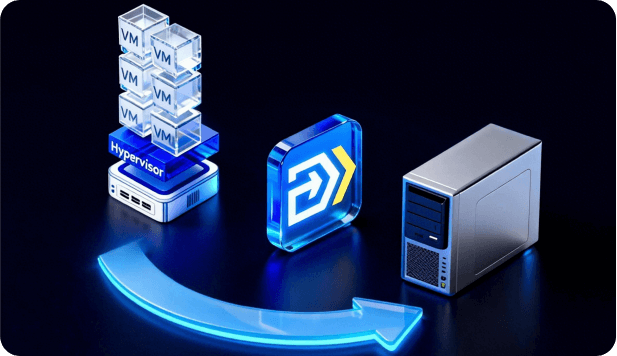

Virtual-to-Physical (V2P) Migration

Restore virtual machines back to physical hardware effortlessly. This is perfect for performance optimization or when re-deploying systems in production environments.

Physical/Virtual to Cloud

Transfer key workloads, configurations, and files to cloud platforms through secure image or network-based migration. EaseUS enables hybrid cloud deployment and remote access, accelerating your digital transformation and remote work enablement.

Support Windows Server 2003-2025

Customized Enterprise Migration and 24/7 Support Services

EaseUS provides fully customized migration consulting and end-to-end enterprise support to ensure every data transfer, deployment, or integration is secure, compliant, and efficient.

Our technical experts evaluate your systems, design personalized migration strategies, and deliver step-by-step guidance from planning to execution with 24/7 remote assistance, live monitoring, and real-time troubleshooting to guarantee smooth and reliable results.

Tell us how we can help
  • Call

    1-800-992-8995 (5/24 available from Mon. to Fri. )

  • Livechat

    Need instant help? Start a live chat with out experts.

Contact us

Support Windows Server 2003-2025

Frequently Asked Questions

1. What is data transfer tool for business?

A data transfer tool for business is specialized software designed to securely and efficiently move data between computers or servers. It ensures secure migration across environments. Tools like EaseUS Todo PCTrans Technician focus on transferring data, programs, accounts, and settings for upgrades or migrations.

2. How does a data transfer tool for business improve efficiency?

This data transfer tool automates data movement to reduce manual tasks. It speeds up migrations and cuts errors. EaseUS Todo PCTrans Technician significantly boosts IT efficiency by automating complex migration tasks that would otherwise take days of manual work. This streamlined process cuts downtime, and prevents productivity loss for employees.

3. How long does a typical PC-to-PC transfer take?

It depends on data size and network speed. Small transfers finish in minutes. Larger ones may take hours. Scans can be completed in a few minutes. A small transfer involving a few gigabytes of documents and 10 applications typically finishes in 20 minutes.

4. Can EaseUS Todo PCTrans Technician run without an internet connection?

Yes. EaseUS Todo PCTrans Technician uses local network or cable connections. It supports image files offline. No internet is needed after installation. EaseUS tool supports Wi-Fi, direct Ethernet cables, LAN, and more transfer methods.

5. What to do if the transfer is interrupted using EaseUS Todo PCTrans Technician?

If the transfer is interrupted using EaseUS Todo PCTrans Technician, reconnect the two PCs either by network or cable. The software tries to automatically re-establish the connection 2-3 times. Ensure network stability and disable firewall/antivirus to prevent interruptions. Resume the transfer after reconnecting.

6. Does the data transfer tool encrypt data during transfer?

Yes, EaseUS Todo PCTrans Technician encrypts all data during transfer using strong, enterprise-grade protocols. Whether transferring over a local network, Wi-Fi, or direct cable, every packet is encrypted end-to-end. This built-in security operates with minimal performance impact.

7. How do I transfer all files from one computer to another using EaseUS Todo PCTrans Technician?

To transfer all files from one computer to another using EaseUS Todo PCTrans Technician, connect both PCs to the same network or via cable. Launch the software, select old and new PC roles, scan and enumerate files, apps, and settings, then select everything you want. Start the transfer and reboot the target PC when done to complete.

8. Can I move applications from one drive to another on the same computer with this transfer tool?

Yes, you can move applications from one drive to another on the same computer. Use the Local Migration feature in EaseUS Todo PCTrans Technician, select apps to transfer, choose the target partition, and start the data transfer. A reboot is required to refresh the transferred programs and settings.