





 About the Author
 Reviews and Awards
 Mac SD Card Recovery
The frustration that files are prone to corruption, deletion, or loss is real for GoPro users. Imagine coming back from an unforgettable trip, plugging your GoPro SD card into your Mac, and finding that videos won't play or have vanished. That's exactly when GoPro video recovery software for Mac becomes essential.
This guide provides a comprehensive guide for GoPro video recovery software for Mac. Whether you've accidentally deleted videos from a GoPro camera, formatted your SD card, or encountered video corruption, you'll find actionable data recovery solutions!
Is It Possible to Recover Deleted GoPro Videos
The short answer is yes. Deleted GoPro videos are not immediately and permanently erased. When you delete a file from your GoPro SD card or format the card, the camera simply marks the space those files occupied as "available for use". Until new data is written over that space, the original files remain intact and recoverable.
Fortunately, the Mac SD card recovery tool has advanced dramatically by leveraging AI-powered scanning algorithms, fragmented-video reconstruction technology, and frame-level repair engines to salvage footage.
Success depends on acting quickly and using the right tools. Here's what you can typically recover:
| Data Loss Scenario | Recoverability | Notes |
| Accidental deletion from the SD card | ✅High | Stop using the card immediately |
| Accidental formatting of the SD card | ✅High | Do not record new footage |
| Corrupted SD card | ✅Medium | Requires deep scanning capability |
| Interrupted recording (battery dies mid-shot) | ✅Medium | May need video repair after recovery |
| Physical SD card damage | ⚠️Low | Professional service may be required |
Best GoPro Video Recovery Software for Mac (Top 4)
GoPro cameras do not come with proprietary data recovery software. If you have deleted or lost files, you must use third-party GoPro file recovery software to recover files from a GoPro SD card.
EaseUS Data Recovery Wizard for Mac (Recommended)
EaseUS Data Recovery Wizard for Mac stands out as the most comprehensive and user-friendly solution for recovering GoPro videos. It combines powerful recovery algorithms with an intuitive interface that guides even first-time users through the process.
EaseUS GoPro Recovery offers comprehensive support for all GoPro models from Hero 3 to Hero 13 and Max, recovering MP4, HEVC, LRV, THM, and MOV files. Its patented video fragment reconstruction technology is tailored for action cameras, drones, and dashcams to restore complete, playable footage. The latest Deep Video Reconstruct (DVR) engine works at the frame level to rebuild previously unplayable or fragmented videos from GoPro, DJI, and Insta360 cameras.
The tool can also recover files from RAW SD cards that Mac Disk Utility cannot recognize, provides a preview option before recovery, and includes a free version that allows up to 2GB of data recovery—enough for several short GoPro clips.
Compatibility:
- ✅Fully compatible with macOS (including Apple Silicon M1/M2/M3/M4)
- ✅Supports all major file systems: APFS, HFS+, exFAT, FAT32, NTFS
- ✅Works with SD cards, microSD cards, external hard drives, and internal Mac storage
Positive Trustpilot reviews from users who successfully recovered GoPro footage. Coverage by reputable tech publications, including BetaNews, Macworld, and Software Advice.
Share this post with your friend on SNS and help more people learn how to recover GoPro video files on a Mac!

3 Best GoPro Video Recovery Software Alternatives
If you're looking to recover deleted GoPro files on a Mac, these three tools offer solid alternatives to EaseUS Data Recovery Wizard for Mac. Here's a quick look at PhotoRec, Recuva, and R-Studio – focusing on their performance with GoPro footage.
1️⃣. PhotoRec
PhotoRec for Mac is a free, open-source command-line tool (also available with a basic interface via TestDisk). It ignores file systems and carves data based on file signatures, making it highly effective for raw recovery of GoPro video files, including MP4, MOV, HEVC, etc.

Pros
- Completely free and portable
- Recovers from severely corrupted or reformatted SD cards
- Supports a wide range of video signatures, including GoPro's typical codecs
Cons
- No folder structure or original filenames – recovered files are renamed randomly
- The command-line interface can be intimidating for casual users
User reviews
- Saved my GoPro footage after the card got corrupted mid-recording. Yes, filenames are a mess, but all MP4s were playable.
- Not beginner-friendly, but unbeatable for the price (free). Works when paid tools fail.

PhotoRec Review: Still Capable of Recovery in 2026 [Complete Review]
PhotoRec is a file recovery program designed to recover lost files. To help you solve data loss problems with PhotoRec, this post provides an in-depth review. Read more >>
2️⃣. Recuva
Recuva for Mac, from the makers of CCleaner, is a user-friendly Windows tool with a free version. It’s designed for quick undeletion and works well with common file types, including GoPro videos.
Pros
- Simple wizard-driven interface
- Free version supports MP4 recovery from SD cards
- Can preview recoverable files before restoring
Cons
- Less effective on heavily overwritten or deeply corrupted cards
- Deep scan is slower and sometimes misses fragmented GoPro videos (common with long recordings)
User reviews
- Brought back a few deleted clips from my HERO10. Didn’t find everything, but the easy interface saved me time.
- Works fine for accidental deletion, but failed on a card that stopped recording mid-session. Switched to PhotoRec for that.
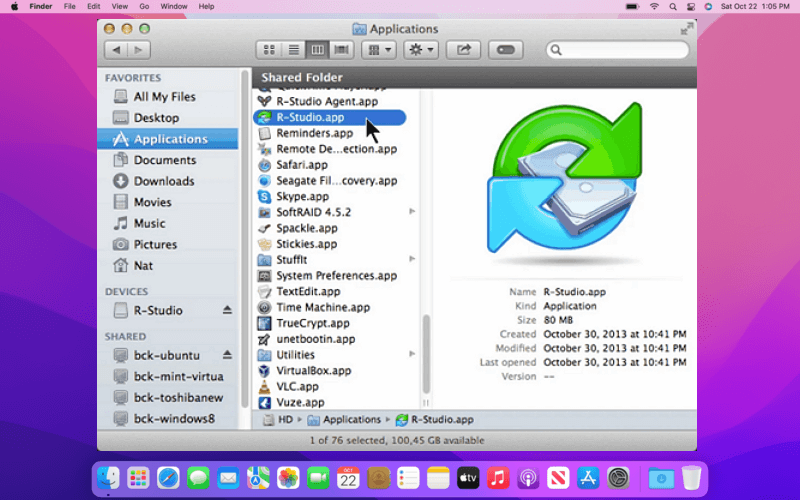
3️⃣. R-Studio
R-Studio for Mac is a professional-grade data recovery tool for Windows, Mac, and Linux. It offers advanced RAID recovery, disk imaging, and powerful file carving – often used by recovery specialists for tricky GoPro SD card failures.
Pros
- Excellent at reconstructing fragmented MP4 files (common GoPro issue)
- Recognizes and preserves original folder structure and filenames
- Creates a disk image to work from, avoiding further damage
Cons
- Expensive ($79.99 USD for the basic version)
- Steep learning curve due to many advanced options
User reviews
- Paid for it after EaseUS failed to recover a 30-minute motorcycle ride. R-Studio got the whole clip intact.
- Overkill if you just deleted a few files, but for corrupted GoPro cards with overwritten data, it's worth every cent.
Step-by-Step: How to Recover GoPro Videos on Mac
Follow this proven workflow to maximize your chances of successful recovery.
Step 1. Stop Using the SD Card Immediately
As soon as you realize videos are missing or corrupted, stop using the GoPro SD card. Do not record new footage, take new photos, or attempt to repair the card using Mac Disk Utility. Any new data written to the card risks overwriting the deleted files you want to recover.
Step 2. Connect Your GoPro SD Card to Your Mac
Remove the microSD card from your GoPro and insert it into a card reader. Connect the card reader to your Mac. Do not connect the GoPro camera directly via USB; instead, use a dedicated card reader for more reliable access to the storage device.
Step 3. Install EaseUS Data Recovery Wizard for Mac
Visit the official EaseUS website(easeus.com) to download the latest version of EaseUS Data Recovery Wizard for Mac. The installation process takes only a few minutes and requires administrator permissions.
Check out the comprehensive Mac data recovery review here:
EaseUS Data Recovery Wizard for Mac Review 2026: Is It Worth It?
by u/EaseUS_Official in EaseUSTech
Step 4. Launch EaseUS GoPro Video Recovery Software
Open EaseUS Data Recovery Wizard for Mac. Go to "SD Card Recovery" mode.
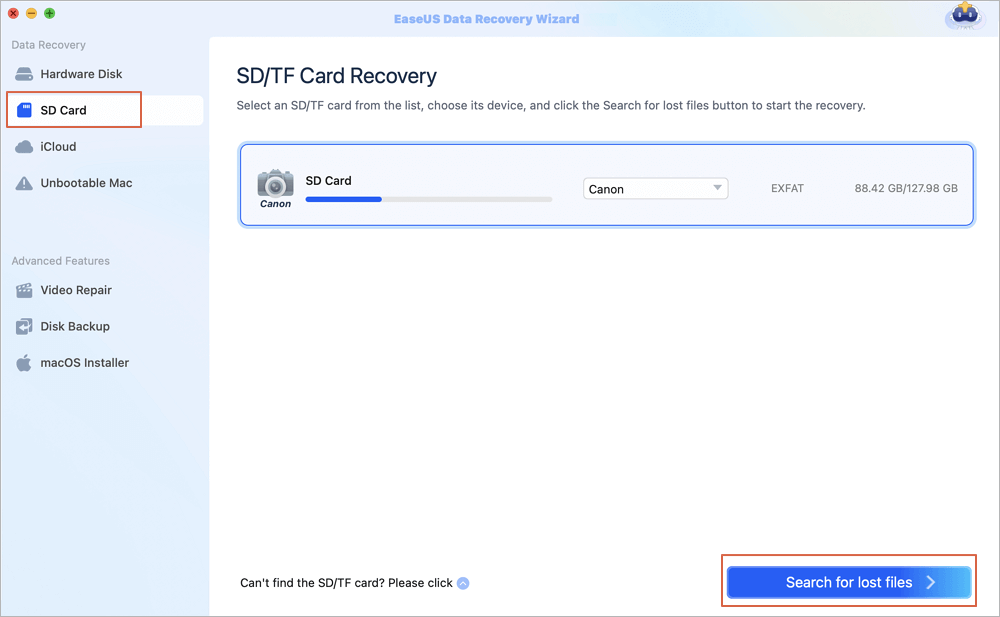
Step 5. Select the SD Card & Scan for Lost Videos
Find your GoPro SD card in the list of detected devices, then click "Search for lost files".
The software will perform two scans:
- Quick Scan: Finishes in minutes; effective for recently deleted files
- Deep Scan: Thorough and comprehensive; takes longer but finds fragmented and corrupted files
For GoPro videos, always let the deep scan complete - this is where EaseUS Data Recovery Wizard's patented video fragment reconstruction technology works its magic.
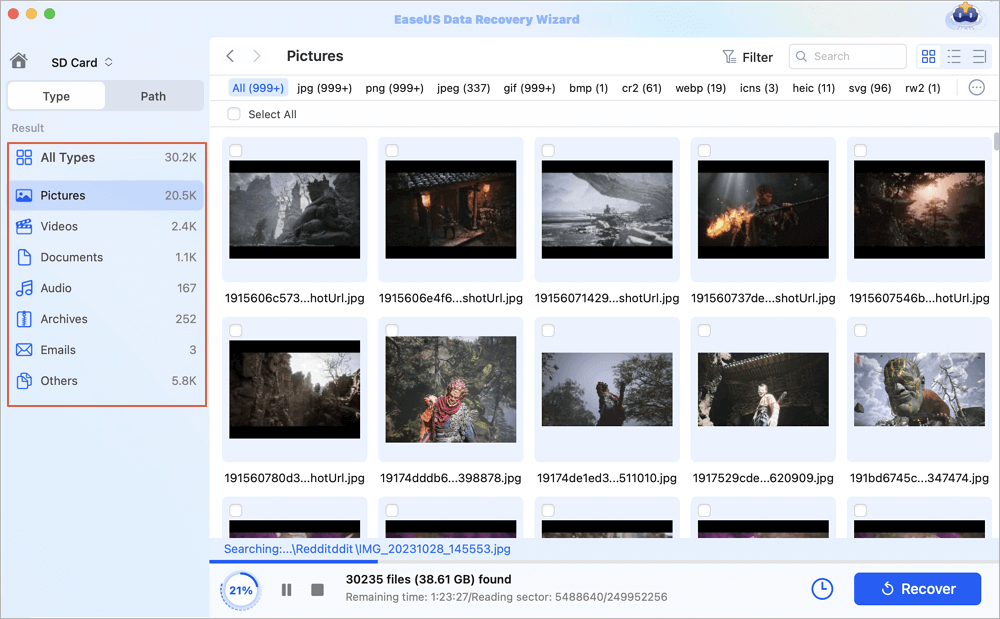
Step 6. Preview and Filter Results
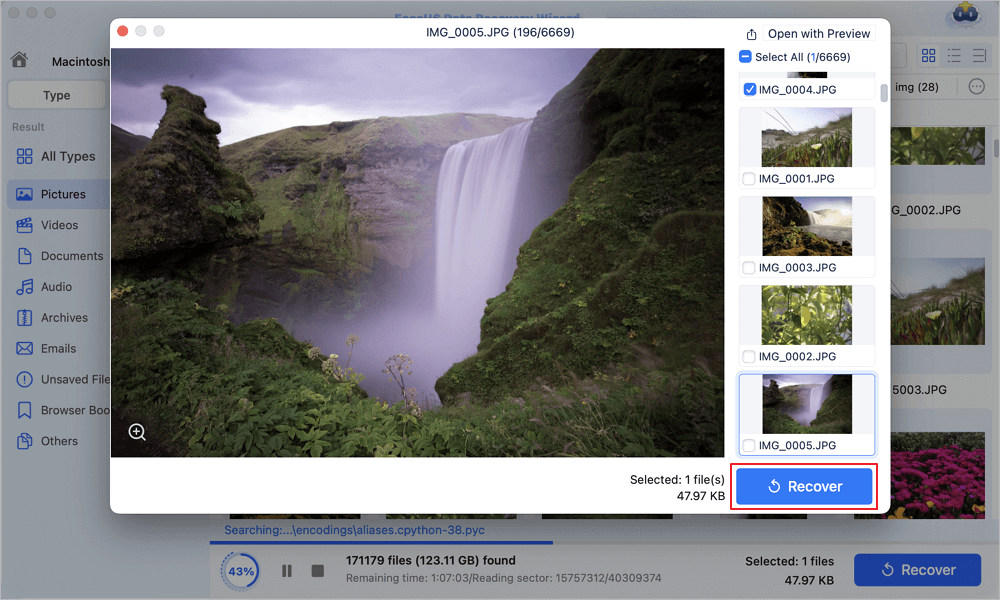
Once scanning completes, use the file type filters to locate your videos quickly. EaseUS allows you to preview recoverable footage before saving—a critical feature that lets you confirm the video is intact before committing to recovery.
Step 7. Recover Your Videos
Select the videos you want to recover and click the "Recover" button. Important: Save the recovered files to a different drive (your Mac's internal drive or an external drive), not back to the GoPro SD card. Saving to the same SD card risks overwriting other recoverable files.
Why GoPro Videos Get Corrupted or Lost: Common Causes
Understanding why GoPro videos fail is the first step toward prevention. GoPro files are susceptible to two main categories of issues:
🔍SD Card-Related Problems
- Improper formatting: Formatting the card in a computer instead of in the GoPro camera
- Faulty SD card: Using low-quality cards or cards not on GoPro's recommended list
- Physical damage: Bent pins, cracked cards, or water damage
- File system corruption: Card becomes RAW or unreadable
⚙️Recording & Transfer Issues
- Battery failure: Camera dies while recording; file header may not be written properly
- Interrupted file transfer: Power outage or bad USB cable during transfer from GoPro to Mac
- Removing the SD card too soon: Ejecting the card while the camera is still writing data
- Firmware issues: Software glitches during recording
⚠️Accidental Actions
- Hitting "Delete All": Accidentally deleting entire folders of footage
- Accidental formatting: Formatting the wrong SD card in camera settings
- Quik app sync issues: Deleting files in the Quik mobile app can delete originals from the SD card
Pro Tips: How to Prevent Future GoPro Video Loss on Mac
Prevention is always better than recovery. Follow these expert guidelines to protect your GoPro footage.
- 1. Use GoPro-recommended SD cards
- 2. Format SD cards in your GoPro camera
- 3. Don't remove the card while recording
- 4. Keep your GoPro firmware updated
- 5. Back up regularly
- 6. Use disk backup before recovery
Conclusion
Losing GoPro videos can be devastating, whether you're a professional filmmaker or a weekend adventurer. But thanks to modern GoPro video recovery software for Mac, lost footage is no longer a permanent loss.
EaseUS Data Recovery Wizard for Mac represents the gold standard in 2026 for GoPro video recovery. Its combination of AI-powered scanning, patented video fragment reconstruction, and the new Deep Video Reconstruct engine makes it uniquely capable of handling the fragmented, high-bitrate video files that GoPro cameras produce.
GoPro Video Recovery Software for Mac FAQs
Here are questions people frequently ask about GoPro video recovery software for Mac:
1. Is it possible to recover GoPro videos after formatting the SD card?
Yes. Formatting an SD card does not immediately erase the data; it only removes the file system index. The video files remain on the card until overwritten. EaseUS Data Recovery Wizard for Mac can scan formatted SD cards and recover lost videos, provided no new data has been written to the card.
2. Can I recover GoPro videos without software?
No. GoPro does not provide built-in recovery tools. If you've deleted videos or formatted your SD card, you must use third-party GoPro video recovery software for Mac. Free options like PhotoRec exist but lack user-friendly interfaces and may struggle with fragmented video files.
3. Can I recover GoPro LRV files on a Mac?
Absolutely. EaseUS Data Recovery Wizard for Mac supports full recovery of LRV (low-resolution proxy) files, along with MP4, HEVC, and THM files. Recovering LRV files can sometimes help repair the corresponding MP4 video.
4. Why won't my recovered GoPro video play on my Mac?
This often happens with standard recovery tools that retrieve partial data without restoring the original file structure. EaseUS addresses this with Deep Video Reconstruct (DVR), which rebuilds videos at the frame level to ensure playability. If the video still won't play, try using EaseUS Video Repair or VLC Media Player, which can often play partially corrupted MP4 files.
Was This Page Helpful?

Brithny is a technology enthusiast, aiming to make readers' tech lives easy and enjoyable. She loves exploring new technologies and writing technical how-to tips. In her spare time, she loves sharing things about her game experience on Facebook or Twitter.
-
EaseUS Data Recovery Wizard is a powerful system recovery software, designed to enable you to recover files you’ve deleted accidentally, potentially lost to malware or an entire hard drive partition.
Read More -
EaseUS Data Recovery Wizard is the best we have seen. It's far from perfect, partly because today's advanced disk technology makes data-recovery more difficult than it was with the simpler technology of the past.
Read More -
EaseUS Data Recovery Wizard Pro has a reputation as one of the best data recovery software programs on the market. It comes with a selection of advanced features, including partition recovery, formatted drive restoration, and corrupted file repair.
Read More
Related Articles
-
Canon Video Recovery Guide: Reliable Methods
![author icon]() Dany/Sep 17, 2026
Dany/Sep 17, 2026 -
Recover Videos from GoPro Hero 13 (Deleted & Formatted)
![author icon]() Dany/Sep 15, 2026
Dany/Sep 15, 2026 -
RSV File Recovery: Recover & Repair Corrupted Sony Videos
![author icon]() Jaden/Sep 15, 2026
Jaden/Sep 15, 2026 -
DJI Action 5 Pro Video Recovery: Restore Deleted Footage Easily
![author icon]() Dany/Sep 15, 2026
Dany/Sep 15, 2026
 Dany/Sep 17, 2026
  Jaden/Sep 15, 2026

