





-
![]() New EaseUS Report: Majority of SD Card Data Loss Cases (72%) Are Highly Recoverable
New EaseUS Report: Majority of SD Card Data Loss Cases (72%) Are Highly Recoverable October 20,2026
 6 min read
 -
![]() Recover Deleted Photos from Olympus Digital Camera | Top Recovery MethodOctober 20,20266 min read
Recover Deleted Photos from Olympus Digital Camera | Top Recovery MethodOctober 20,20266 min read -
![]()
-
![]() SD Card Showing Wrong Size: Restore SD Card Full CapacityOctober 20,20266 min read
SD Card Showing Wrong Size: Restore SD Card Full CapacityOctober 20,20266 min read -
![]()
-
![]()
-
![]()
-
![]() (Solved!) SD Card Files Not Showing in File Manager/ExplorerOctober 20,20266 min read
(Solved!) SD Card Files Not Showing in File Manager/ExplorerOctober 20,20266 min read -
![]()
-
![]() Why is My Camera Not Working on Laptop | Fix Camera Not WorkingOctober 20,20266 min read
Why is My Camera Not Working on Laptop | Fix Camera Not WorkingOctober 20,20266 min read
Page Table of Contents
PAGE CONTENT:
Why Videos Get Lost or Corrupted on GoPro Hero 13
Even with all its fancy features, the GoPro Hero 13, like other cameras, can encounter footage data loss. Plenty of people end up losing videos or finding their files corrupted - usually due to storage hiccups or recording issues.
Here's what usually goes wrong:
- You accidentally deleted your footage on GoPro.
- You formatted the SD card by mistake.
- The file system goes wrong.
- Recording gets interrupted by accident.
- You don't handle your microSD card properly.
- You use a memory card that's either not supported or just plain faulty.
GoPros shoot high-res videos in MP4 (H.264 or H.265), so even a small glitch like pulling out the SD card too soon or the battery dying can wreck your files or make them impossible to play.
Can You Recover Deleted or Corrupted GoPro Hero 13 Videos
The answer is YES, you can usually recover your GoPro videos, even if you deleted them. Deleted GoPro videos are not permanently deleted on your memory card.
When you delete a file, it doesn't disappear right away. It just sits on your SD card until something else replaces it.
Here's what you can recover:
- Videos you deleted
- Videos lost because you formatted the card
- Files that are missing on the GoPro Hero 13, or you can't access
To boost your deleted video recovery chances:
- Stop using the SD card right away
- Try to recover the files as soon as you can
Focus on recovery first. That's more important than any kind of repair. Now, you can get ready for GoPro Hero 13 video recovery with the following content.
Recover Deleted GoPro Hero 13 Videos from SD Card
If you need to recover your GoPro videos, one of your best bet is professional microSD card video recovery software. One tool that really stands out is EaseUS Data Recovery Wizard. It's designed to handle GoPro SD cards, so whether you accidentally deleted your videos or formatted the card by mistake, it can help.
Main features of EaseUS GoPro video recovery tool:
- Brings back deleted or lost GoPro footage
- Gets videos from formatted SD cards
- Supports MP4, MOV, and HEVC files
- Runs deep scans to dig up as much as possible
- Let you preview your videos before you recover them
EaseUS is fast, reliable, and recently updated recovery ability from GoPro devices - so if your GoPro files are gone, you're in good hands with this software.
Follow these steps below to recover deleted videos from the GoPro Hero 13 now:
🏆 EaseUS SD card recovery leverages patented video fragment reconstruction technology to deeply repair video files lost due to accidental deletion, formatting, or corruption. Explicitly designed for cameras, action cameras, drones, and dashcams, it accurately restores complete and playable precious footage.
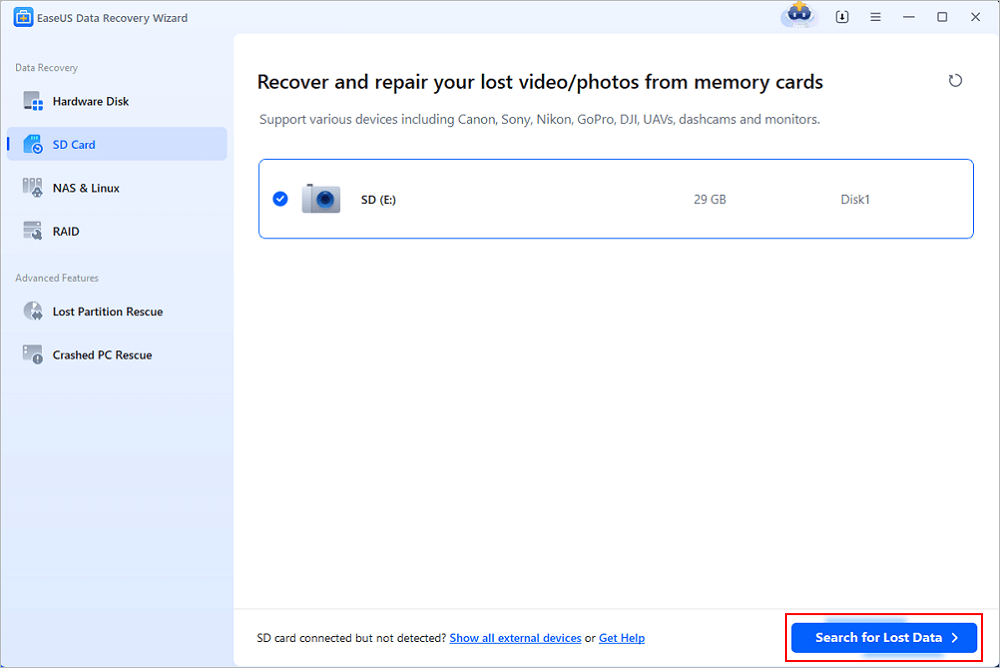
Step 1. Connect the SD card, memory card, or CF Card to your computer and launch EaseUS memory card recovery software on your PC. The SD card will be listed under the Devices section. Choose the SD card and click "Scan for lost data" to start looking for your lost data.
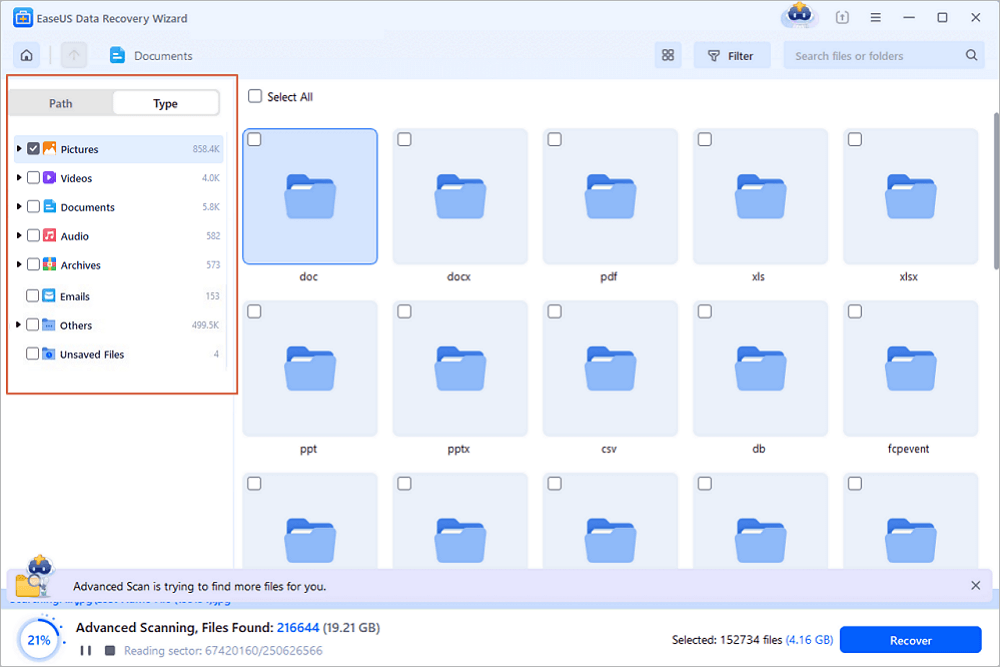
Step 2. The software will start a scan automatically. The scan is powerful enough to find all lost files that even lost file names. After the scanning process, you can find deleted items from the tree-view panel on the left. Then, click "Filter" if you are looking for a specific file type, like photos, documents, videos or emails.
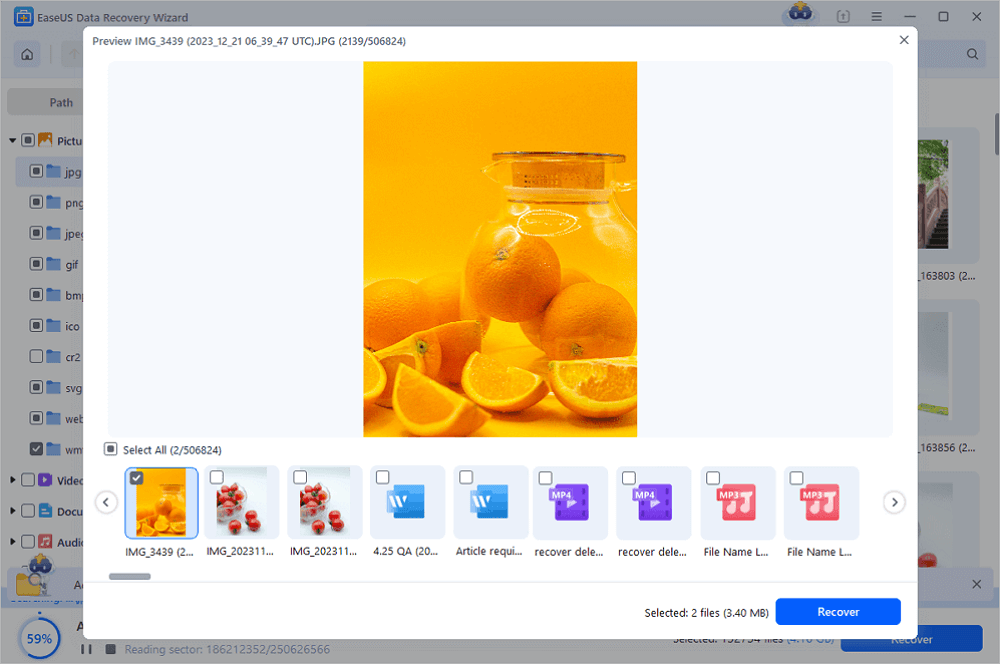
Step 3. You can directly double-click the files to preview the content. After this, you can choose wanted files and click "Recover" to restore them to a secure location on your PC or other external storage devices.
Tip: You can restore data on the local disks, external hard drives, and also the cloud storage.
💡Want to know more about SD card data recovery? For example, what is the best SD card data recovery software? How to recover a damaged SD card? How to recover data from an unreadable SD card...Go for SD Card Data Recovery FAQs and restore your precious lost files.
You can share this reliable tutorial and GoPro recovery tool on social media to help more friends recover missing footage.

Tips to Prevent GoPro Hero 13 Video Loss
Losing your GoPro Hero 13 footage stings, but you can avoid most disasters with a few smart habits. Sure, recovery tools sometimes save the day, but you're much better off not needing them in the first place.
Here's how you keep your GoPro videos safe and your SD card healthy:
- 1. Back Up Videos Regularly. Right after you finish recording, move your videos somewhere safe.
- 2. Pick a Good SD Card. Don't cheap out on memory cards. Go with a microSD that's fast and reliable (look for U3 or V30 on the label).
- 3. Never Interrupt Recording. Stopping the recording too early can wreck your videos or create files that won't play.
- 4. Eject the SD Card Carefully. Make sure your camera's turned off - or use the "eject" option.
- 5. Keep Your Firmware Current. Check for firmware updates every so often. GoPro releases fixes to patch bugs and boost stability.
Summary
Recovering videos from GoPro Hero 13 is achievable if you act quickly and use the right tools. EaseUS Data Recovery Wizard provides an effective solution for recovering deleted, lost, or formatted GoPro videos from SD cards.
Avoid overwriting data and follow proper recovery steps for the best results.
FAQ – GoPro Hero 13 Video Recovery
1. Can I recover deleted GoPro videos without software?
Recovering deleted GoPro videos without any software isn't really possible without any backups. Once you delete a file from your SD card, it disappears from view, but the data isn't gone right away. It just sits there, waiting to be overwritten. Your best shot at getting those videos back is to use a recovery program like EaseUS Data Recovery Wizard. It scans the card and digs up files you thought were lost.
2. How to recover deleted videos from a GoPro Hero 13?
If you need to recover videos from a GoPro Hero 13, here's what you do: take the SD card out, plug it into your computer, and run recovery software. Let the program do a deep scan so it picks up deleted GoPro files. These tools make it easy to check previews and pick exactly what you want to restore.
3. Can I recover videos after formatting the SD card?
Even if you've formatted your SD card, there's still hope as long as you haven't recorded over the old videos. Formatting just erases the file info, not the actual footage. Deep scan recovery programs are good at finding and bringing those files back. Just don't use the card until you've tried to recover your videos.
Was this page helpful?
-
Dany is an editor of EaseUS who lives and works in Chengdu, China. She focuses on writing articles about data recovery on Mac devices and PCs. She is devoted to improving her writing skills and enriching her professional knowledge. Dany also enjoys reading detective novels in her spare time. …


 Why Trust EaseUS
 Editor Reviews

20+
Years of experience

160+
Countries and regions

72 Million+
Downloads

4.9 +
Trustpilot Score





